
Search Results (Searched for: )
- hitchhiker
05 Aug 2026 17:06
Replied by hitchhiker on topic PUMA 200 Robotarm and some Hal/INI issues
I test arround... i will send you later.
I think the singularity is a issue... and dh parameters... possible the alohas are not correct... upside down tcp... i dont know
I think the singularity is a issue... and dh parameters... possible the alohas are not correct... upside down tcp... i dont know
- Aciera
05 Aug 2026 17:03
Looking at those curved jog paths I don't think you are done with your DH-parameters yet.
If you zip up the config folder with the vismach model I'll try to have a look at it.
Replied by Aciera on topic PUMA 200 Robotarm and some Hal/INI issues
an again i wonder that the tcp is upside down..
Looking at those curved jog paths I don't think you are done with your DH-parameters yet.
If you zip up the config folder with the vismach model I'll try to have a look at it.
- saxa
05 Aug 2026 16:07 - 05 Aug 2026 16:07
Replied by saxa on topic Gantry oxyfuel / plasma type machine from scratch
Hi another question from my side is in case I have to replace the servo drives and motors, as it seems that they have lost them, which brand would be the best one to go ? Also in that case would it be worth going directly with EtherCAT type of drives ?
- emresensoy
05 Aug 2026 15:21
LS L7N Servo drives standing INIT state was created by emresensoy
my DIGAN IO card (ER 12 DIG 4 ANA IO) is working without problem,
but servo drives standing INIT state and generates error,
what is the problem?
[/code]
[/code]
[/code]
[/code]
but servo drives standing INIT state and generates error,
what is the problem?
Code:
[code]emre@debian:~$ ethercat slaves
0 0:0 INIT E 0x00007595:0x00000000
1 0:1 INIT E 0x00007595:0x00000000
2 0:2 INIT E 0x00007595:0x00000000
3 0:3 INIT E 0x00007595:0x00000000
4 0:4 INIT E 0x00007595:0x00000000
5 0:5 PREOP + ER 12 DIG 4 ANA IO
Code:
[code][code]emre@debian:~$ sudo dmesg | tail -n 30
[ 538.497723] EtherCAT 0-1: Acknowledged state INIT.
[ 538.497724] EtherCAT 0-2: Acknowledged state INIT.
[ 538.497726] EtherCAT 0-3: Acknowledged state INIT.
[ 538.497727] EtherCAT 0-4: Acknowledged state INIT.
[ 538.499581] EtherCAT 0: Domain 0: Working counter changed to 2/18.
[ 538.529813] EtherCAT 0: Slave states on main device: INIT, OP.
[ 539.503585] EtherCAT 0: Domain 0: Working counter changed to 3/18.
[ 549.453683] EtherCAT 0: Master thread exited.
[ 549.453704] EtherCAT 0: Starting EtherCAT-IDLE thread (build-marker: lib-refclk-quiet-v16).
[ 549.453762] EtherCAT 0: Releasing master...
[ 549.453764] EtherCAT 0: Released.
[ 549.486309] EtherCAT 0: Slave states on main device: INIT, PREOP + ERROR.
[ 549.486318] EtherCAT ERROR 0-0: Failed to set PREOP state, slave refused state change (INIT + ERROR).
[ 549.486321] EtherCAT ERROR 0-1: Failed to set PREOP state, slave refused state change (INIT + ERROR).
[ 549.486322] EtherCAT ERROR 0-2: Failed to set PREOP state, slave refused state change (INIT + ERROR).
[ 549.486324] EtherCAT ERROR 0-3: Failed to set PREOP state, slave refused state change (INIT + ERROR).
[ 549.486326] EtherCAT ERROR 0-4: Failed to set PREOP state, slave refused state change (INIT + ERROR).
[ 549.490488] EtherCAT ERROR 0-0: AL status message 0x0016: "Invalid mailbox configuration".
[ 549.490493] EtherCAT ERROR 0-1: AL status message 0x0016: "Invalid mailbox configuration".
[ 549.490495] EtherCAT ERROR 0-2: AL status message 0x0016: "Invalid mailbox configuration".
[ 549.490497] EtherCAT ERROR 0-3: AL status message 0x0016: "Invalid mailbox configuration".
[ 549.490499] EtherCAT ERROR 0-4: AL status message 0x0016: "Invalid mailbox configuration".
[ 549.498600] EtherCAT 0-0: Acknowledged state INIT.
[ 549.498605] EtherCAT 0-1: Acknowledged state INIT.
[ 549.498606] EtherCAT 0-2: Acknowledged state INIT.
[ 549.498608] EtherCAT 0-3: Acknowledged state INIT.
[ 549.498609] EtherCAT 0-4: Acknowledged state INIT.
[ 549.517994] EtherCAT 0: Slave states on main device: INIT, PREOP.
[ 622.701268] warning: `Socket Thread' uses wireless extensions which will stop working for Wi-Fi 7 hardware; use nl80211
[ 809.225497] perf: interrupt took too long (3952 > 3950), lowering kernel.perf_event_max_sample_rate to 50500
[/code]
Code:
emre@debian:~$ ethercat xml
<?xml version="1.0" ?>
<EtherCATInfoList>
<EtherCATInfo>
<!-- Slave 0 -->
<Vendor>
<Id>30101</Id>
</Vendor>
<Descriptions>
<Devices>
<Device>
<Type ProductCode="#x00000000" RevisionNo="#x00000002"></Type>
</Device>
</Devices>
</Descriptions>
</EtherCATInfo>
<EtherCATInfo>
<!-- Slave 1 -->
<Vendor>
<Id>30101</Id>
</Vendor>
<Descriptions>
<Devices>
<Device>
<Type ProductCode="#x00000000" RevisionNo="#x00000002"></Type>
</Device>
</Devices>
</Descriptions>
</EtherCATInfo>
<EtherCATInfo>
<!-- Slave 2 -->
<Vendor>
<Id>30101</Id>
</Vendor>
<Descriptions>
<Devices>
<Device>
<Type ProductCode="#x00000000" RevisionNo="#x00000002"></Type>
</Device>
</Devices>
</Descriptions>
</EtherCATInfo>
<EtherCATInfo>
<!-- Slave 3 -->
<Vendor>
<Id>30101</Id>
</Vendor>
<Descriptions>
<Devices>
<Device>
<Type ProductCode="#x00000000" RevisionNo="#x00000002"></Type>
</Device>
</Devices>
</Descriptions>
</EtherCATInfo>
<EtherCATInfo>
<!-- Slave 4 -->
<Vendor>
<Id>30101</Id>
</Vendor>
<Descriptions>
<Devices>
<Device>
<Type ProductCode="#x00000000" RevisionNo="#x00000002"></Type>
</Device>
</Devices>
</Descriptions>
</EtherCATInfo>
<EtherCATInfo>
<!-- Slave 5 -->
<Vendor>
<Id>1640067</Id>
</Vendor>
<Descriptions>
<Devices>
<Device>
<Type ProductCode="#x00000002" RevisionNo="#x00000002">ER 12 DIG 4 ANA IO </Type>
<Name><![CDATA[ER 12 DIG 4 ANA IO ]]></Name>
<Sm Enable="1" StartAddress="#x1000" ControlByte="#x64" DefaultSize="0" />
<Sm Enable="1" StartAddress="#x1200" ControlByte="#x20" DefaultSize="0" />
<RxPdo Sm="0" Fixed="1" Mandatory="1">
<Index>#x1600</Index>
<Name>Outputs</Name>
<Entry>
<Index>#x0005</Index>
<SubIndex>1</SubIndex>
<BitLen>32</BitLen>
<Name>DAC1</Name>
<DataType>UINT32</DataType>
</Entry>
<Entry>
<Index>#x0005</Index>
<SubIndex>2</SubIndex>
<BitLen>32</BitLen>
<Name>DAC2</Name>
<DataType>UINT32</DataType>
</Entry>
<Entry>
<Index>#x0005</Index>
<SubIndex>3</SubIndex>
<BitLen>32</BitLen>
<Name>DAC3</Name>
<DataType>UINT32</DataType>
</Entry>
<Entry>
<Index>#x0005</Index>
<SubIndex>4</SubIndex>
<BitLen>32</BitLen>
<Name>DAC4</Name>
<DataType>UINT32</DataType>
</Entry>
<Entry>
<Index>#x0005</Index>
<SubIndex>5</SubIndex>
<BitLen>16</BitLen>
<Name>Output</Name>
<DataType>UINT16</DataType>
</Entry>
</RxPdo>
<TxPdo Sm="1" Fixed="1" Mandatory="1">
<Index>#x1a00</Index>
<Name>Inputs</Name>
<Entry>
<Index>#x0006</Index>
<SubIndex>1</SubIndex>
<BitLen>32</BitLen>
<Name>V1</Name>
<DataType>UINT32</DataType>
</Entry>
<Entry>
<Index>#x0006</Index>
<SubIndex>2</SubIndex>
<BitLen>32</BitLen>
<Name>V2</Name>
<DataType>UINT32</DataType>
</Entry>
<Entry>
<Index>#x0006</Index>
<SubIndex>3</SubIndex>
<BitLen>32</BitLen>
<Name>V3</Name>
<DataType>UINT32</DataType>
</Entry>
<Entry>
<Index>#x0006</Index>
<SubIndex>4</SubIndex>
<BitLen>32</BitLen>
<Name>V4</Name>
<DataType>UINT32</DataType>
</Entry>
<Entry>
<Index>#x0006</Index>
<SubIndex>5</SubIndex>
<BitLen>16</BitLen>
<Name>Input</Name>
<DataType>UINT16</DataType>
</Entry>
</TxPdo>
</Device>
</Devices>
</Descriptions>
</EtherCATInfo>
</EtherCATInfoList>
Code:
[code]
- hitchhiker
05 Aug 2026 13:52 - 05 Aug 2026 13:57
Replied by hitchhiker on topic PUMA 200 Robotarm and some Hal/INI issues
i read this yes but i dont think about the a to c axis.. joint 4 to joint 6 issue...
i homed all again to x0y0z0a0b0c0 and then jog ti a1 and b0.5 still flipping......
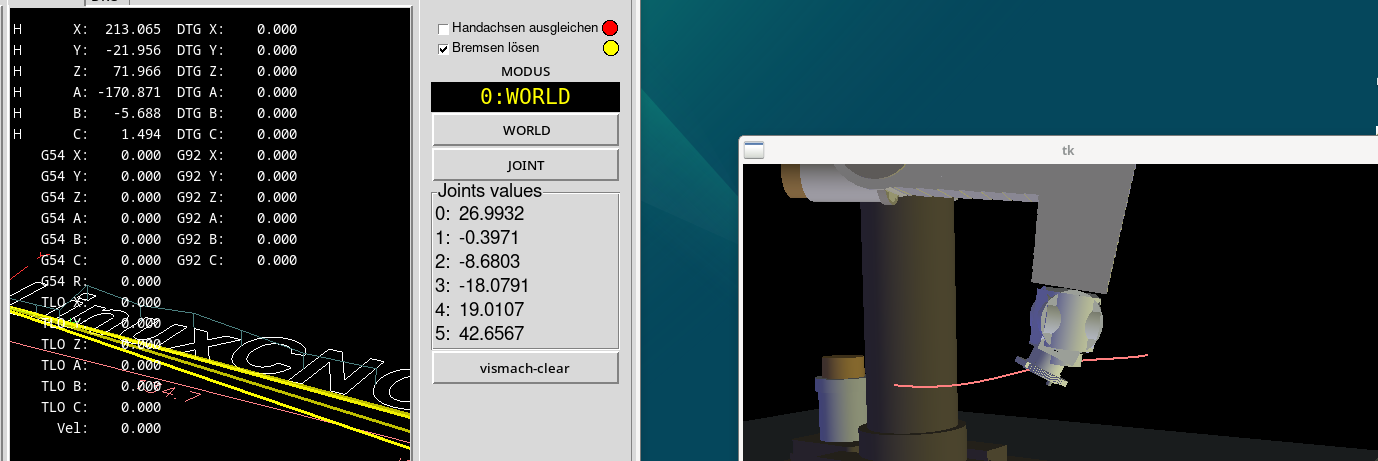
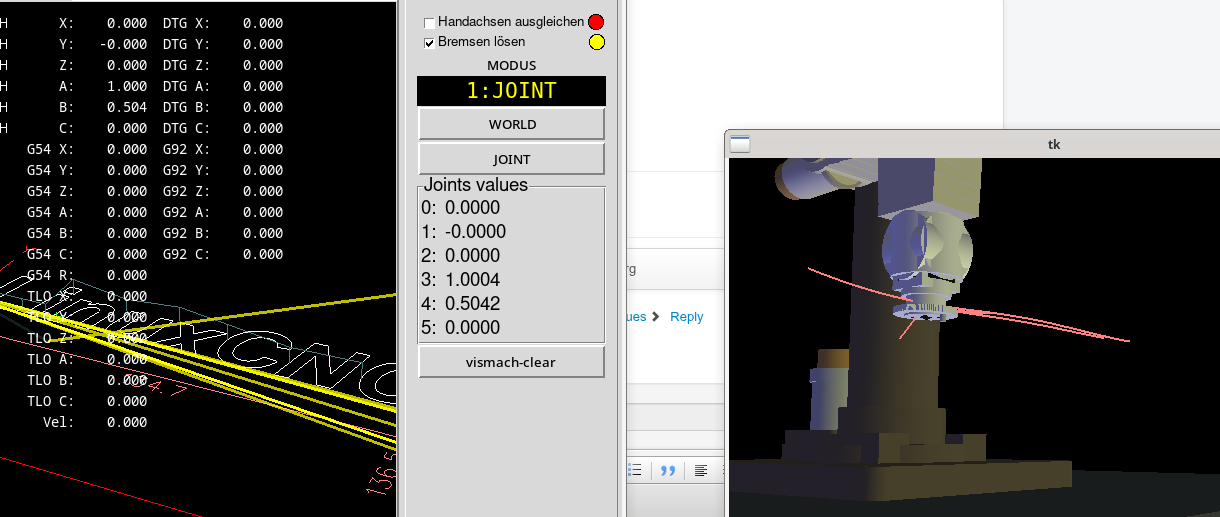
i checked again that all the movements in joint mode are correct ( encoder and motor to degree translation ) the scales are all correct.
an again i wonder that the tcp is upside down..
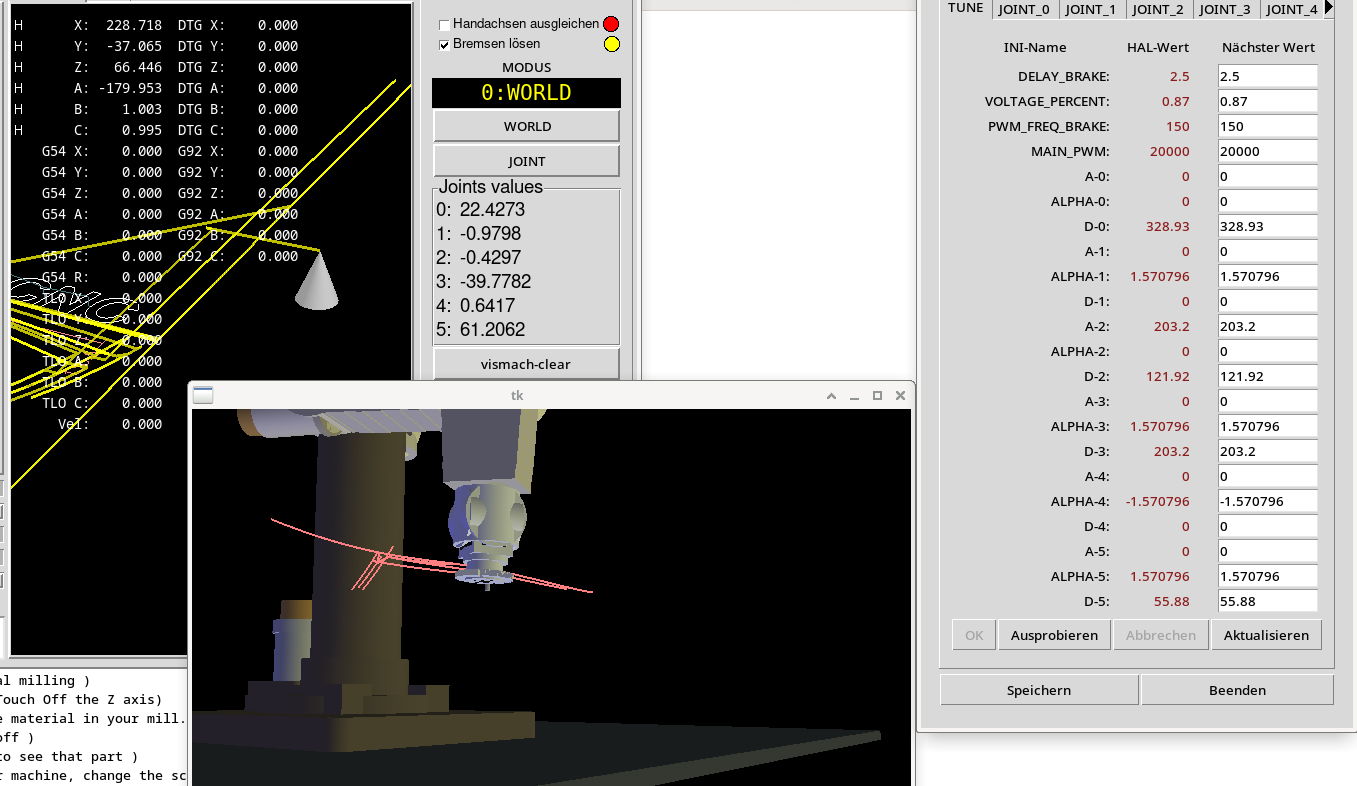
i homed all again to x0y0z0a0b0c0 and then jog ti a1 and b0.5 still flipping......
i checked again that all the movements in joint mode are correct ( encoder and motor to degree translation ) the scales are all correct.
an again i wonder that the tcp is upside down..
- tommylight
-

05 Aug 2026 13:20
Replied by tommylight on topic Best bet for a low cost HW assisted Linuxcnc engine....
Nope, the naming everything related to cnc as "mach3", so beginners think it only works with Mach3, besides the usb cards that only work with mach3.@Tommy: What do you mean with "China is running a misinformation campaign?", do you refer to some spam we see occasionally here?
- Aciera
05 Aug 2026 12:51
Nice!
Have you read the stuff I wrote and linked to regarding singularities?
Move joint_4 away from the zero position and try again.
Replied by Aciera on topic PUMA 200 Robotarm and some Hal/INI issues
i made a vismach model... i update it to the home position i want.. its 1:1 after homing th real arm.
Nice!
i dont know if this explain some wrong dh parameters?! but in some positions the A axis.. joint 4 on the arm starts flipping
Have you read the stuff I wrote and linked to regarding singularities?
Move joint_4 away from the zero position and try again.
- timo
05 Aug 2026 11:16 - 05 Aug 2026 11:17
Replied by timo on topic Best bet for a low cost HW assisted Linuxcnc engine....
@Tommy: What do you mean with "China is running a misinformation campaign?", do you refer to some spam we see occasionally here?
@mars: Does, "I also understand that the Mesa card is solid but the price is less than desirable.", mean you wish it was more expensive so that more people would become motivated to follow up with other options?
@mars: Does, "I also understand that the Mesa card is solid but the price is less than desirable.", mean you wish it was more expensive so that more people would become motivated to follow up with other options?
- Aciera
05 Aug 2026 08:40
Replied by Aciera on topic M19 orientation drift with external encoder and orient component (LinuxCNC 2.9.4
You might want to try 's_orient.comp', this modified version of 'orient.comp' provides an input that is to be connected to your encoder-index signal and will look for the index before orienting the spindle.
forum.linuxcnc.org/media/kunena/attachme...ient_2025-03-18.comp
- download the file and rename to 's_orient.comp'
- to install you need the 'halcompile' tool (you might need to install the 'linuxcnc-dev' package if your are on a package installation of linuxcnc)
- $ halcompile --install {your-path-to-the-file-here}/s_orient.comp
(you will need to use 'sudo' to execute this command on a package installation)
The output should look something like this:
- in your hal file change 'loadrt orient {...}' to 'loadrt s_orient {...}' and connect your encoder index signal to the orient component (you might have to modify your pin names to 's_orient')
forum.linuxcnc.org/media/kunena/attachme...ient_2025-03-18.comp
- download the file and rename to 's_orient.comp'
- to install you need the 'halcompile' tool (you might need to install the 'linuxcnc-dev' package if your are on a package installation of linuxcnc)
- $ halcompile --install {your-path-to-the-file-here}/s_orient.comp
(you will need to use 'sudo' to execute this command on a package installation)
The output should look something like this:
Code:
Compiling realtime s_orient.c
Linking s_orient.so
cp s_orient.so /home/user/git/mylinuxcnc-master/rtlib/
- in your hal file change 'loadrt orient {...}' to 'loadrt s_orient {...}' and connect your encoder index signal to the orient component (you might have to modify your pin names to 's_orient')
- aydinsen
05 Aug 2026 08:31
BF20L ,linuxCNC, touch probe and install was created by aydinsen
Hello from Turkey! Need beginner-friendly guidance on BF20L CNC Touch Probe setup
Hello everyone,
Sending my warmest regards to all forum members! I have been following this community for a while now and have gained a lot of valuable information. I would like to thank everyone who has contributed and shared their knowledge here.
First of all, I have an optimum BF20L mill that has been converted to a CNC. For the controller board, I will leave the link below. Although I have a background in electronics, I am very new to the CNC world and want to make sure I am on the right track.
I want to install a touch probe, but I have a few questions about what to expect:
www.google.com/imgres?imgurl=https://cdn...spwouoe,sh/x/im/m1/3
Hello everyone,
Sending my warmest regards to all forum members! I have been following this community for a while now and have gained a lot of valuable information. I would like to thank everyone who has contributed and shared their knowledge here.
First of all, I have an optimum BF20L mill that has been converted to a CNC. For the controller board, I will leave the link below. Although I have a background in electronics, I am very new to the CNC world and want to make sure I am on the right track.
I want to install a touch probe, but I have a few questions about what to expect:
- Once configured, can I use this probe to automatically set my workpiece zeros (X, Y, and Z axes)? Is that the main expectation?
- Could you please explain how to configure and wire this setup step-by-step, as if you were explaining it to a complete beginner (or "explain like I'm five")?
- Since I live in Turkey, I am not sure which probe model to buy. Can you recommend a budget-friendly, price-to-performance touch probe available here?
www.google.com/imgres?imgurl=https://cdn...spwouoe,sh/x/im/m1/3
- Aciera
05 Aug 2026 08:25
That man page info appears to be left over from the original code. This particular logic was then modified some time later without updating the man page info:
github.com/LinuxCNC/linuxcnc/commit/b2cd...919af6524f3b82e3eb33
Replied by Aciera on topic M19 orientation drift with external encoder and orient component (LinuxCNC 2.9.4
Do i understand that with mode 0 offset is 1, with mode 1 offset is -1, with mode 2 offset is 0 ? because during tests i seemed to find these shifts.
That man page info appears to be left over from the original code. This particular logic was then modified some time later without updating the man page info:
github.com/LinuxCNC/linuxcnc/commit/b2cd...919af6524f3b82e3eb33
- Aciera
05 Aug 2026 08:07 - 05 Aug 2026 11:07

linuxcnc.org/docs/devel/html/en/gcode/m-code.html#mcode:m19
I don't think that is correct. 'M19' does NOT seem to set 'spindle.n.index-enable'.
Testesd on real hardware using current master version :
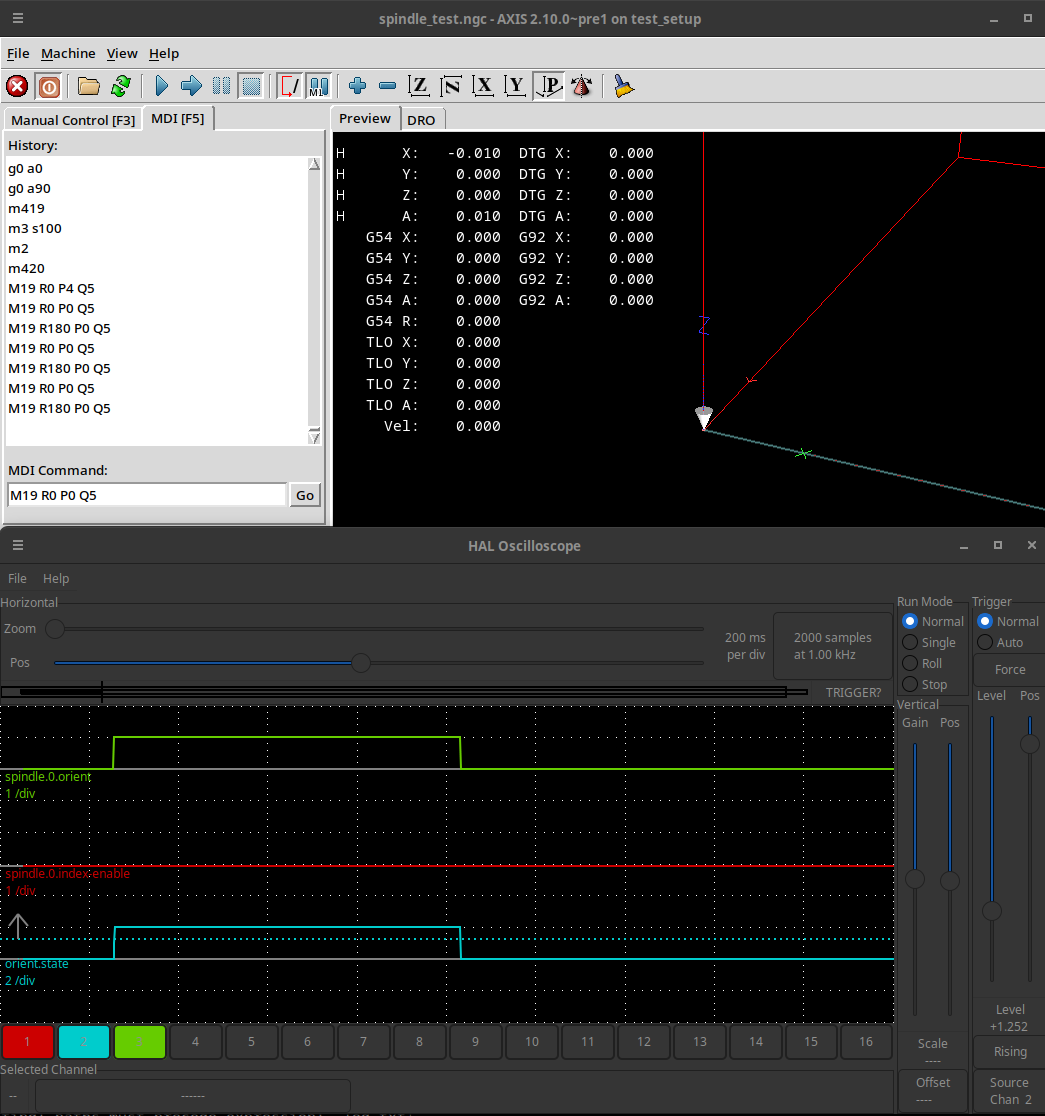
Replied by Aciera on topic M19 orientation drift with external encoder and orient component (LinuxCNC 2.9.4
linuxcnc.org/docs/devel/html/en/gcode/m-code.html#mcode:m19
I don't think that is correct. 'M19' does NOT seem to set 'spindle.n.index-enable'.
Testesd on real hardware using current master version :
- hitchhiker
05 Aug 2026 07:11
Replied by hitchhiker on topic PUMA 200 Robotarm and some Hal/INI issues
hi
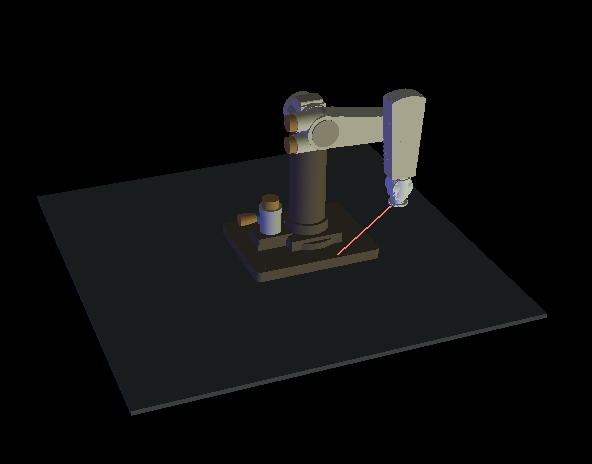
i made a vismach model... i update it to the home position i want.. its 1:1 after homing th real arm.
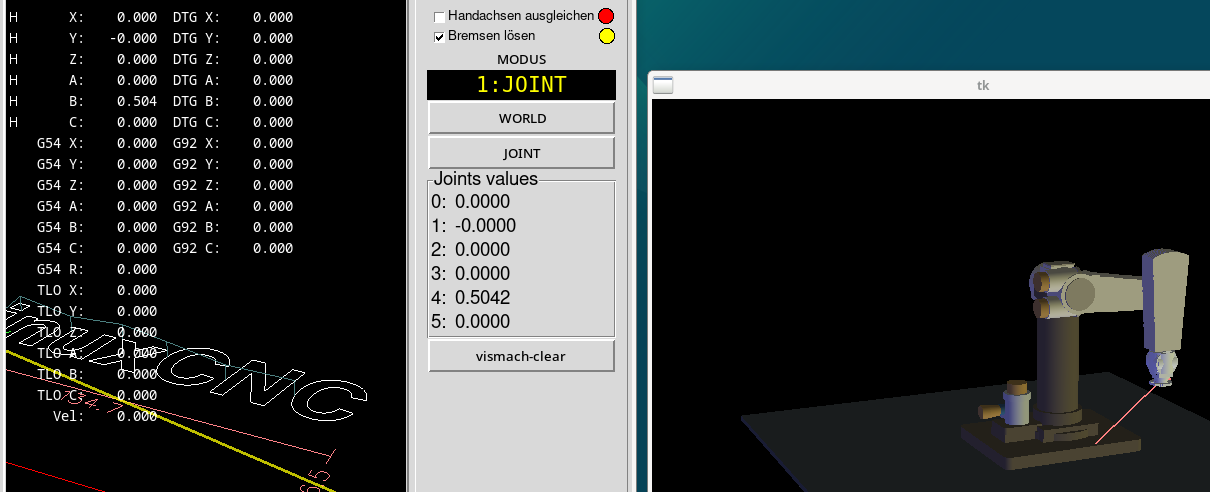
i dont know if it helps but if i home in this position. x0y0z0a0.5b0c0 in Identity/Joint Mode
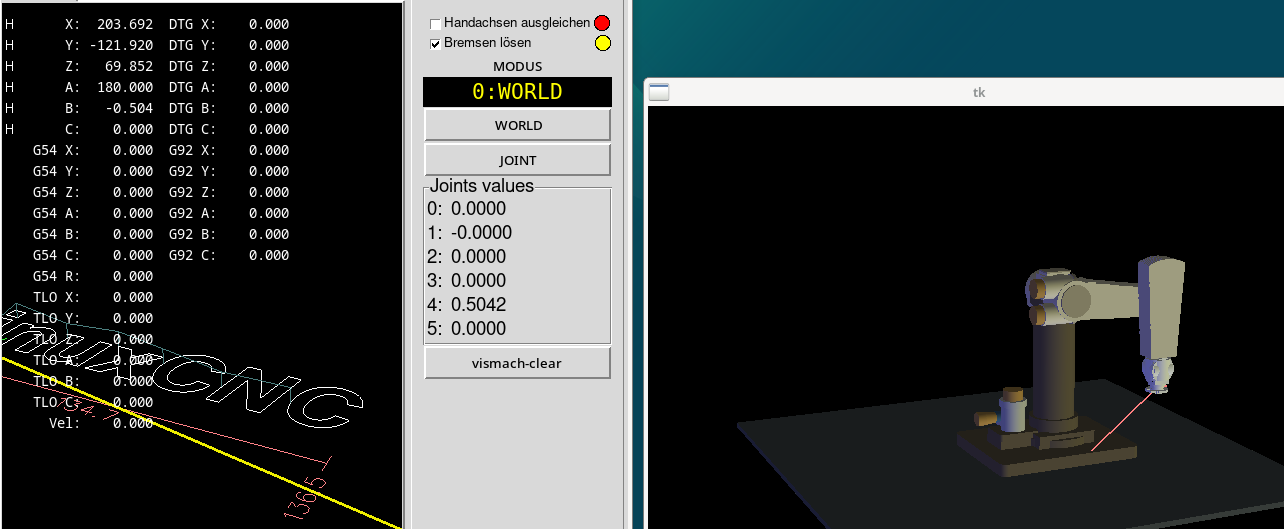
and in the world mode
but if i jog in world mode x + - i see the real failure on the vismach model..
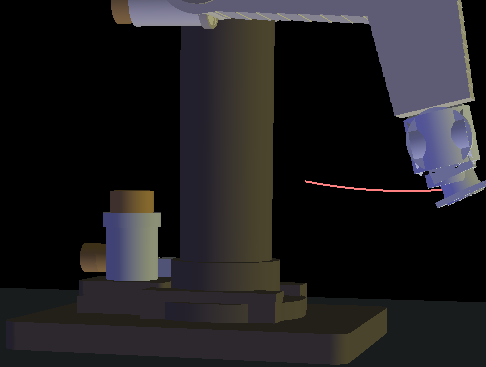
same in Y
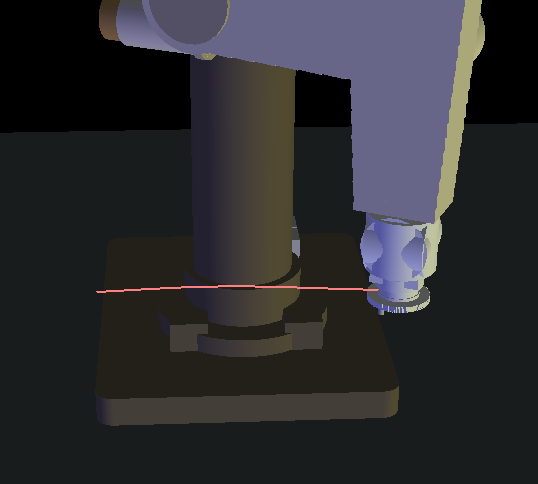
i dont know if this explain some wrong dh parameters?! but in some positions the A axis.. joint 4 on the arm starts flipping
thanks
i made a vismach model... i update it to the home position i want.. its 1:1 after homing th real arm.
i dont know if it helps but if i home in this position. x0y0z0a0.5b0c0 in Identity/Joint Mode
and in the world mode
but if i jog in world mode x + - i see the real failure on the vismach model..
same in Y
i dont know if this explain some wrong dh parameters?! but in some positions the A axis.. joint 4 on the arm starts flipping
thanks
- jelost
05 Aug 2026 05:36 - 05 Aug 2026 05:40
Replied by jelost on topic M19 orientation drift with external encoder and orient component (LinuxCNC 2.9.4
Man page Description :
The spindle is assumed to have stopped in an arbitrary position. The spindle encoder position is linked to the position pin. The current value of the position pin is sampled on a positive edge on the enable pin, and command is computed and set as follows: floor(number of full spindle revolutions in the position sampled on positive edge) plus angle/360 (the fractional revolution) +1/-1/0 depending on mode.
Do i understand that with mode 0 offset is 1, with mode 1 offset is -1, with mode 2 offset is 0 ? because during tests i seemed to find these shifts.
The spindle is assumed to have stopped in an arbitrary position. The spindle encoder position is linked to the position pin. The current value of the position pin is sampled on a positive edge on the enable pin, and command is computed and set as follows: floor(number of full spindle revolutions in the position sampled on positive edge) plus angle/360 (the fractional revolution) +1/-1/0 depending on mode.
Do i understand that with mode 0 offset is 1, with mode 1 offset is -1, with mode 2 offset is 0 ? because during tests i seemed to find these shifts.
- cmorley
05 Aug 2026 02:59
Replied by cmorley on topic Dual PID loops and appropriate pins for feedback to the Trajectory Planner et al
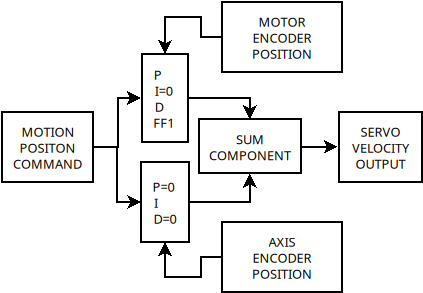
I think this shows the basics of the summed PIDs.
Time to create page: 0.198 seconds