Search Results (Searched for: )

  • grandixximo
29 Jan 2026 01:35
Replied by grandixximo on topic LinuxCNC S-Curve Accelerations

I had the same things happining a while ago when I tested Michels s curve. In the end theese (exactly like your situations) were just "calculation errors" and he solved it by adding allowed dwviations. Pos_out got a allowed deviation of 1e-4 I think.

Like you see in my pictures he had imperfections too. Michels s curve code tested outside linuxcnc when I implemend s curve backlash compensation as a proof of concept.
 
G-code? config folder?
  • COFHAL
29 Jan 2026 01:30 - 29 Jan 2026 01:31
Replied by COFHAL on topic Debian Trixie upgrade/install to 2.9.4
Thank you for your response, and also for your subtle sarcasm in calling me ignorant every time I comment or ask for help in the threads you also participate in. But I think it's better to be considered ignorant than to learn nothing, even if you're treated like garbage. What I'm trying to figure out is how to create an .img file of my hard drive's contents without having to reinstall applications that aren't included in the .img file, like the one you created for the Raspberry Pi 4 with Debian 13, which I've already installed on four Pi 4s. After installation, I add other applications and compile some components that aren't included in the official LCN version, and doing all that every time I install the image you created wastes a lot of my time.
  • micklethenickel
29 Jan 2026 01:24
Replied by micklethenickel on topic Using Mesa 7i95T for laser + galvo (xy2-100) control
Thank you so much!
  • PCW
29 Jan 2026 01:19
7I95T configuration with last two stepgens replaced with XY2-100 galvanometer outputs
and serial 0 RX replaced with XY2-100 Status


File Attachment:

File Name: 7i95t_xymodd.zip
File Size:281.46 KB

 
  • grandixximo
29 Jan 2026 01:19 - 29 Jan 2026 01:20
Replied by grandixximo on topic LinuxCNC S-Curve Accelerations

A word of caution to anyone testing the new planner on real hardware:

I would strongly recommend to NOT activate the new planner in the ini file.
I dropped my homing velocities to 20% and my real hardware setup still runs into the hard stops on homing.

Users should leave ini.planner_type = 0, home the machine and use halshow to set ini.planner_type = 1.

Try with max_jerk and default_jerk to 10000 or more, 1000 was more for showcasing the curves, not to run on actual hardware, already planning to change the showcase ini to 10000 
  • grandixximo
29 Jan 2026 01:17
Replied by grandixximo on topic LinuxCNC S-Curve Accelerations

I've been trying to test this on real hardware using Mesa but I cannot seem to get the new planner to work at all.

- [TRAJ] section has 'MAX_LINEAR_JERK = 1000.0'
- both [JOINT_0] and [JOINT_1] have 'MAX_JERK = 1000.0'
- ini.planner_type = 1


Yet running this code in G61.1 mode
Code:
G21 F5000 G0 x0 y0 g1 x20 y20 x0 y0 m2 I get this:  [attachment=74126]Screenshot from 2026-01-27 10-31-48.png[/attachment] here is my ini file: [spoiler] # This file was updated with the Mesa Configuration Tool on Nov 25 2025 13:43:50 # Changes to most things are ok and will be read by the Configuration Tool [MESA] VERSION = 2.1.8 BOARD = 7i95 BOARD_NAME = 7i95t [EMC] VERSION = 1.1 MACHINE = test_setup DEBUG = 0x00000000 [HM2] DRIVER = hm2_eth ADDRESS = 192.168.1.121 [DISPLAY] DISPLAY = axis PROGRAM_PREFIX = ./nc_files POSITION_OFFSET = RELATIVE POSITION_FEEDBACK = ACTUAL MAX_FEED_OVERRIDE = 1.2 MIN_LINEAR_VELOCITY = 0.0 DEFAULT_LINEAR_VELOCITY = 150.0 MAX_LINEAR_VELOCITY = 300.0 CYCLE_TIME = 0.1 INTRO_GRAPHIC = emc2.gif INTRO_TIME = 0 OPEN_FILE = ./square.ngc EDITOR = gedit DEFAULT_ANGULAR_VELOCITY = 18000 MAX_ANGULAR_VELOCITY = 36000 MIN_ANGULAR_VELOCITY = 1 [KINS] KINEMATICS = trivkins JOINTS = 2 [EMCIO] CYCLE_TIME = 0.100 TOOL_TABLE = tool.tbl [RS274NGC] PARAMETER_FILE = parameters.var [EMCMOT] EMCMOT = motmod COMM_TIMEOUT = 1.0 SERVO_PERIOD = 1000000 [TASK] TASK = milltask CYCLE_TIME = 0.010 [TRAJ] COORDINATES = XY LINEAR_UNITS = mm ANGULAR_UNITS = degree MAX_LINEAR_VELOCITY = 200.0 PLANNER_TYPE = 1 MAX_LINEAR_JERK = 1000.0 DEFAULT_LINEAR_JERK = 500.0 [HAL] HALFILE = main.hal [AXIS_X] MIN_LIMIT = 0 MAX_LIMIT = 300 MAX_VELOCITY = 300 MAX_ACCELERATION = 800 [JOINT_0] CARD = 0 MIN_LIMIT = 0 MAX_LIMIT = 300 MAX_VELOCITY = 300 MAX_ACCELERATION = 800 MAX_JERK = 1000.0 TYPE = LINEAR SCALE = 252.65 STEPGEN_MAX_VEL = 360.00 STEPGEN_MAX_ACC = 960.00 DIRSETUP = 10000 DIRHOLD = 10000 STEPLEN = 4000 STEPSPACE = 4000 ENCODER_SCALE = 200 FERROR = 1.5 MIN_FERROR = 0.25 DEADBAND = 0.01 P = 1000 I = 0 D = 0 FF0 = 0 FF1 = 1 FF2 = 0 BIAS = 0 MAX_OUTPUT = 0 MAX_ERROR = 0.0127 HOME_OFFSET = -0.75 HOME = 0 HOME_SEARCH_VEL = -5 HOME_LATCH_VEL = -5 HOME_FINAL_VEL = 2.5 HOME_IGNORE_LIMITS = YES HOME_SEQUENCE = 0 [AXIS_Y] MIN_LIMIT = 0 MAX_LIMIT = 300 MAX_VELOCITY = 300 MAX_ACCELERATION = 800 [JOINT_1] CARD = 0 MIN_LIMIT = 0 MAX_LIMIT = 300 MAX_VELOCITY = 300 MAX_ACCELERATION = 800 MAX_JERK = 1000.0 TYPE = LINEAR SCALE = 252.65 STEPGEN_MAX_VEL = 360.00 STEPGEN_MAX_ACC = 960.00 DIRSETUP = 10000 DIRHOLD = 10000 STEPLEN = 4000 STEPSPACE = 4000 ENCODER_SCALE = 200 FERROR = 1.5 MIN_FERROR = 0.25 DEADBAND = 0.01 P = 1000 I = 0 D = 0 FF0 = 0 FF1 = 1 FF2 = 0 BIAS = 0 MAX_OUTPUT = 0 MAX_ERROR = 0.0127 HOME_OFFSET = 0.25 HOME = 0 HOME_SEARCH_VEL = -5 HOME_LATCH_VEL = -5 HOME_FINAL_VEL = 2.5 HOME_IGNORE_LIMITS = YES HOME_SEQUENCE = 0 [/spoiler] What am I missing?
 
Axis Max Jerk ?
  • unknown
29 Jan 2026 01:13 - 29 Jan 2026 01:15
So.....you are wanting testers for a closed source hardware project ;)
What's in it for the testers ? :)

USB Stability & Real-Time Thread I’m well aware that USB isn't for the Servo Thread. 

What thread will it run in ? And you suggesting another thread to add to a config ? What period would this be run at ?
How would that affect a config that has a base thread (for software step gen) and a servo thread for other functions ?
  • grandixximo
29 Jan 2026 01:13 - 29 Jan 2026 01:37
Replied by grandixximo on topic LinuxCNC S-Curve Accelerations

A word of caution to anyone testing the new planner on real hardware:

I would strongly recommend to NOT activate the new planner in the ini file.
I dropped my homing velocities to 20% and my real hardware setup still runs into the hard stops on homing.

Users should leave ini.planner_type = 0, home the machine and use halshow to set ini.planner_type = 1.
 

I would echo this warning for the latest master changes

1. Jerk does not seem to be limited nor acceleration:


2. Commanded position may take off on random tangents"


Do you think this is related to the 0000% feed override? how many multipliers of feed override have you set?

I tested with my configuration can complete torus no problem but I only did 200%

can you zip your config folder? I also don't use inches, that could be a factor.
  • unknown
29 Jan 2026 01:08
Replied by unknown on topic Debian Trixie upgrade/install to 2.9.4
Google "linux clone hdd"

And choose your poison, the subject is a bit expansive, and it's not something I'd like to describe to a newbie. There are many many ways to do this.

You can also use debian's preseed config to install extra apps.

Once again google "debian preseed" and you will have a clean install without any fluff.
  • grandixximo
29 Jan 2026 01:07
Replied by grandixximo on topic LinuxCNC S-Curve Accelerations
Please share a zip of entire configuration, so I can reproduce what you are seeing on my end, thank you
  • phino
29 Jan 2026 01:05

Do you need the galvo status?
Would be great to have firmware for both option. Thanks for making the firmware!

Are there instructions somewhere for building the firmware for oneself?
  • unknown
29 Jan 2026 01:01
  • COFHAL
29 Jan 2026 00:56
How do I create an image of the contents of one hard drive to install it on another? This is to avoid having to reinstall the additional applications I use with LCN.
  • COFHAL
29 Jan 2026 00:50
Replied by COFHAL on topic Debian Trixie upgrade/install to 2.9.4
Excuse my ignorance, but how do I create an image of the contents of one hard drive to install it on another? This is to avoid having to reinstall the additional applications I use with LCN.
  • COFHAL
29 Jan 2026 00:38 - 29 Jan 2026 00:40
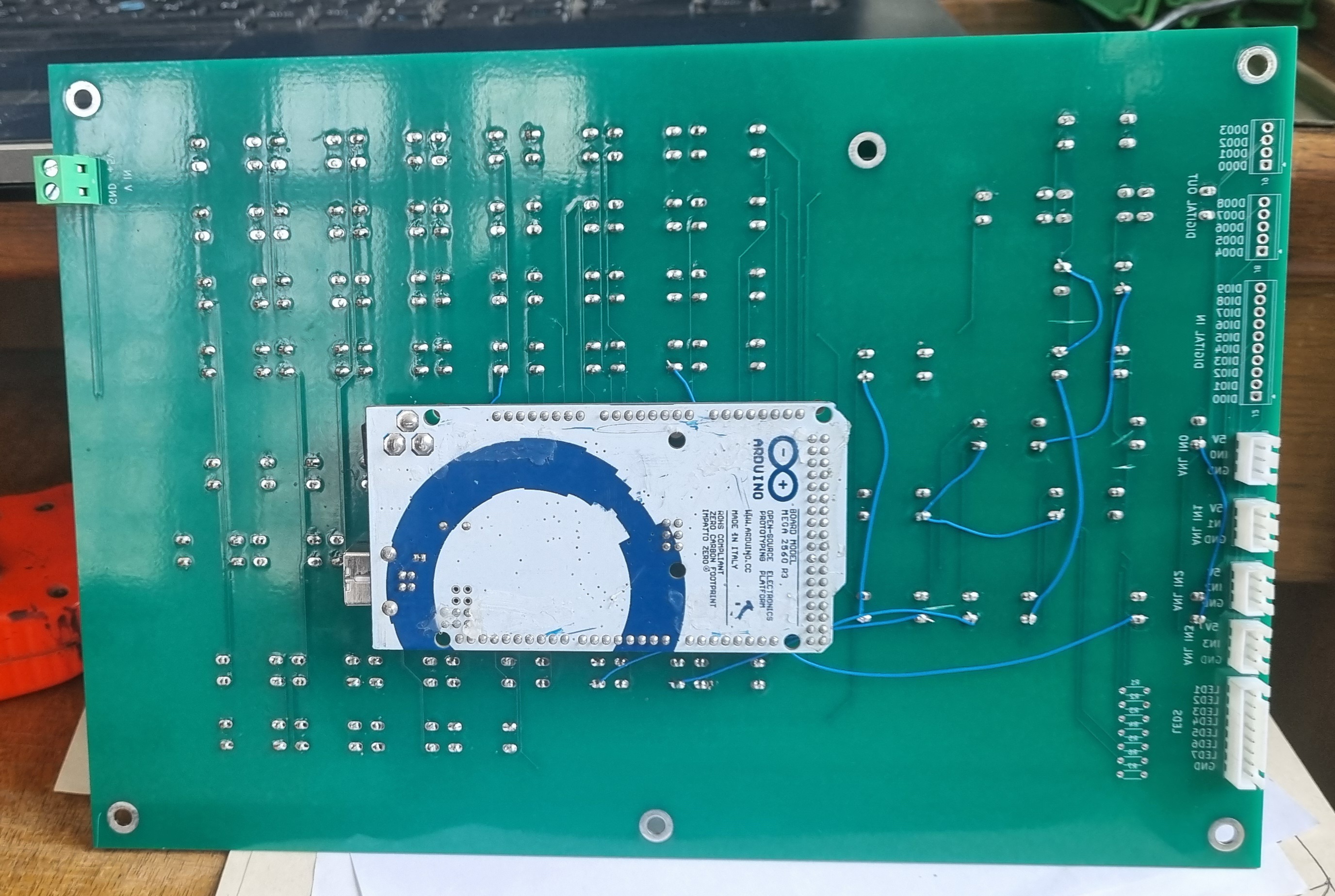
I use Arduino Connector, I really like your project, it's very professional. I don't know if you plan to create matrix-type keyboards to simulate keys or to be used as HAL pins like in Arduino Connector, which gives great flexibility.
Displaying 7981 - 7995 out of 11908 results.
Time to create page: 0.393 seconds
Powered by Kunena Forum