Very small 4 axis mill for cutting plastic materials

More
1 year 3 weeks ago #336065 by partec
Thank you for these very interesting explanations. 
I've barely familiarized myself with these special LinuxCNC capabilities until now, but I certainly sense their great potential.
In my ever-loved RHINO, I primarily try to find analytical geometric solutions directly, for example, an X-Y-Z-C-Points.ngc where the spatial position of the envelope shape is precisely used as the basis for the cutting contour.
The method you mentioned in the forum, e.g. according to github.com/FreddieHong19/Open5x, could also be used as an idea for creating such a suitable X-Y-Z-C-Punkte.ngc with Grasshopper.

Please Log in or Create an account to join the conversation.

More
3 months 3 weeks ago #347648 by tommylight
This machine is still waiting for the files it has to use, so still with me, and of course i had to play a bit with it tonight as i do have some sample files to play with that may or may not end up what we use.
I might have chased the wrong rabbit when i built this, so a bit of TCP exercise is in order...if i get the chance.
Any advice that might save me time, please do chime in.
Thank you.

Please Log in or Create an account to join the conversation.

More
3 months 3 weeks ago #347653 by Aciera
So, the .pts files contain a path on the surface of a 3d model as consecutive 3d points and you are trying to post process this to create 4axis (xyzc) gcode where the c axis keeps the tool perpendicular to the model surface.

Seems you are basically trying to use a python filter script to do what a CAM and post prosessor would usually do.

You could use dx and dy from the pts file to calculate the tool orientation angle in the xy-plane (ie the c axis value) that keeps the tool perpendicular to the path segment. In order to keep the tool positioned on the work piece while the c-axis moves you need TCP kinematics.

The 1mm tool path offset could possibly be achieved by simply using a 2mm bull nose bit (depends on the required detail resolution of course).

If you need to use smaller tools then you would likely need to calculate new xyz coordinates to compensate for the 1mm offset and tool radius compensation.


Of course, the proper and easy way to do this would be to use a CAM :)
The following user(s) said Thank You: tommylight

Please Log in or Create an account to join the conversation.
More
3 months 3 weeks ago #347669 by tommylight

So, the .pts files contain a path on the surface of a 3d model as consecutive 3d points and you are trying to post process this to create 4axis (xyzc) gcode where the c axis keeps the tool perpendicular to the model surface.
Yes.

Seems you are basically trying to use a python filter script to do what a CAM and post prosessor would usually do.
Yes.

You could use dx and dy from the pts file to calculate the tool orientation angle in the xy-plane (ie the c axis value) that keeps the tool perpendicular to the path segment.
How?
I used some Gemini generated scripts but all had issues with ... everything.

In order to keep the tool positioned on the work piece while the c-axis moves you need TCP kinematics.
Yes of course, already set and configured ( i think), but a bit fuzzy on G53 vs G54 values, as i have G54 X0Y0 at the center of the C axis, but G53 are far from it.

The 1mm tool path offset could possibly be achieved by simply using a 2mm bull nose bit (depends on the required detail resolution of course).
I do not think this is important much, the material is soft, both of them, so has to just pierce the thin one (0.8-1mm) and does not matter if it goes deeper, as long as that "deeper" is under 4-5mm.

Of course, the proper and easy way to do this would be to use a CAM :)
Yup, know of any good open source one?
reminds me, have to check FreeCad if it can do anything about it, but this adds another layer for the client to deal with, while the script/filter one is neat, open the file, home the machine (has switches), run.

Please Log in or Create an account to join the conversation.

More
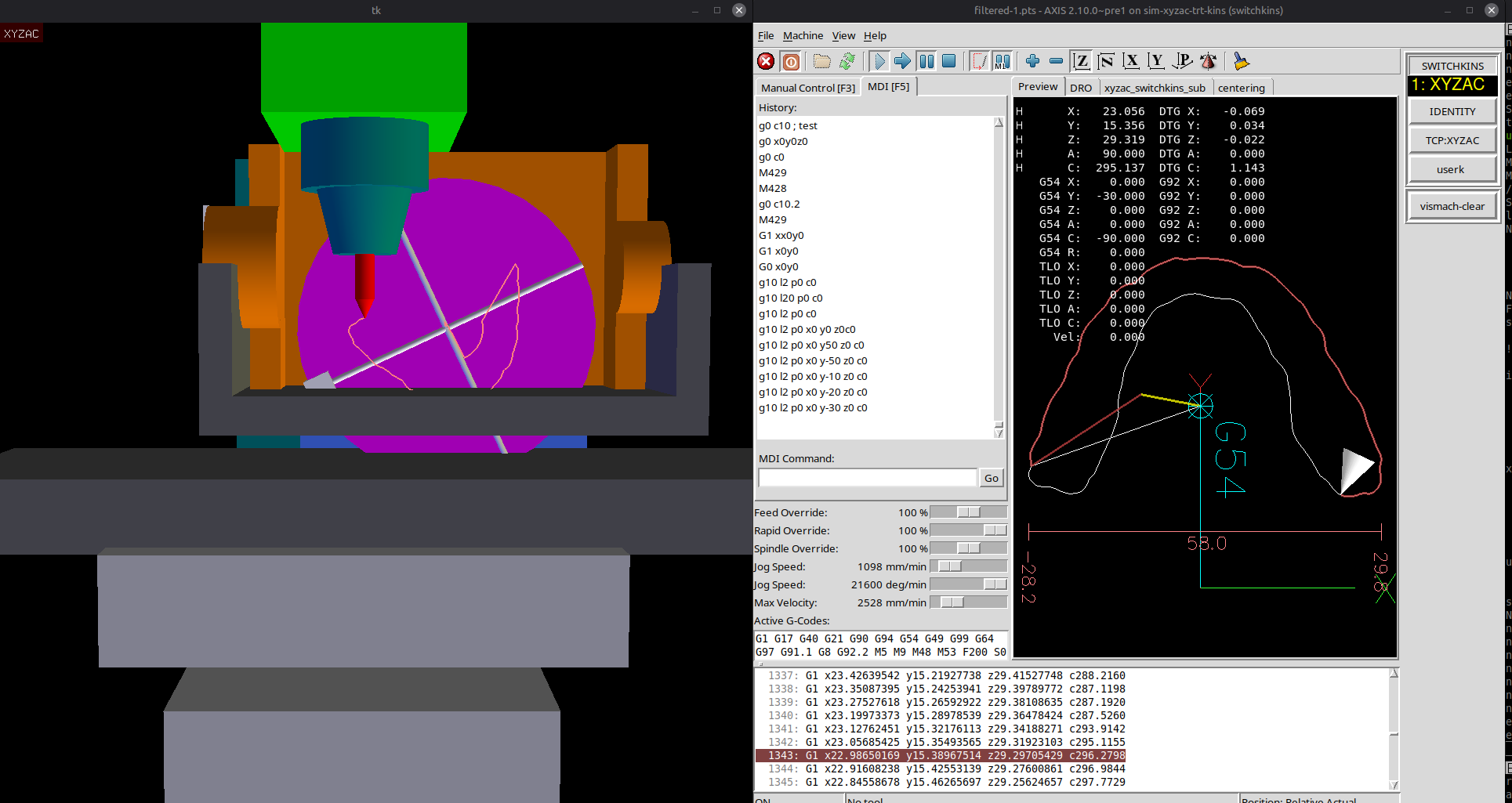
3 months 3 weeks ago - 3 months 3 weeks ago #347678 by Aciera


Modified filter script:
 

File Attachment:

File Name: LinuxCNC_p..._axis.py
File Size:4.29 KB


Tested with /sim/axis/vismach/5axis/table-rotary-tilting/xyzac-trt.ini with the following modifications to the ini file:

Code:
[DISPLAY]             GEOMETRY = XYZ-CA

NOTE that trt-kins and trt-vismach simulations uses unconventional rotational directions so the tool cone in the preview is on the opposite side of the path. 

Code:
[FILTER] PROGRAM_EXTENSION = .pts points file pts = ./LinuxCNC_pts_filter_4_axis.py

A axis max limits need to be expanded to be able to tilt the table to 90° for the vismach simulation
Code:
[AXIS_A]        MAX_LIMIT =   90


Code:
[JOINT_3]        MAX_LIMIT =   90
Last edit: 3 months 3 weeks ago by Aciera.

Please Log in or Create an account to join the conversation.

More
3 months 3 weeks ago #347681 by Aciera

Yes of course, already set and configured ( i think), but a bit fuzzy on G53 vs G54 values, as i have G54 X0Y0 at the center of the C axis, but G53 are far from it.


trt-kinematics have parameters to compensate for offsets between the machine reference point and the rotation-point of the table rotary:

See for example 'xyzac-trt.ini':
Code:
# not currently supported by xyzac-trt-gui: HALCMD = setp xyzac-trt-kins.x-rot-point 0 HALCMD = setp xyzac-trt-kins.y-rot-point 0 HALCMD = setp xyzac-trt-kins.z-rot-point 0

Note though that, as indicated, the vismach simulation does not support these.

Yup, know of any good open source one?


I do not.
The following user(s) said Thank You: tommylight

Please Log in or Create an account to join the conversation.

Time to create page: 0.400 seconds
Powered by Kunena Forum
