Tool compensation switching plane

More
10 years 7 months ago #71256 by REEEN
Thank you very much andy !

I will try it out and post my results here.

Greets Rene

Please Log in or Create an account to join the conversation.

More
10 years 7 months ago #71260 by andypugh
I tried to set my system up to do this a couple of days ago, for this job
However I don't think that the Touchy GUI can cope with non-trivial kinematics. I got a lot of error messages I didn't recognise and decided to just use a G1 X[40 * COS[21]] Z[40 * SIN[21]] F20 instead to get the job done.

The HAL changes are very minor indeed, replace
Code:
loadrt trivkins
with
Code:
loadrt 5axiskins setp 5axiskins.pivot-length 213.4
and add
Code:
net dummy-B axis.4.motor-position-cmd => axis.4.motor-position-fb
In your case this dummy-axis also needs to operate the head tilt, but I would suggest still leaving the feedback short-circuited like this, and operate the head tilt actuator with simple HAL.

INI changes are a bit more complicated. You probably need AXES = 9 and COORDINATES = XYZBW.
You probably also need an [AXIS_N] section for all 9 axes. though these can be very basic, with just limits, a home-sequence and home-velocities set to zero to activate immediate homing.

Please Log in or Create an account to join the conversation.
More
10 years 7 months ago #71278 by REEEN
Thank you very much Andy :)

Iam using gmoccapy gui for all our machines, it is very important for us to use this gui, because our control panell is created directly for it.
I thought that kinematics are independant from the gui...
I hope it will work with gmoccapy.

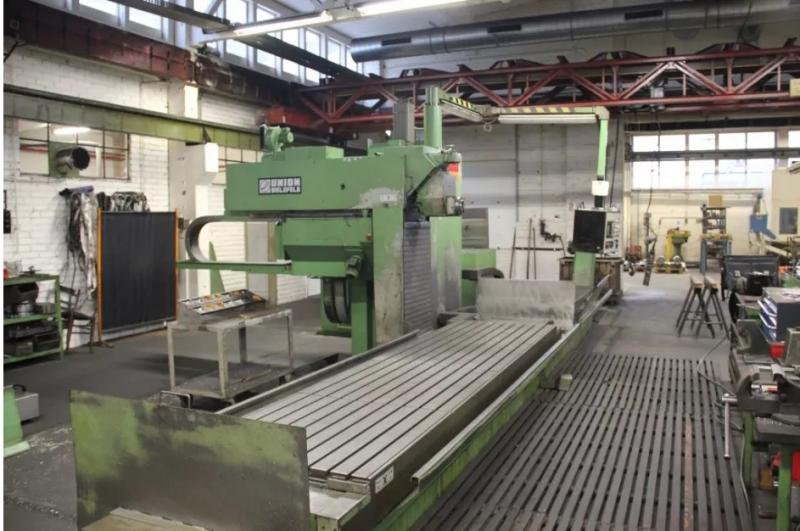
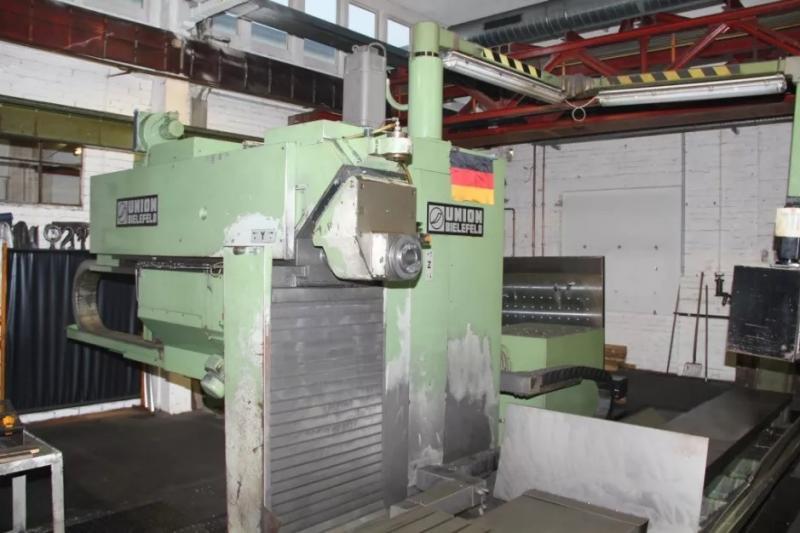
My mill is a bit different from yours the tilt head is 45 degree to z axis so the tool will either place towards the user or vertikal.
The head only has to positions that will be hal driven.

Here is a picture:


It is a very enormous machine.

Greets Rene

Please Log in or Create an account to join the conversation.
More
10 years 7 months ago #71280 by andypugh

REEEN wrote: I thought that kinematics are independant from the gui...


It ought to be, but the GUI needs to be able to switch from Joint Mode to World Mode.

An easy test would be to take a sim config (sim-axis-vismach-5axis for example) and change the GUI in the INI file and see what happens.

In practice your mill has two identity-type kinematics. So it is possible that you can use a switchable trivial kinematics.

The very worst case is running two separate configs and two separate G-code files for each head position. And that probably isn't too much trouble in practice.

Is there a tool-changer?

Please Log in or Create an account to join the conversation.

More
10 years 7 months ago #71282 by REEEN
There is no tool changer.
But the machine had the option for an automatic toolchanger.

I lile the way with the switchable trivkins.
Can we somehow change the offset from z to y with the head sensors in the kinematic file ?


Two configs is not really possible since the user wanted to run full programmes to mill 2 sides of the parts without restarting.

Greets REEEN

Please Log in or Create an account to join the conversation.

More
10 years 7 months ago #71283 by andypugh

REEEN wrote: I lile the way with the switchable trivkins.
Can we somehow change the offset from z to y with the head sensors in the kinematic file ?


I think so. Except the offsets will remain in Z, but the motors will link to different axes.

Vertical
X -> 0
Y -> 1
Z -> 2

Horizontal
-X -> 0
Y -> 2
Z -> 1

Switching from one orientation to the other without a following-error is likely to be interesting.

I am hopeful that there is a way to determine the current coordinate system in HAL, then G54-G58 used as vertical and G59, G59.1 ... G59.3 used for vertical could automatically rotate the head and simultaneously correct for tool point offsets.

Please Log in or Create an account to join the conversation.

Time to create page: 0.056 seconds
Powered by Kunena Forum
