
- Configuring LinuxCNC
- Advanced Configuration
- Byte2Bot Daughter Board/ Raspberry Pi5 issue: creating a 0-10v Spindle Voltage
Byte2Bot Daughter Board/ Raspberry Pi5 issue: creating a 0-10v Spindle Voltage
- EdWorks
-
 Topic Author
- Offline
- New Member
-

Less
More
- Posts: 17
- Thank you received: 1
19 Dec 2025 18:34 - 19 Dec 2025 18:47 #340310
by EdWorks
Byte2Bot Daughter Board/ Raspberry Pi5 issue: creating a 0-10v Spindle Voltage was created by EdWorks
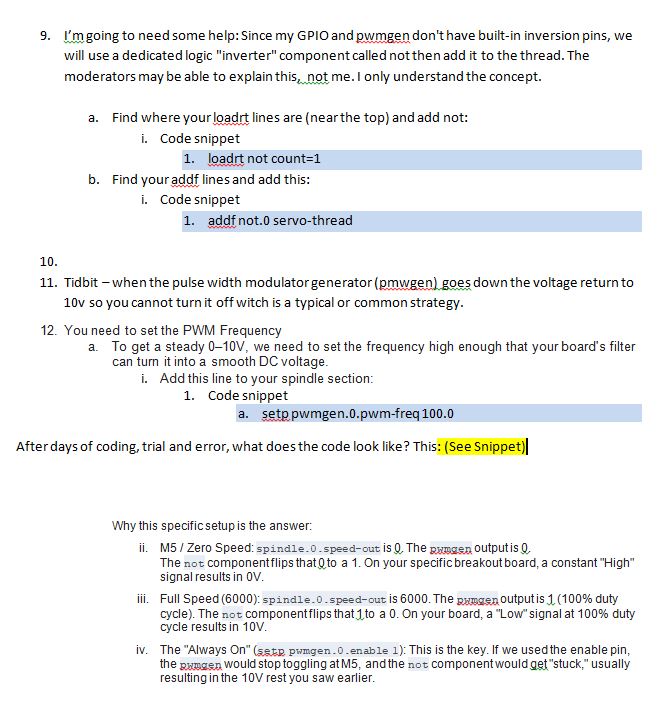
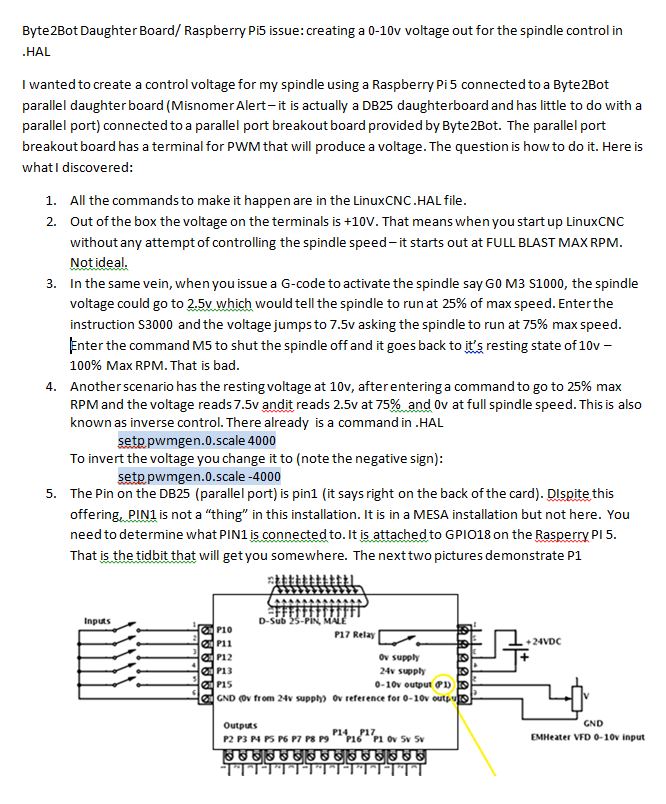
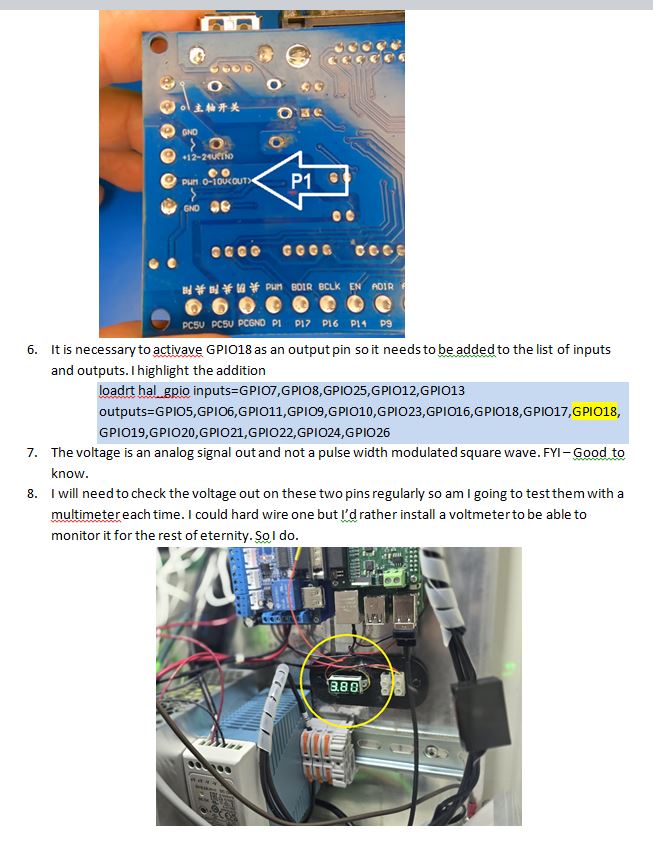
I wanted to create a control voltage for my spindle using a Raspberry Pi 5 connected to a Byte2Bot parallel daughter board (Misnomer Alert – it is actually a DB25 daughterboard and has little to do with a parallel port) connected to a parallel port breakout board provided by Byte2Bot. The parallel port breakout board has a terminal for PWM that will produce a voltage. The question is how to do it. Here is what I discovered:
This issue continues in the attachments:
LinuxCNCQuestionA
LinuxCNCQuestionB
LinuxCNCQuestionC
This issue continues in the attachments:
LinuxCNCQuestionA
LinuxCNCQuestionB
LinuxCNCQuestionC
Last edit: 19 Dec 2025 18:47 by EdWorks. Reason: Formatting is lost in the editor
Please Log in or Create an account to join the conversation.
- EdWorks
-
Topic Author
- Offline
- New Member
-
Less
More
- Posts: 17
- Thank you received: 1
19 Dec 2025 18:48 #340311
by EdWorks
Replied by EdWorks on topic Byte2Bot Daughter Board/ Raspberry Pi5 issue: creating a 0-10v Spindle Voltage
And here is the Snippet:
# --- SPINDLE PWM CONFIGURATION ---
# Load and Add Functions
# (Ensure loadrt pwmgen and loadrt scale are at the top of your file)
addf pwmgen.make-pulses base-thread
addf pwmgen.update servo-thread
# 3. Connect Spindle Enable
# This turns the PWM generator on only when the spindle is active and needs to be eliminated.
# (removed) net spindle-on spindle.0.on => pwmgen.0.enable
#Inverted Voltage Corrections
# First you need to add the next two lines above
# loadrt not count=1
# addf not.0 servo-thread
# set the Frequency
# first we need to set a frequency for the PWM in order for it to smooth the output
setp pwmgen.0.pwm-freq 100.0
# Calibration
# When using a 0-10v output signal, you may need to invert the PWM output
# so that the 5 axis breakout board will output 0V at spindle off,and
# 10v when the spindle is full on. The Negative sign before the 60000 usually does this.
# unfortunately the resting (spindle off) voltage is 10.0V - bad -very bad!
# rather we leave everything alone and creat a not.0 variable that reverses the values
setp pwmgen.0.scale 60000
setp pwmgen.0.offset 0.0
setp pwmgen.0.enable 1
# Connect Spindle Speed Command
# This signal carries the RPM requested by G-code (S command)
net spindle-speed-cmd spindle.0.speed-out => pwmgen.0.value
# Prepare to invert it
net spindle-pwm-raw pwmgen.0.pwm => not.0.in
# Connect and invert the PWM Output to Physical GPIO
# This is the "Writer" for GPIO18
net spindle-pwm-final not.0.out => hal_gpio.GPIO18-out
#End Spindle Code
# --- SPINDLE PWM CONFIGURATION ---
# Load and Add Functions
# (Ensure loadrt pwmgen and loadrt scale are at the top of your file)
addf pwmgen.make-pulses base-thread
addf pwmgen.update servo-thread
# 3. Connect Spindle Enable
# This turns the PWM generator on only when the spindle is active and needs to be eliminated.
# (removed) net spindle-on spindle.0.on => pwmgen.0.enable
#Inverted Voltage Corrections
# First you need to add the next two lines above
# loadrt not count=1
# addf not.0 servo-thread
# set the Frequency
# first we need to set a frequency for the PWM in order for it to smooth the output
setp pwmgen.0.pwm-freq 100.0
# Calibration
# When using a 0-10v output signal, you may need to invert the PWM output
# so that the 5 axis breakout board will output 0V at spindle off,and
# 10v when the spindle is full on. The Negative sign before the 60000 usually does this.
# unfortunately the resting (spindle off) voltage is 10.0V - bad -very bad!
# rather we leave everything alone and creat a not.0 variable that reverses the values
setp pwmgen.0.scale 60000
setp pwmgen.0.offset 0.0
setp pwmgen.0.enable 1
# Connect Spindle Speed Command
# This signal carries the RPM requested by G-code (S command)
net spindle-speed-cmd spindle.0.speed-out => pwmgen.0.value
# Prepare to invert it
net spindle-pwm-raw pwmgen.0.pwm => not.0.in
# Connect and invert the PWM Output to Physical GPIO
# This is the "Writer" for GPIO18
net spindle-pwm-final not.0.out => hal_gpio.GPIO18-out
#End Spindle Code
Please Log in or Create an account to join the conversation.
- EdWorks
-
Topic Author
- Offline
- New Member
-
Less
More
- Posts: 17
- Thank you received: 1
19 Dec 2025 18:49 - 19 Dec 2025 18:58 #340312
by EdWorks
Replied by EdWorks on topic Byte2Bot Daughter Board/ Raspberry Pi5 issue: creating a 0-10v Spindle Voltage
It appears to work fine. Any further suggestions would be appreciated.
Full HAL file attached.
Full HAL file attached.
Last edit: 19 Dec 2025 18:58 by EdWorks.
Please Log in or Create an account to join the conversation.
- Configuring LinuxCNC
- Advanced Configuration
- Byte2Bot Daughter Board/ Raspberry Pi5 issue: creating a 0-10v Spindle Voltage
Time to create page: 0.120 seconds