
- Configuring LinuxCNC
- Advanced Configuration
- [solved] XHC-WHB04B-06 rotary knob button feed rate not work
[solved] XHC-WHB04B-06 rotary knob button feed rate not work
- andrax
-
 Topic Author
- Offline
- Platinum Member
-

Less
More
- Posts: 320
- Thank you received: 83
25 Jan 2026 16:09 #341899
by andrax
XHC-WHB04B-06 rotary knob button feed rate not work was created by andrax
Hi,
I have a question about the configuration of the XHC WHB04B-06.
I already asked this question in the German forum but unfortunately did not receive an answer.
First of all, the handwheel works perfectly except for the rotary knob button.
Here I can only set the increments. But I also want to control the feed rates.
I think the settings need to be adjusted here:
# GUI feed rate related signals can be used when program is running moving GUI slider
net pdnt.feed-override.scale whb.halui.feed-override.scale halui.feed-override.scale # needed for both FeedOverride+/- and rotary knob button
net pdnt.max-velocity.value whb.halui.max-velocity.value halui.max-velocity.value # needed for Mpg mode : button feed position% * max-velocity = Mpg feedrate
# take feed override min/max values from/to the GUI
net pdnt.feed-override.value halui.feed-override.value whb.halui.feed-override.value # GUI feed rate related signals
net pdnt.feed-override.increase whb.halui.feed-override.increase halui.feed-override.increase
net pdnt.feed-override.decrease whb.halui.feed-override.decrease halui.feed-override.decrease
I just don't know which ones?
I have a question about the configuration of the XHC WHB04B-06.
I already asked this question in the German forum but unfortunately did not receive an answer.
First of all, the handwheel works perfectly except for the rotary knob button.
Here I can only set the increments. But I also want to control the feed rates.
I think the settings need to be adjusted here:
# GUI feed rate related signals can be used when program is running moving GUI slider
net pdnt.feed-override.scale whb.halui.feed-override.scale halui.feed-override.scale # needed for both FeedOverride+/- and rotary knob button
net pdnt.max-velocity.value whb.halui.max-velocity.value halui.max-velocity.value # needed for Mpg mode : button feed position% * max-velocity = Mpg feedrate
# take feed override min/max values from/to the GUI
net pdnt.feed-override.value halui.feed-override.value whb.halui.feed-override.value # GUI feed rate related signals
net pdnt.feed-override.increase whb.halui.feed-override.increase halui.feed-override.increase
net pdnt.feed-override.decrease whb.halui.feed-override.decrease halui.feed-override.decrease
I just don't know which ones?
Please Log in or Create an account to join the conversation.
- andypugh
-

- Offline
- Moderator
-

Less
More
- Posts: 19898
- Thank you received: 4655
25 Jan 2026 16:49 #341905
by andypugh
Replied by andypugh on topic XHC-WHB04B-06 rotary knob button feed rate not work
Which GUI are you using?
Please Log in or Create an account to join the conversation.
- andrax
-
Topic Author
- Offline
- Platinum Member
-
Less
More
- Posts: 320
- Thank you received: 83
25 Jan 2026 16:52 #341906
by andrax
Replied by andrax on topic XHC-WHB04B-06 rotary knob button feed rate not work
I use gmoccapy.
So far, I have found that these two signals control the feed rate:
gmocacapy.spc-feed.value
gmocacapy.spc-speed.value
So far, I have found that these two signals control the feed rate:
gmocacapy.spc-feed.value
gmocacapy.spc-speed.value
Please Log in or Create an account to join the conversation.
- andypugh
-
- Offline
- Moderator
-
Less
More
- Posts: 19898
- Thank you received: 4655
25 Jan 2026 17:03 #341909
by andypugh
Replied by andypugh on topic XHC-WHB04B-06 rotary knob button feed rate not work
You could quickly check if those have the desired affect by opening halshow, opening the "watch" tab and picking those pins from the tree. Then you can set values directly.
If that works then link them up in HAL.
If that works then link them up in HAL.
The following user(s) said Thank You: andrax
Please Log in or Create an account to join the conversation.
- andrax
-
Topic Author
- Offline
- Platinum Member
-
Less
More
- Posts: 320
- Thank you received: 83
26 Jan 2026 17:54 #341962
by andrax
Replied by andrax on topic XHC-WHB04B-06 rotary knob button feed rate not work
I tested the signals on the rotary control.
The pins for feed.selected light up depending on the selection.
whb.halui.feed-override.scale always remains 0.
whb.halui.max-velocity.value always remains 166.666.
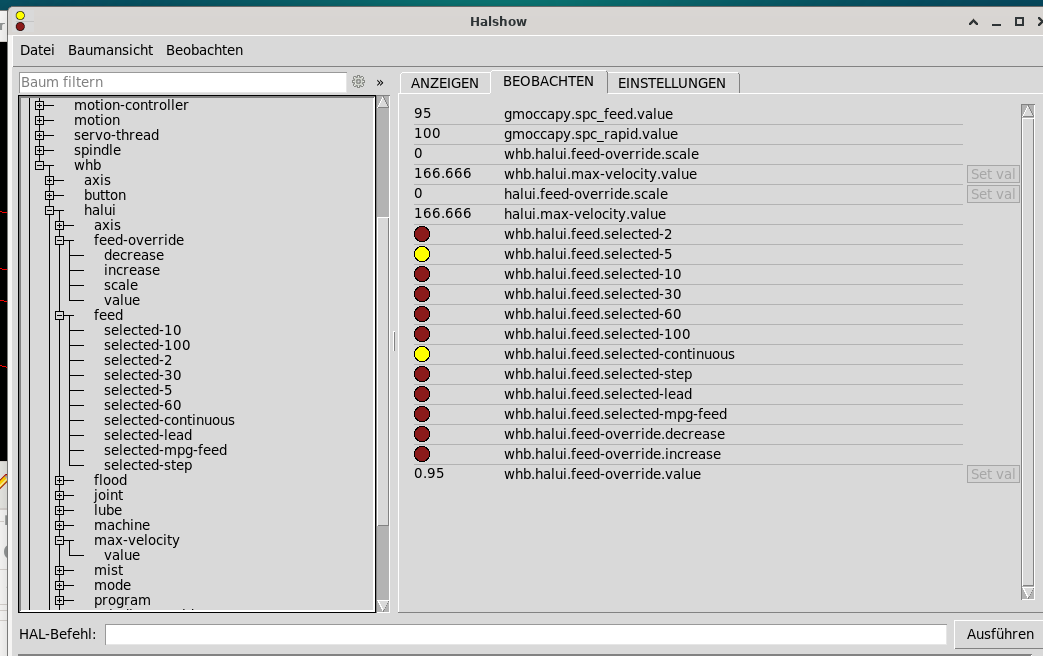
The pins for feed.selected light up depending on the selection.
whb.halui.feed-override.scale always remains 0.
whb.halui.max-velocity.value always remains 166.666.
Attachments:
Please Log in or Create an account to join the conversation.
- andrax
-
Topic Author
- Offline
- Platinum Member
-
Less
More
- Posts: 320
- Thank you received: 83
31 Jan 2026 17:34 #342254
by andrax
Replied by andrax on topic [solved] XHC-WHB04B-06 rotary knob button feed rate not work
I have found a solution that works for me.
After wasting a week with Mux trying to build something with 6 input pins + enable, I have now decided on a different approach. Since the rotary control does not have a direct output for the feed, I am tapping the signal from whb.axis.a.jog-scale. Now I just had to convert the value with div2 for jog, feed, and rapid.
After wasting a week with Mux trying to build something with 6 input pins + enable, I have now decided on a different approach. Since the rotary control does not have a direct output for the feed, I am tapping the signal from whb.axis.a.jog-scale. Now I just had to convert the value with div2 for jog, feed, and rapid.
# Aufruf
loadrt div2 count=3
addf div2.0    servo-thread
addf div2.1    servo-thread
addf div2.2    servo-thread

#

net    analog_enable        gmoccapy.jog.jog-velocity.analog-enable        whb.halui.feed.selected-continuous
net    analog_enable        gmoccapy.feed.feed-override.analog-enable
net    analog_enable        gmoccapy.rapid.rapid-override.analog-enable
#
net feed_in         div2.0.in0    whb.axis.a.jog-scale
setp                 div2.0.in1 3.333
net feed_jog         div2.0.out
#
net feed_in         div2.1.in0
setp                 div2.1.in1 3.27
net feed_overide     div2.1.out
#
net feed_in         div2.2.in0
setp                 div2.2.in1 1.64
net feed_rapid         div2.2.out

net feed_jog          gmoccapy.jog.jog-velocity.direct-value
net feed_overide       gmoccapy.feed.feed-override.direct-value
net feed_rapid         gmoccapy.rapid.rapid-override.direct-value
The following user(s) said Thank You: tommylight
Please Log in or Create an account to join the conversation.
- Configuring LinuxCNC
- Advanced Configuration
- [solved] XHC-WHB04B-06 rotary knob button feed rate not work
Time to create page: 0.337 seconds