
- Configuring LinuxCNC
- Advanced Configuration
- Rover 336 retrofit – horizontal drills and tool offsets in LinuxCNC
Rover 336 retrofit – horizontal drills and tool offsets in LinuxCNC
- GDTH
-
 Topic Author
- Offline
- Senior Member
-

Less
More
- Posts: 60
- Thank you received: 2
06 Mar 2026 11:11 #343937
by GDTH
Rover 336 retrofit – horizontal drills and tool offsets in LinuxCNC was created by GDTH
Hello,I am currently retrofitting a Biesse Rover 336 with LinuxCNC.The machine is controlled with a Mesa 7i77, and I am using EtherCAT modules distributed throughout the machine for the I/O.Originally the machine had a Control Techniques Unidrive VFD, but I was unable to change the required parameters, so I replaced it with a Danfoss VFD, which is now working well.At this point the machine is mostly operational:
Error: Function 'positionABC' can only be used with multi-axis machine configurations.
Error at line: 2040
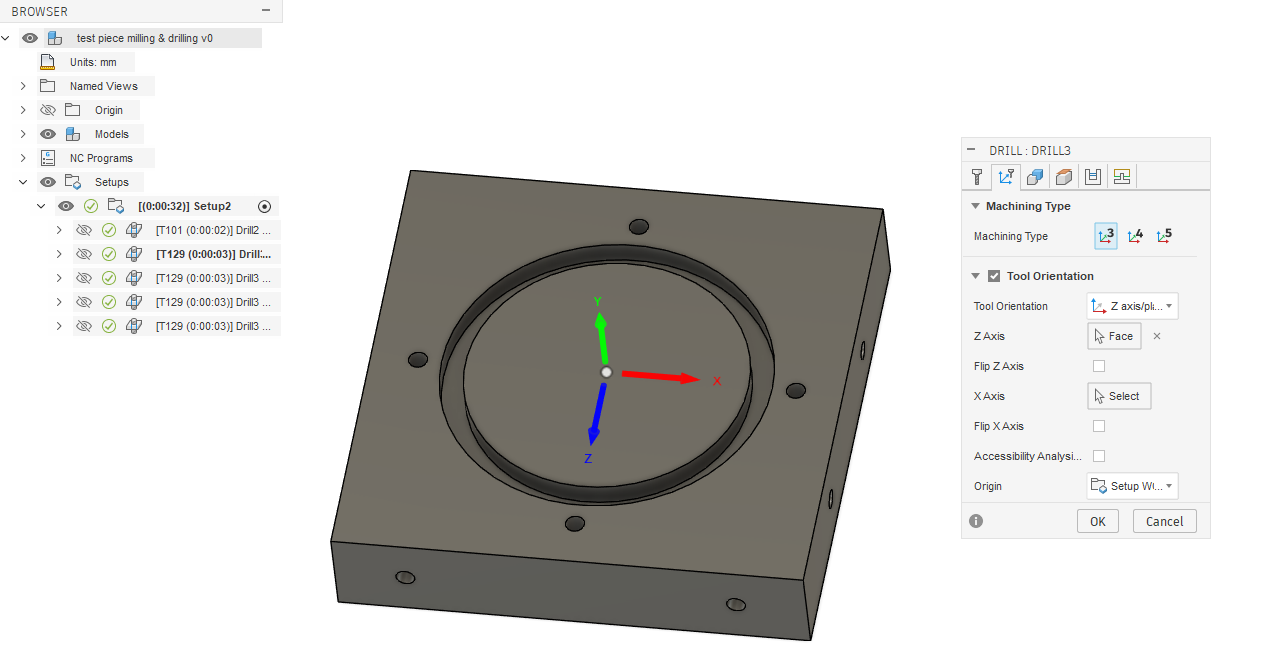
Error in operation: 'Drill2'I suspect this may be related to how I defined the horizontal drilling operation.Is there a recommended way to program horizontal drilling for drill banks in Fusion when targeting LinuxCNC?Any advice from people who have implemented drill banks or horizontal drills on router-style machines would be very helpful.Thanks!
- Homing works
- XYZ motion works
- Spindle runs correctly
- The toolchanger sequence is mostly prepared
- Toolchanger: 7 tools
- Vertical drills: ~25
- Horizontal drill (X axis): 1
- Horizontal drills (Y axis): 3
- Tools 1–7 → spindle toolchanger
- Tools 101–130 → drill bank (fixed tools)
- Store the offsets in the tool table (like normal tools)
- Apply the offsets inside the M6 tool change routine, since these drills are fixed and it may reduce the chance of mistakes.
Error: Function 'positionABC' can only be used with multi-axis machine configurations.
Error at line: 2040
Error in operation: 'Drill2'I suspect this may be related to how I defined the horizontal drilling operation.Is there a recommended way to program horizontal drilling for drill banks in Fusion when targeting LinuxCNC?Any advice from people who have implemented drill banks or horizontal drills on router-style machines would be very helpful.Thanks!
Please Log in or Create an account to join the conversation.
- andypugh
-

- Offline
- Moderator
-

Less
More
- Posts: 19899
- Thank you received: 4655
06 Mar 2026 20:23 #343954
by andypugh
Replied by andypugh on topic Rover 336 retrofit – horizontal drills and tool offsets in LinuxCNC
I would expect the tool table to work for this application. I have suggested it before and nobody has come back to say that it was a terrible idea.
Please Log in or Create an account to join the conversation.
- hmnijp
- Offline
- Senior Member
-
Less
More
- Posts: 42
- Thank you received: 49
07 Mar 2026 16:30 - 07 Mar 2026 16:51 #343992
by hmnijp
Replied by hmnijp on topic Rover 336 retrofit – horizontal drills and tool offsets in LinuxCNC
In LinuxCNC, the XYZ tool offsets applied via G43 work correctly for the tool.
You can apply them inside M6 by executing G43 inside remap, or separately — it doesn't matter.
The error you are receiving indicates that you have changed the tool orientation (rotated the WCS). The post-processor checks whether your MachineConfig can perform an ABC coordinate system rotation, but you most likely have a standard 3x configuration.
However, to use drilling in planes other than XY (G17) without WCS rotation, you will need to change the post-processor logic in Fusion 360. The standard LinuxCNC-EMC2 post does not allow this. The standard 5x or 3+2 post will not work either as they rotate the coordinate system, which is unnecessary when drilling in a plane other than g17.
There are different ways to implement this:
1) Classic 5x/TCP rotates the coordinate system by controlling the AB axes and TCP activation codes — this is probably too complicated for your machine.
2) Allow tool vector orientation other than Z – this is often used for rotary/angle heads on milling machines. To do this, you need to modify the postprocessor. See this topic for more information: forums.autodesk.com/t5/hsm-post-processo...n-stock/td-p/8911668
In this case, you do not need to select 'Tool orientation' in Fusion; WCS remains the same as in the setup.
3) The strange but common logic of posts for some furniture machining centers with drilling blocks that you can find looks like this: the g54 offset is defined for the XY machine plane, other offsets are used for side surfaces, and then the CNC recalculates. The control program looks like a cardboard box unfolded onto a plane. I don't think you'll want to use this strange proprietary logic.
I recommend adding mandatory checks:
In the post-processor:
- Check which tool numbers can be used in planes other than the XY plane.
- Check that side tools (T for the ZY plane) are only used for operations on the ZY work plane.
In the CNC:
- check that the XYZ tool offsets for side tools are not equal to 0 (this check can be performed inside M6).
You can apply them inside M6 by executing G43 inside remap, or separately — it doesn't matter.
The error you are receiving indicates that you have changed the tool orientation (rotated the WCS). The post-processor checks whether your MachineConfig can perform an ABC coordinate system rotation, but you most likely have a standard 3x configuration.
However, to use drilling in planes other than XY (G17) without WCS rotation, you will need to change the post-processor logic in Fusion 360. The standard LinuxCNC-EMC2 post does not allow this. The standard 5x or 3+2 post will not work either as they rotate the coordinate system, which is unnecessary when drilling in a plane other than g17.
There are different ways to implement this:
1) Classic 5x/TCP rotates the coordinate system by controlling the AB axes and TCP activation codes — this is probably too complicated for your machine.
2) Allow tool vector orientation other than Z – this is often used for rotary/angle heads on milling machines. To do this, you need to modify the postprocessor. See this topic for more information: forums.autodesk.com/t5/hsm-post-processo...n-stock/td-p/8911668
In this case, you do not need to select 'Tool orientation' in Fusion; WCS remains the same as in the setup.
3) The strange but common logic of posts for some furniture machining centers with drilling blocks that you can find looks like this: the g54 offset is defined for the XY machine plane, other offsets are used for side surfaces, and then the CNC recalculates. The control program looks like a cardboard box unfolded onto a plane. I don't think you'll want to use this strange proprietary logic.
I recommend adding mandatory checks:
In the post-processor:
- Check which tool numbers can be used in planes other than the XY plane.
- Check that side tools (T for the ZY plane) are only used for operations on the ZY work plane.
In the CNC:
- check that the XYZ tool offsets for side tools are not equal to 0 (this check can be performed inside M6).
Last edit: 07 Mar 2026 16:51 by hmnijp.
Please Log in or Create an account to join the conversation.
- Configuring LinuxCNC
- Advanced Configuration
- Rover 336 retrofit – horizontal drills and tool offsets in LinuxCNC
Time to create page: 0.081 seconds