CSS/G96 for other than X-axis?

More
7 months 3 hours ago #345054 by spumco
UPDATE

I have switchkins working.  I have not yet tested CSS, but the axis/joint swap works with a couple of M-codes.
  • Normal mode:
    • jogging/g-code/MDI axis "V" moves the parting slide (joint-3)
    • jogging/g-code/MDI axis "X" moves the real X-axis (joint-0)
  • Switched mode
    • jogging/g-code/MDI axis "X" moves the parting slide
    • jogging axis V and joint-0 is disabled
    • Pre-switch V-axis G54 offsets are written to the virtual X
    • Appropriate max/min limits and accel/velocity are written to the virtual X
  • Switched back to normal
    • All jogging/g-code/MDI work normally
    • X-axis position goes back to pre-switch position (G53 X0)
    • Same for V-axis
Remaining issues
  • Axis GUI screen buttons can still jog joint-0/V-axis when in switched mode
    • I don't plan to use Axis once I'm done configuring & sorting out the lathe, but I don't know how to stop NML background messages from a GUI from moving the true X-axis.  Any ideas how to no-kidding stop an axis from being moved without disabling the drive? like DEACTIVATE_JOINT or something?
    • Bad Things will happen if the real X-axis moves when I've got the main and sub-spindles both clamped on a part.
  • Jogging the slide while in switched mode results in half the motion I'd expect.
    • i.e. the DRO doesn't match the physical distance the slide moves.
    • This may be due to a scale component I've got in the X-axis jogging logic so I can jog in diameter mode.  Maybe I need to get rid of that and change the joint-0 scale.

Not posting config or other files until I've tested CSS and sort out the jog motion issue.

Big thanks to @Aciera for the help.
The following user(s) said Thank You: tommylight

Please Log in or Create an account to join the conversation.
More
6 months 4 weeks ago #345060 by Aciera

Any ideas how to no-kidding stop an axis from being moved without disabling the drive? like DEACTIVATE_JOINT or something?


I'm not aware of a way to block the operator from commanding a move of a particular axis. Would be a handy feature to have.

- I use Gmoccapy where the onscreen jog buttons can be hidden and only physical jogging through hal pins needs to be handled.
- MDI entries are more involved as one would need to parse all commands that an operator enters, still possible without too much effort.
- Rehoming can be handled using 'motion.homing-inhibit'.

Still leaves program execution and any mdi commands that are not coming from the gui entry.
The following user(s) said Thank You: spumco

Please Log in or Create an account to join the conversation.
More
6 months 4 weeks ago #345061 by spumco

I'm not aware of a way to block the operator from commanding a move of a particular axis. Would be a handy feature to have.


Appreciate you having a think about it.

I'd like to experiment with that NML message I found (DEACTIVATE_JOINT).  If I can deactivate joint-0 near the beginning of the sub-spindle transfer process I can simplify the parting-slide jogging disable (which happens later in the overall sequence).

Any idea how I can send an NML message to LCNC?

Maybe it's done via python interface, but I don't see anything obvious in the LCNC manual section on python-interface that includes that specific command.
 

Please Log in or Create an account to join the conversation.
More
6 months 4 weeks ago #345069 by Aciera
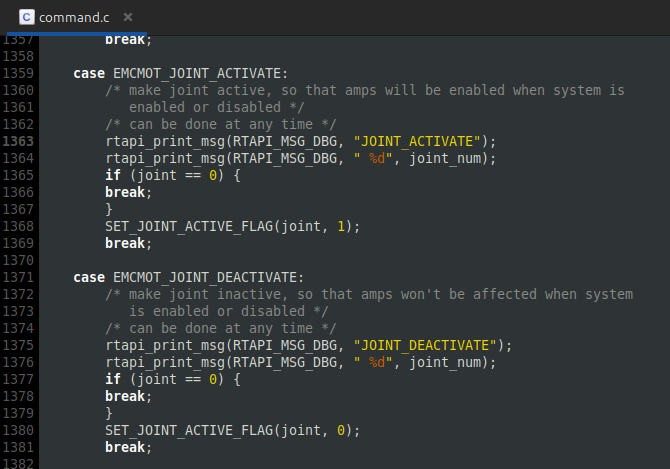
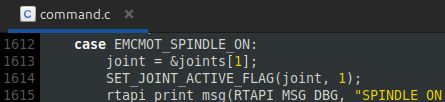
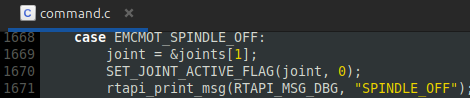
Not sure if there is an easier way of trying this but I inserted the the actions of 'EMCMOT_JOINT_ACTIVATE' / 'EMCMOT_JOINT_DEACTIVATE' (ie set/reset 'SET_JOINT_ACTIVE_FLAG' for a specific joint :
 

into 'EMCMOT_SPINDLE_ON' / 'EMCMOT_SPINDLE_OFF':


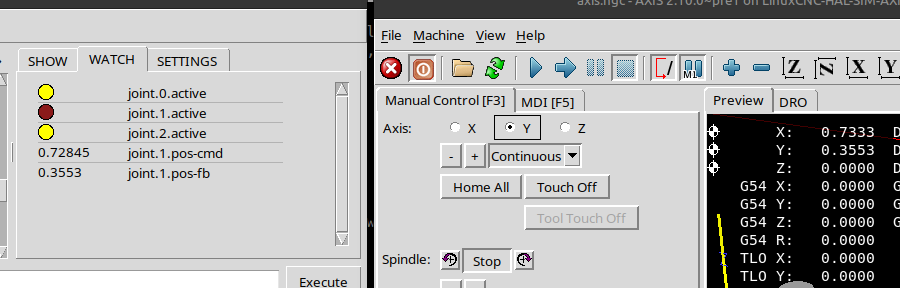
Which lets me clear 'joint.1.active' using the spindle control but it does basically the same as disabling the drive as 'joint.1.pos-cmd' is still updated as the axis is jogged or commanded through the interpreter:


The problem with the following error when reactivating the joint remains the same as if it was done in hal or the drive disabled. 
 

Please Log in or Create an account to join the conversation.
More
6 months 4 weeks ago #345070 by Aciera
What would be needed here is to have the _interpreter_ reject the axis word which was disabled. So just like if the operator used an axis letter that was not configured in the ini file. Any MDI or gcode program line containing the disable axis letter would create an error 'Bad character x used'.

Unfortunately I do not know how to dynamically pass the disabled axes to the interpreter during runtime.
The following user(s) said Thank You: spumco

Please Log in or Create an account to join the conversation.

More
6 months 4 weeks ago #345071 by spumco
I wonder if this could be done through the switchkins component.

Do you think LCNC would throw an error if I just left joint-0 out while operating under Case 1? 

Instead of this:
Code:
case 0:             pos->tran.x = j[0];             pos->tran.z = j[1];             pos->c      = j[2];             pos->v      = j[3];             break;         case 1:             pos->tran.x = j[3];             pos->tran.z = j[1];             pos->c      = j[2];             pos->v      = j[0];             break;     }     // unused coordinates:     pos->a = 0;     pos->b = 0;     pos->u = 0;     pos->w = 0;

Maybe this:
Code:
case 0:             pos->tran.x = j[0];             pos->tran.z = j[1];             pos->c      = j[2];             pos->v      = j[3];             break;         case 1:             pos->tran.x = j[3];             pos->tran.z = j[1];             pos->c      = j[2];            break;     }     // unused coordinates:     pos->a = 0;     pos->b = 0;     pos->v = 0;     pos->u = 0;     pos->w = 0;

And do something similar for the inverse later in the comp.

​​​​​​​

Please Log in or Create an account to join the conversation.

Time to create page: 0.265 seconds
Powered by Kunena Forum
