
REMAP: gang lathe tool orientation
- spumco
- Offline
- Platinum Member
-

Less
More
- Posts: 2180
- Thank you received: 905
13 Apr 2026 02:43 #345472
by spumco
REMAP: gang lathe tool orientation was created by spumco
Learning how to actually operate the lathe I built, and I've confused myself over tool orientation.
Gang-tool lathe, with front and back tools. Defined in INI as a back tool lathe, but that can change if needed.
I use Fusion for CAM, and the standard LCNC post for fusion. The post handles front/back tool orientation by setting the 'turret' value in the F360 tool library to 103 or 104. When the post sees a '103' for the turret, it outputs all X-moves with negative values. Opposite for '104'.
While this results in appropriate tool motion, the LCNC backplot is wrong, kinda. The toolpaths are appropriately displayed as negative X (below centerline), but the tool tip indicator is approaching across the centerline - looks kinda crashy.
Having researched the forum a while back about gang-tool lathes, I found the 'trick' about using G10 to rotate the WCS 180 degrees around Z for back tools. So I've got a couple M-codes to do just that - flip back and forth between back and front tool views.
Caught me off guard the first time I flipped the X axis and jogs were backwards. I somehow thought it was just the display/backplot that rotated...
But that got me thinking about the point of this long-winded post. Can I use the lathe tool orientation value (parameter #5413) to drive the M-code WCS flip during a tool change? And leave all tools as 'front turret' in F360 so the post only outputs X positive numbers?
I've got a lathe-fanucy test config on deck (remap T) for testing. Maybe add a conditional check for the value of #5413? Something like:
Anyone see any holes in my theory or suggestions for improvement?
Gang-tool lathe, with front and back tools. Defined in INI as a back tool lathe, but that can change if needed.
I use Fusion for CAM, and the standard LCNC post for fusion. The post handles front/back tool orientation by setting the 'turret' value in the F360 tool library to 103 or 104. When the post sees a '103' for the turret, it outputs all X-moves with negative values. Opposite for '104'.
While this results in appropriate tool motion, the LCNC backplot is wrong, kinda. The toolpaths are appropriately displayed as negative X (below centerline), but the tool tip indicator is approaching across the centerline - looks kinda crashy.
Having researched the forum a while back about gang-tool lathes, I found the 'trick' about using G10 to rotate the WCS 180 degrees around Z for back tools. So I've got a couple M-codes to do just that - flip back and forth between back and front tool views.
Caught me off guard the first time I flipped the X axis and jogs were backwards. I somehow thought it was just the display/backplot that rotated...
But that got me thinking about the point of this long-winded post. Can I use the lathe tool orientation value (parameter #5413) to drive the M-code WCS flip during a tool change? And leave all tools as 'front turret' in F360 so the post only outputs X positive numbers?
I've got a lathe-fanucy test config on deck (remap T) for testing. Maybe add a conditional check for the value of #5413? Something like:
O<toolchange> sub
(debug, Tool requested = #<tool>)
#<wear> = [10000 + FIX[ #<tool>  / 100]]
#<tool> = [#<tool> MOD 100]
M6 T#<tool>
G43 H#<tool>
O100 IF [#<wear> GT 10000]
    G43.2 H#<wear>
O100 ENDIF
#<pocket> = #<tool>

(NEW WCS FLIP HERE - M268=FRONT, M269=BACK)
O101 IF [#5413 LT 1]
   (abort, tool missing orientation value)
O101 ELSEIF [#5413 EQ 1]
   M268
O101 ELSEIF [#5413 EQ 2]
   M268
O101 ELSEIF [#5413 EQ 6]
   M268
O101 ELSE
   M269
O101 ENDIF
(END WCS FLIP HERE)

(debug, tool = #<tool> wear = #<wear>)
O<toolchange> endsub [0]
Anyone see any holes in my theory or suggestions for improvement?
Please Log in or Create an account to join the conversation.
- andypugh
-

- Offline
- Moderator
-

Less
More
- Posts: 19898
- Thank you received: 4655
17 Apr 2026 19:06 #345650
by andypugh
Replied by andypugh on topic REMAP: gang lathe tool orientation
You might have problems with tool radius compensation if you use the orientation, but only if you are doing compensation in the control rather than in the CAM.
So, basically, as a purely graphical fix, it will probably work.
You will need to have different orientations in the CAM tool table and the control tool table, but there is no auto-synching anyway, so that's not a problem.
So, basically, as a purely graphical fix, it will probably work.
You will need to have different orientations in the CAM tool table and the control tool table, but there is no auto-synching anyway, so that's not a problem.
The following user(s) said Thank You: spumco
Please Log in or Create an account to join the conversation.
- spumco
- Offline
- Platinum Member
-
Less
More
- Posts: 2180
- Thank you received: 905
19 Apr 2026 04:54 #345715
by spumco
Replied by spumco on topic REMAP: gang lathe tool orientation
Well, that works nicely with only a minor issue remaining.
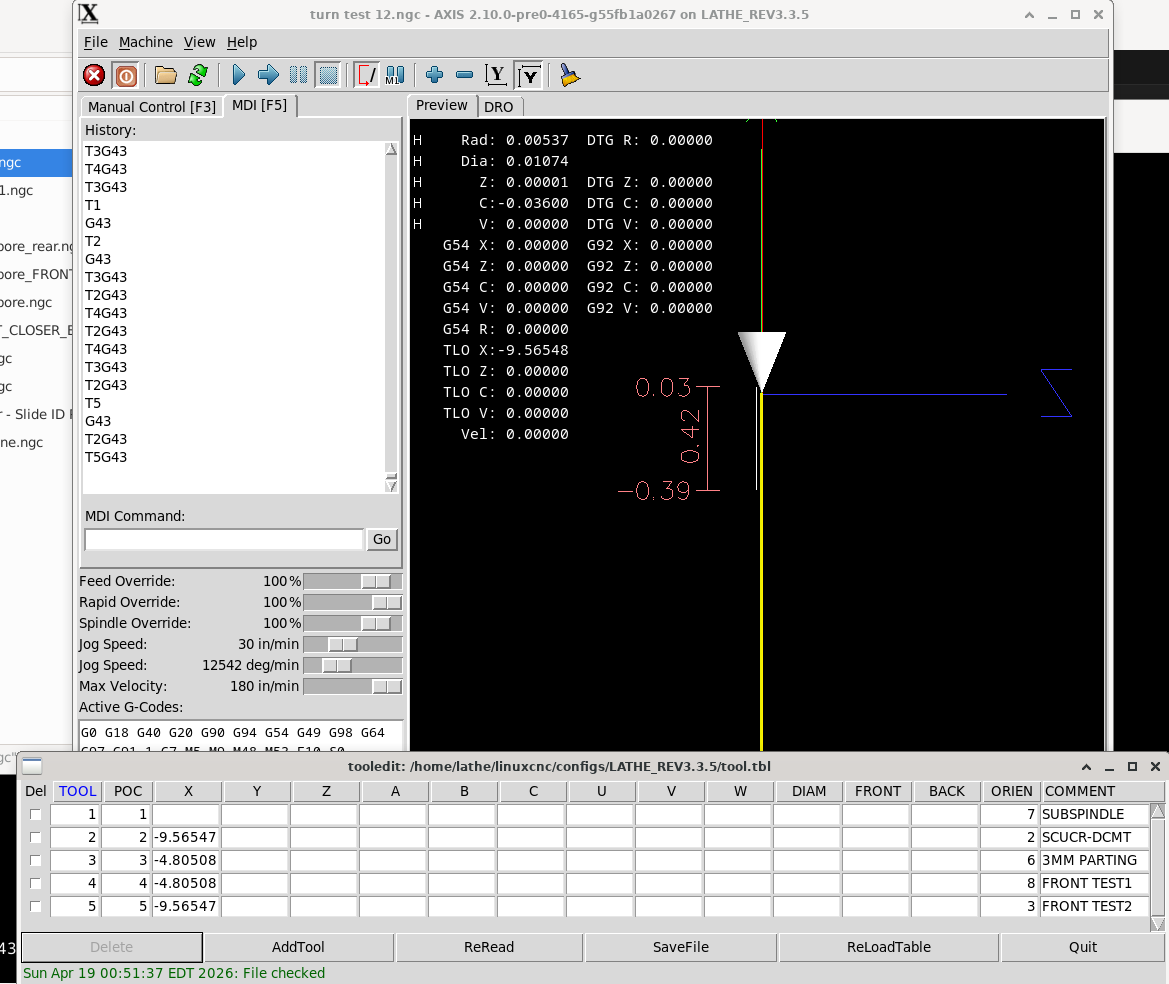
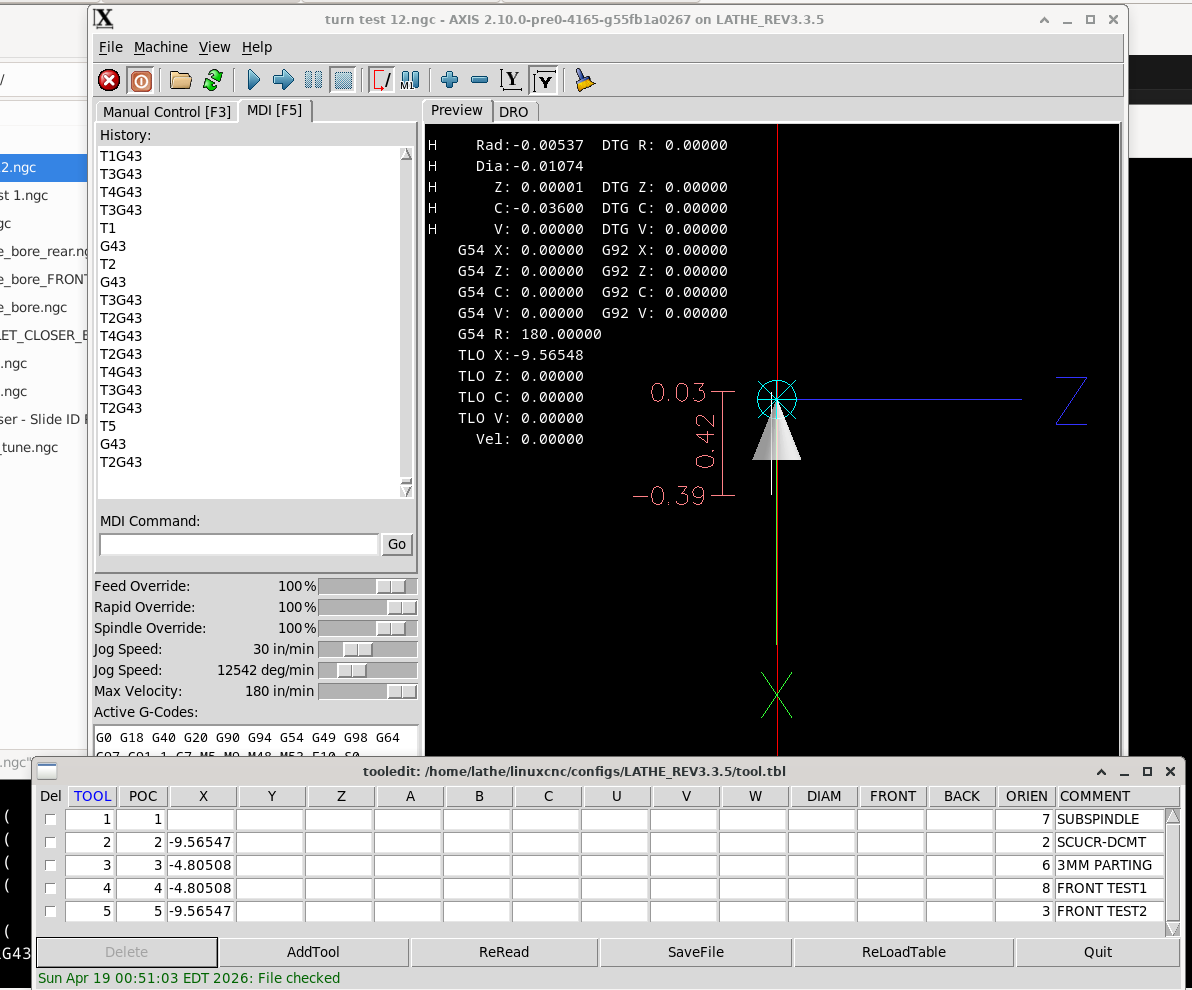
Backplot display now follows actual tool orientation, according to the orientation value in the tool table. Had to swap the orientation M-codes; was confused until I remembered I have the configuration set to BACKTOOL in the INI file (X is up/away).
What's a little odd is that rotating the WCS doesn't alter jog direction on the handwheel. X+ moves the table up/away, and X- moves the table down/towards the operator regardless of the WCS flip.
Remaining Issue: Something is off in the remap or toolchange.ngc, because G43 isn't automatically applied despite being in the .ngc file. G43 works in the lathe-fanucy sim, but not on mine for some reason.
Down-facing "normal" tool - T5:
Up-facing "back" tool - T2
Backplot display now follows actual tool orientation, according to the orientation value in the tool table. Had to swap the orientation M-codes; was confused until I remembered I have the configuration set to BACKTOOL in the INI file (X is up/away).
What's a little odd is that rotating the WCS doesn't alter jog direction on the handwheel. X+ moves the table up/away, and X- moves the table down/towards the operator regardless of the WCS flip.
Remaining Issue: Something is off in the remap or toolchange.ngc, because G43 isn't automatically applied despite being in the .ngc file. G43 works in the lathe-fanucy sim, but not on mine for some reason.
Down-facing "normal" tool - T5:
Up-facing "back" tool - T2
Please Log in or Create an account to join the conversation.
- spumco
- Offline
- Platinum Member
-
Less
More
- Posts: 2180
- Thank you received: 905
19 Apr 2026 05:05 #345716
by spumco
Not that I can tell.
I set all tools to "turret 104" - i.e. back-tools - in Fusion, and make sure all tools are oriented the same way. Fusion simulation always shows the tool above the part. I just have to make sure spindle direction is appropriate for the particular tool.
The tool orientation value isn't passed from Fusion to the post, so the 'flip' only happens in LCNC.
I've not tested Fusion's 'turn below center' setting yet, so that behavior and post output remains to be seen. I think if you select an OD boring tool and create an ID turning toolpath it will automatically reverse the spindle direction and output negative-X values. Would be rather user-friendly if it works as advertised...
Replied by spumco on topic REMAP: gang lathe tool orientation
You will need to have different orientations in the CAM tool table and the control tool table, but there is no auto-synching anyway, so that's not a problem.
Not that I can tell.
I set all tools to "turret 104" - i.e. back-tools - in Fusion, and make sure all tools are oriented the same way. Fusion simulation always shows the tool above the part. I just have to make sure spindle direction is appropriate for the particular tool.
The tool orientation value isn't passed from Fusion to the post, so the 'flip' only happens in LCNC.
I've not tested Fusion's 'turn below center' setting yet, so that behavior and post output remains to be seen. I think if you select an OD boring tool and create an ID turning toolpath it will automatically reverse the spindle direction and output negative-X values. Would be rather user-friendly if it works as advertised...
Please Log in or Create an account to join the conversation.
- spumco
- Offline
- Platinum Member
-
Less
More
- Posts: 2180
- Thank you received: 905
19 Apr 2026 15:27 #345738
by spumco
Replied by spumco on topic REMAP: gang lathe tool orientation
Tested F360's' "turn below center" feature and it seems to work quite well with the standard LCNC post.
Example:
N14 T2 M6
N16 G90 G95 G18
N17 G54
N18 M7
N19 G97 S628 M4
N20 G0 X2.13 Z0.1969
N21 G96 D3000 S350 M4
N22 G0 Z0.0125
N23 X2.054
N24 G1 Z-2.0156 F0.005
N25 X2.1
N26 X2.13 Z-2.0006
N27 G0 Z0.0125
N28 X2.008
N29 G1 Z-2.0156 F0.005
N30 X2.054
N31 X2.104 Z-1.9906
N32 G0 X2.13
N33 Z0.1969
N34 G97 S628 M4
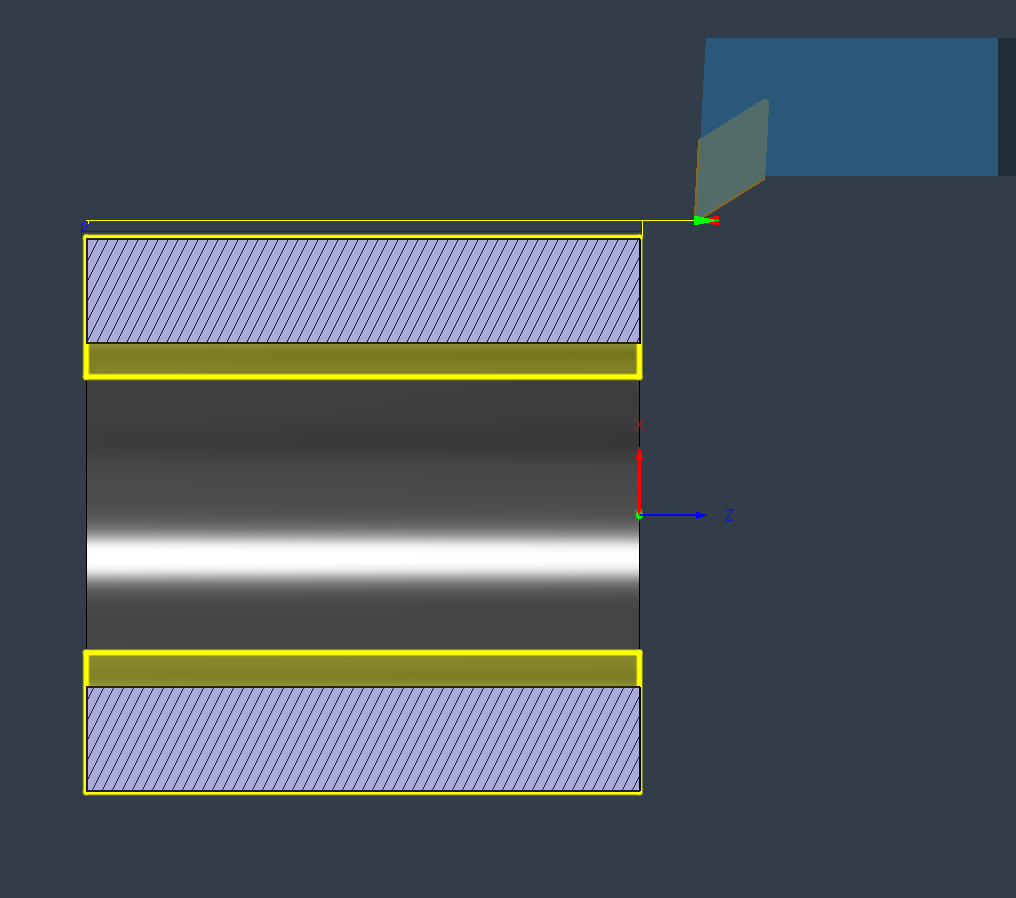
OP2 ID turning, with 'turn in negative X' enabled:
(PROFILE ROUGHING2)
N35 M9
N36 M5
N37 M1
N39 M7
N40 G97 S1393 M3
N41 G0 X-0.96 Z0.1969
N42 G96 D3000 S350 M3
N43 G0 Z0.0125
N44 X-1.05
N45 G1 Z-2.0156 F0.005
N46 X-1.
N47 X-0.96 Z-1.9956
N48 G0 Z0.0125
N49 X-1.1
N50 G1 Z-2.0156 F0.005
N51 X-1.05
N52 X-1. Z-1.9906
N53 G0 Z0.0125
N54 X-1.15
N55 G1 Z-2.0156 F0.005
N56 X-1.1
N57 X-1.05 Z-1.9906
N58 G0 Z0.0125
N59 X-1.196
N60 G1 Z-2.0156 F0.005
N61 X-1.15
N62 X-1.1 Z-1.9906
N63 G0 Z0.0125
N64 X-1.242
N65 G1 Z-2.0156 F0.005
N66 X-1.196
N67 X-1.146 Z-1.9906
N68 G0 X-0.96
N69 Z0.1969
N70 G97 S1393 M3
N71 M9
N72 M5
N73 G53 G0 Z0.
N74 M30
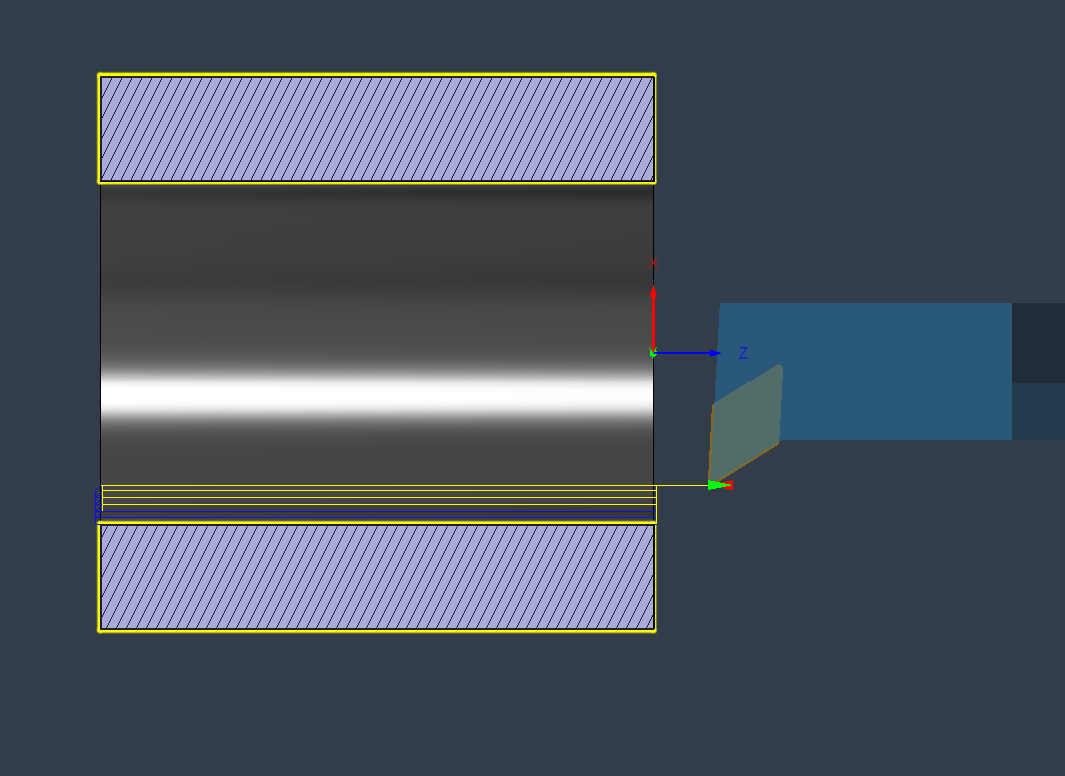
Tool is set in the LCNC tool table with orientation as T2 (earlier post), so the backplot looks like reality with the WCS rotation M-code.
It seems like this workflow and post means I don't have to set up different tools in the same library for multi-function ID/OD tools. Nice.
Example:
- Tool is a 'back' tool, but on my backtool-defined lathe the tool is pointing away from the operator (up).
- Tool defined in F360 as 'normal' orientation, i.e. tip down. F360 defaults to a slant-bed turret lathe, so X+ is up in the simulation.
- Tool set to 'turret 104' for post 'gang-tool on X+ turret'
Warning: Spoiler!
N14 T2 M6
N16 G90 G95 G18
N17 G54
N18 M7
N19 G97 S628 M4
N20 G0 X2.13 Z0.1969
N21 G96 D3000 S350 M4
N22 G0 Z0.0125
N23 X2.054
N24 G1 Z-2.0156 F0.005
N25 X2.1
N26 X2.13 Z-2.0006
N27 G0 Z0.0125
N28 X2.008
N29 G1 Z-2.0156 F0.005
N30 X2.054
N31 X2.104 Z-1.9906
N32 G0 X2.13
N33 Z0.1969
N34 G97 S628 M4
OP2 ID turning, with 'turn in negative X' enabled:
Warning: Spoiler!
(PROFILE ROUGHING2)
N35 M9
N36 M5
N37 M1
N39 M7
N40 G97 S1393 M3
N41 G0 X-0.96 Z0.1969
N42 G96 D3000 S350 M3
N43 G0 Z0.0125
N44 X-1.05
N45 G1 Z-2.0156 F0.005
N46 X-1.
N47 X-0.96 Z-1.9956
N48 G0 Z0.0125
N49 X-1.1
N50 G1 Z-2.0156 F0.005
N51 X-1.05
N52 X-1. Z-1.9906
N53 G0 Z0.0125
N54 X-1.15
N55 G1 Z-2.0156 F0.005
N56 X-1.1
N57 X-1.05 Z-1.9906
N58 G0 Z0.0125
N59 X-1.196
N60 G1 Z-2.0156 F0.005
N61 X-1.15
N62 X-1.1 Z-1.9906
N63 G0 Z0.0125
N64 X-1.242
N65 G1 Z-2.0156 F0.005
N66 X-1.196
N67 X-1.146 Z-1.9906
N68 G0 X-0.96
N69 Z0.1969
N70 G97 S1393 M3
N71 M9
N72 M5
N73 G53 G0 Z0.
N74 M30
Tool is set in the LCNC tool table with orientation as T2 (earlier post), so the backplot looks like reality with the WCS rotation M-code.
It seems like this workflow and post means I don't have to set up different tools in the same library for multi-function ID/OD tools. Nice.
Attachments:
Please Log in or Create an account to join the conversation.
- andypugh
-
- Offline
- Moderator
-
Less
More
- Posts: 19898
- Thank you received: 4655
19 Apr 2026 16:29 #345741
by andypugh
Replied by andypugh on topic REMAP: gang lathe tool orientation
I am surprised that you have tool cones and not lathe tool shapes in the graphics. You should have a reasonably accurate picture of an insert.
You may need to set up frontangle and backangle in the LinuxCNC tool table for that to work, as well as the orientation.
You may need to set up frontangle and backangle in the LinuxCNC tool table for that to work, as well as the orientation.
The following user(s) said Thank You: spumco
Please Log in or Create an account to join the conversation.
- spumco
- Offline
- Platinum Member
-
Less
More
- Posts: 2180
- Thank you received: 905
19 Apr 2026 17:54 - 19 Apr 2026 17:57 #345743
by spumco
Replied by spumco on topic REMAP: gang lathe tool orientation
I set up front and back angles, but it needed diameter to start displaying the inset shape.
However... it's displaying the tool tip past centerline when the tool is at X0. I tried fiddling with the table angles (-87 & -32 vs 342.5 & 287.5) and it didn't make a difference.
Same display issue when the WCS rotation is in effect.
Below photos has tool #2 active.
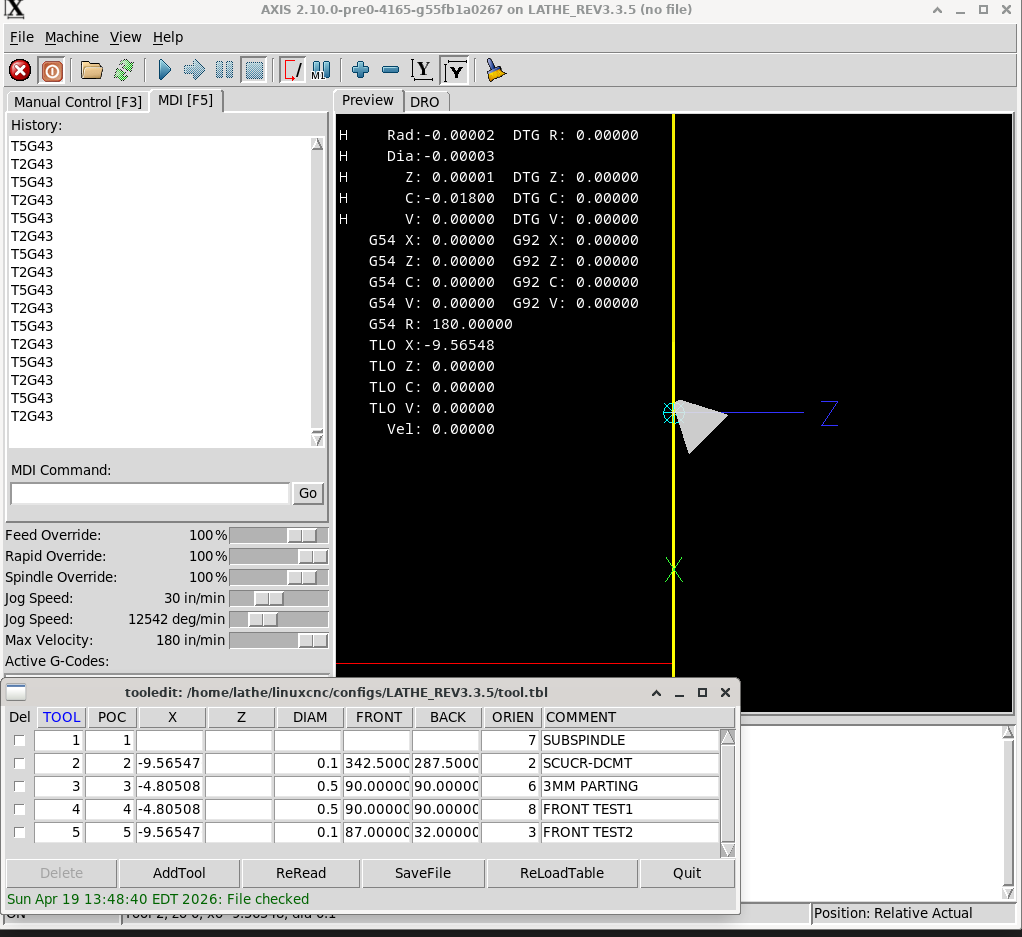
However... it's displaying the tool tip past centerline when the tool is at X0. I tried fiddling with the table angles (-87 & -32 vs 342.5 & 287.5) and it didn't make a difference.
Same display issue when the WCS rotation is in effect.
Below photos has tool #2 active.
Attachments:
Last edit: 19 Apr 2026 17:57 by spumco. Reason: angle maths
Please Log in or Create an account to join the conversation.
Time to create page: 0.215 seconds