Forum Header

simulation mode

More
8 years 1 month ago #117872 by kccheng
Replied by kccheng on topic simulation mode

cmorley wrote: as a quick check, go to the file, sim_hardware.hal and any line like:
(just out-invert-fake)

parport.0.pin-06-out-invert-fake 1

change to :

parport.0.pin-06-out-invert 1

see if that works.
Chris M


With that change, I can start LinuxCNC. But when I do "Home All"
I got error message:

How switch inactive before start of latch move.

parport.0.pin-06-out-invert
is my Z-Direction pin, it's the only inverted pin.
The Z axis is reversed (home at top, Z+ goes down).


Regards,
KC

Please Log in or Create an account to join the conversation.

More
8 years 1 month ago #117873 by kccheng
Replied by kccheng on topic simulation mode
Since I want to setup a simulation CNC, I realize that don't really need to mimic the
hardware configuration of my real floppy CNC.

Here is some tests I did for v2.7.14:

1) stepconf

At the start page, if I choose "Modify a configuration already created with this program"

I still need to check "Create simulated hardware configuration" !! If this checkbox is not checked, the simulation mode in the previous configration file will be overrided as FALSE.


2) remove the invert PIN.

So the LinuxCNC can start normally (the inverted PIN is buggy)
But click "Home All" will cause error.

3) remove the HOME pin

LinuxCNC now can run without any problem.
However, the the "Home All" button become "Home Axis" and I can only Home one axis at a time !!!


Regards,
KC

Please Log in or Create an account to join the conversation.

More
8 years 1 month ago #117879 by cmorley
Replied by cmorley on topic simulation mode
So that seems to indicate more then one problem.
output Pin wrong name ( we know how to fix that one )

sounds like homing input is inverted.
I wonder if this is caused by the hardware default logic vrs software simulation of the parport not being the same?

can you post your stepconf file again but compressed? the forum only allows me to open it in firefox not download it.

Chris M

Please Log in or Create an account to join the conversation.

More
8 years 1 month ago #117890 by kccheng
Replied by kccheng on topic simulation mode
Here is the Zipped configuration file.
Compare it with my real floppyCNC configuration file, there are on 2 different tag
as following:

<property name="machinename" type="string" value="floppy-sim"/>
<property name="sim_hardware" type="bool" value="True"/>


Regards,
KC

Please Log in or Create an account to join the conversation.

More
8 years 1 month ago - 8 years 1 month ago #117891 by kccheng
Replied by kccheng on topic simulation mode
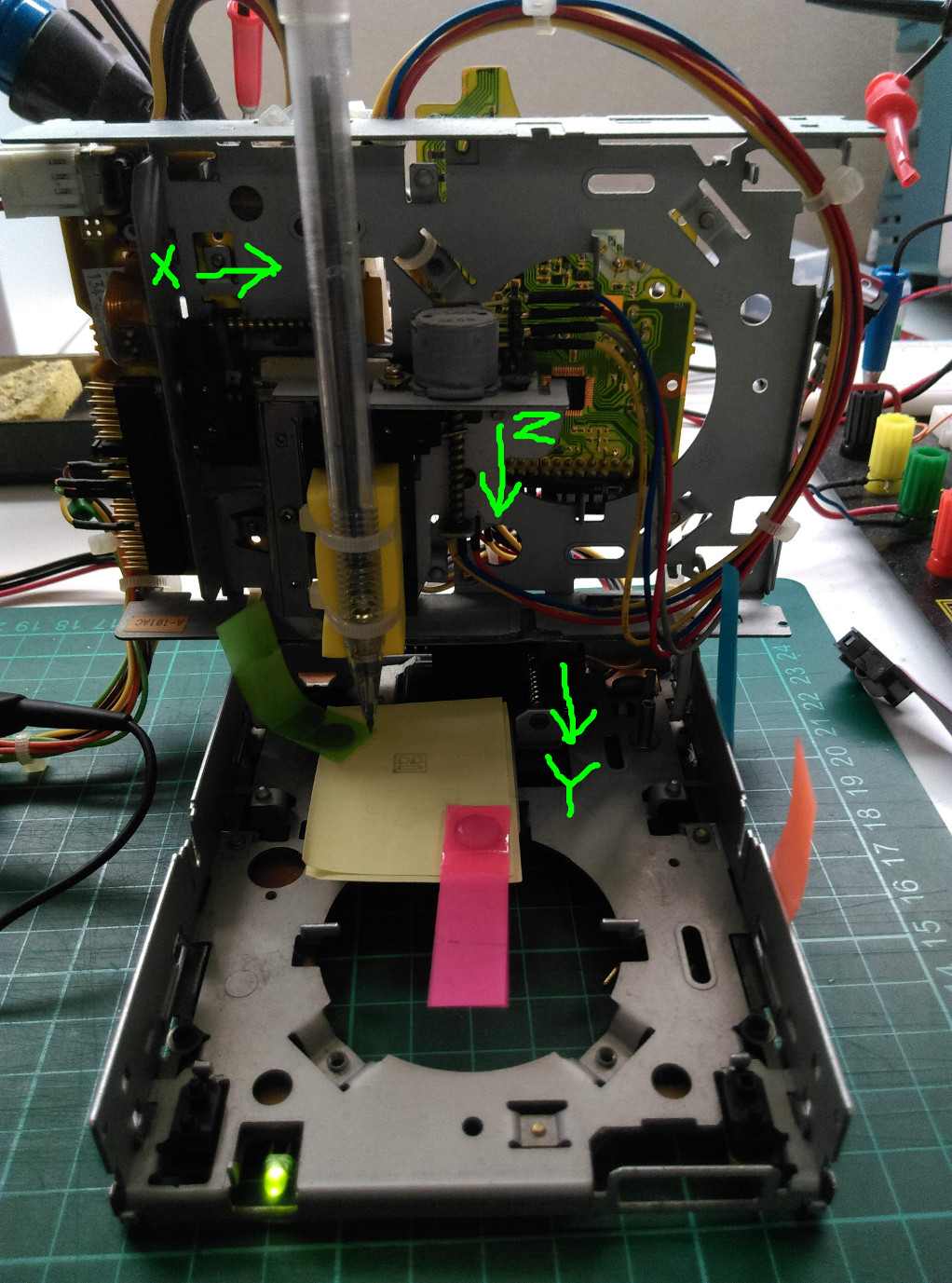
Here is the picture of my floppyCNC, FYI.
The Z axis is reversed, that's why I invert the PIN 6 (Z-Direction)
Last edit: 8 years 1 month ago by kccheng.

Please Log in or Create an account to join the conversation.

More
4 years 7 months ago - 4 years 7 months ago #238747 by ajsinfotech
Replied by ajsinfotech on topic simulation mode
Hi dear,
I'm installing linuxcnc from source (2.9 version) on a RPi4. 
Software building runs fine, no error at all but I cannot start in simulation mode to make my first tests.

I mean, I run the following on the command line:
Code:
. /home/pi/linuxcnc/scripts/rip-environment linuxcnc

Then I select any default configuration among qtdragon, qmoccapy, even axis and always get the same in my linuxcnc_debug.txt:
Can not find -sec TRAJ -var TPMOD -num 1 
Can not find -sec EMCMOT -var HOMEMOD -num 1 

Here is my log:
Code:
LINUXCNC - 2.9.0~pre0 Machine configuration directory is '/home/pi/linuxcnc/configs/sim/qtvcp_screens/qtdragon' Machine configuration file is 'qtdragon.ini' Starting LinuxCNC... linuxcnc TPMOD=tpmod HOMEMOD=homemod EMCMOT=motmod Note: Using POSIX realtime Found file(REL): ./core_sim.hal Found file(lib): /home/pi/linuxcnc/lib/hallib/simulated_home.hal [QTvcp][INFO]  Logging to "/home/pi/linuxcnc/configs/sim/qtvcp_screens/qtdragon/qtdragon.log" (logger.py:102) Traceback (most recent call last):   File "/home/pi/linuxcnc/bin/qtvcp", line 22, in <module>     from qtvcp.lib import xembed   File "/home/pi/linuxcnc/lib/python/qtvcp/lib/xembed.py", line 47, in <module>     from Xlib.protocol import event ModuleNotFoundError: No module named 'Xlib' Shutting down and cleaning up LinuxCNC... task: 205 cycles, min=0.000029, max=0.024989, avg=0.009657, 0 latency excursions (> 10x expected cycle time of 0.010000s) Note: Using POSIX realtime LinuxCNC terminated with an error.  You can find more information in the log:     /home/pi/linuxcnc_debug.txt and     /home/pi/linuxcnc_print.txt as well as in the output of the shell command 'dmesg' and in the terminal

Here is my linuxcnc_debug.txt:
Code:
Can not find -sec TRAJ -var TPMOD -num 1  Can not find -sec EMCMOT -var HOMEMOD -num 1  7633 7670 Stopping realtime threads Unloading hal components

And my linuxcnc_debug.txt:
Code:
RUN_IN_PLACE=yes LINUXCNC_DIR= LINUXCNC_BIN_DIR=/home/pi/linuxcnc/bin LINUXCNC_TCL_DIR=/home/pi/linuxcnc/tcl LINUXCNC_SCRIPT_DIR= LINUXCNC_RTLIB_DIR=/home/pi/linuxcnc/rtlib LINUXCNC_CONFIG_DIR= LINUXCNC_LANG_DIR=/home/pi/linuxcnc/src/objects INIVAR=inivar HALCMD=halcmd LINUXCNC_EMCSH=/usr/bin/wish8.6 INIFILE=/home/pi/linuxcnc/configs/sim/qtvcp_screens/qtdragon/qtdragon.ini VERSION=1.1 PARAMETER_FILE=qtdragon.var TPMOD= HOMEMOD= TASK=milltask HALUI=halui DISPLAY=qtvcp qtdragon COORDINATES=XYZ KINEMATICS=trivkins coordinates=XYZ Starting LinuxCNC server program: linuxcncsvr Loading Real Time OS, RTAPI, and HAL_LIB modules Starting LinuxCNC IO program: io Starting HAL User Interface program: halui Starting TASK program: milltask Starting DISPLAY program: qtvcp Removing HAL_LIB, RTAPI, and Real Time OS modules Removing NML shared memory segments

I can't figure out what is happening. Whatever example configuration I try, I always get the same error basically. I am absolutely lost.
Any addressing will be appreciated!

Thanks in advance.

PS: I realize LINUXCNC_DIR, TPMOD and HOMEMOD are in blanks but, I don't know if it is ok for a default simulation configuration nor where to set up to try.
Last edit: 4 years 7 months ago by ajsinfotech.

Please Log in or Create an account to join the conversation.

Time to create page: 0.349 seconds
Powered by Kunena Forum