Results of latency test, list of computers tested for use with LinuxCNC

More
2 years 6 months ago - 2 years 6 months ago #297771 by Cant do this anymore bye all
Some of those Lenovos are good uns.

Although I think a lot of people disable Speed Step.
Last edit: 2 years 6 months ago by Cant do this anymore bye all.
The following user(s) said Thank You: seuchato

Please Log in or Create an account to join the conversation.
More
2 years 6 months ago #297788 by seuchato
cornholio

"Although I think a lot of people disable Speed Step."

Why the "although"? I believe, that's a good thing to do. First, LinuxCNC does not need a lot of computing power, second it just needs low latency. The later is where SpeedStep imho is harmful.

In the trial version of the script, I am trying to figure out how to find out, if SpeedStep is enabled or not. So, if you have good points for SpeedStep, kindly let us know which ones.

greez
chris

Please Log in or Create an account to join the conversation.

More
2 years 2 months ago #308188 by uugp
I bought a few very old motherboards for $5-$10 to run CNC, which is much cheaper than the Raspberry Pi.
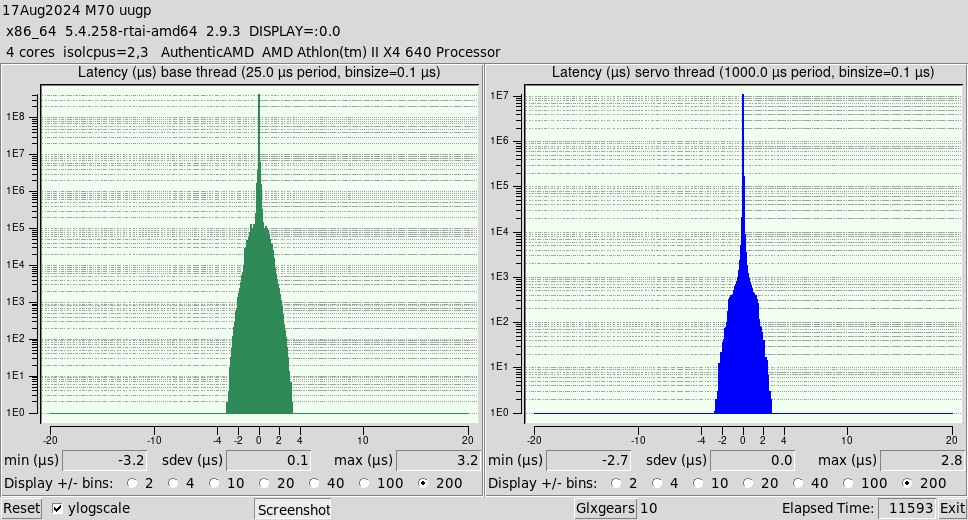
Post a test record, which I think this is a configuration that can work stably, for reference.

Configuration 1: ASUS-M4A88T-M with built in paralletport+AMD640iiX4+ATI graphics old card + RTAI.  


Latency test 3 hours, seems to be good, but it is fake.
In order for the parallel port-stepping configuration to work stably, this value needs to be set to more than 9000 in setpconf, otherwise there will still be rare random errors, such as following errors or latency spikes.
The built-in graphics card can be used and without spike, and adding a graphics card can reduce the Latency slightly and obtain a good color, But once add a graphics card, it will have spikes issue. - no matter how much Latency value is set, so it must be add a option to GRUB:    radeon.dpm=0 

Several key points:
in GRUB:
radeon.dpm=0 Causes GPU to overheat
idle=poll   Causes CPU to overheat

in BIOS:
CPU Over Voltage <= 1.25V   Otherwise, it will overheat and crashes
ACPI APIC surpport = Enable   Otherwise, Linuxcnc crashes with the RTAI kernel 
others, as far as possible set Manuall or Fixed value

A confusion
on AXIS GUI graphical display area, LEFT click will causes the rolling coordinate numbers to be halt/pause update.
no interference with machine moving.
 

Please Log in or Create an account to join the conversation.

More
2 years 2 months ago #308268 by seuchato
uugp
Nice find! Those values are very good, almost too good to be true! If however those values are true and at 9000 there are no random latency issues anymore, then you do have a very nice system for software stepping, too.
Kindly allow a couple of questions / remarks / recommendations:
  1. Did you run any other program? I see 10 glxgears, but what about a browser, vimeo or youtube, ... while doing the latency test?
  2. On board graphics is usually the way to go. Tracking down and elimination sparce spikes is a hard job, usually also with questionable success. So I'd stick with onboard graphics.
  3. What do you mean by "... and obtain a good color ..."?
  4. Seems the mobo is for Athlon IIX* cpus, which appeared around 2009. So, really old :-). I'd check the capacitors before making chips and/or have a spare one available. Not sure if such an old mobo is really a good idea as a cnc controller though.
Greez
chris

Please Log in or Create an account to join the conversation.

More
2 years 2 months ago #308881 by uugp

uugp
Nice find! Those values are very good, almost too good to be true! If however those values are true and at 9000 there are no random latency issues anymore, then you do have a very nice system for software stepping, too.
Kindly allow a couple of questions / remarks / recommendations:
  1. Did you run any other program? I see 10 glxgears, but what about a browser, vimeo or youtube, ... while doing the latency test?
  2. On board graphics is usually the way to go. Tracking down and elimination sparce spikes is a hard job, usually also with questionable success. So I'd stick with onboard graphics.
  3. What do you mean by "... and obtain a good color ..."?
  4. Seems the mobo is for Athlon IIX* cpus, which appeared around 2009. So, really old :-). I'd check the capacitors before making chips and/or have a spare one available. Not sure if such an old mobo is really a good idea as a cnc controller though.

    Greez
    chris
Hi seuchato

Sorry for the late reply.
1.YES!  If this can runwith10 glxgears, then running other programs will be run fine.But I'm just using it as a controller, no programs unrelated to the controller will run during operation. Gcode  transmitted over Samba.
2.YES! Many failed experimental results have been placed under the desk. The purpose of posting is to avoid repeating a tedious testing task.
3.The built-in graphics card is weak and only provides a dim desktop color. Opening an app will also cause blinking, although running LCNC is fine. So I am also hesitant about whether to use an external graphics card.
4.Checking the capacitance is necessary. Usually no problem. If you are lucky, you can buy brand new antiques. As long as it works, it's good, no matter whether it's new or old. A 40-nanometer chip can last for 20 years, exceeding the limit of mechanical wear and tear.
   I've been encountering all kinds of weird problems with the new PC, I just haven't posted them. 

Please Log in or Create an account to join the conversation.

More
1 year 7 months ago #323926 by webbyguy
Hi shellcrash,
I'm trying to get an X6 1090T working with a biostar A880GZ motherboard (which I think is just one generation newer). I'm so far unable to get as low a jitter as you got, and I was wondering if you remembered any bios, kernel, etc settings that enabled you to get such low jitter numbers.


I've only gotten below 40us jitter so far: forum.linuxcnc.org/38-general-linuxcnc-q...it-of-jitter?start=0

Please Log in or Create an account to join the conversation.

Time to create page: 0.370 seconds
Powered by Kunena Forum
