Hi,
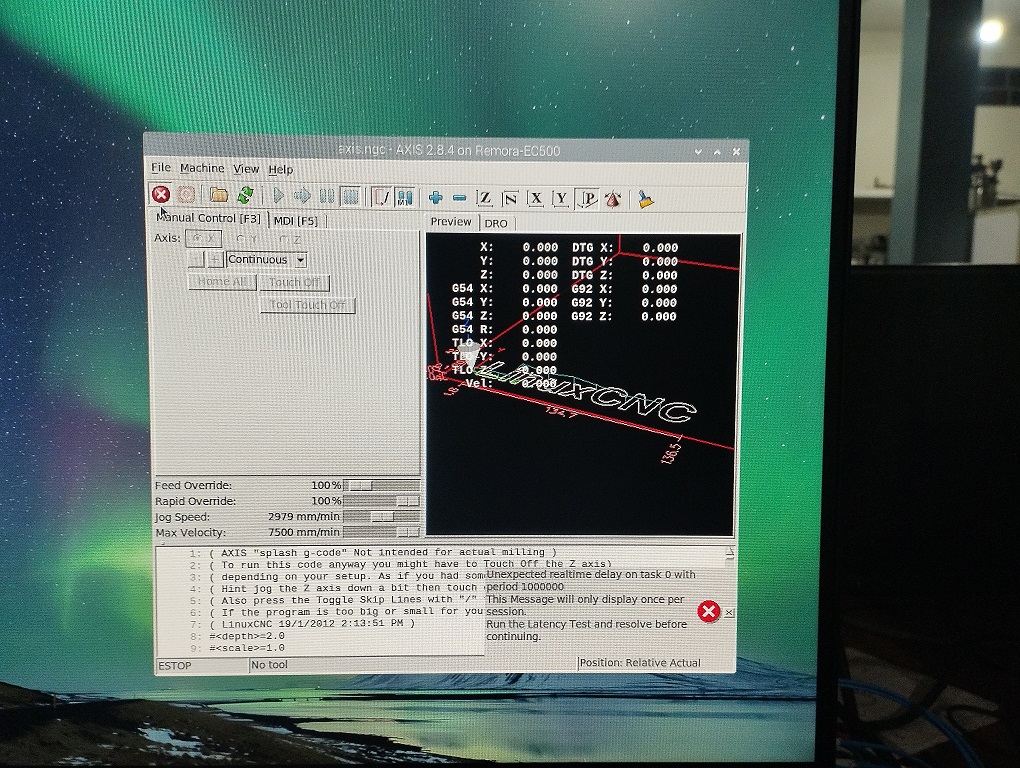
I am currently doing a project with EC500_v5 using remora firmware. I have flashed the controller board with the remora firmware and have done all the necessary steps mentioned in the remora documentation. When I faced certain problems, I had refered this forum and I could solve those issues on my way, Now I am able to open the LinuxCNC, but I am
not able to come out of the e-stop. I am adding all the steps that I had done till now. I would like to get some
help from this community for solving this problem.These are the steps that I had followed. I would like to know whether I have done anything wrong in this. I am new to LinuxCNC and trying to learn more about it. So sorry if I ask silly questions.image missing /media/kunena/emoticons/smile.png
- Flashed EC500_V5 with Remora Firmware
- File downloaded from the Github link (
github.com/scottalford75/Remora-RT1052-cpp/tree/main/Firmware
)
- Latest version of firmware was installed: remora-rt1052-3.1.2.bin
- Raspberry Pi LinuxCNC image downloaded from the link provided in
Remora Documentation
(
github.com/Expatria-Technologies/remora-flexi-hal/releases
) and installed to RPI4 Model B
- Connected RPI4 with EC500_V5 (RT1052 Chip) by Ethernet cable
- Copy files to upload the configuration file to the LinuxCNC
- Downloaded the files from Github (
github.com/scottalford75/Remora-RT1052-c.../remora-rt1052-basic
)
- Copy the folder remora-rt1052-basic to the folder LinuxCNC > Configs
- Copy the folder components to the folder LinuxCNC
- Installing the Remora Components
- sudo halcompile –install remora-eth-3.0.c
- Result: Success
- Ethernet Setup
- Open DHCP configuration in terminal
- sudo nano /etc/dhcpcd.conf
- Navigate the file to the section ” Example static IP configuration ” , uncomment this section (by removing the #), modify it as follows, then save and exit nano (ctrl X, then Y then enter)
- interface eth0
static ip_address=10.10.10.11/24
- Reboot you Raspberry Pi
- Verified that the ip address of the RPI4 has changed to 10.10.10.11/24 from the network settings window
Terminal Emulator Command: hostname -I
Result:
10.10.10.11 192.168.40.209 2401:4900:4bbf:1813:83b0:6004:289d:6227
- Upload the configuration file to the LinuxCNC
- Upload the configuration file – python3 upload_config.py ec500-rt1052.txt
- Result:
Traceback (most recent call last):
File “upload_config.py”, Line &, in <module>
import tftpy
ModuleNotFoundError: No module named ‘tftpy’
- Tried to install tftpy using the command
pip install tftpy
It showed that tftpy-0.8.2 got installed successfully
- Upload the configuration file – python3 upload_config.py ec500-rt1052.txt
- Result:
Traceback (most recent call last):
File “upload_config.py”, Line &, in <module>
import tftpy
ModuleNotFoundError: No module named ‘tftpy’
- Installed : pip install selenium
- Upload the configuration file – python3 upload_config.py ec500-rt1052.txt
- Result:
Valid JSON config file, uploading to board
Config file length (words) = 1716
Config file length (bytes) = 6862
Reminder = 2
Padding added = [0, 0]
Config file length with padding (bytes) = 6864
CRC-32 = 0x580751a8
(Furthermore sentences were there: Attached with this message)
- Reboot the Controller Board and RPI4
- Open LinuxCNC: Application > CNC > LinuxCNC
- Open the configuration: My Configuration > remora-ec500 basic > remora-ec500-rt1052
- Error:
Debug file information:
Note: Using POSIX realtime
remora-nv: dlopen: /usr/lib/linuxcnc/modules/remora-nv.so: cannot open shared object file: No such file or directory
./remora-nvem.hal:9: waitpid failed /usr/bin/rtapi_app remora-nv
./remora-nvem.hal:9: /usr/bin/rtapi_app exited without becoming ready
./remora-nvem.hal:9: insmod for remora-nv failed, returned -1
1798
-
- Downloaded the file from
github.com/scottalford75/Remora-NVEM/tre...Components/Remora-nv
and copied the file Remora-nv to LinuxCNC > Components
Installed the file using the code:
sudo halcompile –install remora.c
- Rebooted RPI4 and tried opening LinuxCNC
- Error: nvmpg file is missing
- Copied nvmpg.c file to LinuxCNC > Components
Installed it using the command:
sudo halcompile –install nvmpg.c
Installed successfully
- LinuxCNC Axis GUI opened
- Rebooted RPI4 and EC500
- Check out of E-Stop - Failed
I had tried reflashing EC500 but no change.
Attachment not found
Hope to get a help on this.
- Aravind