so far I came up with this and I hope it helps a little
Remora NVEM v5 RT1052 firmware config upload tutorial
Debian 12 setup linuxcnc on PC for 25.01.2024 download iso from linuxcnc website install as normal
run "sudo apt update"
You can use remote ssh or install xrdp from RDP windows for remote desktop control
Make sure you have python3 installed (preferably both)
If not found install "sudo apt install python3-pip -y"
to check python version run "pip3 --version"
rasta@cnc:~$ pip3 --version
pip 23.0.1 from /usr/lib/python3/dist-packages/pip (python 3.11)
rasta@cnc:~$ pip3 install tftpy --break-system-packages
Defaulting to user installation because normal site-packages is not writeable
Collecting tftpy
Downloading tftpy-0.8.2.tar.gz (34 kB)
Preparing metadata (setup.py) ... done
Building wheels for collected packages: tftpy
Building wheel for tftpy (setup.py) ... done
Created wheel for tftpy: filename=tftpy-0.8.2-py3-none-any.whl size=29493 sha256=6cc80a34937fca7ef8268a1c9ababbc7de607953334dbd73d7493c8728a785d0
Stored in directory: /home/rasta/.cache/pip/wheels/94/a1/0d/8e3ae42f90c94e8c27aaeaf42be9823ac7fc1d1ae88def693d
Successfully built tftpy
Installing collected packages: tftpy
Successfully installed tftpy-0.8.2
Ttpy will be required to upload config to board.
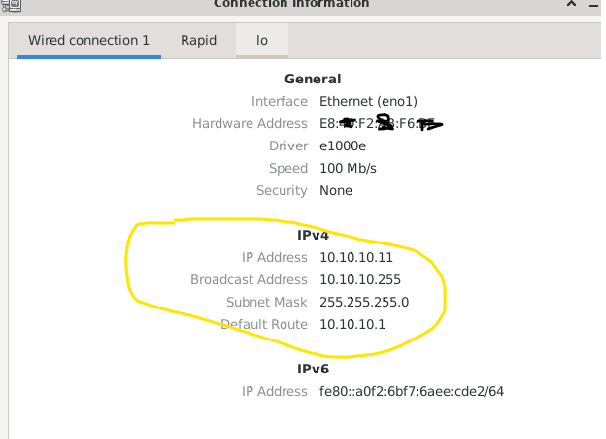
set you Ethernet as below
To allow connection to board via eth cable on hardcoded in firmware IP 10.10.10.10
check if you pc can ping board with
somehow this worked for me and I was ready to run from linuxcnc config folder downloaded from
github.com/scottalford75/Remora-RT1052-c.../remora-rt1052-basic
that contain upload_python.py script
"python3 upload_config.py your_config.txt"
(replace your_config.txt with correct config related to your setup or provided example config
tbc...