
- Posts: 7
- Thank you received: 5
Remora - ethernet NVEM / EC300 / EC500 cnc board
- spdbmp927
- Offline
- New Member
-

Less
More
4 years 7 months ago #238865
by spdbmp927
Replied by spdbmp927 on topic Remora - ethernet NVEM / EC300 / EC500 cnc board
Hello all,
I have had an NVEM board for about a year with plans to use it with MACH3 on a Bridgeport mill conversion. I recently started on the conversion, and came across this and couldn't turn it down. I also have a couple RPis laying around. Today I loaded a RPi with 64bit buster and built LinuxCNC for it. If this wasn't challenging enough my HDMI cable broke so I did most of it through SSH. I am now getting ready to reprogram the STM32 so i can do some wiring and testing.
Scott, I tried but my mysterious DIP8 is completely blank, not a single symbol.
I have had an NVEM board for about a year with plans to use it with MACH3 on a Bridgeport mill conversion. I recently started on the conversion, and came across this and couldn't turn it down. I also have a couple RPis laying around. Today I loaded a RPi with 64bit buster and built LinuxCNC for it. If this wasn't challenging enough my HDMI cable broke so I did most of it through SSH. I am now getting ready to reprogram the STM32 so i can do some wiring and testing.
Scott, I tried but my mysterious DIP8 is completely blank, not a single symbol.
Please Log in or Create an account to join the conversation.
- Domi
- Offline
- Senior Member
-

Less
More
- Posts: 64
- Thank you received: 0
4 years 7 months ago #238869
by Domi
Replied by Domi on topic Remora - ethernet NVEM / EC300 / EC500 cnc board
Ok. I managed to download and install it. I rewrote Hal as I wrote royka. I don't understand what you mean (my ini file). Royka: In which file did you overwrite the output for the spindle? Now I stopped setting up a static IP. I tried different ways according to the instructions from the web, but without success. Another question: what then? How did you install mymill for remoru? Via Applications-Linuxcnc (axis) or via some wizard? For example, for a mesa card? Because only there it is to write the IP address. I guess I really should have bought a Mesa card. But I liked this board (simple, described inputs and outputs, communication speed, ethernet and of course the price). And I like to try new things. And when I came across this thread, it seemed easy to me. But it is not so. At least not for me.
Please Log in or Create an account to join the conversation.
- Domi
- Offline
- Senior Member
-
Less
More
- Posts: 64
- Thank you received: 0
4 years 7 months ago #238871
by Domi
Replied by Domi on topic Remora - ethernet NVEM / EC300 / EC500 cnc board
And I don't understand why it's not all as easy as in the deebian wheezy I used on the LPT port before. Now I have installed Livecd LinuxCNC Deb 10 Buster and the terminals are missing some components like wget and so on.
Please Log in or Create an account to join the conversation.
- royka
- Offline
- Platinum Member
-

Less
More
- Posts: 383
- Thank you received: 135
4 years 7 months ago - 4 years 7 months ago #238888
by royka
Replied by royka on topic Remora - ethernet NVEM / EC300 / EC500 cnc board
Your ini file is the configuration file. You can find everything on this forum, wiki, google, youtube. The things you're asking is mostly the beginning basic, start reading please. You say you like to try new things, but then you ask why it's not as easy as it was with the lpt port....
linuxcnc.org/docs/html/common/linux-faq.html#faq:terminal
linuxcnc.org/docs/html/getting-started/running-linuxcnc.html
linuxcnc.org/docs/html/examples/spindle.html
When you created a configuration with the wizard it creates a shortcut on the desktop. You could right click on it and choose (something like) "Edit launcher" and you will see which ini file it loads. In the folder of that ini file you have to copy the hal file to. Then in the ini file type the name of that hal file (instead of the default one).
In short with the launcher, you start LinuxCNC with the configuration file, so LinuxCNC knows which configuration to load.
In your configuration file (.ini) you can tell which hal file to load.
The spindle configuration in my post probably needs to be inverted, in the manual of Remora you could find how to. When I'm ready I will post my config
linuxcnc.org/docs/html/common/linux-faq.html#faq:terminal
linuxcnc.org/docs/html/getting-started/running-linuxcnc.html
linuxcnc.org/docs/html/examples/spindle.html
When you created a configuration with the wizard it creates a shortcut on the desktop. You could right click on it and choose (something like) "Edit launcher" and you will see which ini file it loads. In the folder of that ini file you have to copy the hal file to. Then in the ini file type the name of that hal file (instead of the default one).
In short with the launcher, you start LinuxCNC with the configuration file, so LinuxCNC knows which configuration to load.
In your configuration file (.ini) you can tell which hal file to load.
The spindle configuration in my post probably needs to be inverted, in the manual of Remora you could find how to. When I'm ready I will post my config
Last edit: 4 years 7 months ago by royka.
The following user(s) said Thank You: Domi
Please Log in or Create an account to join the conversation.
- spdbmp927
- Offline
- New Member
-
Less
More
- Posts: 7
- Thank you received: 5
4 years 7 months ago - 4 years 7 months ago #238964
by spdbmp927
Replied by spdbmp927 on topic Remora - ethernet NVEM / EC300 / EC500 cnc board
Before I flashed the NVEM with the Remora firmware I created an image of the stock software also, so I have one if its needed. I did buy my board about a year ago and it says NVEMV2 on it so i believe it is a version 2 board, and I don't know how different they are.
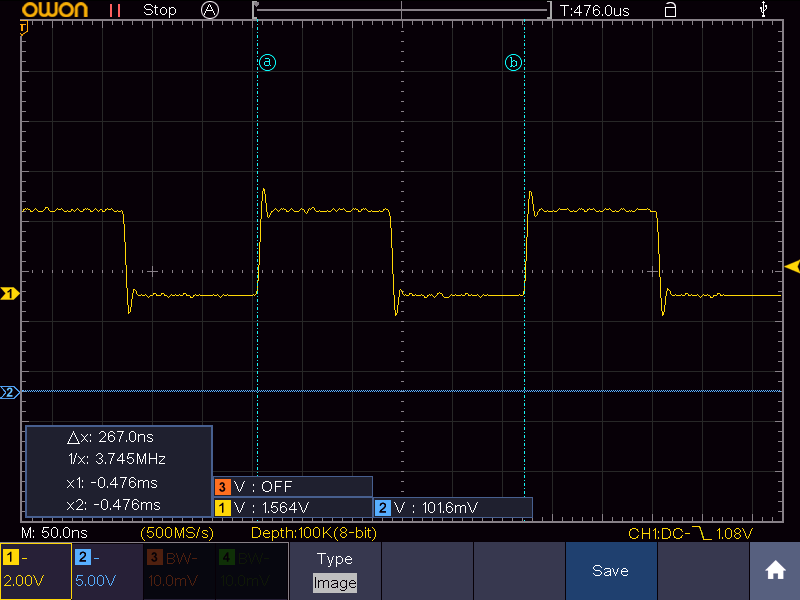
I do have the mystery chip, although it is rotated from Scott's board and the power and ground pins are switched. The three connected pins are the same as Scott's diagram. Scott, when you tested the PA_3 pin do you remember if the ST-Link was connected? To be clear by connected I mean having pushed the "connect" button on the programmer, and disconnected meaning plugged in and powered up, but without connecting, or having pushed "disconnect" on the programmer. While the ST-Link was connected PA_3 stayed near ground, but when I disconnected the ST-Link I discovered a 3.75 Mhz square wave on the PA_3 pin. As soon as you connect the programmer the square wave stops, and it restarts on disconnect.
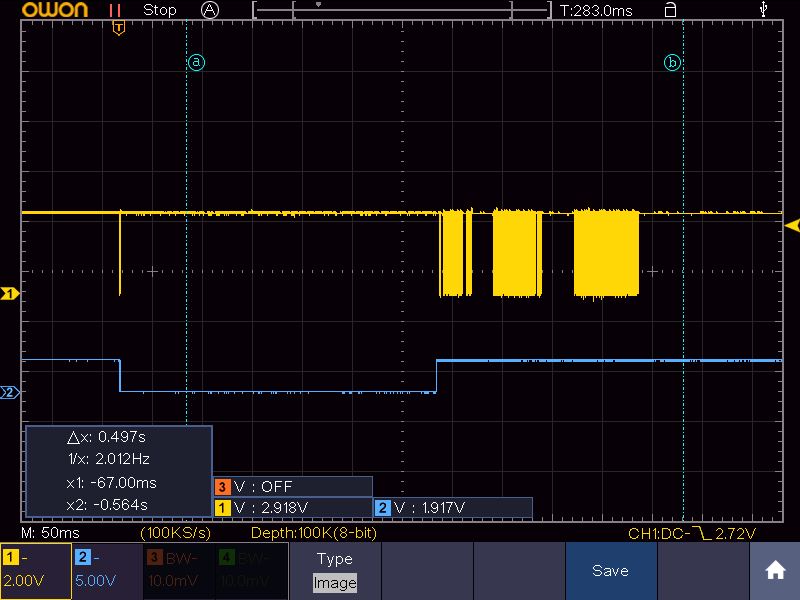
After the disconnect button is pushed or the device is initially powered on the PA_5 pin seems to go low for a short pulse, wait ~0.3 seconds, then host short burst of communication. The PA_4 pin goes low for this brief pause, and then returns high. This initial pulse (before the apparent communication) is when the PA_3 pin starts the 3.75 Mhz signal.
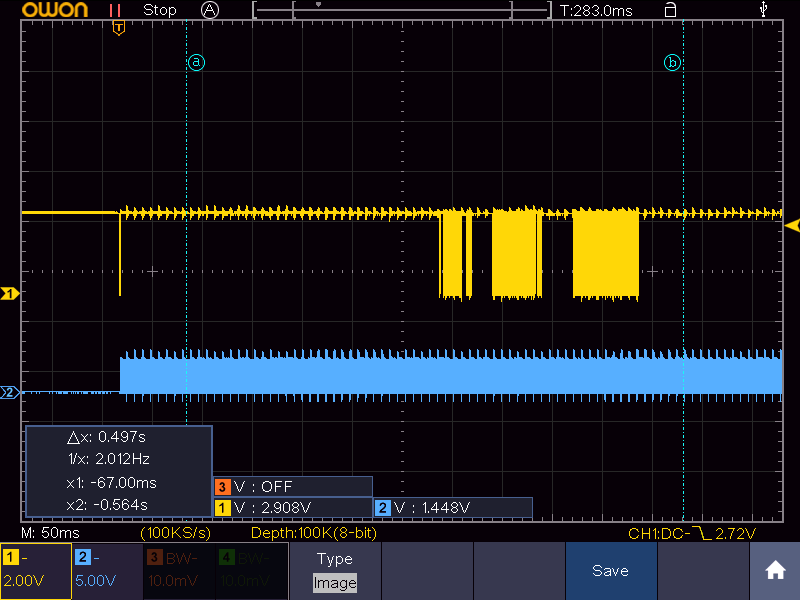
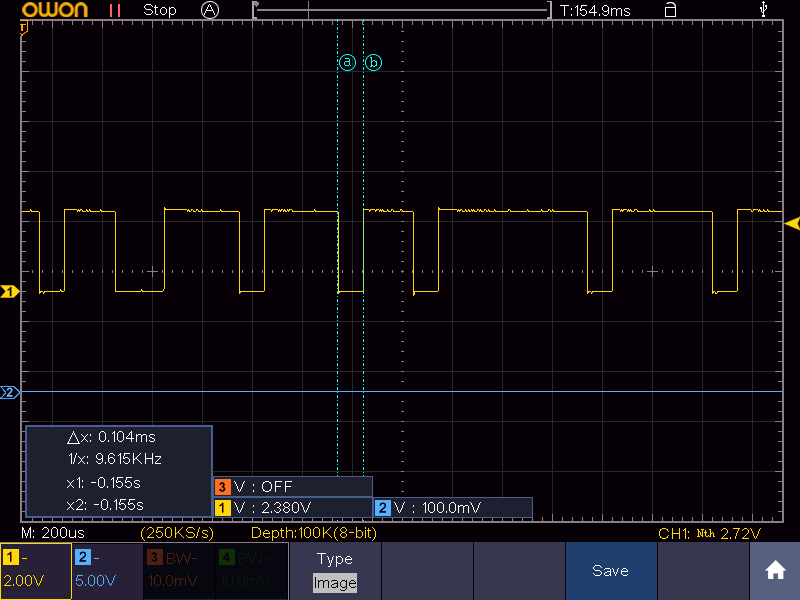
It appears that pin 5 is a single wire communication line. I'm not sure what it is but it appears to be high or low for multiples of 100 microseconds.
When I flashed the Remora firmware the signals all stopped. PA_4 and PA_5 remain high, and PA_3 remains low so whatever it is it's at least initiated by the processor. I'm not sure what to make of all this, but hopefully this will help.
I do have the mystery chip, although it is rotated from Scott's board and the power and ground pins are switched. The three connected pins are the same as Scott's diagram. Scott, when you tested the PA_3 pin do you remember if the ST-Link was connected? To be clear by connected I mean having pushed the "connect" button on the programmer, and disconnected meaning plugged in and powered up, but without connecting, or having pushed "disconnect" on the programmer. While the ST-Link was connected PA_3 stayed near ground, but when I disconnected the ST-Link I discovered a 3.75 Mhz square wave on the PA_3 pin. As soon as you connect the programmer the square wave stops, and it restarts on disconnect.
After the disconnect button is pushed or the device is initially powered on the PA_5 pin seems to go low for a short pulse, wait ~0.3 seconds, then host short burst of communication. The PA_4 pin goes low for this brief pause, and then returns high. This initial pulse (before the apparent communication) is when the PA_3 pin starts the 3.75 Mhz signal.
It appears that pin 5 is a single wire communication line. I'm not sure what it is but it appears to be high or low for multiples of 100 microseconds.
When I flashed the Remora firmware the signals all stopped. PA_4 and PA_5 remain high, and PA_3 remains low so whatever it is it's at least initiated by the processor. I'm not sure what to make of all this, but hopefully this will help.
Last edit: 4 years 7 months ago by spdbmp927. Reason: fixed a typo
The following user(s) said Thank You: tommylight
Please Log in or Create an account to join the conversation.
- Domi
- Offline
- Senior Member
-
Less
More
- Posts: 64
- Thank you received: 0
4 years 7 months ago #238976
by Domi
Replied by Domi on topic Remora - ethernet NVEM / EC300 / EC500 cnc board
Hello. So I seem to have done everything I had. Well, after starting, I get an error :
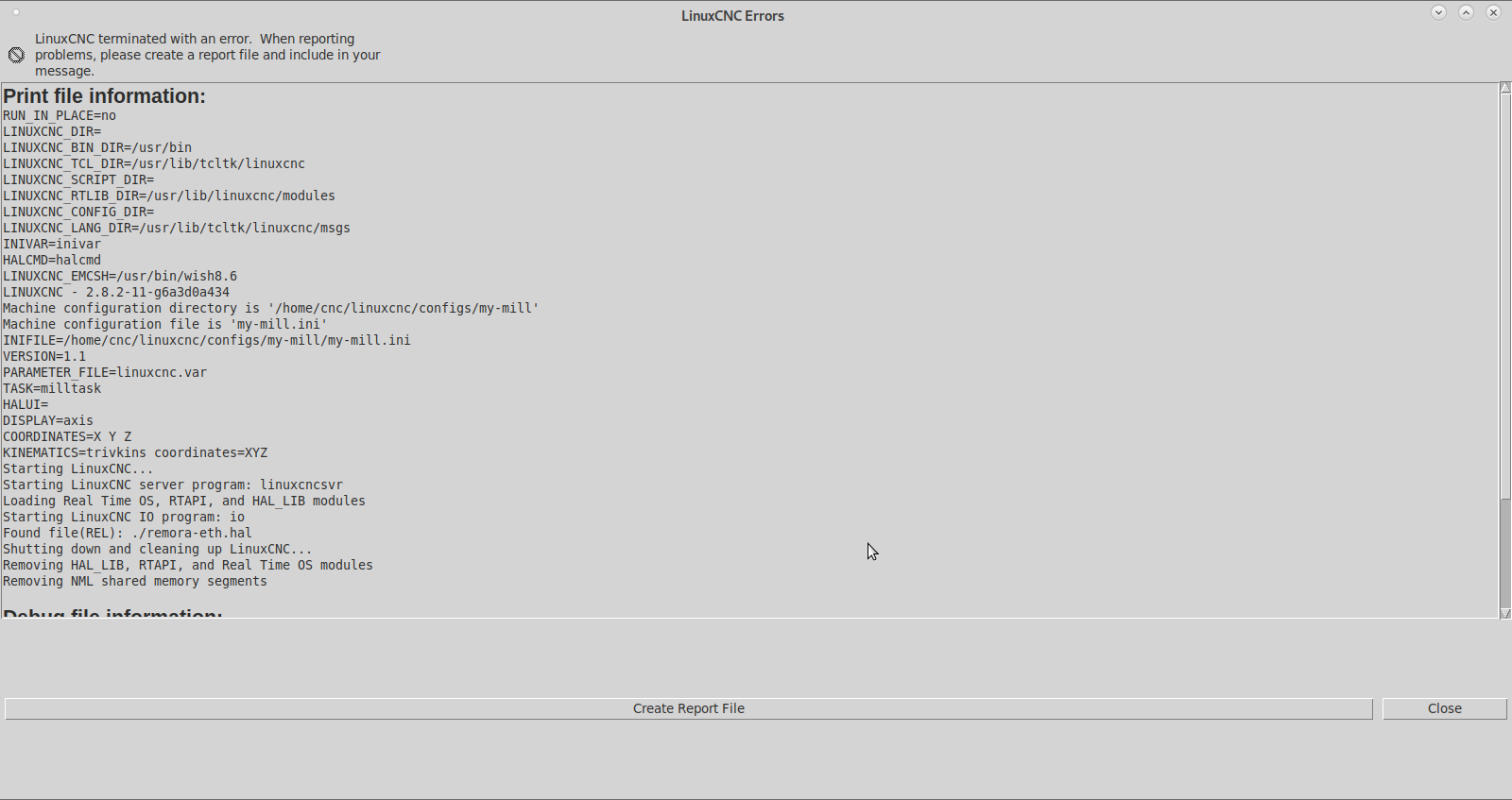
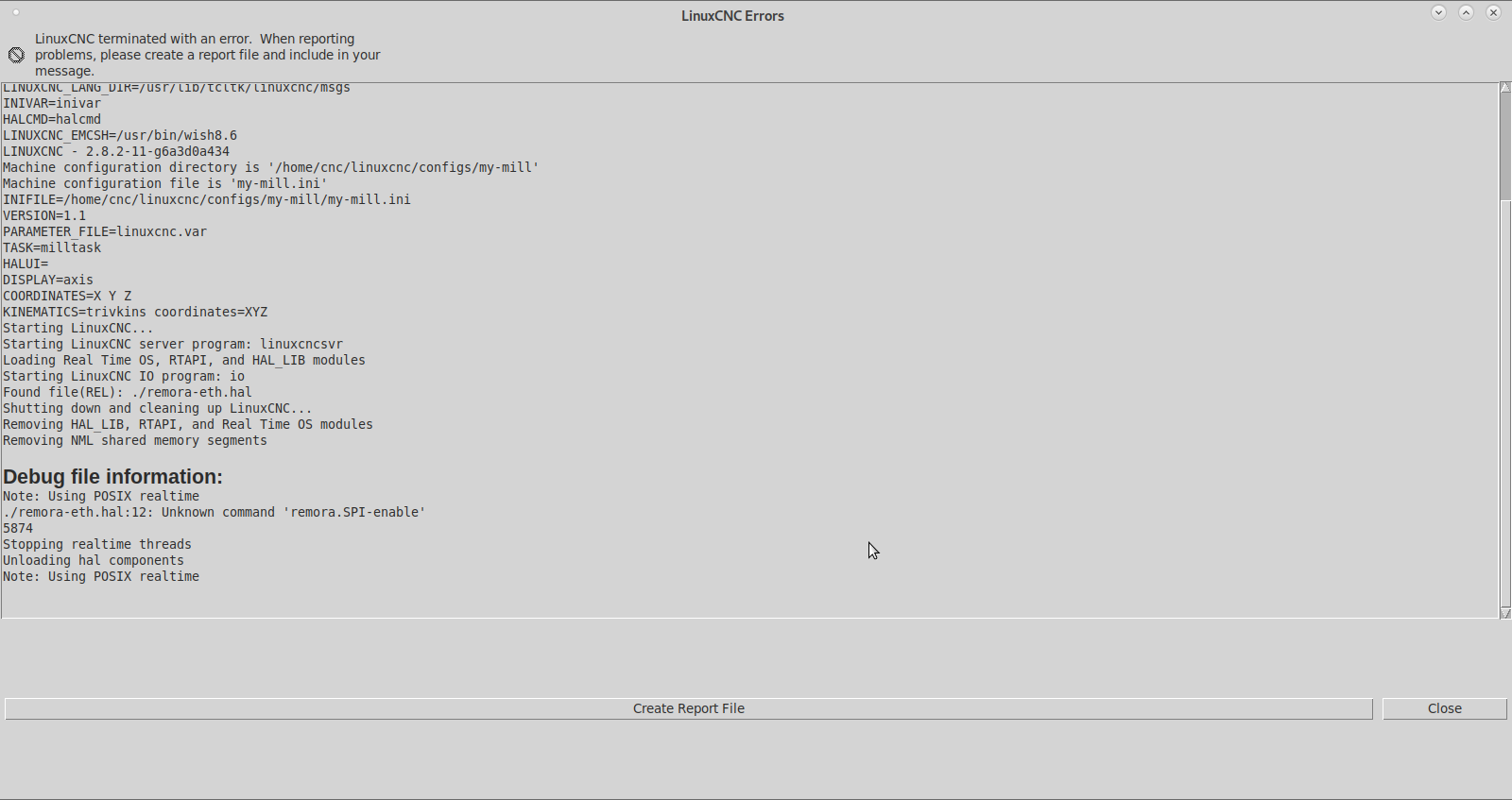
Please Log in or Create an account to join the conversation.
Time to create page: 0.420 seconds