QTplasmaC upgrade now huge latency

More
1 year 7 months ago #323648 by JTknives
I ended up buying it because it was $103 and had a SSD as well.
The following user(s) said Thank You: rodw

Please Log in or Create an account to join the conversation.
More
1 year 7 months ago #323718 by JTknives
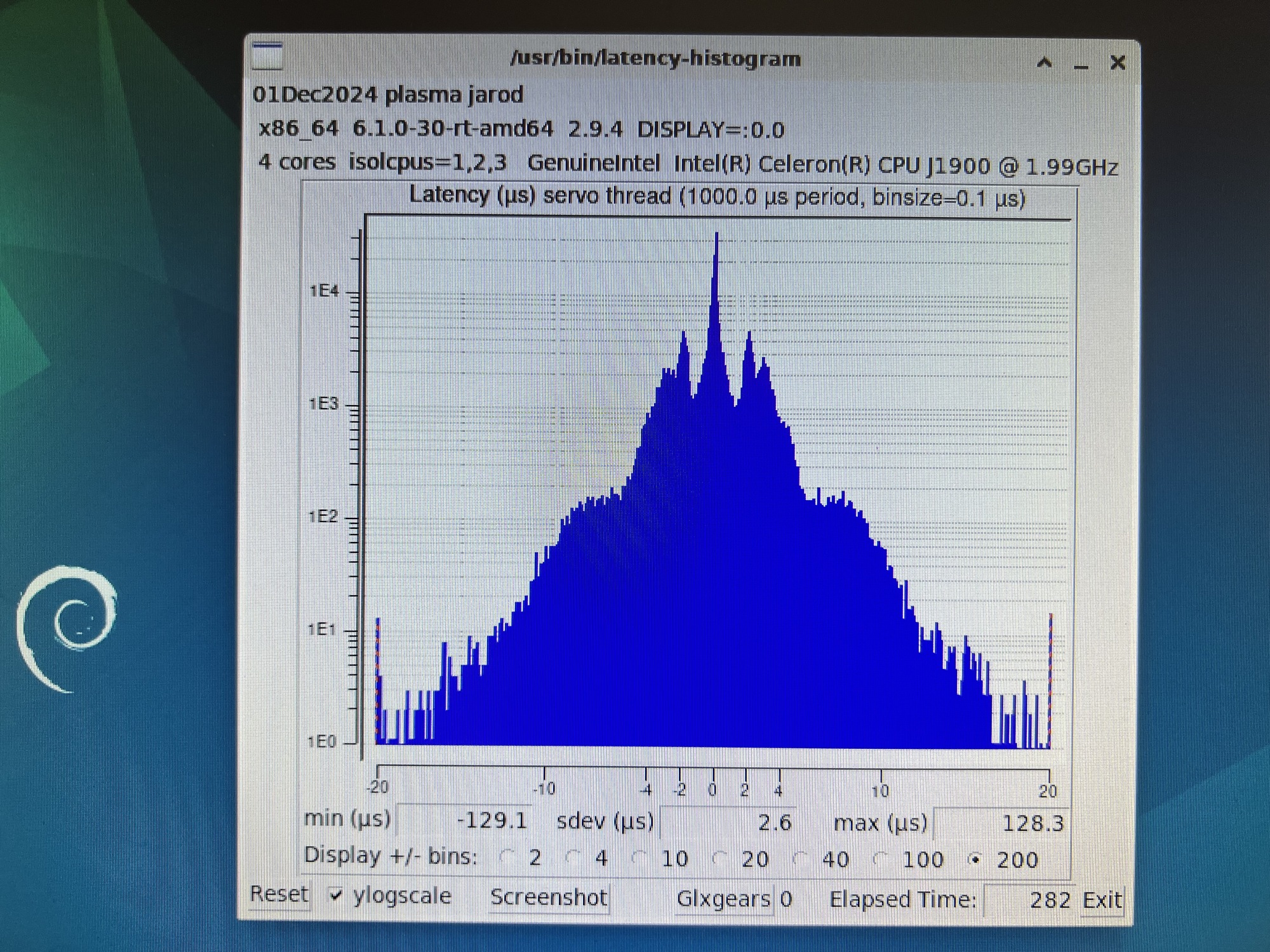
I isolated the cores today and ran the test. Still need to do the kernel upgrade.  

Please Log in or Create an account to join the conversation.

More
1 year 7 months ago #323721 by rodw
That is OK for a Mesa card and about where mine ran for years. I'll try and remember to look at my brix tonight.
Did you do the cpu affinity?

Please Log in or Create an account to join the conversation.
More
1 year 7 months ago - 1 year 7 months ago #323723 by tommylight
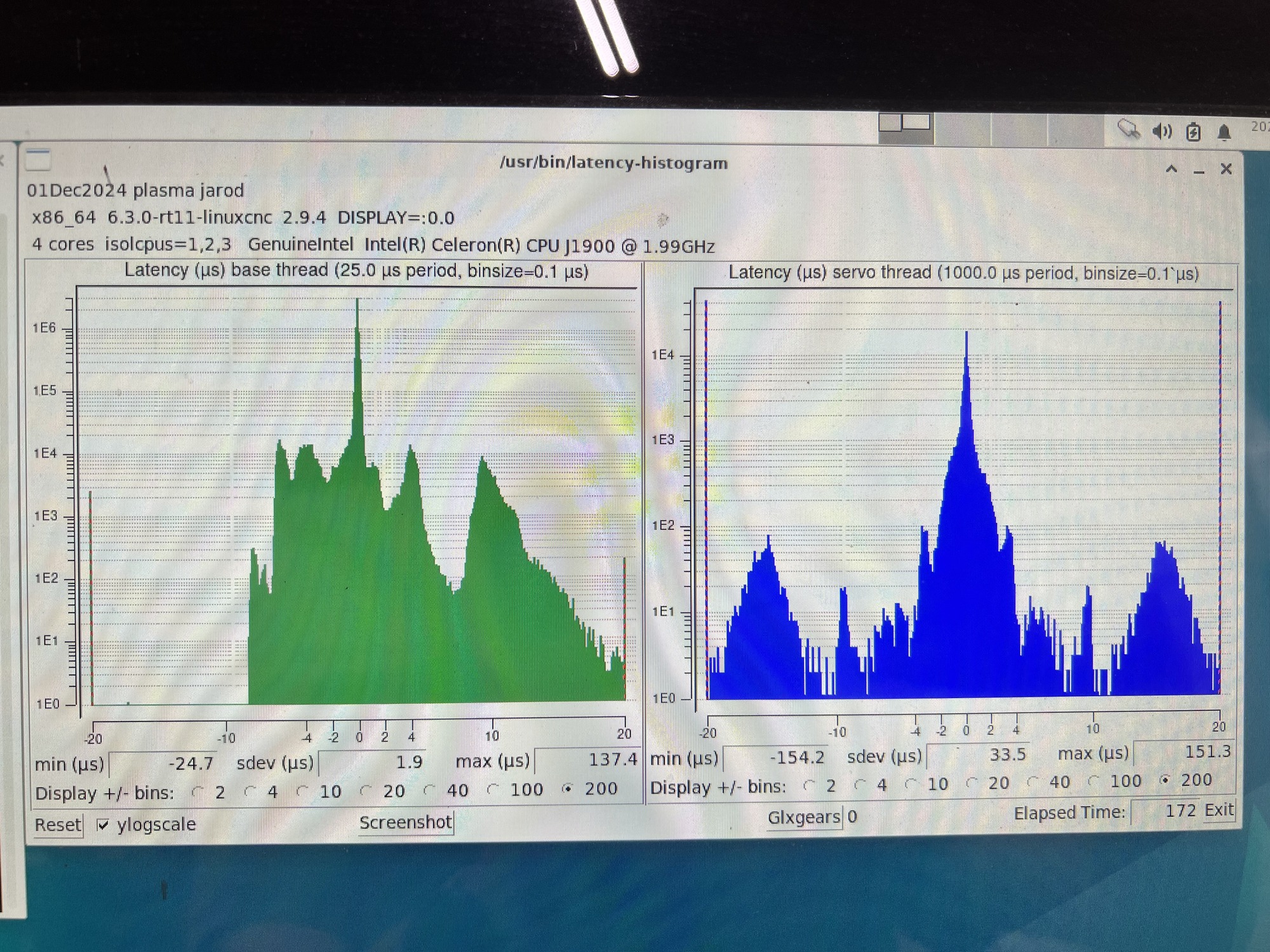
Not OK, notice the red/blue vertical lines on both sides of the histogram, those are excursions outside the visible area that do not show unless explicitly requested, so
latency-histogram --nobase --sbinsize 1000 --show
will show those excursions.
Although it just might be usable for Mesa, but i would not risk it.
Last edit: 1 year 7 months ago by tommylight. Reason: more info

Please Log in or Create an account to join the conversation.

More
1 year 7 months ago #323725 by JTknives
I went through the google dock and enlisted the help of ChatGPT and this is what I did and the results.

• CPU: Intel Celeron J1900 @ 1.99GHz (4 cores)
• Kernel: 6.3.0-rt11-linuxcnc (upgraded from 6.1.0)
• NIC: Realtek RTL8111/8168/8411 (using r8168-dkms driver 8.051.02)
• Power Supply: Switched to a more stable supply from the plasma table

What I Did:

1. Installed the 6.3.0-rt11-linuxcnc kernel.
2. Installed and configured the r8168-dkms driver.
3. Disabled EEE on the NIC (r8168.EEE=0).
4. Set kernel boot parameters:

isolcpus=1,2,3 nohz_full=1,2,3 rcu_nocbs=1,2,3 pcidle.max_cstate=1 processor.max_cstate=1 idle=poll


5. Assigned IRQ 91 (NIC) to CPU core 1.
6. Set all CPUs to performance governor (persistent in rc.local).
7. Confirmed BIOS settings: C-states disabled, Turbo Boost off, EIST off.


Please Log in or Create an account to join the conversation.

More
1 year 7 months ago #323726 by tommylight
In BIOS hyperthreading must be disabled, and TPM also.
And in case you find "aggressive link management" regarding PCI-E, also disable.

Please Log in or Create an account to join the conversation.

Time to create page: 0.280 seconds
Powered by Kunena Forum
