
Mini PC for LinuxCNC/CPU Realtime Performance
- giaviv
- Offline
- New Member
-

Less
More
- Posts: 7
- Thank you received: 0
26 Jan 2026 11:18 #341928
by giaviv
Mini PC for LinuxCNC/CPU Realtime Performance was created by giaviv
I’d like to replace my weak HP EliteDesk G2 on which I currently run LinuxCNC. In my setup, the PC drives a Mesa 7i95t over ethernet, and displays a LinuxCNC UI on a monitor. Form factor is important since the PC is only used for LinuxCNC.I’m looking at various options for ~$800 range mini PCs, but am struggling to understand how they will perform in a realtime environment. Some of the options are:
Thanks!
- Beelink EQR7, cpu: AMD Ryzen5 7535U
- Beelink SER9 PRO+, cpu: AMD Ryzen7 H 255
- GEEKOM GT13 Pro, cpu: Intel Core i9-13900HK
- ASUS NUC 14 Pro, cpu: Intel Ultra 7 155H
- MINISFORUM DeskMini UM870, cpu: AMD Ryzen 7 8745H
Thanks!
Please Log in or Create an account to join the conversation.
- 0x2102
-

- Offline
- Elite Member
-

Less
More
- Posts: 223
- Thank you received: 88
26 Jan 2026 12:17 - 26 Jan 2026 12:19 #341930
by 0x2102
Replied by 0x2102 on topic Mini PC for LinuxCNC/CPU Realtime Performance
I think best bet is to keep the G2 and try to optimize it for LinuxCNC.
1.) Disable all power saving options in the BIOS
2.) Update your grub CMD line to include: max_cstate=1 idle=poll isolcpus=(your last CPU core)
3.) Set up IRQ affinity (see below)
4.) Disable IRQ coalescing (see below)
forum.linuxcnc.org/38-general-linuxcnc-questions/47974-grub
forum.linuxcnc.org/38-general-linuxcnc-q...irq-affinity?start=0
forum.linuxcnc.org/38-general-linuxcnc-q...g-for-intel-ethernet
A newer or more modern PC can be sometimes worse and it's a bit of a gamble if it works out of the box.
Once you address 1 - 4 you are in control on how well your PC works with LinuxCNC.
1.) Disable all power saving options in the BIOS
2.) Update your grub CMD line to include: max_cstate=1 idle=poll isolcpus=(your last CPU core)
3.) Set up IRQ affinity (see below)
4.) Disable IRQ coalescing (see below)
forum.linuxcnc.org/38-general-linuxcnc-questions/47974-grub
forum.linuxcnc.org/38-general-linuxcnc-q...irq-affinity?start=0
forum.linuxcnc.org/38-general-linuxcnc-q...g-for-intel-ethernet
A newer or more modern PC can be sometimes worse and it's a bit of a gamble if it works out of the box.
Once you address 1 - 4 you are in control on how well your PC works with LinuxCNC.
Last edit: 26 Jan 2026 12:19 by 0x2102.
The following user(s) said Thank You: tommylight
Please Log in or Create an account to join the conversation.
- giaviv
- Offline
- New Member
-
Less
More
- Posts: 7
- Thank you received: 0
26 Jan 2026 12:43 #341932
by giaviv
Replied by giaviv on topic Mini PC for LinuxCNC/CPU Realtime Performance
Thanks for the reply! I’ve done all that so I believe my G2 is optimized for LinuxCNC.
However I’m a bit limited by the low ram (8GB), low disk space and etc.
I realize newer models are risky, therefore some of the models I am looking at are far from new generation CPUs (like the Ryzen5 7535U).. Or is CPU not the only potential issue, but also things like the motherboard etc?
However I’m a bit limited by the low ram (8GB), low disk space and etc.
I realize newer models are risky, therefore some of the models I am looking at are far from new generation CPUs (like the Ryzen5 7535U).. Or is CPU not the only potential issue, but also things like the motherboard etc?
Please Log in or Create an account to join the conversation.
- Hakan
- Offline
- Platinum Member
-

Less
More
- Posts: 1317
- Thank you received: 454
26 Jan 2026 13:17 #341937
by Hakan
Replied by Hakan on topic Mini PC for LinuxCNC/CPU Realtime Performance
Many of us run systems with much lower spec CPUs, like Celeron J1900, i3-6100, N100, N150 with good result. 8GB should be plenty.
What does your latency-plot look like?
What does your latency-plot look like?
Please Log in or Create an account to join the conversation.
- tommylight
-

- Away
- Moderator
-

Less
More
- Posts: 21942
- Thank you received: 7471
26 Jan 2026 13:24 #341939
by tommylight
-
As a general rule, i would stay away from those small PC's, they are cute and stuff, but way to limited thermally, the xxxxU versions are fine, but a 13900 ... oh hell no, it will be limited thermally to something like a good 4 core CPU when under load, and they fail but being limited will prolong their life a lot so...
There were some NUC's that were OK for LinuxCNC way back.
After all this, there is no way to know for sure if any of those will be OK, short of buying and testing.
Replied by tommylight on topic Mini PC for LinuxCNC/CPU Realtime Performance
8GB should be fine, and how low is "low disk space"? Linux starts complaining only when you get under 1GB of free space, so anything above is fine.However I’m a bit limited by the low ram (8GB), low disk space and etc.
7535U is not "far from new", it is new and still in production, Zen3 with 15W TDP, so it is a laptop CPU and this may be bad for latency, although not always.I realize newer models are risky, therefore some of the models I am looking at are far from new generation CPUs (like the Ryzen5 7535U)..
CPU's are mostly fine as they can change states and do stuff, mainboards are usually the latency killers depending on quality, BIOS implementation, power saving options, etc, etc, way to many to list here, but mostly bad/weak CPU power stage set to work at the edge and throttling the CPU to save itself from going up in smoke.Or is CPU not the only potential issue, but also things like the motherboard etc?
-
As a general rule, i would stay away from those small PC's, they are cute and stuff, but way to limited thermally, the xxxxU versions are fine, but a 13900 ... oh hell no, it will be limited thermally to something like a good 4 core CPU when under load, and they fail but being limited will prolong their life a lot so...
There were some NUC's that were OK for LinuxCNC way back.
After all this, there is no way to know for sure if any of those will be OK, short of buying and testing.
Please Log in or Create an account to join the conversation.
- rodw
-

- Offline
- Platinum Member
-
Less
More
- Posts: 12154
- Thank you received: 4148
26 Jan 2026 19:57 #341968
by rodw
Replied by rodw on topic Mini PC for LinuxCNC/CPU Realtime Performance
This is nonsense! 4 gb RAM is fine for LinuxCNC but it will tolerate 8gb without ill affect. Linux is more memory efficient than Windows.....Thanks for the reply! I’ve done all that so I believe my G2 is optimized for LinuxCNC.
However I’m a bit limited by the low ram (8GB), low disk space and etc.
The following user(s) said Thank You: NWE
Please Log in or Create an account to join the conversation.
- NWE
-

- Offline
- Elite Member
-
Less
More
- Posts: 261
- Thank you received: 80
27 Jan 2026 04:32 #341986
by NWE
Replied by NWE on topic Mini PC for LinuxCNC/CPU Realtime Performance
I've had good success with generic fanless industrial mini-pc's in aluminum housings. One had a Celeron N5105, another had the J1900 CPU, both seemed performant for my applications. I was not running anything graphics intensive.
I tried a $90 USD UXX and a $110 MinsForum, with intel N4020 celeron CPUs, gave up on both of those. The one couldn't be configured to boot automatically when the power is switched on, both had insurmountable ethernet power-save features that interfered with ethercat.
I tried a $90 USD UXX and a $110 MinsForum, with intel N4020 celeron CPUs, gave up on both of those. The one couldn't be configured to boot automatically when the power is switched on, both had insurmountable ethernet power-save features that interfered with ethercat.
Please Log in or Create an account to join the conversation.
- NWE
-
- Offline
- Elite Member
-
Less
More
- Posts: 261
- Thank you received: 80
27 Jan 2026 05:01 - 27 Jan 2026 05:14 #341988
by NWE
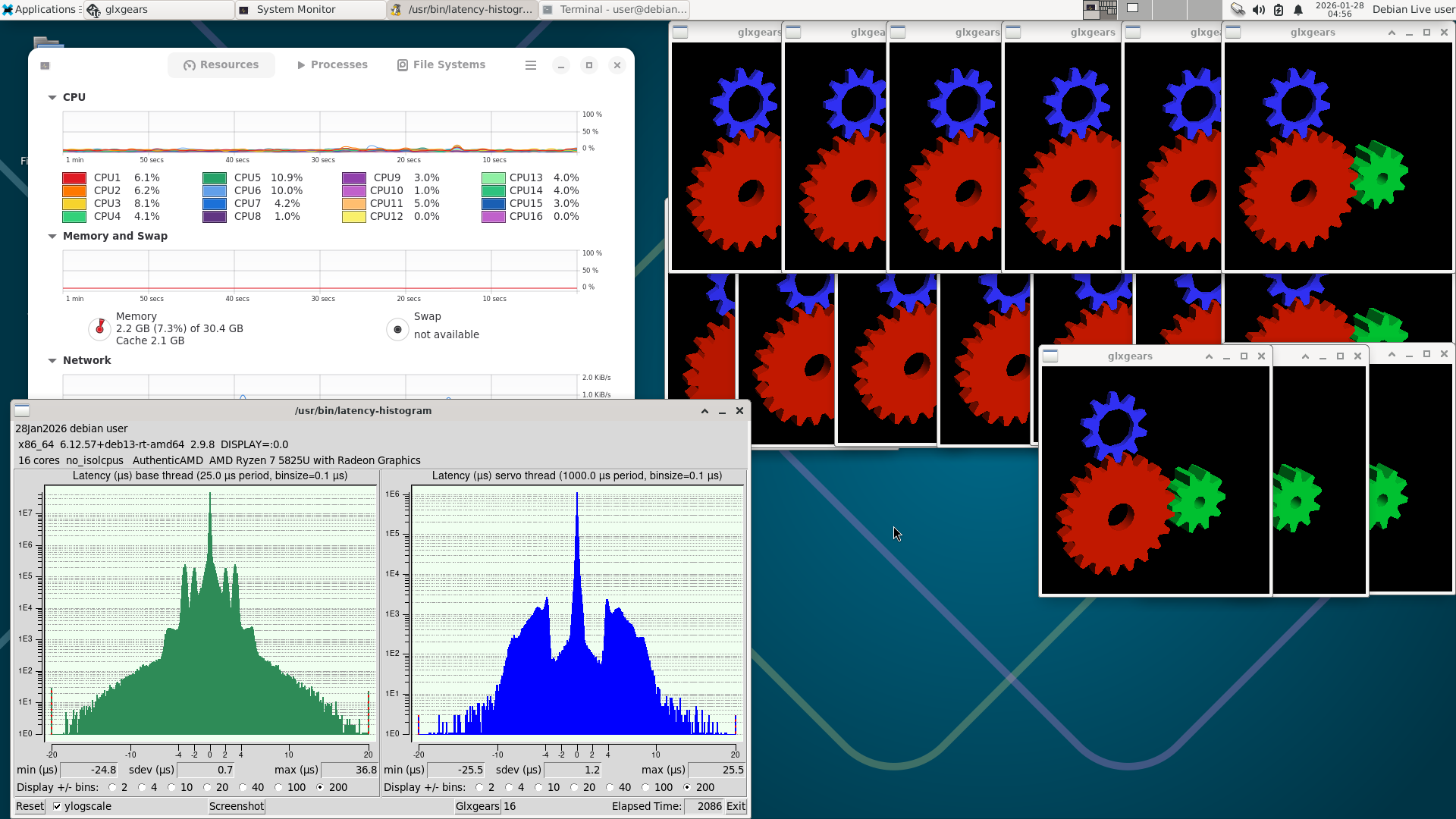
I am running a GMKtec M5 Plus mini-pc with a Ryzen 7 5825U cpu and 32GB RAM on Debian 13 and it works well. It is my only pc that also has Windows on it. It runs a lot cooler on linux and its little fan is quiet. Every time I boot Win11 on it I am reminded it has a noisy little fan that can really blow hot air. I never tried LinuxCNC or the realtime kernel on it. I left it at work today. Tomorrow evening I'll bring it home and post some latency tests from a LinuxCNC live boot.
Replied by NWE on topic Mini PC for LinuxCNC/CPU Realtime Performance
LinuxCNC uses minimal RAM, but I could see needing lots of RAM if you were running CAD/CAM software on the machine and working with larger files. If that is the case you might want the kind of computing power you're talking about.However I’m a bit limited by the low ram (8GB), low disk space and etc.
I am running a GMKtec M5 Plus mini-pc with a Ryzen 7 5825U cpu and 32GB RAM on Debian 13 and it works well. It is my only pc that also has Windows on it. It runs a lot cooler on linux and its little fan is quiet. Every time I boot Win11 on it I am reminded it has a noisy little fan that can really blow hot air. I never tried LinuxCNC or the realtime kernel on it. I left it at work today. Tomorrow evening I'll bring it home and post some latency tests from a LinuxCNC live boot.
Last edit: 27 Jan 2026 05:14 by NWE.
The following user(s) said Thank You: tommylight
Please Log in or Create an account to join the conversation.
- NWE
-
- Offline
- Elite Member
-
Less
More
- Posts: 261
- Thank you received: 80
28 Jan 2026 05:00 #342062
by NWE
Replied by NWE on topic Mini PC for LinuxCNC/CPU Realtime Performance
Here it is. This is on a live boot without trying any latency optimization stuff. While this was running, I installed some software and ran glxgears.
Please Log in or Create an account to join the conversation.
- unknown
- Offline
- Platinum Member
-
Less
More
- Posts: 888
- Thank you received: 325
28 Jan 2026 09:33 #342067
by unknown
Replied by unknown on topic Mini PC for LinuxCNC/CPU Realtime Performance
Not a PC platform, but the RPi5 is more than capable running with a Mesa card, Ethernet or SPi......... Not something Tommy would recommend. I didn't for a while.....but things change.
Please Log in or Create an account to join the conversation.
Time to create page: 0.149 seconds