
- Posts: 47
- Thank you received: 2
Splines to Gcode from dxf file
- Matt Hat
- Offline
- Senior Member
-

Less
More
4 years 9 months ago - 4 years 9 months ago #230693
by Matt Hat
Replied by Matt Hat on topic Splines to Gcode from dxf file
The spline_constructor() actually works as well. Implemented is some efficient algorithm to reconstruct a spline with N segments through the N-Points given into to the spline_constructor as input argument. However, the boundary conditions are only correct, if the tangent at the start and end are added to the input as first and last point. The spline_constructor() will always connect a two-point vector input by a straight line as long as no further interior points are given. Also, coefficients are calculated in the canonical basis (1,t,t^2,t^3) and not in the Berstein basis.
For a sequence of type: straight line, spline, straight line, simply add the first and last point of the straight line segments to the spline_constructor() input to join the spline smoothly to the straight line ends. If the spline_constructor() is used only for graphics output, I guess that's fine. Evt. it does not look the same as in the dxf or in the actually milled part.

For a sequence of type: straight line, spline, straight line, simply add the first and last point of the straight line segments to the spline_constructor() input to join the spline smoothly to the straight line ends. If the spline_constructor() is used only for graphics output, I guess that's fine. Evt. it does not look the same as in the dxf or in the actually milled part.
Last edit: 4 years 9 months ago by Matt Hat. Reason: Corrigenda.
Please Log in or Create an account to join the conversation.
- Matt Hat
- Offline
- Senior Member
-
Less
More
- Posts: 47
- Thank you received: 2
4 years 9 months ago #231095
by Matt Hat
Replied by Matt Hat on topic Splines to Gcode from dxf file
I have tested autodesk fusion 360. It provides a spline definition by use of control points. The definition should agree with the Feed command from linuxCNC. However, no benefit there, the output will not contain any G5 but only G1 moves.
Please Log in or Create an account to join the conversation.
- Matt Hat
- Offline
- Senior Member
-
Less
More
- Posts: 47
- Thank you received: 2
4 years 9 months ago - 4 years 9 months ago #231190
by Matt Hat
Replied by Matt Hat on topic Splines to Gcode from dxf file
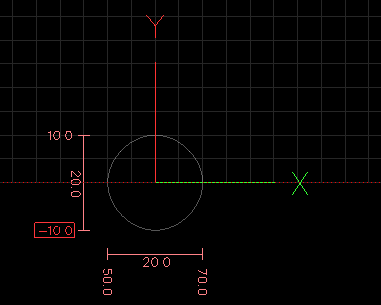
Finally I can show some G5 code that actually runs in linuxCNC. Against my previous posts, the parameters I,J,P, Q are indeed given relatively to the start and end points. This should give a circle of Radius 10 mm:
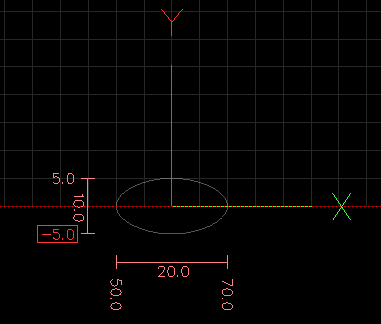
and this an ellipse of size 20x10 mm:
Details on github with some reorganization of the files.
[url] github.com/Matttab/spline-examples/tree/main/linuxCNCsplineTest [/url]
Code:
G0 X10 G5 X0.000 Y10.000 I0.000 J5.200 P5.200 Q0.000
G5 X-10.000 Y0.000 I-5.200 J0.000 P0.000 Q5.200
G5 X0.000 Y-10.000 I0.000 J-5.200 P-5.200 Q0.000
G5 X10.000 Y0.000 I5.200 J0.000 P0.000 Q-5.200
Code:
G0 X10 G5 X0.000 Y5.000 I0.000 J2.600 P5.200 Q0.000
G5 X-10.000 Y0.000 I-5.200 J0.000 P0.000 Q2.600
G5 X0.000 Y-5.000 I0.000 J-2.600 P-5.200 Q0.000
G5 X10.000 Y0.000 I5.200 J0.000 P0.000 Q-2.600
Details on github with some reorganization of the files.
[url] github.com/Matttab/spline-examples/tree/main/linuxCNCsplineTest [/url]
Last edit: 4 years 9 months ago by Matt Hat.
Please Log in or Create an account to join the conversation.
- robertspark
- Offline
- Platinum Member
-

Less
More
- Posts: 915
- Thank you received: 216
4 years 9 months ago - 4 years 9 months ago #231202
by robertspark
Replied by robertspark on topic Splines to Gcode from dxf file
if you have a spline in a DXF file there are normally a few options to change it to a simple entity (polyline) which is recognisable by post processing software.
I normally use "splineedit" if I am using AutoCAD / bricscad and only dealing with 1 spline, and convert it to a polyline entity, with a high curve fit number ( but you will end up with a lot of entities / segments).
option 2 if I have more than 1 spline..... I create a new linetype called "splines" or whatever and make it my current layer. I then use "qselect" to select all spline entities and place them on their own layer I just created. I then turn off all layers except the one I am working on via "-la" , "*", "off"
I then used "pedit" (polyline edit) and "m" (multiple) and then select all the splines with a mouse sweep of the screen followed by selecting "splines to polylines" and again give it a high precision, and then save the file as a DXF for sheetcam / estlcam to post process to gcode.
I have also read that you can save the DXF as an old r12 DXF file format and it will do a similar thing as r12 DXF does not recognise splines and will convert them to polylines..... although I've just read this and not tried it out.
3d splines can be a pia as they have elevation, so if you have bricscad ot full autocad you can run commands such as "flatten" and "overkill" to flatten the objects to the same plane "Z0" and remove overlaid or multiple stacked entities one on top of each other.
librecad will do some of the above but I don't think it has overkill or flatten commands.
I normally use "splineedit" if I am using AutoCAD / bricscad and only dealing with 1 spline, and convert it to a polyline entity, with a high curve fit number ( but you will end up with a lot of entities / segments).
option 2 if I have more than 1 spline..... I create a new linetype called "splines" or whatever and make it my current layer. I then use "qselect" to select all spline entities and place them on their own layer I just created. I then turn off all layers except the one I am working on via "-la" , "*", "off"
I then used "pedit" (polyline edit) and "m" (multiple) and then select all the splines with a mouse sweep of the screen followed by selecting "splines to polylines" and again give it a high precision, and then save the file as a DXF for sheetcam / estlcam to post process to gcode.
I have also read that you can save the DXF as an old r12 DXF file format and it will do a similar thing as r12 DXF does not recognise splines and will convert them to polylines..... although I've just read this and not tried it out.
3d splines can be a pia as they have elevation, so if you have bricscad ot full autocad you can run commands such as "flatten" and "overkill" to flatten the objects to the same plane "Z0" and remove overlaid or multiple stacked entities one on top of each other.
librecad will do some of the above but I don't think it has overkill or flatten commands.
Last edit: 4 years 9 months ago by robertspark.
Please Log in or Create an account to join the conversation.
- Matt Hat
- Offline
- Senior Member
-
Less
More
- Posts: 47
- Thank you received: 2
4 years 9 months ago - 4 years 9 months ago #231320
by Matt Hat
These G5 commands will give the following circle when loaded to linuxCNC.
Replied by Matt Hat on topic Splines to Gcode from dxf file
Code:
G0 X10
G5 X0.000 Y10.000 I0.000 J5.200 P5.200 Q0.000
G5 X-10.000 Y0.000 I-5.200 J0.000 P0.000 Q5.200
G5 X0.000 Y-10.000 I0.000 J-5.200 P-5.200 Q0.000
G5 X10.000 Y0.000 I5.200 J0.000 P0.000 Q-5.200
Last edit: 4 years 9 months ago by Matt Hat.
Please Log in or Create an account to join the conversation.
- Matt Hat
- Offline
- Senior Member
-
Less
More
- Posts: 47
- Thank you received: 2
4 years 9 months ago - 4 years 9 months ago #231321
by Matt Hat
These G5 commands will give the following ellipse when loaded to linuxCNC.
Replied by Matt Hat on topic Splines to Gcode from dxf file
Code:
G0 X10
G5 X0.000 Y5.000 I0.000 J2.600 P5.200 Q0.000
G5 X-10.000 Y0.000 I-5.200 J0.000 P0.000 Q2.600
G5 X0.000 Y-5.000 I0.000 J-2.600 P-5.200 Q0.000
G5 X10.000 Y0.000 I5.200 J0.000 P0.000 Q-2.600
These G5 commands will give the following ellipse when loaded to linuxCNC.
Last edit: 4 years 9 months ago by Matt Hat.
Please Log in or Create an account to join the conversation.
Time to create page: 0.147 seconds