
- Posts: 47
- Thank you received: 2
Splines to Gcode from dxf file
- Matt Hat
- Offline
- Senior Member
-

Less
More
4 years 10 months ago - 4 years 10 months ago #230213
by Matt Hat
Replied by Matt Hat on topic Splines to Gcode from dxf file
What is the linuxcnc interpretation of G5 G5.1 and G5.2 ?
Can I access that source code? Is there a more detailed documentation?
I had luckily some time to do a little math on splines and geometrical shape approximation. However, I still miss to translate a given spline to B-Splines or even NURBS. Unfortunately, linuxcnc does not seem to support simple splines. I am still glad it supports other splines though.
If a CAD-CAM or post-processor already outputs B-Spline or NURBS, it should be simpler to convert to G-Command. Probably a translation from global to relative coordinates should do it to specify the positions of the control points relative to the way points.
Interpolation of a spline - as any graphics program does it to actually plot the spline - is relatively simple. Tricky is the conversion between different types of splines, and in particular, convert it to the format linuxcnc is accepting.
A curious property of splines is, that boundary conditions will affect the shape of the spline globally. A wrong conversion of the boundary conditions will change the shape of the whole spline. I think this is the reason why João gets splines looking different than expected.
A common approach to relax the dependency of the shape on the boundary conditions, is to add more or multiple points (also called knots, nodes, or tool way points) at the two ends of the spline. Either more dense points or additional virtual points that are only used for computation but finally dropped in any output.
Whatever is automatically added and dropped, will not be accessible. Likely a good reason for any CAD-CAM or post-processor to simply output a sequence of unique short straight line segments instead.
I guess we need to pass the control points to a G5 commands relatively to the knots. Challenging is the reconstruction of the control points (also called control polygon) for a given spline. Unfortunately, fitting of B-Splines or NURBS to a given discrete set of way points is far more tricky than fitting of a simple cubic pp spline. I did not find support of B-Spline fitting in GNU octave and Matlab has hidden that function in an exotic 'robotic systems' toolbox; it is not even in the 'curve fitting' toolbox as all the other spline functionalities.
Good news is: the control points of a given pp spline can be reconstructed by solving a conventional set of linear equations. This way a pp spline could be transformed to a B-Spline: Calculate first the control points and construct from these the B-Spline or NURBS. Algorithms for solving the set of linear equations can be found and likely adapted. The missing link, again, is the proper definition of the boundary conditions.
Any advice on how to fix the boundary conditions programmatically is heartily welcome. Padding with additional points outside the planned tool trace is not much helpful. These points will not be milled and should not appear in any G-Code. A higher density of points is also not much interesting, I rather go with straight segments then
I did upload my GNU Octave and Matlab scrips to: [url=https://https://github.com/Matttab/spline-examples] github.com/Matttab/spline-examples [/url]
Use of simple polynominal and B-Splines in GNU Octave and Matlab for geometrical shape approximation
The objective are simple spline approximations of common geometric shapes with potential practical use in CNC machining. Interest is on spline interpolations with a low number of parameters, describing common shapes such as circles, ellipses, squares, slots, pockets and contours of arbitrary shape. Splines are used in the CAD to define the geometry, in the CAM to define the tool path by a list of dedicated G-code machine instructions, and in the CNC control SW, to eventually interpolate G5 spline instruction to actual workpiece or tool movements. Mapping of spline parameters to dimensions of the geometrical entities is welcome. Conversion of parameters between different types of splines is part of adaption to the broad variety of commercial and home-made hobbyist CAD-CAM-CNC systems.
Can I access that source code? Is there a more detailed documentation?
I had luckily some time to do a little math on splines and geometrical shape approximation. However, I still miss to translate a given spline to B-Splines or even NURBS. Unfortunately, linuxcnc does not seem to support simple splines. I am still glad it supports other splines though.
If a CAD-CAM or post-processor already outputs B-Spline or NURBS, it should be simpler to convert to G-Command. Probably a translation from global to relative coordinates should do it to specify the positions of the control points relative to the way points.
Interpolation of a spline - as any graphics program does it to actually plot the spline - is relatively simple. Tricky is the conversion between different types of splines, and in particular, convert it to the format linuxcnc is accepting.
A curious property of splines is, that boundary conditions will affect the shape of the spline globally. A wrong conversion of the boundary conditions will change the shape of the whole spline. I think this is the reason why João gets splines looking different than expected.
A common approach to relax the dependency of the shape on the boundary conditions, is to add more or multiple points (also called knots, nodes, or tool way points) at the two ends of the spline. Either more dense points or additional virtual points that are only used for computation but finally dropped in any output.
Whatever is automatically added and dropped, will not be accessible. Likely a good reason for any CAD-CAM or post-processor to simply output a sequence of unique short straight line segments instead.
I guess we need to pass the control points to a G5 commands relatively to the knots. Challenging is the reconstruction of the control points (also called control polygon) for a given spline. Unfortunately, fitting of B-Splines or NURBS to a given discrete set of way points is far more tricky than fitting of a simple cubic pp spline. I did not find support of B-Spline fitting in GNU octave and Matlab has hidden that function in an exotic 'robotic systems' toolbox; it is not even in the 'curve fitting' toolbox as all the other spline functionalities.
Good news is: the control points of a given pp spline can be reconstructed by solving a conventional set of linear equations. This way a pp spline could be transformed to a B-Spline: Calculate first the control points and construct from these the B-Spline or NURBS. Algorithms for solving the set of linear equations can be found and likely adapted. The missing link, again, is the proper definition of the boundary conditions.
Any advice on how to fix the boundary conditions programmatically is heartily welcome. Padding with additional points outside the planned tool trace is not much helpful. These points will not be milled and should not appear in any G-Code. A higher density of points is also not much interesting, I rather go with straight segments then
I did upload my GNU Octave and Matlab scrips to: [url=https://https://github.com/Matttab/spline-examples] github.com/Matttab/spline-examples [/url]
Use of simple polynominal and B-Splines in GNU Octave and Matlab for geometrical shape approximation
The objective are simple spline approximations of common geometric shapes with potential practical use in CNC machining. Interest is on spline interpolations with a low number of parameters, describing common shapes such as circles, ellipses, squares, slots, pockets and contours of arbitrary shape. Splines are used in the CAD to define the geometry, in the CAM to define the tool path by a list of dedicated G-code machine instructions, and in the CNC control SW, to eventually interpolate G5 spline instruction to actual workpiece or tool movements. Mapping of spline parameters to dimensions of the geometrical entities is welcome. Conversion of parameters between different types of splines is part of adaption to the broad variety of commercial and home-made hobbyist CAD-CAM-CNC systems.
Last edit: 4 years 10 months ago by Matt Hat.
Please Log in or Create an account to join the conversation.
- Grotius
- Offline
- Platinum Member
-

Less
More
- Posts: 2419
- Thank you received: 2349
4 years 10 months ago #230218
by Grotius
Replied by Grotius on topic Splines to Gcode from dxf file
Hi,
What is the linuxcnc interpretation of G5 G5.1 and G5.2 ?
Can I access that source code? Is there a more detailed documentation?
There is a source code for it indeed, that shows how it's been calculated.
some source code
starting at line 188.
The spline algo starting at line 212.
P.s the github link doen't work.
It think now you can test some more !
What is the linuxcnc interpretation of G5 G5.1 and G5.2 ?
Can I access that source code? Is there a more detailed documentation?
There is a source code for it indeed, that shows how it's been calculated.
some source code
starting at line 188.
The spline algo starting at line 212.
P.s the github link doen't work.
It think now you can test some more !
Please Log in or Create an account to join the conversation.
- Matt Hat
- Offline
- Senior Member
-
Less
More
- Posts: 47
- Thank you received: 2
4 years 10 months ago - 4 years 10 months ago #230240
by Matt Hat
Replied by Matt Hat on topic Splines to Gcode from dxf file
I switched the github repo from private to public this morning. I hope it works by now, else let me know.
Yes, that code fragments help a lot to stitch things together.
Yes, that code fragments help a lot to stitch things together.
Last edit: 4 years 10 months ago by Matt Hat.
Please Log in or Create an account to join the conversation.
- Grotius
- Offline
- Platinum Member
-
Less
More
- Posts: 2419
- Thank you received: 2349
4 years 10 months ago #230259
by Grotius
Replied by Grotius on topic Splines to Gcode from dxf file
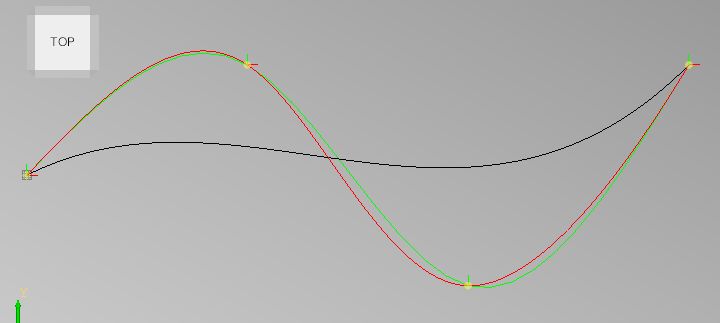
Hi, i just did a short test:
Black is the lcnc spline algo.
Red is the cubic spline algo.
Green is the 3d spline algo.
It looks like the lcnc spline is not really a spline.
Code:
void SPLINE_FEED(double x1, double y1, double x2, double y2, double x3, double y3) {
double x0 = 0;
double y0 = 0;
pvec_v.push_back({0,0,0});
for(int i=1; i<=100; i++) { double t = i / 100.;
double t3 = t*t*t;
double t2 = 3*t*t*(1-t);
double t1 = 3*t*(1-t)*(1-t);
double t0 = (1-t)*(1-t)*(1-t);
double x = x0*t0 + x1*t1 + x2*t2 + x3*t3;
double y = y0*t0 + y1*t1 + y2*t2 + y3*t3;
double z = 0;
pvec_v.push_back({x,y,z});
}
}
void cubic_spline(){
std::vector<std::vector<double>> C; //2d array
C.push_back({0,0});
C.push_back({100,50});
C.push_back({200,-50});
C.push_back({300,50});
double S[C.size()-1][2][4];
double w, b[C.size()], d[C.size()], x[C.size()];
int i, dim;
int n = C.size()-1; // number of splines
for(dim=0; dim<2; dim++)
{
// define d[]:
d[0]=3.0*(C[1][dim]-C[0][dim]);
for(i=1; i<n; i++)
d[i]=3.0*(C[i+1][dim]-C[i-1][dim]);
d[n]=3.0*(C[n][dim]-C[n-1][dim]);
// forward sweep: (simplified tridiagonal solution: all a[i]=1 and all c[i]=1)
b[0]=2.0;
for(i=1; i<C.size(); i++)
{
w = 1.0/b[i-1];
b[i] = 4.0 - w;
d[i] -= (w*d[i-1]);
}
// calculate solution vector x[i] = D[i]:
// (Wikipedia x[] = Wolfram D[])
x[n]=d[n]/b[n];
for(i=n-1; i>=0; i--)
x[i]=(d[i]-x[i+1])/b[i];
// calculate spline S[i][dim] a, b, c and d:
for(i=0; i<n; i++)
{
S[i][dim][0]=C[i][dim];
S[i][dim][1]=x[i];
S[i][dim][2]=3.0*(C[i+1][dim]-C[i][dim]) - 2.0*x[i] - x[i+1];
S[i][dim][3]=2.0*(C[i][dim]-C[i+1][dim]) + x[i] + x[i+1];
}
}
for(int p=0; p<C.size()-1; p++) //spline points
{
for(double t=0; t<1; t+=0.01) //time 0-1 for each spline
{
double px = ((S[p][0][3]*t+S[p][0][2])*t+S[p][0][1])*t+S[p][0][0];
double py = ((S[p][1][3]*t+S[p][1][2])*t+S[p][1][1])*t+S[p][1][0];
//std::cout<< "x:" << px << " y:" << py << std::endl;
pvec_a.push_back({px,py,0});
}
}
}
void MainWindow::on_pushButton_pressed()
{
//!
Handle(AIS_Shape) ashape=draw_primitives().draw_3d_origin({0,0,0},5);
OpencascadeWidget->show_shape(ashape);
ashape=draw_primitives().draw_3d_origin({100,50,0},5);
OpencascadeWidget->show_shape(ashape);
ashape=draw_primitives().draw_3d_origin({200,-50,0},5);
OpencascadeWidget->show_shape(ashape);
ashape=draw_primitives().draw_3d_origin({300,50,0},5);
OpencascadeWidget->show_shape(ashape);
OpencascadeWidget->Redraw();
SPLINE_FEED(100,50,200,-50,300,50);
cubic_spline(); //black
gp_Pnt p;
std::vector<gp_Pnt> pvec;
p.SetXYZ({0,0,0});
pvec.push_back(p);
p.SetXYZ({100,50,0});
pvec.push_back(p);
p.SetXYZ({200,-50,0});
pvec.push_back(p);
p.SetXYZ({300,50,0});
pvec.push_back(p);
ashape=draw_primitives().draw_3d_spline(pvec,10);
OpencascadeWidget->show_shape(ashape);
ashape=draw_primitives().colorize(ashape,Quantity_NOC_GREEN,0); //green
OpencascadeWidget->Redraw();
draw_result();
}
Black is the lcnc spline algo.
Red is the cubic spline algo.
Green is the 3d spline algo.
It looks like the lcnc spline is not really a spline.
Please Log in or Create an account to join the conversation.
- andypugh
- Offline
- Moderator
-

Less
More
- Posts: 19899
- Thank you received: 4655
4 years 10 months ago #230272
by andypugh
Replied by andypugh on topic Splines to Gcode from dxf file
The G5 splines were a bit of a push-and-run rather a long time ago. I have a feeling that they were a masters project and then the author moved on.
I am not sure that the link above (to gcodemodule.cc) is the best place to look. You should probably look in interp_convert:
github.com/LinuxCNC/linuxcnc/blob/3cef75...terp_convert.cc#L123
It seems that an academic paper resulted: www.unipa.it/persone/docenti/l/ernesto.l...Pubblicazione=141770
I am not sure that the link above (to gcodemodule.cc) is the best place to look. You should probably look in interp_convert:
github.com/LinuxCNC/linuxcnc/blob/3cef75...terp_convert.cc#L123
It seems that an academic paper resulted: www.unipa.it/persone/docenti/l/ernesto.l...Pubblicazione=141770
Please Log in or Create an account to join the conversation.
- Grotius
- Offline
- Platinum Member
-
Less
More
- Posts: 2419
- Thank you received: 2349
4 years 10 months ago #230285
by Grotius
Replied by Grotius on topic Splines to Gcode from dxf file
Hi,
The G5 splines were a bit of a push-and-run rather a long time ago. I have a feeling that they were a masters project and then the author moved on.
Ok. Nice to know.
linuxcnc spline algo found in this document page 24
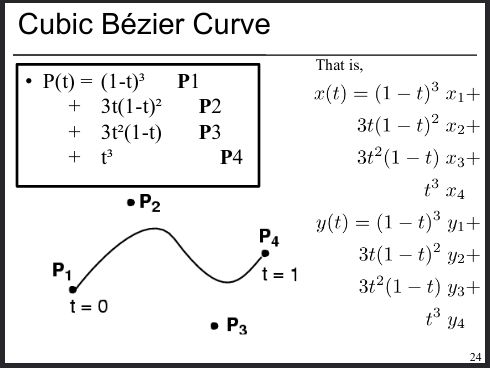
It's a cubic bezier curve.... Not even a spline.
The G5 splines were a bit of a push-and-run rather a long time ago. I have a feeling that they were a masters project and then the author moved on.
Ok. Nice to know.
linuxcnc spline algo found in this document page 24
It's a cubic bezier curve.... Not even a spline.
The following user(s) said Thank You: jtc
Please Log in or Create an account to join the conversation.
Time to create page: 6.526 seconds