
- Posts: 27
- Thank you received: 2
Beginner trying to learn basic programming
- usert_l
- Offline
- Junior Member
-

Less
More
7 years 4 months ago - 7 years 4 months ago #135660
by usert_l
Replied by usert_l on topic Beginner trying to learn basic programming
I made and saved the changes as suggested, and then open up the program in the sim/axis/lathe simulator config.
Before I can click run, I had to click home all axes (that when it moves and creates those two yellow lines parallel to the X and Z axes).
I then click run and for some reason it keeps stopping at line 11 ... I don't know what's causing that. This is first time I'm in the lathe simulator.
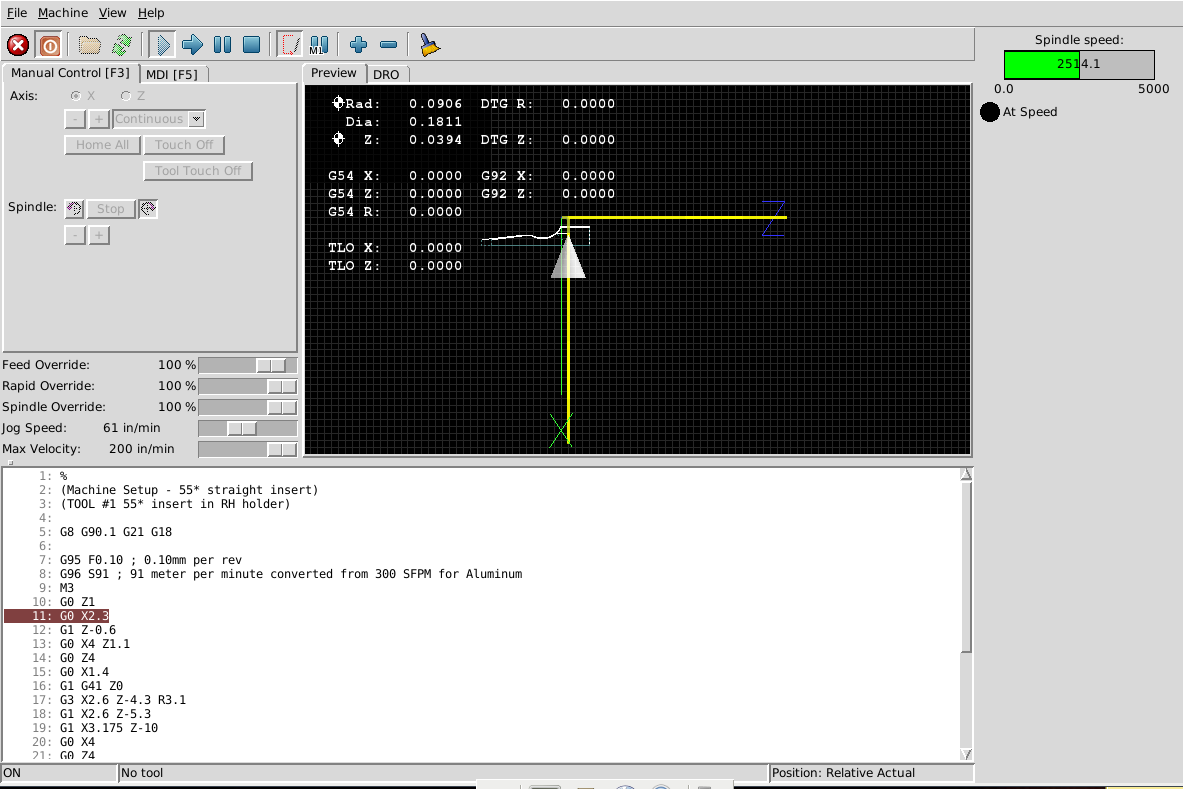
Before I can click run, I had to click home all axes (that when it moves and creates those two yellow lines parallel to the X and Z axes).
I then click run and for some reason it keeps stopping at line 11 ... I don't know what's causing that. This is first time I'm in the lathe simulator.
Last edit: 7 years 4 months ago by usert_l.
Please Log in or Create an account to join the conversation.
- andypugh
- Offline
- Moderator
-

Less
More
- Posts: 19899
- Thank you received: 4655
7 years 4 months ago #135671
by andypugh
Replied by andypugh on topic Beginner trying to learn basic programming
I think it is actually waiting for spindle-at-speed.
Though why the sim would fail to reach speed is a mystery to me.
Try adding D5000 to the G96 line
Though why the sim would fail to reach speed is a mystery to me.
Try adding D5000 to the G96 line
The following user(s) said Thank You: usert_l
Please Log in or Create an account to join the conversation.
- usert_l
- Offline
- Junior Member
-
Less
More
- Posts: 27
- Thank you received: 2
7 years 4 months ago #135690
by usert_l
Replied by usert_l on topic Beginner trying to learn basic programming
Ok it seems to be working now. Spindle max speed limit seems to be about 2500. If I set anything higher than that, the spindle would never be able to reach that speed. So I had to make it D2500 instead to the G96 line.
I do have a question about the G96 constant surface speed mode ... I believe that it automatically adjusts the spindle speed according to how close or far away the cutting tool position is relative to the centerline of the stock (Z axis), as the tool cuts along the profile of the part. However, I noticed that the spindle RPM pretty much stays constant @ 2500 throughout the entire program in the simulator config. Is that something that the simulator config doesn't take into account?
I do have a question about the G96 constant surface speed mode ... I believe that it automatically adjusts the spindle speed according to how close or far away the cutting tool position is relative to the centerline of the stock (Z axis), as the tool cuts along the profile of the part. However, I noticed that the spindle RPM pretty much stays constant @ 2500 throughout the entire program in the simulator config. Is that something that the simulator config doesn't take into account?
Please Log in or Create an account to join the conversation.
- andypugh
- Offline
- Moderator
-
Less
More
- Posts: 19899
- Thank you received: 4655
7 years 4 months ago #135691
by andypugh
Replied by andypugh on topic Beginner trying to learn basic programming
It looks like the sim config tops out at 2500, so that is pretty much what you will see with small diameter work and a high surface speed.
You can edit the config, though bear in mind that this limit might not exist in the HAL of a real machine.
Have a look in the HAL at the "limit_speed" pins and parameters.
(And note that, because of what it is, maxv = acceleration, and max = max velocity)
You can edit the config, though bear in mind that this limit might not exist in the HAL of a real machine.
Have a look in the HAL at the "limit_speed" pins and parameters.
(And note that, because of what it is, maxv = acceleration, and max = max velocity)
Please Log in or Create an account to join the conversation.
- andypugh
- Offline
- Moderator
-
Less
More
- Posts: 19899
- Thank you received: 4655
7 years 4 months ago #135692
by andypugh
Replied by andypugh on topic Beginner trying to learn basic programming
andypugh wrote: It looks like the sim config tops out at 2500, so that is pretty much what you will see with small diameter work and a high surface speed.
You can edit the config, though bear in mind that this limit might not exist in the HAL of a real machine.
Have a look in the HAL at the "limit_speed" pins and parameters. (Machine menu => Show HAL configuration)
(And note that, because of what it is, maxv = acceleration, and max = max velocity)
Please Log in or Create an account to join the conversation.
Time to create page: 0.342 seconds