I have a small problem with dynamic tool length measurement with G43.1.
I call via remap a macro on this basis:
My adapted macro looks like this
Code:
o<messen_eng> sub
M64P10
#1700=1200 (Tool change X position)
#1701=0 (Tool change Y position)
#1702=-1 (Tool change Z position)
#1800=-100 (Position safe Z/Starting point for G38.2 move)
#1801=1279.125 (position probe X)
#1802=2498 (position probe Y)
#1900=#<_coord_system> (Store coordinate system only G54 till G59)
o500 if [#<_current_tool> EQ #<_selected_tool>]
;(debug, Tool already in spindle)
o500 else
M5
G54
G90 G0
G53 Z#1702 (Go to tool change Z position)
G53 X#1700 Y#1701 (Go to tool change XY position)
M6 T#<_selected_tool>
#4999=#5400. (save actually loaded tool... for another macro)
G43.1 Z0 (TLO reset)
G53 X#1801 Y#1802 (Go to probe position)
G53 Z#1800 (Go to save Z position)
G91
G38.2 Z-197.5 F850 (probing fast)
G1 Z2.0 F150 (go up a bit)
G38.2 Z-2.25 F25 (probing slow)
#2000=[#5063+#5223] (Switching point+zero Offset)
#2001=[#2000-#2002+#2003](new - diff + old)
#2002=[#2000] (Save old switch point)
#2003=[#2001] (Save old offset)
G1 Z5.0 F500 (go up away from sensor)
G90 G0
G43.1 Z#2001 (TLO set)
G53 Z#1800 (Go to save Z position)
G53 Z#1702 (Go to tool change Z position)
#1803=1 (State tool already measured)
;(debug, Differenz ist: #2001)
(Restore old zero (only G54 to G59)
o100 if[#1900 EQ 540]
G54
o100 endif
o101 if[#1900 EQ 550]
G55
o101 endif
o102 if[#1900 EQ 560]
G56
o102 endif
o103 if[#1900 EQ 570]
G57
o103 endif
o104 if[#1900 EQ 580]
G58
o104 endif
o500 endif
M65P10
o<messen_eng> endsub
M2
My Z axis has the following specification
[AXIS_Z]
MAX_VELOCITY = 100.0
MAX_ACCELERATION = 700.0
MIN_LIMIT = -300.0
MAX_LIMIT = 0.01
My workflow is as follows.
1. tool measurement via the macro above
2. define Z0 (for the tests I set it far away from machine limits)
3. start program
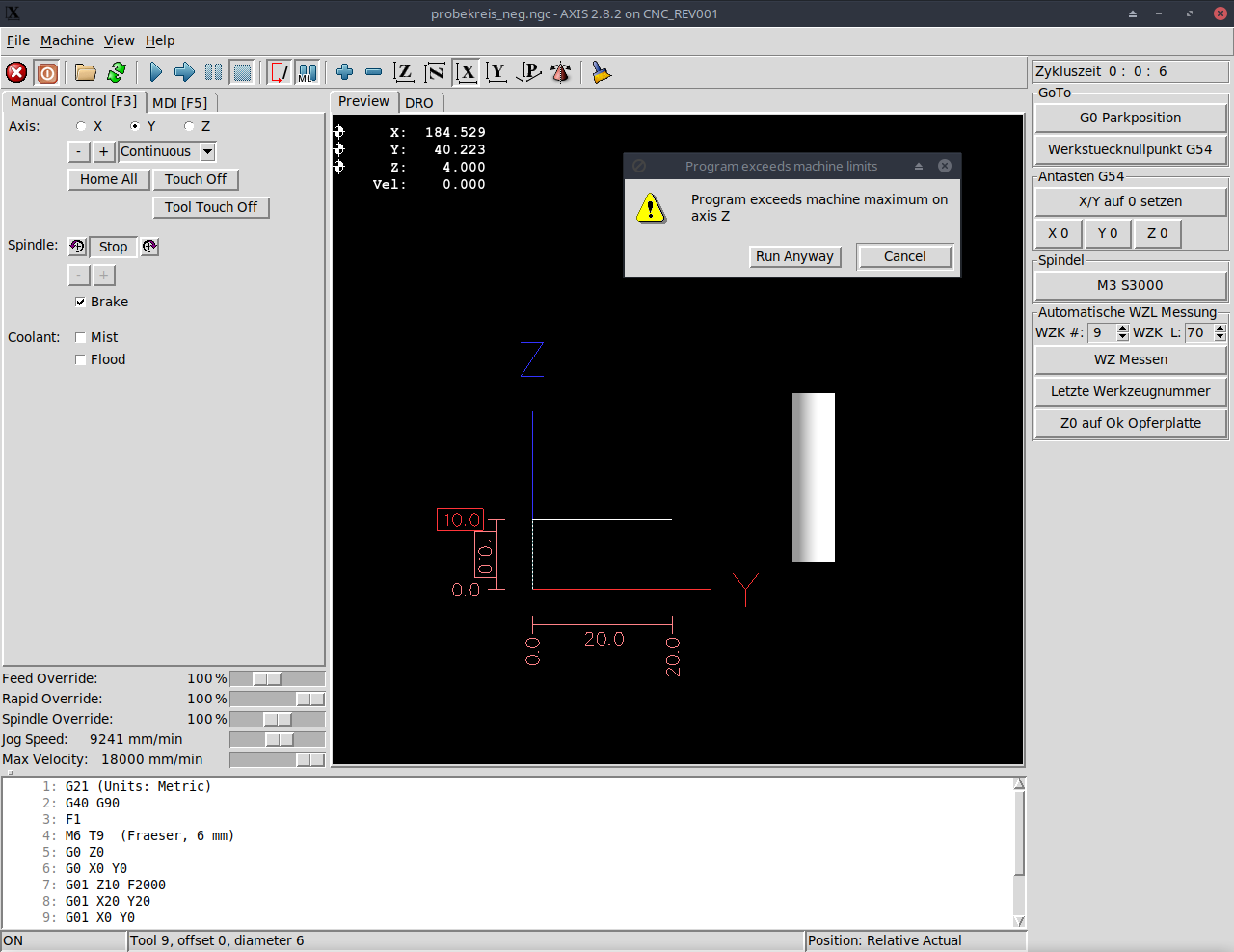
If I now start a program I get the message, "Program Exceeds machine maximum on axis Z.". As far as I could understand, the error occurs when the machine is moved to different Z heights in the program run.
For example, this code works here:
G21 (Units: Metric)
G40 G90
F1
M6 T9 ( Cutter, 6 mm)
G0 Z10
G0 X0 Y0
G01 Z10 F2000 (same height)
G01 X20 Y20
G01 X0 Y0
G0 Z10
M05 M30
This one as well:
G21 (Units: Metric)
G40 G90
F1
M6 T9 (Cutter, 6 mm)
G0 Z0
G0 X0 Y0
G01 Z0 F2000 (same height)
G01 X20 Y20
G01 X0 Y0
G0 Z0
M05 M30
This however not only with the above mentioned error message:
G21 (Units: Metric)
G40 G90
F1
M6 T9 (Cutter, 6 mm)
G0 Z0
G0 X0 Y0
G01 Z10 F2000 (different height)
G01 X20 Y20
G01 X0 Y0
G0 Z0
M05 M30
If I then click on "Run anyway", the program runs through to the end of the cycle without any problems. However, since I have to click the message away every time and thus cannot use my external hardware start button, I would like to solve the problem. Does anyone have a troubleshooting approach?
Best wishes
Jan


 .
.