Axis configuration not fully working on 2.9.6

More
1 year 4 weeks ago #335821 by Fabse
Hey guys,
my config works as i want it on linuxcnc 2.9.4. After updating to 2.9.5 (or 2.9.6) it does not anymore. It mainly is the pendant that is not working as before. I use a china pendant (XHC WHB04B). Most buttons don't work anymore. For example when staring my machine, I hit the "reset" button. With version 2.9.4 I can home my machine after that. With 2.9.6 nothing happens. Control via GUI seems to work just fine.
I think the problem must be related to one of these, or maybe both points in the changelog:
  • halui: on startup, set the first configured axis as ‘is-selected’ instead of X
  • halui: Don’t create ‘halui.axis.’- pins for unconfigured axes
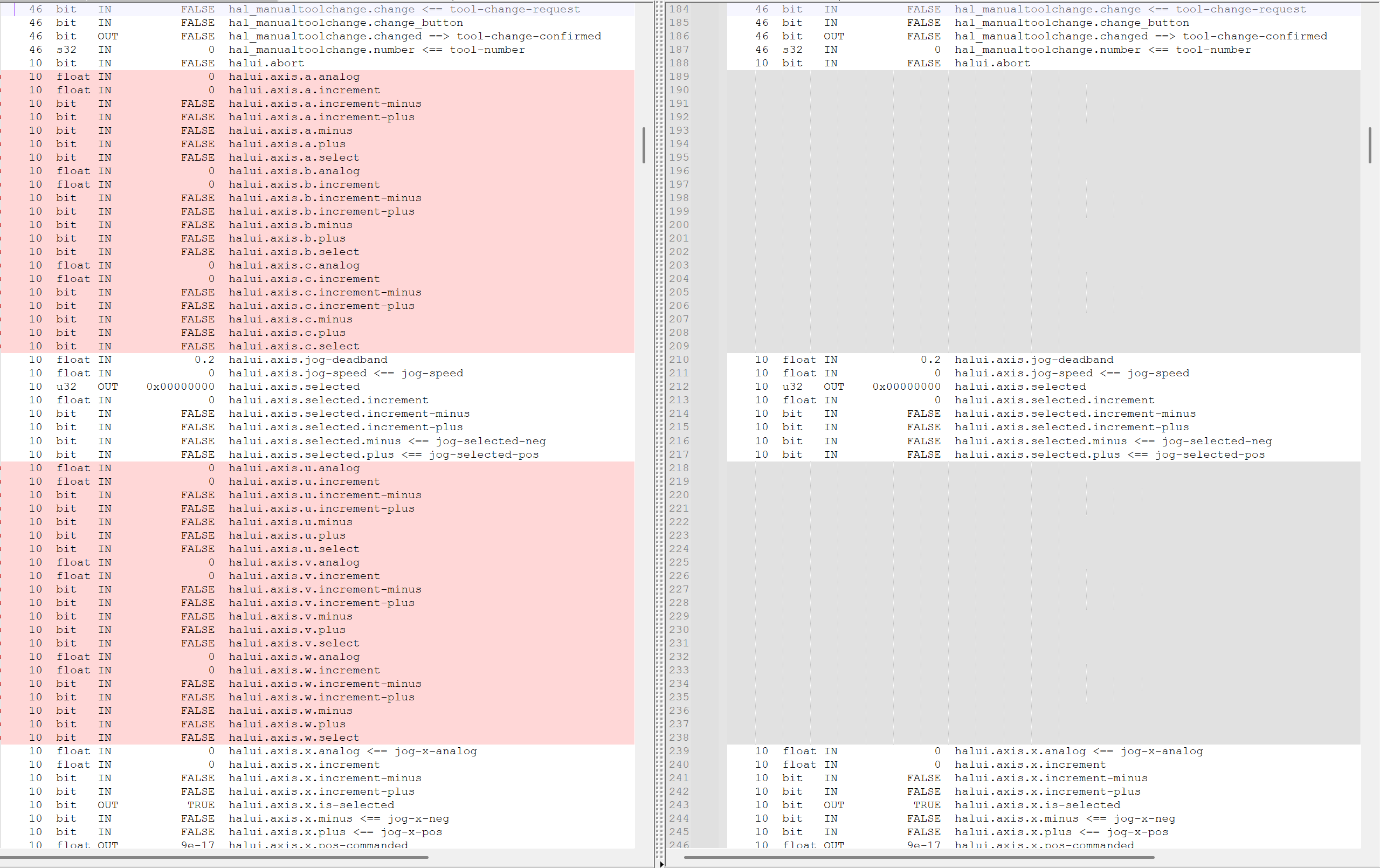
I looked at all created HAL pins under 2.9.4 and 2.9.6. I compared the output and found some missing pins under 2.9.6. I don't see why i would need these pins, but I figured it maybe where my error is? See the atteched pic for the missing pins.
I hope someone of the pros on this forum can help me. I don't know how to solve this on my own.
 

Please Log in or Create an account to join the conversation.
More
1 year 4 weeks ago #335822 by Aciera
If your config would need any of those pins it would not start up at all but fail with an error about a missing hal pin. The first place to troubleshoot your issue is to open the halshow tool and check the signals coming from the pendant.
The following user(s) said Thank You: rodw

Please Log in or Create an account to join the conversation.

More
1 year 4 weeks ago #335824 by Fabse
Thank you for your quick response! I didn't think about it that way... So I don't have to worry about the pins not being created?
What could be the reason for some of the signals not being connected correctly? I mean, it was working on 2.9.4 after all. I managed to solve a lot of problems while setting up my machine, most of them thanks to posts on this forum. This issue i can not wrap my head around.
But I will do what you suggest and check the signals.

Please Log in or Create an account to join the conversation.

More
1 year 4 weeks ago #335825 by Aciera

So I don't have to worry about the pins not being created?


No. Hal connections are created on startup when the hal files are read. If a hal pin used in any of your hal files was missing the config would not start at all. So your problem is not because of 'signals not being connected correctly'.
One thing to do is start your config from the terminal and check the output in the terminal. Another is to check the XHC WHB04B hal component using the halshow tool to confirm button press events are actually reaching your hal connections.
The following user(s) said Thank You: rodw, Fabse

Please Log in or Create an account to join the conversation.

More
1 year 3 weeks ago #335915 by Fabse
Ok, today I had the opportunity to check my signals. I started with analyzing the "reset" button, which is supposed to turn on/off the machine. When on version 2.9.4 the button toggles "halui.machine.on", which then activates "halui.machine.is-on". This is what I expected to see.
When on 2.9.6 I see that "halui.machine.on" is toggled, but i never get the "halui.machine.is-on" to become true. It isn't even true when I switch on the machine via the F2 key. The machine functions, but this pin never says it is on.
How could this be explained?

Please Log in or Create an account to join the conversation.

More
1 year 3 weeks ago #335923 by Aciera
If you open one of the sim configs and check "halui.machine.is-on" does it go true when you enable the machine with the gui button?

Please Log in or Create an account to join the conversation.

Time to create page: 0.334 seconds
Powered by Kunena Forum
