usb485 to huanyang vfd

More
7 years 3 months ago #140939 by tjones
Hi All,

I have been following the tutorial in the link below to get my VFD talking with Linuxcnc. I am able to load into Linuxcnc and home the machine. The custom panel shows up but I am unable to get my spindle to actually turn on. I suspect it has something to do with the spindle vfd enable. When I check the monitor in linuxcnc it says false and I haven't been able to figure out how to enable it. As I am pretty green to messing around in .hal and the way linuxcnc is configured. Can linuxcnc open if the usb is plugged in and nothing is plugged into the vfd? That may send me down the path of checking all my continuity...

wapl.es/cnc/2015/12/04/huanyang-linuxcnc-2.7-speed-control.html

Please Log in or Create an account to join the conversation.

More
More
7 years 3 months ago - 7 years 3 months ago #140947 by Hakan
Replied by Hakan on topic usb485 to huanyang vfd
If you just want to check that it works you can enter a line after the loadusr of the hy_vfd component
Code:
setp vfd.enable 1
if you named it "vfd" in the loadusr line

A better way is finally to connect it to perhaps motion.enabled
There is a signal motion.spindle-on that starts the spindle, but I think it is better to have the communication already going. It doesn't hurt to have the ocmmunication going all the time as far as I can see.

If the vfd is not communicating properly, you will get tons of errors, like crc warnings or timeouts. You can't miss it.

A first test to check the comms is easily done outside linuxcnc (don't start it) with these lines
Code:
halcmd loadusr -Wn spindle-vfd hy_vfd -n spindle-vfd -t 1 -d /dev/ttyUSB0 -p none -r 38400 -s 1 halcmd setp spindle-vfd.enable 1 halcmd show pin

You should see a TRUE on the hycomm_ok pin, then all is good. Use the actual parameters for your setup in the loadusr line
Last edit: 7 years 3 months ago by Hakan.

Please Log in or Create an account to join the conversation.
More
7 years 2 months ago #141869 by tjones
Replied by tjones on topic usb485 to huanyang vfd
Ok so I found a few issues. using -g in the loadusr line is a big help.

When using the -Wn command you shouldn't use the -n command. I was getting a double name error. To this point I was able to boot into Axis. After I changed this line I was unable to boot into axis and I was able to look at the debug file. A couple of the next errors I was able to clear up by double checking all the parameters in the VFD.

When I run the first line, halcmd loadusr... line It says, "waiting for component 'spindle-vfd' to become ready.

Is there timeout command I can add? when I go to open linuxcCNC it never opens because it is waiting for the 'spindle-vfd-' component to become ready. Then I have to open linuxcnc again to show an error message and then I am stuck in the loop again.

Please Log in or Create an account to join the conversation.

More
7 years 2 months ago - 7 years 2 months ago #141893 by Hakan
Replied by Hakan on topic usb485 to huanyang vfd
Those lines are from my running 2.8 (2.9 now?) system, they should be ok.

When you get messages from the loadusr line then it is something with the usb connection, the usb device or something along those lines. Make sure you use the right usb device name in the /dev/ttyUSBx and that it has the proper file protection to allow you to open it. Maybe something from "dmesg" can give a hint?

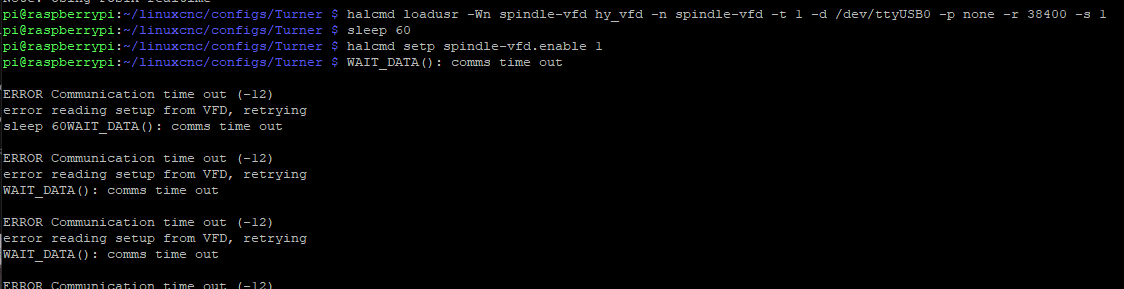
First when you give the "setp spindle-vfd.enable 1" command the device will start/try to communicate with the vfd. Before that it isn't doing that.

Here is what happens when I unplug the twisted pair cable to the vfd, the usb dongle is connected to the computer. The comm errors come at the enable point. The sleep is there just to show there are no errors from the loadusr line.
Last edit: 7 years 2 months ago by Hakan.

Please Log in or Create an account to join the conversation.

More
7 years 2 months ago #141923 by tjones
Replied by tjones on topic usb485 to huanyang vfd
Ok so I unplugged and plugged the USB converter into multiple USB ports and got USB0 everytime. Screen shot below of running the, dmesg | -i usb, command. I am not exactly sure what I am looking for in the dmesg file other then it tells me what that usb device is. I tried a different cable connected to the VFD as well. I have attached the hal files as well.


File Attachment:

File Name: custom.hal
File Size:984 B

File Attachment:

File Name: custom_postgui.hal
File Size:470 B

File Attachment:

File Name: Paul_CNC.hal
File Size:10.01 KB

Please Log in or Create an account to join the conversation.

Time to create page: 0.154 seconds
Powered by Kunena Forum
