Please Log in or Create an account to join the conversation.
Just to clarify, do you have everything connected to the router? Or did you have just the Mesa card plugged in the first time, then just the router, the second time?
[/code][/code][/code]Code:[code]2: eth0: <BROADCAST,MULTICAST,UP,LOWER_UP> mtu 1500 qdisc pfifo_fast state UP group default qlen 1000 link/ether e8:4e:06:84:dc:c9 brd ff:ff:ff:ff:ff:ff inet 10.10.10.11/8 brd 10.255.255.255 scope global eth0 and: [code][code]2: eth0: <BROADCAST,MULTICAST,UP,LOWER_UP> mtu 1500 qdisc pfifo_fast state UP group default qlen 1000 link/ether e8:4e:06:84:dc:c9 brd ff:ff:ff:ff:ff:ff inet 192.168.1.245/24 brd 192.168.1.255 scope global dynamic eth0
Please Log in or Create an account to join the conversation.
Please Log in or Create an account to join the conversation.
Going by your most recent answer I interpret the above:Jocman post=342013 userid=24026
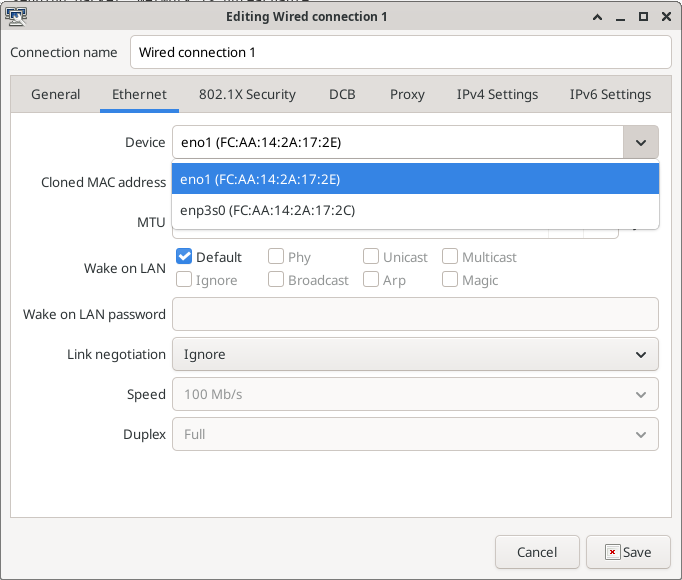
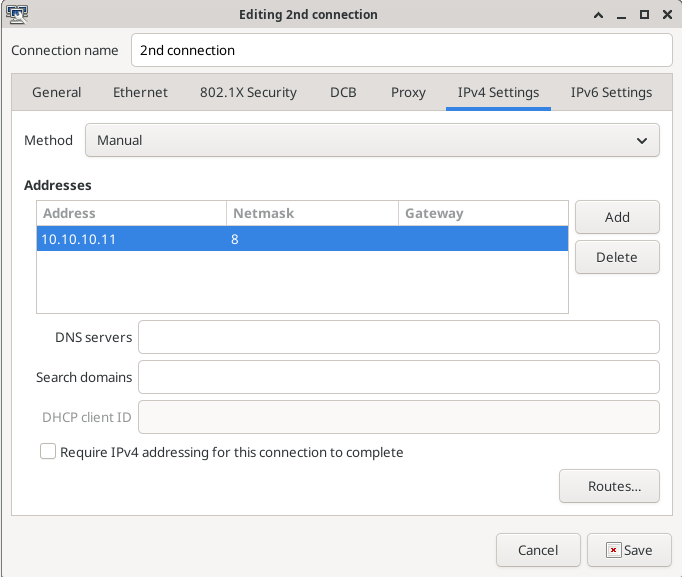
As I've 2 lan cards (the onboard and a second PCI board), I tried to launch
ip a
when connected to both, and this is what I get:
connected to Mesa (onboard card):
joccnc@JocCnc:~$ ip a
1: lo: <LOOPBACK,UP,LOWER_UP> mtu 65536 qdisc noqueue state UNKNOWN group default qlen 1
-- snip --
2: eth0: <BROADCAST,MULTICAST,UP,LOWER_UP> mtu 1500 qdisc pfifo_fast state UP group default qlen 1000
link/ether e8:4e:06:84:dc:c9 brd ff:ff:ff:ff:ff:ff
inet 10.10.10.11/8 brd 10.255.255.255 scope global eth0
-- snip --
3: eth1: <NO-CARRIER,BROADCAST,MULTICAST,UP> mtu 1500 qdisc pfifo_fast state DOWN group default qlen 1000
link/ether 70:85:c2:6a:f0:3d brd ff:ff:ff:ff:ff:ff
joccnc@JocCnc:~$
and pinging my router:
joccnc@JocCnc:~$ ping 192.168.1.1
PING 192.168.1.1 (192.168.1.1): 56 data bytes
ping: sending packet: Network is unreachable
connected to WEB:
joccnc@JocCnc:~$ ip a
1: lo: <LOOPBACK,UP,LOWER_UP> mtu 65536 qdisc noqueue state UNKNOWN group default qlen 1
-- snip --
2: eth0: <BROADCAST,MULTICAST,UP,LOWER_UP> mtu 1500 qdisc pfifo_fast state UP group default qlen 1000
link/ether e8:4e:06:84:dc:c9 brd ff:ff:ff:ff:ff:ff
inet 192.168.1.245/24 brd 192.168.1.255 scope global dynamic eth0
-- snip --
3: eth1: <NO-CARRIER,BROADCAST,MULTICAST,UP> mtu 1500 qdisc pfifo_fast state DOWN group default qlen 1000
link/ether 70:85:c2:6a:f0:3d brd ff:ff:ff:ff:ff:ff
joccnc@JocCnc:~$
and pinging my router:
joccnc@JocCnc:~$ ping 192.168.1.1
PING 192.168.1.1 (192.168.1.1): 56 data bytes
64 bytes from 192.168.1.1: icmp_seq=0 ttl=64 time=0.651 ms
64 bytes from 192.168.1.1: icmp_seq=1 ttl=64 time=0.488 ms
[\quote]
Please Log in or Create an account to join the conversation.
Please Log in or Create an account to join the conversation.
That is a sure sign something is still not set correctly, it only requires reseting the network from the network manager by clicking on the icon and clicking on the active network from the list.After restarting the system 5 times (yes, 5), finally linuxcnc "sees" the mesa card, and axys is revived.
Please Log in or Create an account to join the conversation.