MAC address not retrieved (after 2 years stop)

More
9 months 1 week ago #341858 by tommylight
Do a
Code:
sudo apt update
before trying to install something, then
Code:
sudo apt install r8168-dkms

Please Log in or Create an account to join the conversation.

More
9 months 6 days ago #341922 by Jocman
I've tried to update the system, but I get this:
Code:
joccnc@JocCnc:~$ sudo apt update [sudo] password for joccnc: Sorry, try again. [sudo] password for joccnc: Ign:1 http://linuxcnc.org stretch InRelease Err:2 http://linuxcnc.org stretch Release Cannot initiate the connection to linuxcnc.org:80 (69.163.143.134). - connect (101: Network is unreachable) Ign:3 http://security.debian.org/debian-security stretch/updates InRelease Err:4 http://security.debian.org/debian-security stretch/updates Release 404 Not Found [IP: 151.101.2.132 80] Ign:5 http://ftp.debian.org/debian stretch InRelease Err:6 http://ftp.debian.org/debian stretch Release 404 Not Found [IP: 146.75.62.132 80] Reading package lists... Done E: The repository 'http://linuxcnc.org stretch Release' does no longer have a Release file. N: Updating from such a repository can't be done securely, and is therefore disabled by default. N: See apt-secure(8) manpage for repository creation and user configuration details. E: The repository 'http://security.debian.org/debian-security stretch/updates Release' does no longer have a Release file. N: Updating from such a repository can't be done securely, and is therefore disabled by default. N: See apt-secure(8) manpage for repository creation and user configuration details. E: The repository 'http://ftp.debian.org/debian stretch Release' does no longer have a Release file. N: Updating from such a repository can't be done securely, and is therefore disabled by default. N: See apt-secure(8) manpage for repository creation and user configuration details.

As I can understand, there's something wrong (it seems almost...impossible to not find anything. Windows maybe, but Linux.....): too old version (2.7.14)???.
Anyway, I'm a little bit demoralized...
2 years ago I made the last job (a double sided PCB) and everything was perfect, then shutdown the system.
I can't understand what happened.
Before keeping going on with making you waste your time (I don't want it), as per your experience my problems can be related to:
1) software (linuxcnc) failure?
2) Mesa board failure?
3) MB failure?

In case 1), if I install the last linuxcnc release, will it be any chance to retrieve my current setup and customization (hoping it can fix the current problem)? 4 years ago I've spent almost 4-5 months to set linuxcnc (and with your needfull support, by myself I can't do anything....) and customize my axis with the function I normally use, so lose everything is something I don't want to....

Anyway, please tell me your opinion, I'll follow your suggestions.

Please Log in or Create an account to join the conversation.

More
9 months 6 days ago #341925 by rodw
Looks like you've lost your network. what does ip a say?
Look to make sure you have an IP address on your network side 
can you ping your router?

Please Log in or Create an account to join the conversation.

More
9 months 6 days ago #341958 by Jocman
I don't think I've lost the network.
I've selected the pci card to connect to my network (in fact, I can normally access internet).
BTW, this evening (here's almost 6 pm) I hope to make another try (if my wife allow me image missing /media/kunena/emoticons/unsure.png)

Please Log in or Create an account to join the conversation.

More
9 months 6 days ago #341960 by tommylight

Please Log in or Create an account to join the conversation.

More
9 months 5 days ago #342013 by Jocman
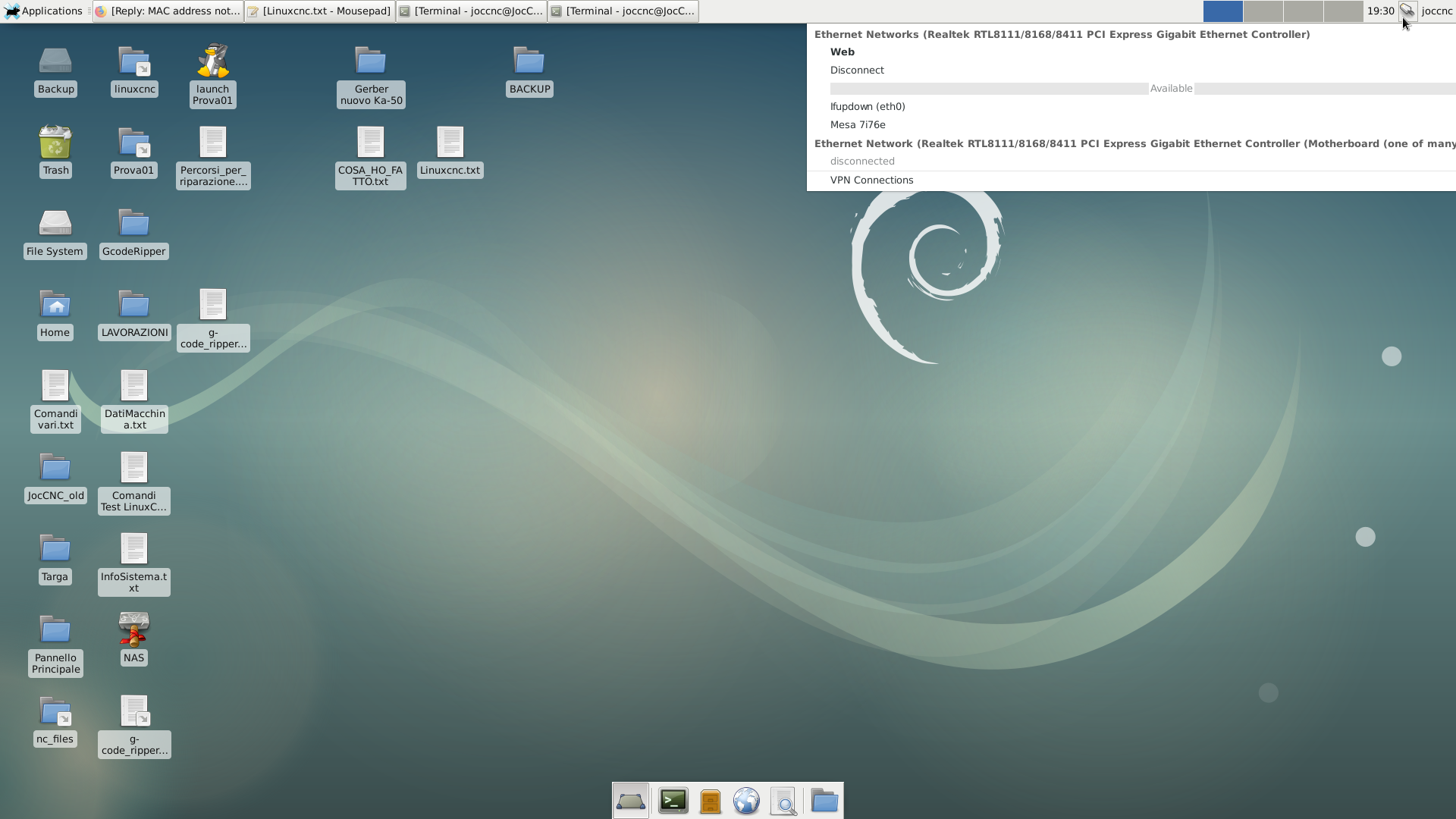
As I've 2 lan cards (the onboard and a second PCI board), I tried to launch
Code:
ip a
when connected to both, and this is what I get:
connected to Mesa (onboard card):
Code:
joccnc@JocCnc:~$ ip a 1: lo: <LOOPBACK,UP,LOWER_UP> mtu 65536 qdisc noqueue state UNKNOWN group default qlen 1     link/loopback 00:00:00:00:00:00 brd 00:00:00:00:00:00     inet 127.0.0.1/8 scope host lo        valid_lft forever preferred_lft forever     inet6 ::1/128 scope host        valid_lft forever preferred_lft forever 2: eth0: <BROADCAST,MULTICAST,UP,LOWER_UP> mtu 1500 qdisc pfifo_fast state UP group default qlen 1000     link/ether e8:4e:06:84:dc:c9 brd ff:ff:ff:ff:ff:ff     inet 10.10.10.11/8 brd 10.255.255.255 scope global eth0        valid_lft forever preferred_lft forever     inet6 fd59:b8bd:be6f:0:377f:d68c:ef9e:9227/64 scope global noprefixroute dynamic        valid_lft 7154sec preferred_lft 3554sec     inet6 fe80::8bdd:424d:f6d4:7ea2/64 scope link        valid_lft forever preferred_lft forever 3: eth1: <NO-CARRIER,BROADCAST,MULTICAST,UP> mtu 1500 qdisc pfifo_fast state DOWN group default qlen 1000     link/ether 70:85:c2:6a:f0:3d brd ff:ff:ff:ff:ff:ff joccnc@JocCnc:~$
and pinging  my router:
Code:
joccnc@JocCnc:~$ ping 192.168.1.1 PING 192.168.1.1 (192.168.1.1): 56 data bytes ping: sending packet: Network is unreachable


connected to WEB:
Code:
joccnc@JocCnc:~$ ip a 1: lo: <LOOPBACK,UP,LOWER_UP> mtu 65536 qdisc noqueue state UNKNOWN group default qlen 1     link/loopback 00:00:00:00:00:00 brd 00:00:00:00:00:00     inet 127.0.0.1/8 scope host lo        valid_lft forever preferred_lft forever     inet6 ::1/128 scope host        valid_lft forever preferred_lft forever 2: eth0: <BROADCAST,MULTICAST,UP,LOWER_UP> mtu 1500 qdisc pfifo_fast state UP group default qlen 1000     link/ether e8:4e:06:84:dc:c9 brd ff:ff:ff:ff:ff:ff     inet 192.168.1.245/24 brd 192.168.1.255 scope global dynamic eth0        valid_lft 863814sec preferred_lft 863814sec     inet6 fd59:b8bd:be6f:0:6bdd:2ca7:6e73:aa7b/64 scope global noprefixroute dynamic        valid_lft 7016sec preferred_lft 3416sec     inet6 fe80::6ed6:c856:a0cb:2db8/64 scope link        valid_lft forever preferred_lft forever 3: eth1: <NO-CARRIER,BROADCAST,MULTICAST,UP> mtu 1500 qdisc pfifo_fast state DOWN group default qlen 1000     link/ether 70:85:c2:6a:f0:3d brd ff:ff:ff:ff:ff:ff joccnc@JocCnc:~$
and pinging my router:
Code:
joccnc@JocCnc:~$ ping 192.168.1.1 PING 192.168.1.1 (192.168.1.1): 56 data bytes 64 bytes from 192.168.1.1: icmp_seq=0 ttl=64 time=0.651 ms 64 bytes from 192.168.1.1: icmp_seq=1 ttl=64 time=0.488 ms 64 bytes from 192.168.1.1: icmp_seq=2 ttl=64 time=0.479 ms 64 bytes from 192.168.1.1: icmp_seq=3 ttl=64 time=0.522 ms 64 bytes from 192.168.1.1: icmp_seq=4 ttl=64 time=0.479 ms 64 bytes from 192.168.1.1: icmp_seq=5 ttl=64 time=0.461 ms 64 bytes from 192.168.1.1: icmp_seq=6 ttl=64 time=0.479 ms 64 bytes from 192.168.1.1: icmp_seq=7 ttl=64 time=0.478 ms 64 bytes from 192.168.1.1: icmp_seq=8 ttl=64 time=0.483 ms 64 bytes from 192.168.1.1: icmp_seq=9 ttl=64 time=0.486 ms 64 bytes from 192.168.1.1: icmp_seq=10 ttl=64 time=0.398 ms

I've attached a screenshot of my desktop showing the lan connection window

Please Log in or Create an account to join the conversation.

Moderators: PCW, jmelson
Time to create page: 0.128 seconds
Powered by Kunena Forum