Press Brake CNC Control & G-Code

More
9 years 9 months ago #86041 by bymccoy
I'll use the inbuilt PLC for a number of things including the sequence/step interlocking, but for the hydraulic and safety systems I'll use an industrial PLC with safety modules. If anything, the ability to use the press with its inbuilt PLC and maintenance HMI is handy, if the CNC control software isn't working etc.

I'll go the Modbus way then, as used to that from control work.

Please Log in or Create an account to join the conversation.

More
9 years 9 months ago #86042 by andypugh
Your simplest approach, then, is likely to be to communicate from the ClassicLadder software PLC to the hardware PLC with Modbus.
There are a couple of other ways, described here:
linuxcnc.org/docs/2.7/html/drivers/mb2hal.html

Please Log in or Create an account to join the conversation.

More
9 years 9 months ago #86163 by bymccoy
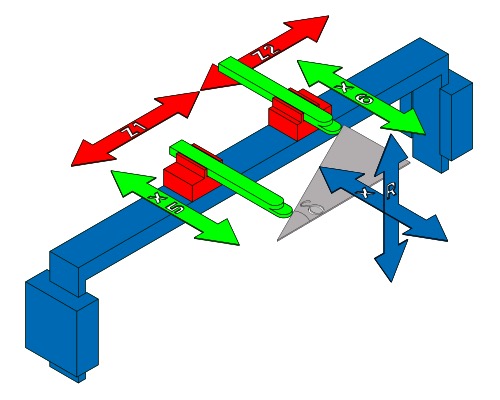
As there are two carriages on the same linear rail that form the Z-axis (Z1 and Z2), I'm trying to figure out the best way the logic could be programmed. Can LinuxCNC handle multiple things on the same axis?

The logic could be handled elsewhere, but would like it configurable in LinuxCNC. Pictures of the axis attached..

The Z axis is straight forward (LinuxCNC doesn't even need to know they're on the same axis), but there's got to be some kind of dynamic collision detection. So, Z2's min limit is always Z1's position, and Z1's max limit is Z2's position etc. I'm not sure if I should do this separately, so that Z = Z1's position, Zd = the distance between Z1 and Z2 or Z = the centre and Zd is the deviation between Z1 and Z2... Or if both should start from the origin, but there's some kind of relationship where their limits are dynamic...

In reality, theres something physical or in code that stops the axis from hitting each other when they're moving to the next position, plus there's some logic in the routine programming that stops an operator from moving Z1 and Z2 into each other's space fora position. It's not like I'm running a 3D printer with two separate heads on gantries, and that I have to sequence their operation dynamically without collision!

Basically, I see in hardware, that one end of Z has Z1's min limit, the other end has Z2's max limit and a switch on either carriage is assigned as both Z1's max limit and Z2's min limit. If both carriages touch during operation, they both stop as they've reached their limits! That deals with programmes with errors in them, or me entering crazy values in the UI. Next, the software UI says "NO" if you enter a position for Z1 or Z2 that overlap their space. In terms of homing them, I would look at using the Z1 min limit, and then getting Z2 to touch against Z1... or maybe that's super dumb, and I should send them to either end of Z...

The X axis is apparently complex, but actually straight forward, in that there's an average position (the main gantry maintains) and then the two sub-axis X1 and X2 deviate either positively or negatively. When both X1/X2 deviate the same, the they should be in their neutral position and the whole X axis moves to that point. If X1/X2 are say 100mm apart starting from origin, then X should be +50mm and X1/X2 should be +50mm and -50mm from X respectively. This scaling between X1/X2 and X is quite straight forward - X is a byproduct of X1 and X2 positions, even if I entered X in the user interface, it would just be a lazy way of entering X1 and X2 to be the same position. The real complexity comes from creating angles, by offsetting X1 or X2 so the material in the press brake can be angled, but that's just math, and that's what computers are for :)

I also need to figure out if the X1 and X2 origin is the X origin or they have their own. At this stage I don't think I need or can achieve the deviation between X1 and X2 to be the max length of X. It should only allow a certain deviation to be entered (so, I can enter X1 = 100mm from origin and X2 = 500mm from origin, giving a deviation of 400mm, placing X at 300mm, X1 at -200mm from X and X2 at +200mm from X) - X1 and X2 can be a maximum of their deviation apart, but the scaling can be between say 0 and 800mm (or however long X is).

Before I plow money into extra MESA cards etc, I might mock this up using an Arduino Mega with a RepRap board and a couple of NEMA 17 steppers and 3D printed bits.

Is LinuxCNC a proper motion control platform (ie can be used against anything), or is it really geared towards CNC machines? Am I using the right or wrong tool here for the motion control?

J

Please Log in or Create an account to join the conversation.

More
9 years 9 months ago #86182 by andypugh

bymccoy wrote: Is LinuxCNC a proper motion control platform (ie can be used against anything)


Yes, very much so.

As to your Dual-Z config, one option might be to use Z and W, with W being the distance between Z1 (directly controlled) and Z2.

LinuxCNC supports XYZ,ABC,UVW as letters that send position commands to hardware.

Please Log in or Create an account to join the conversation.

More
9 years 9 months ago #86251 by bymccoy

andypugh wrote: As to your Dual-Z config, one option might be to use Z and W, with W being the distance between Z1 (directly controlled) and Z2.


Yeah, I was leaning toward having a delta as the 2nd variable/position, afterall, I don't care that Z2 is N mm from the left, I just care that it's positioned far enough away from Z1 that the part I'm aligning has something to rest against. Likewise, I can then just move Z1, and Z2 will follow it - this is handy as if you fold a part multiple times or are using different tools as stations along the length of the press, then unless you change the parts orientation, you'll pretty much want the spacing to be the same.

I think for X and X1/X2 I might do something similar. Maybe specify A (which is X1's position) and then U (which is delta between X1 and X2) with X being calculated as the half way point between A and U.

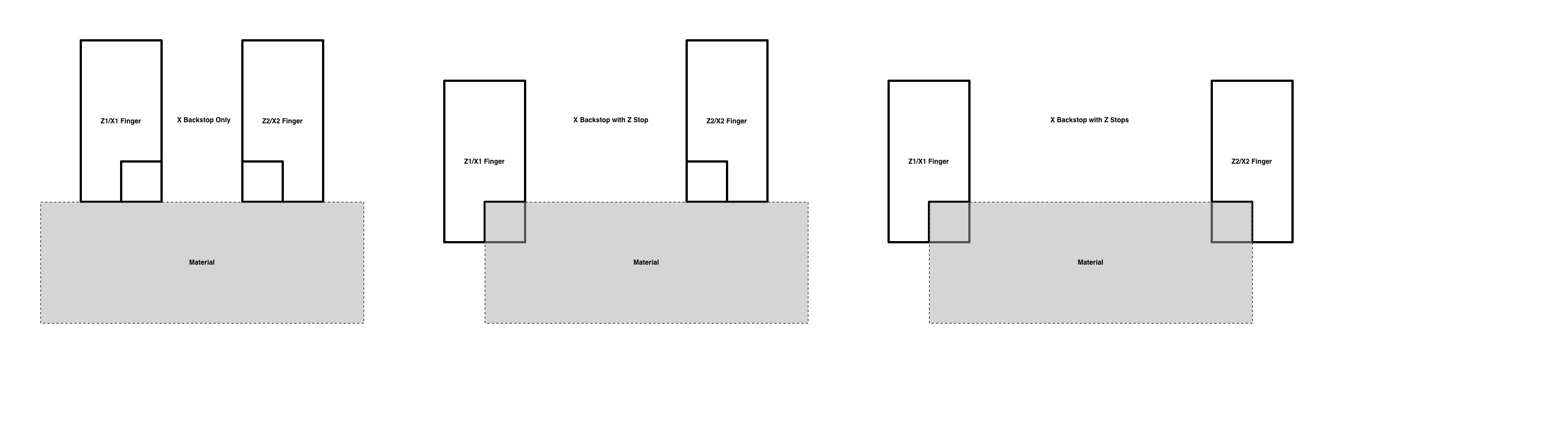
The fingers normally have steps machined into them, so you can either use them as a back stop, or use a notch/step in them for the side(s) and back of the material. If you want a single side stop, then you just move the finger forward and to the left by the step size. A finger of 40mm width with a 20mm x 20mm notch, can either be used without offset on it's face, or with a 20mm x 20mm offset for the notch. I've attached an illustration to explain. This can be achieved with some nice macros/buttons in the UI and just require the step size to be added/deducted. The fingers often have rounded steps or tips, so that material has good contact when you're folding an angle and have the steps at different positions.

I'm including lots of detail in my posts for a few reasons... I know 99% of folks won't be interested, but it's a good way to 'talk through' my ideas, solicit feedback from folk with experience (albeit not just with presses but with motion control, LinuxCNC etc) and also so that if somebody else is looking to do this, then there's some info out there. I struggled to find info, so I'm happy to share and talk with anybody else looking to do this.

Thanks!

Please Log in or Create an account to join the conversation.

More
9 years 9 months ago #86436 by andypugh
Normally U is a sort of "auxiliary X" and W is an "auxilliary Z" but you can set things up any way you want.

I wouldn't use A unless I had to, though. ABC are normally rotary axes.

Please Log in or Create an account to join the conversation.

Time to create page: 0.306 seconds
Powered by Kunena Forum