How to start Hal in interactive mode

More
10 years 8 months ago - 10 years 8 months ago #69789 by Todd Zuercher
In axis on the pull down menu for Machine, there is an option to open Hal Scope.
You may want to read up on the manuals for Hal Scope.
The first time you open it it will open the configuration window. I usually set it to trace 4 signals sampling in the servo thread, which is plenty for most servo tuning.
You'll also want to click on Configuration in the Machine pull down menu of Axis as well. This is where you can input your changes to P, I, D, FF1, FF2... for testing and then save them permanently to your ini file.
There are several servo tuning tutorials specific to Linuxcnc. Search them out they can be quite helpful.
Last edit: 10 years 8 months ago by Todd Zuercher.

Please Log in or Create an account to join the conversation.
More
10 years 8 months ago #69790 by jamby
Todd
I've been reading BJT's servo tuning page and the Hal Manual about HalScope. But I am missing the idea of, do your run a short move program or how do you produce the data you want to chart. Some where someone mentioned you cant get it jogging.
So as usual I am lost.

Jim

Please Log in or Create an account to join the conversation.

More
10 years 8 months ago #69798 by BigJohnT
I just do a MDI G0 for rapid and a G1 for cutting speed check. So if I'm tuning the X axis I have two MDI's that I click one like this:
G0 X2
G0 X0

JT

Please Log in or Create an account to join the conversation.

More
10 years 8 months ago #69809 by jamby
JT
What settings for the "trigger" do you use?
Jim

Please Log in or Create an account to join the conversation.

More
10 years 8 months ago #69819 by Todd Zuercher
I usually just do incremental jog moves for my movements.
For the trigger I usually set it to normal use the rising edge of the velocity command for the axis I'm testing as the trigger.
I like to plot the velocity command, velocity feed back, and the pid error.

Please Log in or Create an account to join the conversation.

More
10 years 8 months ago #69871 by jamby
Todd, JT

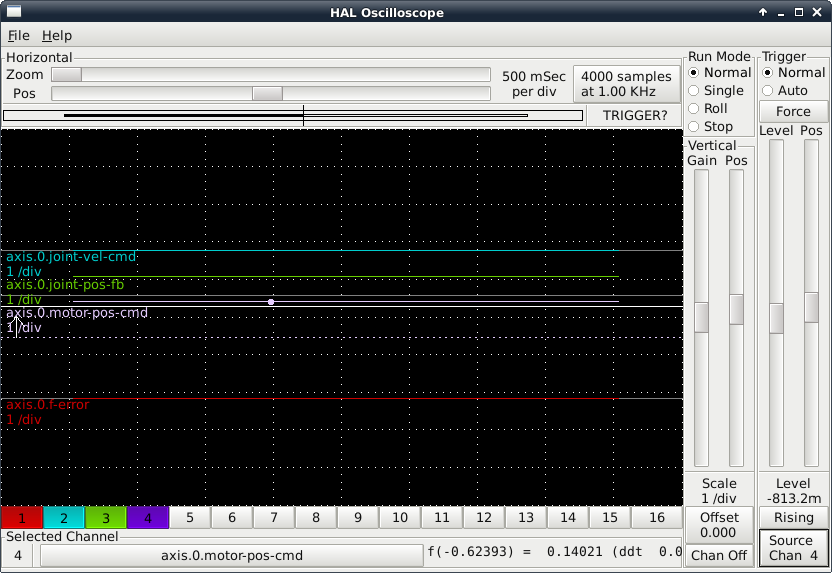
I've got a interactive HalScope session running. Channel 1 is "axis.0.f-error", channel 2 is "axis.0.joint-vel-cmd", channel 3 is "axis.0.joint-vel-fb", and channel 4 is "axis.0.motor-cmd".
Using MDI mode to move X axis back and forth 1.0 inch at a time.

Run Mode is set to "Normal", Trigger is set to "Normal". I have tried all 4 channels as trigger but still don't get anything on the screen.

Do you see what I am doing wrong??
Jim

Please Log in or Create an account to join the conversation.

Time to create page: 0.440 seconds
Powered by Kunena Forum
