
- Posts: 7
- Thank you received: 0
How to hard-reset machine position in sim.axis?
- justice
- Offline
- New Member
-

Less
More
10 years 8 months ago #70486
by justice
How to hard-reset machine position in sim.axis? was created by justice
Newbie here, using the simulator in 2.7.4 to try to get a handle on mixing G92 with G54.
I've somehow managed to get my simulator to believe that the machine position is a couple hundred inches away from the origin. I can't home (error: end of move in home state 5). I can't G00 back to origin (error: Can't issue MDI command when not homed). Deleting the .VAR file didn't help.
How can I completely reset the simulator to factory defaults?
I've somehow managed to get my simulator to believe that the machine position is a couple hundred inches away from the origin. I can't home (error: end of move in home state 5). I can't G00 back to origin (error: Can't issue MDI command when not homed). Deleting the .VAR file didn't help.
How can I completely reset the simulator to factory defaults?
Please Log in or Create an account to join the conversation.
- BigJohnT
- Offline
- Administrator
-

Less
More
- Posts: 3981
- Thank you received: 994
10 years 8 months ago #70507
by BigJohnT
Replied by BigJohnT on topic How to hard-reset machine position in sim.axis?
Please Log in or Create an account to join the conversation.
- justice
- Offline
- New Member
-
Less
More
- Posts: 7
- Thank you received: 0
10 years 8 months ago #70527
by justice
Replied by justice on topic How to hard-reset machine position in sim.axis?
Thanks, but this doesn't actually work. As described above, I can't home the Z axis (maybe the sim is outside its limit switch, so it can't find the home switch?). One can't issue MDI commands without homing. So I really need a way to make the machine completely forget it's persistent state.
Please Log in or Create an account to join the conversation.
- BigJohnT
- Offline
- Administrator
-
Less
More
- Posts: 3981
- Thank you received: 994
10 years 8 months ago - 10 years 8 months ago #70536
by BigJohnT
Replied by BigJohnT on topic How to hard-reset machine position in sim.axis?
linuxcnc.org/docs/2.7/html/gui/axis.html#_menu_items
Take a look at Zero Coordinate System.
If you delete the .var file and the backup var file you have no more offsets. I suspect you did not delete the one your ini points to.
JT
Take a look at Zero Coordinate System.
If you delete the .var file and the backup var file you have no more offsets. I suspect you did not delete the one your ini points to.
JT
Last edit: 10 years 8 months ago by BigJohnT.
Please Log in or Create an account to join the conversation.
- justice
- Offline
- New Member
-
Less
More
- Posts: 7
- Thank you received: 0
10 years 8 months ago #70552
by justice
Replied by justice on topic How to hard-reset machine position in sim.axis?
Thanks for your continued help, Big John. I tried about four different items in Machine->Zero Coordinate System; they each returned the "can't issue MDI command when not homed."
I am using a canned sim.axis machine called "axis.ini". It points to a VAR file called "sim.var". I shut down linuxcnc and deleted that file (and the .bak) from ~/linuxcnc/configs/sim.axis/. It did not exist anywhere else on the filesystem.
There's no effect, my Z-axis is still ridiculous, and won't home.
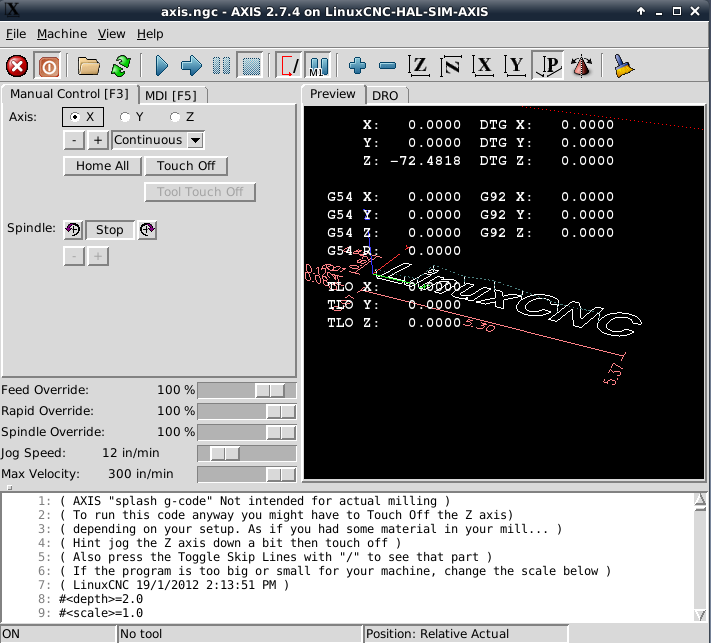
I am using a canned sim.axis machine called "axis.ini". It points to a VAR file called "sim.var". I shut down linuxcnc and deleted that file (and the .bak) from ~/linuxcnc/configs/sim.axis/. It did not exist anywhere else on the filesystem.
There's no effect, my Z-axis is still ridiculous, and won't home.
Please Log in or Create an account to join the conversation.
- racedirector
- Offline
- Elite Member
-

Less
More
- Posts: 231
- Thank you received: 42
10 years 8 months ago #70555
by racedirector
Replied by racedirector on topic How to hard-reset machine position in sim.axis?
Try deleting position.txt in the config directory, that holds the axis positions between runs. Deleting it will set it all back to zero....
The following user(s) said Thank You: BigJohnT, justice
Please Log in or Create an account to join the conversation.
Time to create page: 0.497 seconds