n00b: I might be an idiot? Set up help.

More
7 years 7 months ago #128596 by MoreAaron
Thank you for that tip. That I did not know. Linux is a tricky devil.

Please Log in or Create an account to join the conversation.

More
7 years 7 months ago #128597 by tommylight
Naaah Linux is very user friendly, it is just picky who it's friends are ! :)
That issue with address changing i noticed twice and i have changed addresses more than i could count.
But it is an issue that could send you endlessly chasing gremlins, better to avoid that.
The following user(s) said Thank You: MoreAaron

Please Log in or Create an account to join the conversation.

More
7 years 7 months ago #128624 by MoreAaron
Well I have tried every single address I can find in lspci -v, proc ioports, etc.

lspci in op.

iports:
0378-037a : parport0
dc00-dc02 : parport1
dc03-dc07 : parport1


Nothing.
I've got a new IEEE1284parallel port cable otw which will arrive Saturday. Maybe my cable is shit. :dunno:

I'll probably check for one locally too cause waiting is for suckers. :)

Also... I've noticed now that the AD3 led is stuck on. Even when nothing is attached to any output pin. Could be nothing, but I guess I'll google around and see.

Thanks again for all the help so far and do keep any ideas, etc coming... before I get desperate and just order a centroid acorn. lol

Please Log in or Create an account to join the conversation.

More
7 years 7 months ago - 7 years 7 months ago #128649 by andypugh
You should be able to use
Code:
loadrt hal_parport cfg="0x378 out"
or
Code:
loadrt hal_parport cfg="0 out"
for the on-board parallel port (have you tried using that one?
And
Code:
loadrt hal_parport cfg="0xdc00 out"
or
Code:
loadrt hal_parport cfg="1 out"
for your PCI card.

dmesg might give you some more ideas what is going on.

I will assume that you are using the RTAI live CD
Open 2 terminal windows
In the first run these commands to clear and monitor the dmesg kernel log
Code:
tail -f /var/log/kern.log
This window will show kernel messages from the drivers as they are created (ignore any output in this window up to this point)

In the second window enter an interactive HAL session and try these commands.
Code:
halrun loadrt hal_parport cfg="0xdc00 out"
Take a note (copy and paste) of any output in either window
you can then exit the HAL session
Code:
exit
and repeat the HAL commands in the same window with the other options and addresses.
Before you exit you can also read the parallel port pin states and set pin values, but to do that you need to load and start a realtime thread and add the parport functions to that
Code:
loadrt threads addf parport.0.read thread1 addf parport.0.write thread1 start show pin
and set the state of output pins
Code:
setp parport.0.pin-00-out 1 setp parport.0.pin-00-out 0
Last edit: 7 years 7 months ago by andypugh.
The following user(s) said Thank You: MoreAaron

Please Log in or Create an account to join the conversation.

More
7 years 7 months ago #128661 by MoreAaron
I will do all of that as soon as I get home. :)

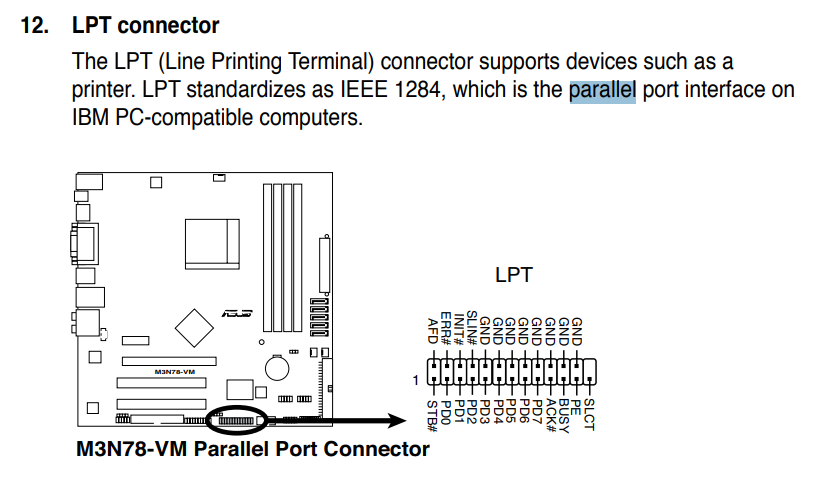
The confusing thing is I am 99% sure the main board doesn't have a parallel port. I'll need to double check when I get home but I am pretty sure it is an Asus M3N78-VM

The back panel basically looks like this:

Please Log in or Create an account to join the conversation.

More
7 years 7 months ago #128662 by MoreAaron
MF. Turns out there is one... it is internal. I never even thought to look for such a thing.


Please Log in or Create an account to join the conversation.

Time to create page: 0.895 seconds
Powered by Kunena Forum