Handling large files

More
7 years 4 months ago - 7 years 4 months ago #138188 by Lezard
Replied by Lezard on topic Handling large files
OK, so I've made some progress on this idea : I've been able to use sampler to read motion.program−line, but the output to a text file still needs some work : halsampler creates the file but it remains empty. I think I might need to close the file at some point, but I still need to figure out when and how to do it. Also, it seems that motion.program−line is actually the count of line processed from the beginning of the session, not from the start of the ngc file ? I still need to double-check to make sure.

On another note, I've experimented with the use of Start-from-line : it works, but in my case, if the spindle was stopped, it won't restart it. I guess this is normal, but this means that I really need some sort of script, maybe run from a button on the UI, to resume the execution of the G-Code with all required pre-commands, so that I won't forget anything important. So the sampler/halsampler might need to store more than just the line number, so that I can create a script that restores proper conditions before resuming the file processing.

More on this later, but I will be away from the machine for some days
Last edit: 7 years 4 months ago by Lezard.

Please Log in or Create an account to join the conversation.

More
7 years 4 months ago #138190 by lorenzn
Replied by lorenzn on topic Handling large files

halsampler creates the file but it remains empty.


Did you set the enable pin?

Please Log in or Create an account to join the conversation.
More
7 years 4 months ago #138193 by Lezard
Replied by Lezard on topic Handling large files

lorenzn wrote:

halsampler creates the file but it remains empty.


Did you set the enable pin?


I think it is enabled by default, I checked it with HAL monitor (?) and I could see that the pin and associated signal received the expected value. I'm a bit confused by the halsampler doc : it seems that there is no function to activate, just loadusr halsampler ?

Please Log in or Create an account to join the conversation.

More
7 years 4 months ago #138196 by Grotius
Replied by Grotius on topic Handling large files
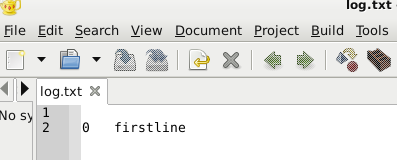
I made a short code example for your mars surface log file...
You could integrate this code in a component. Yourhal_line will be your input character text string in this case, could be
a complete g_code line.
Code:
#include <stdio.h> #include <stdlib.h> #include <string.h> #include <math.h> char linebuffer[200] = "firstline"; int i; //int main(int argc, char *argv[]){ FILE *file_write=fopen("log.txt", "w"); file_write=fopen("log.txt", "w"); //Yourhal_line = linebuffer; fprintf(file_write,"\n%d\t%s ", i, linebuffer); i++; fclose(file_write); //}

Output :


Good luck !!
The following user(s) said Thank You: chimeno

Please Log in or Create an account to join the conversation.

More
7 years 4 months ago #138197 by lorenzn
Replied by lorenzn on topic Handling large files
Yes I see you're right it is enabled by default. When I used it, I setp enable 0 in my .hal file, then enabled with halcmd when I was ready to sample the data and write to the file.
Code:
loadrt sampler depth=10000 cfg=b addf sampler.0 servo-thread setp sampler.0.enable 0 net 1-is-homed sampler.0.pin.0

Then run
Code:
$ halcmd setp sampler.0.enable 1 $ halsampler -t out

Please Log in or Create an account to join the conversation.

More
7 years 4 months ago #138200 by Lezard
Replied by Lezard on topic Handling large files
Hi @Grotius,

Thank you very much for your code sample.
I'm really a noob on this so will need some time to figure out what it does/how to use it, but I'm sure it will come handy at some point.
The following user(s) said Thank You: Grotius

Please Log in or Create an account to join the conversation.

Time to create page: 0.073 seconds
Powered by Kunena Forum
