[maybe you've already tried this and I misunderstood your original post. If so, sorry... and we'll keep working on it]
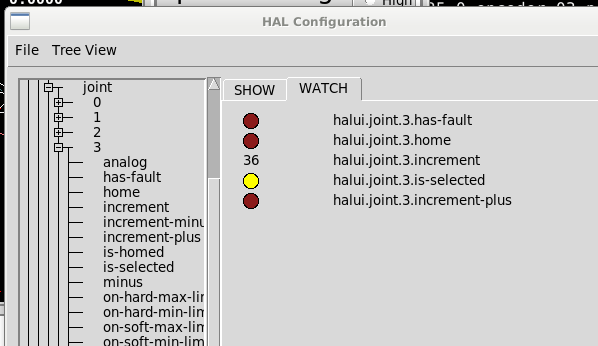
Ok, I think the issue is that you have connected your manual input button (hm2_5i25.0.7i76.0.3.input-21) to the joint jogging function in halui, but you haven't connected the button/input to halui axis jogging.
Specifically, this section of the HAL file:
Code:
#MVL Carousel Manual Button
setp halui.joint.3.increment 36.0
sets jog-speed 1440
net jog-carousel => halui.joint.3.select halui.joint.3.increment-plus <= hm2_5i25.0.7i76.0.3.input-21
Try connecting the input to the a-axis as well:
Code:
#MVL Carousel Manual Button
setp halui.joint.3.increment 36.0
[color=#c0392b]setp halui.axis.a.increment 36.0[/color]
sets jog-speed 1440
net jog-carousel => halui.joint.3.select halui.joint.3.increment-plus <= hm2_5i25.0.7i76.0.3.input-21
[color=#c0392b]net jog-carousel => halui.axis.a.select halui.axis.a.increment-plus[/color]
If that doesn't work reliably, then I suspect the problem may be that you are selecting the axis/joint with the same signal as you are commanding a jog. You may need a slight delay between axis/joint selection and the jog command - you did mention that 'joint jogging works
sometimes'
If this is the case, then a time-delay component might be the ticket. Something like this:
Code:
loadrt timedelay.0
addf timedelay.0 servo-thread
...
setp timedelay.0.on-delay 0.1
setp timedelay.0.off-delay 0
net jog-carousel => timedelay.0.in
net jog-carousel => halui.joint.3.select => halui.axis.a.select[color=#c0392b] [/color]<= hm2_5i25.0.7i76.0.3.input-21
net jog-move <= timedelay.0.out
net jog-move => halui.joint.3.increment-plus halui.axis.a.increment-plus
What this will hopefully do is add a slight delay between selecting the axis/joint and commanding the move. If it works, play around with the on-delay value to the point where there isn't an annoying wait between mashing the button and seeing the carousel move.