
- Posts: 723
- Thank you received: 139
Trajectory Planner using Ruckig Lib
- smc.collins
- Offline
- Platinum Member
-

Less
More
2 years 9 months ago #291978
by smc.collins
Replied by smc.collins on topic Trajectory Planner using Ruckig Lib
I've got big iron with the capability to run 1000 ipm, I'm very very interested
Please Log in or Create an account to join the conversation.
- RDA
- Offline
- Premium Member
-

Less
More
- Posts: 157
- Thank you received: 43
2 years 9 months ago #292010
by RDA
Replied by RDA on topic Trajectory Planner using Ruckig Lib
I think we all want to see this running and working.
Probably many are willing to help/contribute, just let everyone one know what you guys need to push this forward.
Probably many are willing to help/contribute, just let everyone one know what you guys need to push this forward.
Please Log in or Create an account to join the conversation.
- ihavenofish
- Offline
- Platinum Member
-
Less
More
- Posts: 1029
- Thank you received: 286
2 years 8 months ago #292166
by ihavenofish
Replied by ihavenofish on topic Trajectory Planner using Ruckig Lib
I cant help with coding, and can only offer encouragement. I definitely want to test it on my little machine once it is in a functional state.
Please Log in or Create an account to join the conversation.
- Grotius
- Offline
- Platinum Member
-
Less
More
- Posts: 2419
- Thank you received: 2349
2 years 8 months ago #292212
by Grotius
Replied by Grotius on topic Trajectory Planner using Ruckig Lib
Hi,
The project so far worked more or less okey when each g0,g1,g2,g3 had a start and stop.
I have seen a tiny bug wich is related to loading a arc, it doesn't read if arc is clockwise or counterclockwise.
This issue is resolvable.
So far my blending tryouts failed.
Last week i started thinking about how to go on with this project.
I made a test, wich i found out to be interesting. I will tell you how it works, and i hope you will understand,
and share a conclusion about it.
The question is : Is the X-axis capable to follow the Y-axis on the path?
The path test :
We have a path, containing 3 segments :
Compare the ruckig runners to a motor for x and y, using a scurve motion profile.
Graph map :
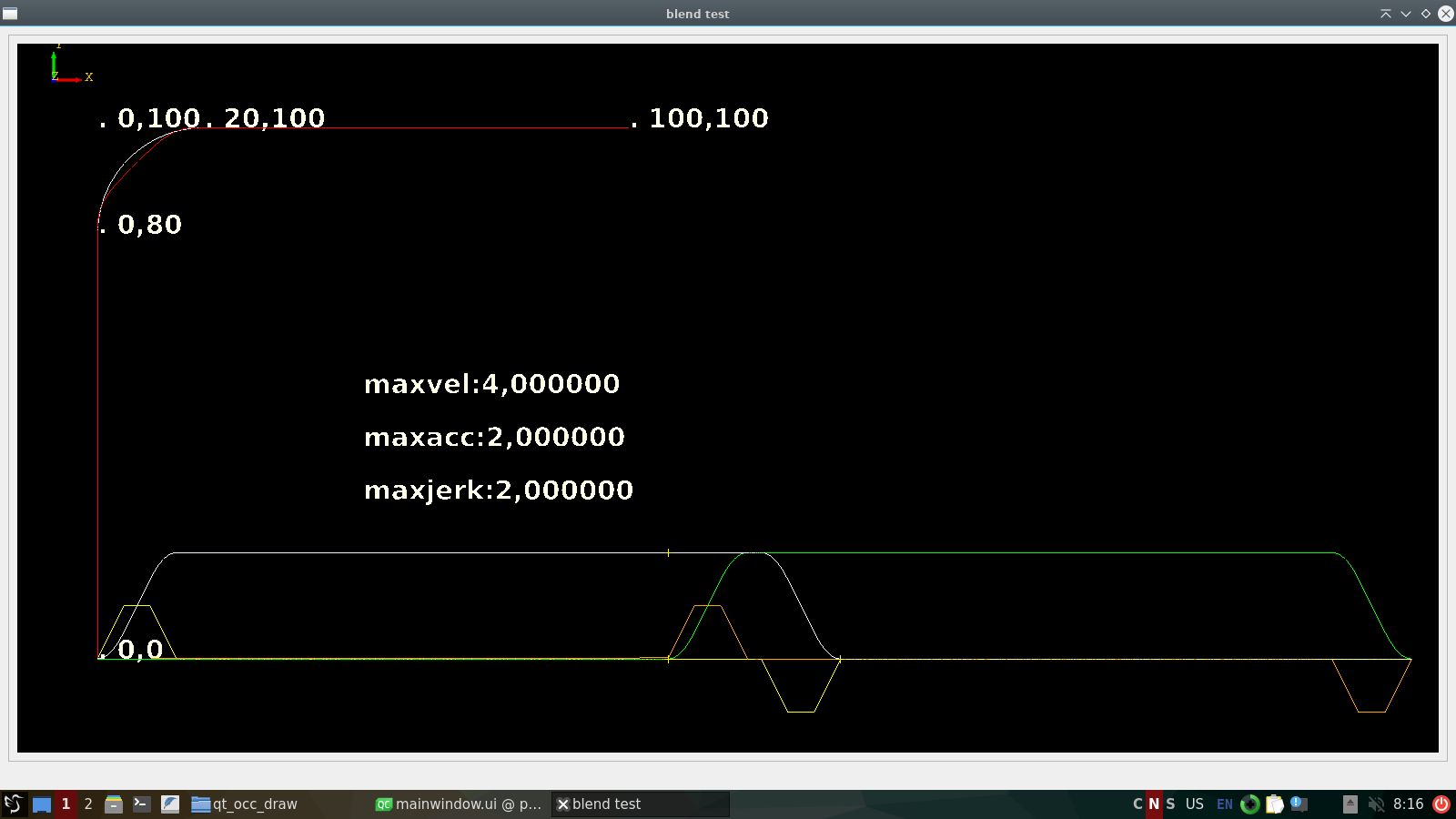
velocity=4.
We see the red arc in the upper left corner is inside the arc of segment 2.
This is good news. We could follow the white arc exactly doing interpolation, this involves slowing down the x axis
to follow the arc exactly.
In my opinion, this solution results in the optimal corner velocity.
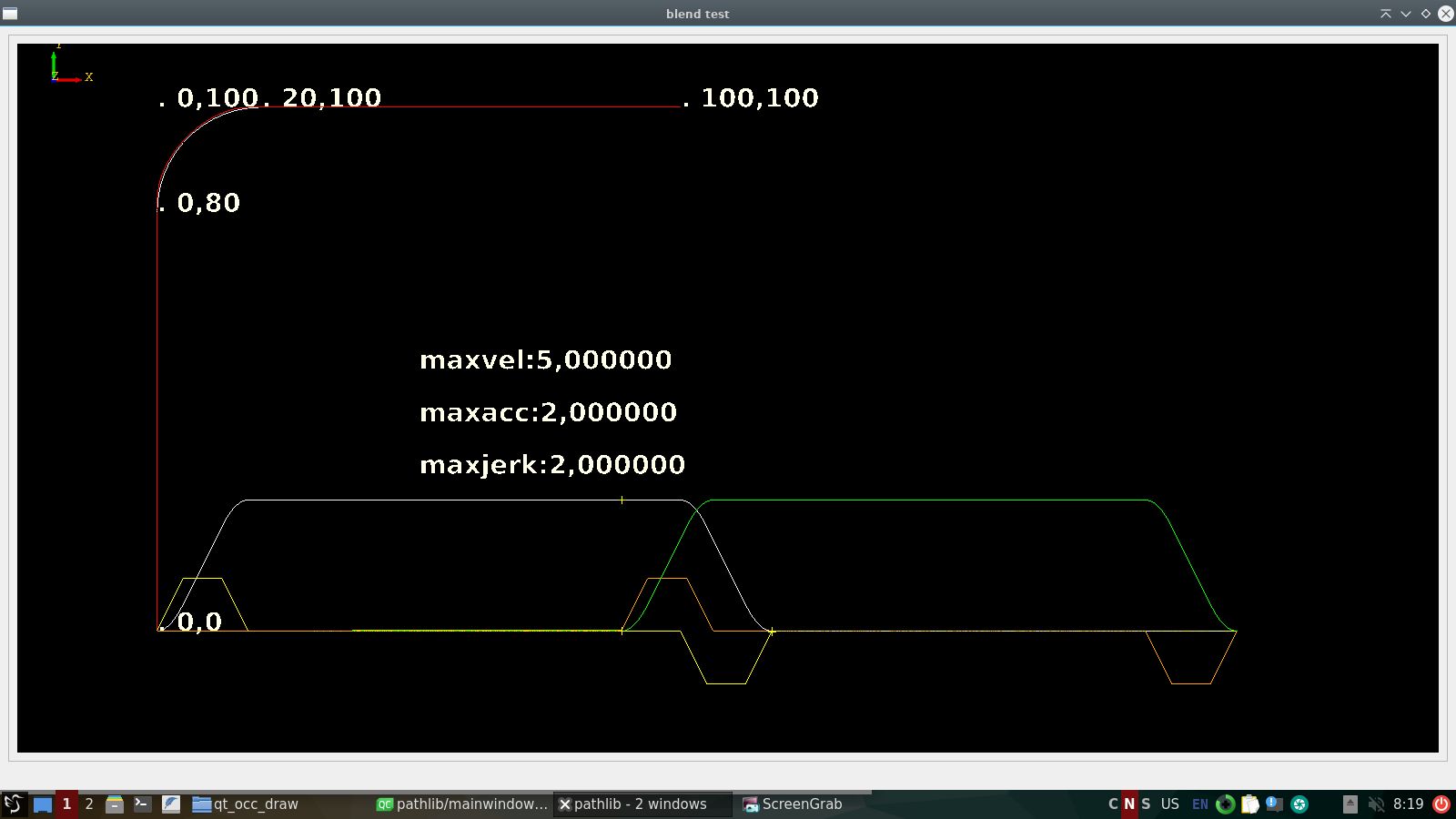
velocity=5.
It's hard to see, but the red arc is outside the white arc, interpolation to get the x axis on the arc would only
work if we increase the x axis max-acceleration value. This option fails.
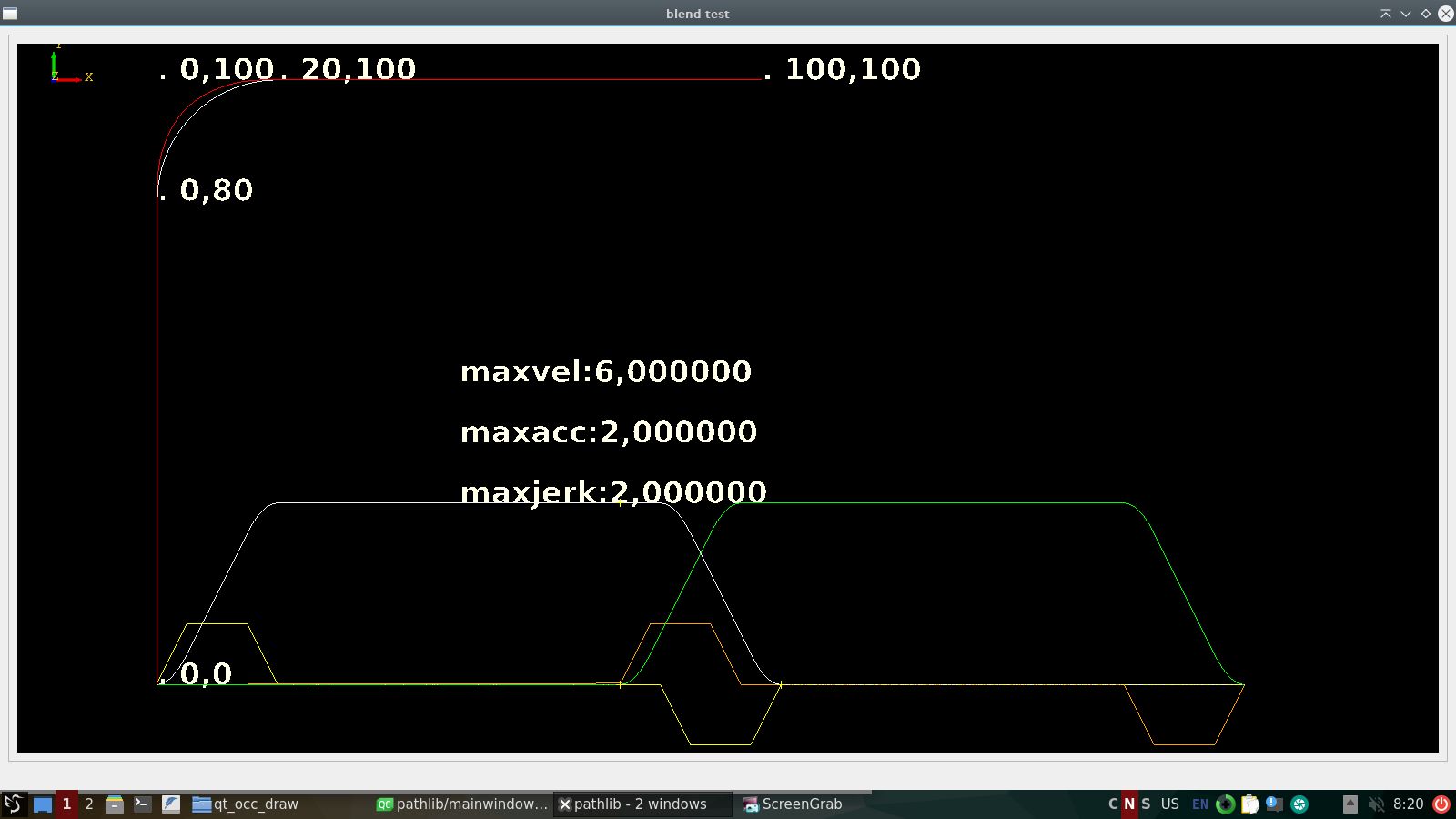
velocity=6.
The red arc is far outside the white arc. Its impossible to resolve a valid path.
I hope you can understand this mathematical problem, and i hope we can create a algoritme to solve this soon.
The project so far worked more or less okey when each g0,g1,g2,g3 had a start and stop.
I have seen a tiny bug wich is related to loading a arc, it doesn't read if arc is clockwise or counterclockwise.
This issue is resolvable.
So far my blending tryouts failed.
Last week i started thinking about how to go on with this project.
I made a test, wich i found out to be interesting. I will tell you how it works, and i hope you will understand,
and share a conclusion about it.
The question is : Is the X-axis capable to follow the Y-axis on the path?
The path test :
We have a path, containing 3 segments :
- segment 1: a line from {0,0} to {0,80}.
- segment 2: a clockwise arc from {0,80} to {20,100}.
- segment 1: a line from {20,100} to {100,100}.
Compare the ruckig runners to a motor for x and y, using a scurve motion profile.
- ruckig scurve runner, x axis.
- ruckig scurve runner, y axis.
- perform a motion for y axis from {0,0} to {0,100}.
- when y axis is at {0,80,0} start x axis from {0,0} to {100,0}.
Graph map :
- On the bottom we have the velocity and acceleration graph.
- On the bottom the 2 yellow points are at {0,80}, this is the begin of the arc.
- The red line is are the position points for the ruckig runners x and y.
- The white arc in the upper left corner represents segment 2.
velocity=4.
We see the red arc in the upper left corner is inside the arc of segment 2.
This is good news. We could follow the white arc exactly doing interpolation, this involves slowing down the x axis
to follow the arc exactly.
In my opinion, this solution results in the optimal corner velocity.
velocity=5.
It's hard to see, but the red arc is outside the white arc, interpolation to get the x axis on the arc would only
work if we increase the x axis max-acceleration value. This option fails.
velocity=6.
The red arc is far outside the white arc. Its impossible to resolve a valid path.
I hope you can understand this mathematical problem, and i hope we can create a algoritme to solve this soon.
The following user(s) said Thank You: akb1212, tommylight, tivoi, vmihalca, Ritterchen, nwallace, Unlogic
Please Log in or Create an account to join the conversation.
- RDA
- Offline
- Premium Member
-
Less
More
- Posts: 157
- Thank you received: 43
2 years 8 months ago #292323
by RDA
Replied by RDA on topic Trajectory Planner using Ruckig Lib
Sorry but what do you mean by:
velocity=5.
It's hard to see, but the red arc is outside the white arc, interpolation to get the x axis on the arc would only
work if we increase the x axis max-acceleration value. This option fails.
I assume you get it to follow the path by increasing the max-acc? But I dont understand what you mean with ”this option fails”.
velocity=5.
It's hard to see, but the red arc is outside the white arc, interpolation to get the x axis on the arc would only
work if we increase the x axis max-acceleration value. This option fails.
I assume you get it to follow the path by increasing the max-acc? But I dont understand what you mean with ”this option fails”.
Please Log in or Create an account to join the conversation.
- Grotius
- Offline
- Platinum Member
-
Less
More
- Posts: 2419
- Thank you received: 2349
2 years 8 months ago #292784
by Grotius
Replied by Grotius on topic Trajectory Planner using Ruckig Lib
I assume you get it to follow the path by increasing the max-acc?
Yes.
I dont understand what you mean with ”this option fails”.
It's not a good thing to use value's that are above machine limits and or user input for maxacc etc.
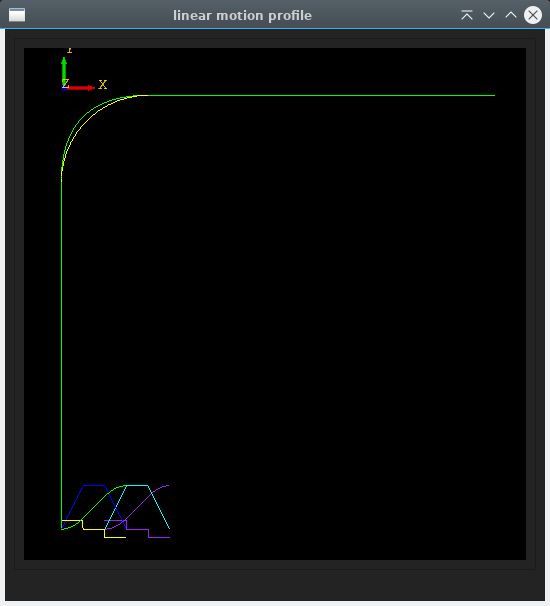
I did a second test using linear velocity profile, the 2 line and arc coordinates are the same as in previous post.
I had to make a c++ class for this, was a lot of work.
So far the waypoints that constructed the green arc, are outside the yelllow arc. The yellow arc is the exact path to follow.
So next thing is try to get exact path waypoints. With ruckig, this was a no go.
- Curve input -
vo:0.000 vm:10.000 ve:0.000 s:100.000 a:2.000
- Curve period t1 :acc
- Curve period t2 :steady
- Curve period t3 :dcc
- Curve times :
t1:5.000
t2:5.000
t3:5.000
ttot:15.000
- Curve displacement :
s1:25.000
s2:50.000
s3:25.000
stot:100.000
Yes.
I dont understand what you mean with ”this option fails”.
It's not a good thing to use value's that are above machine limits and or user input for maxacc etc.
I did a second test using linear velocity profile, the 2 line and arc coordinates are the same as in previous post.
I had to make a c++ class for this, was a lot of work.
So far the waypoints that constructed the green arc, are outside the yelllow arc. The yellow arc is the exact path to follow.
So next thing is try to get exact path waypoints. With ruckig, this was a no go.
- Curve input -
vo:0.000 vm:10.000 ve:0.000 s:100.000 a:2.000
- Curve period t1 :acc
- Curve period t2 :steady
- Curve period t3 :dcc
- Curve times :
t1:5.000
t2:5.000
t3:5.000
ttot:15.000
- Curve displacement :
s1:25.000
s2:50.000
s3:25.000
stot:100.000
The following user(s) said Thank You: akb1212, tommylight, Unlogic
Please Log in or Create an account to join the conversation.
Time to create page: 0.378 seconds