(LPT) Debian 12 Latency spikes/unexpected real time delay. Looking for solution.

More
1 year 8 months ago #322122 by denhen89
Yes, buying the 7i76e might be a good idea, but its difficult to get (out of stock everywhere) and i would wish to not need to rewire anything and configure.

Of course I could ask or look for a pc setup that works 100% with the newest rtai kernel and buy the same hardware, but its just strange that I cannot get that machine that worked really well with wheezy not working on debian 12.

On tomorrow i will try a couple more bios settings but all energy saving functions are disabled and I know I didn't had to fix so many things to get a jitter of about 8000.

@tommylight: this I have solved already and the machine sounds and works by jogging perfectly fine now, but I still get unexpected realtime error on task 1 on start up.

Currently I mostly do changes in the cpu ratio and other cpu settings like cpu bus frequency and if I setup a wrong value, lets say, cpu frequency 165 instead of 120 then the machine might make that strange movement, smooth but not all the time.

I attach 2 pictures of one windows screen (tweaker), so that you see the options. That are not anymore the current settings. Tomorrow I can show pictures of the other options available but I am sure it's setup correct.

In grub config I have only what was already there: "quiet" and I added "isolcpus=5" to it. I believe with wheezy I had isolcpus=1,2,34,5, but I am not sure anymore.
The cpu is a amd phenom ii x6 1055t.


Please Log in or Create an account to join the conversation.

More
1 year 8 months ago #322125 by PCW
The 7I76E has been replaced with the 7I76EU which is available from a couple of sources.
 
The 7I92T option would work with your existing breakouts, but it would require
completely different hal/ini files.

 
The following user(s) said Thank You: denhen89

Please Log in or Create an account to join the conversation.

More
1 year 8 months ago - 1 year 8 months ago #322197 by denhen89
Thank you for that.

Update: I have the pc at this moment at home, so i can do some tests while doing my work.
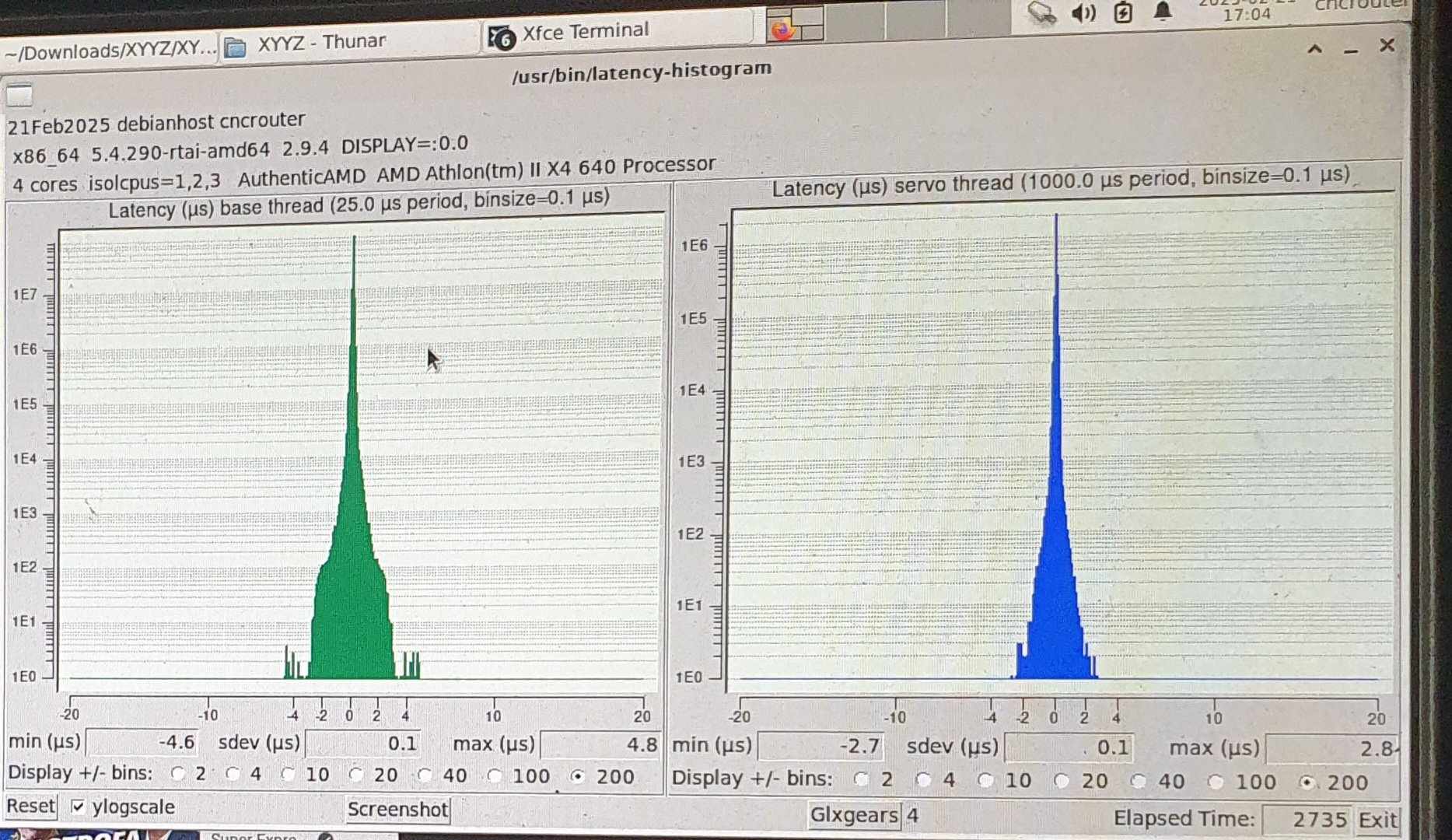
When i start latency-histogram and run it for some time (e.g. 15 min) with 3x glxgears the base thread looks good. Depending on the cpu bios settings i have stable max us of 20.000, but i found out that when i addionally start a youtube video (720p), the latency goes up, pretty quickly, almost directly after starting the video and then the latency jumps to 45000 then 60.000 and who knows how high it goes but then of course it doesnt matter anymore. 
Of course i have to connect the pc back to the machine and see if it starts without unexpected real time delay and if the machines runs smooth, because after going from wheezy to debian 12 i had the situations where there latency-test (not histogram) showed good results in for a short time but the motors didnt move as they should.

While writing this post, the latency-histogram is still runing and still at 20.0 us. Maybe i am able to get it to work, but it seems that the vga might cause the latency spike and thats why i get a unexpected real time delay on start up.

What i could do next is to buy better ram, because one stick of the ddr3 1600mhz (2x4gb) ram that i had from my last main pc is not working, so i am currently using some old 1333mhz ddr3 2x2gb rams.
Also a onboard vga might give better results, but i dont have a pc with integrated vga to test it.
Last edit: 1 year 8 months ago by denhen89.

Please Log in or Create an account to join the conversation.

More
1 year 8 months ago #322216 by denhen89
Update:
The machines works again, without unexpected real time delay and a very good latency, but i had to take the PC of my Lathe. (the lathe machine uses the Mesa 7i76e card)
That PC has a on-board graphic card, but i first tested it with the VGA that was already there and i got the same latency issues. As soon as i used the on-board vga, the latency was perfect and no "realtime errors" at start up.

I have started latency-histogram, with 4 x glxgears and a youtube video running for about 1 hour.
I first started the histogram, then opened one glxgears and waited to check if anything spikes happen. Then i opened 3 more glxgears. No latency spike. Then the youtube video and the pc was running like that for almost one hour without any change to the base thread.
On tomorrow i will run a milling program and check if anything bad happens.

Also i will connect that "latency issue PC" to the Lathe and hope there will be no problems, but i think with the Mesa card there shouldnt be any.
The following user(s) said Thank You: tommylight, royka

Please Log in or Create an account to join the conversation.

More
1 year 8 months ago #322229 by tommylight
The following user(s) said Thank You: denhen89

Please Log in or Create an account to join the conversation.

More
1 year 8 months ago #322350 by denhen89
Yes, and after some testing on yesterday it seems to work.
I just need to solve a noise problems that exist only when the spindle is running. The VFD is plugged to a different plug in a other room, which is not the same "line" if i can say so, as the CNC router is connected to. If its connected to the same line as the cnc router, then as soon as the spindle starts the axis moves like crazy.
Currently it seems that the axis are getting some noise when other things like vacuum cleaner is running or when turning off, and then the axis moves slightly.

I am not sure if grounding the machine with a ground rod would help, but this is not a linux/linuxcnc related problem.

So, thanks for help guys. The Latency problem is solved and anyone who has similar problems should consider to use a pc with integrated Graphics card.
The following user(s) said Thank You: tommylight

Please Log in or Create an account to join the conversation.

Time to create page: 0.447 seconds
Powered by Kunena Forum