
GUI that somewhat resembles haas or fanuc workflow.
- Aciera
-

- Offline
- Administrator
-

Less
More
- Posts: 4819
- Thank you received: 2176
04 Jun 2025 05:21 - 04 Jun 2025 05:26 #329658
by Aciera
Replied by Aciera on topic GUI that somewhat resembles haas or fanuc workflow.
Not sure what GUI you are using but it seems to me that you might not have given the existing GUIs much consideration other then the fact that it does not look and feel like the controls you are used to.
External buttons can be implemented with most GUIs. Start/stop/pause, jogging, overrides, homing, etc. with physical buttons, encoders and potentiometers. This has been possible for a long time.
None of my machine refits use screen jogging buttons and _certainly_ no keyboard shortcuts.
Also tool and work offsets pages have been around for years.
As an example, Gmoccapy which I use, but there are others:
linuxcnc.org/docs/html/gui/gmoccapy.html#_hal_pins
External buttons can be implemented with most GUIs. Start/stop/pause, jogging, overrides, homing, etc. with physical buttons, encoders and potentiometers. This has been possible for a long time.
None of my machine refits use screen jogging buttons and _certainly_ no keyboard shortcuts.
Also tool and work offsets pages have been around for years.
As an example, Gmoccapy which I use, but there are others:
linuxcnc.org/docs/html/gui/gmoccapy.html#_hal_pins
Last edit: 04 Jun 2025 05:26 by Aciera.
The following user(s) said Thank You: tommylight, spumco, Kieran
Please Log in or Create an account to join the conversation.
- cakeslob
- Offline
- Platinum Member
-

Less
More
- Posts: 927
- Thank you received: 280
04 Jun 2025 15:03 - 04 Jun 2025 18:26 #329692
by cakeslob
Replied by cakeslob on topic GUI that somewhat resembles haas or fanuc workflow.
Here is my current attempt to have a fanuc like gui
github.com/cakeslob/regularmac_800
I dont have all the controls mapped to the Tab/arrow keys yet, or a softkey menu
- Not everything needs to be on the screen at the same time.
- I dont think people have a problem with graphics, most stuff is crude text shortforms.
- It uses a combo of hard keys for each menu -(some multi press buttons, ie press offset for tool, press offset again for work offset) and soft keys that change with each menu
- you can load/setup/run the program with like 5 buttons(some soft) + arrow keys
- some modes (ie edit/MDI/Jog/pendant/auto) disable other features , so you cant run a program from edit mode, you can edit a program in MDI mode, you cant jog in auto, etc
-the whole gui is bacically controlled by pg up/down, arrow keys, and function keys
- monitor aspect is usually 1:1 square, but thats uncommon in consumer stuff, so 4:3 is closest
- no axis movement until start button. so any probe routines or toolsets, you need to press cycle start.
I have tested out every gui to find the most similar one. All the GUI could be made to be like fanuc style, The cloest ones to fanuc style workflow were keystick and mini, but its been a long time since I was able to use those so maybe its nostalgia. Qtdragon or the smaller one could be made to work like fanuc style with not to much changes, but it would be more python backend behavior for keyboard behavior/navigation (no mouse needed), and softkey stuff than actual GUI organization, the layout of the small one (woodpecker?) is pretty close to what fanuc stuff looks like .
github.com/cakeslob/regularmac_800
I dont have all the controls mapped to the Tab/arrow keys yet, or a softkey menu
Fanuc has a nice workflow because you dont have to screw around with a mouse and find buttons and stuff like that.What would be a short list of requirements for an industrial screen?
No axis movement without START button?
No graphics?
Mostly text styles or more modern graphical elements?
Multi function soft keys? Hardware only keys.
What target monitor size?
Etc.
- Not everything needs to be on the screen at the same time.
- I dont think people have a problem with graphics, most stuff is crude text shortforms.
- It uses a combo of hard keys for each menu -(some multi press buttons, ie press offset for tool, press offset again for work offset) and soft keys that change with each menu
- you can load/setup/run the program with like 5 buttons(some soft) + arrow keys
- some modes (ie edit/MDI/Jog/pendant/auto) disable other features , so you cant run a program from edit mode, you can edit a program in MDI mode, you cant jog in auto, etc
-the whole gui is bacically controlled by pg up/down, arrow keys, and function keys
- monitor aspect is usually 1:1 square, but thats uncommon in consumer stuff, so 4:3 is closest
- no axis movement until start button. so any probe routines or toolsets, you need to press cycle start.
Not sure what GUI you are using but it seems to me that you might not have given the existing GUIs much consideration other then the fact that it does not look and feel like the controls you are used to.
External buttons can be implemented with most GUIs. Start/stop/pause, jogging, overrides, homing, etc. with physical buttons, encoders and potentiometers. This has been possible for a long time.
None of my machine refits use screen jogging buttons and _certainly_ no keyboard shortcuts.
Also tool and work offsets pages have been around for years.
As an example, Gmoccapy which I use, but there are others:
linuxcnc.org/docs/html/gui/gmoccapy.html#_hal_pins
I have tested out every gui to find the most similar one. All the GUI could be made to be like fanuc style, The cloest ones to fanuc style workflow were keystick and mini, but its been a long time since I was able to use those so maybe its nostalgia. Qtdragon or the smaller one could be made to work like fanuc style with not to much changes, but it would be more python backend behavior for keyboard behavior/navigation (no mouse needed), and softkey stuff than actual GUI organization, the layout of the small one (woodpecker?) is pretty close to what fanuc stuff looks like .
Last edit: 04 Jun 2025 18:26 by cakeslob.
The following user(s) said Thank You: Aciera, spumco
Please Log in or Create an account to join the conversation.
- andypugh
-

- Offline
- Moderator
-

Less
More
- Posts: 19898
- Thank you received: 4655
04 Jun 2025 15:20 #329694
by andypugh
Replied by andypugh on topic GUI that somewhat resembles haas or fanuc workflow.
The discussion ot touchscreens missed out a third tech, Surface Acoustic Wave. I actually delibearately seek these out, as they have a hard glass front panel for scratch resistance, but are not as easily false-triggered as capacitive.
I use Touchy + jogwheel on both my machines, it suits me. The MDI tab is rather neat.
I use Touchy + jogwheel on both my machines, it suits me. The MDI tab is rather neat.
The following user(s) said Thank You: spumco
Please Log in or Create an account to join the conversation.
- spumco
- Offline
- Platinum Member
-
Less
More
- Posts: 2180
- Thank you received: 905
04 Jun 2025 20:05 #329713
by spumco
Replied by spumco on topic GUI that somewhat resembles haas or fanuc workflow.
My preferences are very similar to @cakeslob's post. I think Gmoccapy is the closest current GUI available, although there are quite a few changes I'd make if I were handed a magic wand.What would be a short list of requirements for an industrial screen?
No axis movement without START button?
No graphics?
Mostly text styles or more modern graphical elements?
Multi function soft keys? Hardware only keys.
What target monitor size?
Etc.
- General Layout
- 4:3 or 1:1, although it looks like I have to walk back my previous statement about commercial controls never using 16:9. Siemens, Fanuc, Okuma and others appear to have 16:9 options on their latest controls.
- General concepts/restrictions
- No on-screen controls can cause movement or spindle activation
- This includes probing and tool-change functions
- No axis movement (besides jogging & homing) unless cycle start is pressed.
- i.e. for MDI you have to enter the command and then press cycle start
- Icons/cartoons for function keys optional
- Ideally, a GUI config page would be accessible where each softkey button could be named or have an icon assigned by the user.
- Default to text in the desired language.
- No on-screen controls can cause movement or spindle activation
- Navigation
- Option 1 - softkeys on bottom & side
- Option 2 - softkeys on bottom, and external hardware buttons or selector switch for different screens/modes (i.e. 840d)
- Option 3 - Haas arrow/page navigation
- Main screen
- No backplot/preview
- Large DRO - gmoccapy's DRO is excellent, although the "R/D" in lathe mode is annoying
- User selects which axes are displayed, and gets to pick one of two 'sizes' to save some space.
- Large G-code window
- User-selectable font and size within window
- No editing g-code inside main run screen
- Spindle & override windows
- No on-screen sliders/buttons. All adjustments made via external hardware.
- No temperature bar for override % - a number is sufficient but a blinking/highlighted function is nice if not at 100%
- Small temp bar for spindle load
- Room enough for multiple spindles
- Jogging
- External hardware only
- Disabled unless jogging 'mode' is selected (i.e. as @cakeslob described)
- Auto
- No run/stop or other motion via softkeys.
- Part counter
- Remaining time (estimate, of course) window/display
- Tool page
- User settings page with checkboxes for which columns are displayed. No digging in a yaml file needed.
- User settings page has 'tool changer installed' checkbox along with number of slots
- If selected, top of page has non-graphical array of the slot numbers plus spindle position, and empty boxes next to them which are automatically updated when a tool change is performed.
- Although the Probe Basic graphics are impressive, I think they're unnecessary. But a simplified display of what's in the tool changer or turret would be helpful.
- Parameters page
- I'd like to see a page with realtime (or nearly) display of all parameters, at least the numbered ones. I really miss this one in LCNC.
Please Log in or Create an account to join the conversation.
- cakeslob
- Offline
- Platinum Member
-
Less
More
- Posts: 927
- Thank you received: 280
05 Jun 2025 00:27 - 05 Jun 2025 00:49 #329718
by cakeslob
Replied by cakeslob on topic GUI that somewhat resembles haas or fanuc workflow.
The whole idea of a more industrial gui is difficult to implement/deploy on linuxCNC since theres not really a premade unit with a unified set of controls. Everyone is going to have different physical setups. I think lots can be done in hal already but some stuff is hard to do, like the ability to not need a mouse by default. Axis is already pretty close to technically not needing a mouse to operate, but it lacks features. The peripherals needed to run axis (file manager, tool editor, gcode editor) kill the whole thing also.
second for the parameter page, I made an attempt to make a parameter display for axis, based on qtvcp code, but I am stuck on how to change them.
github.com/cakeslob/regularmac_800/tree/offset
Ive made good progress making the axis gui more fanuc like, PhilC has helped me a lot, and I use lots of stuff from qtvcp because it has all the features I want. I post this to show its not all gui whining but computers are hard.
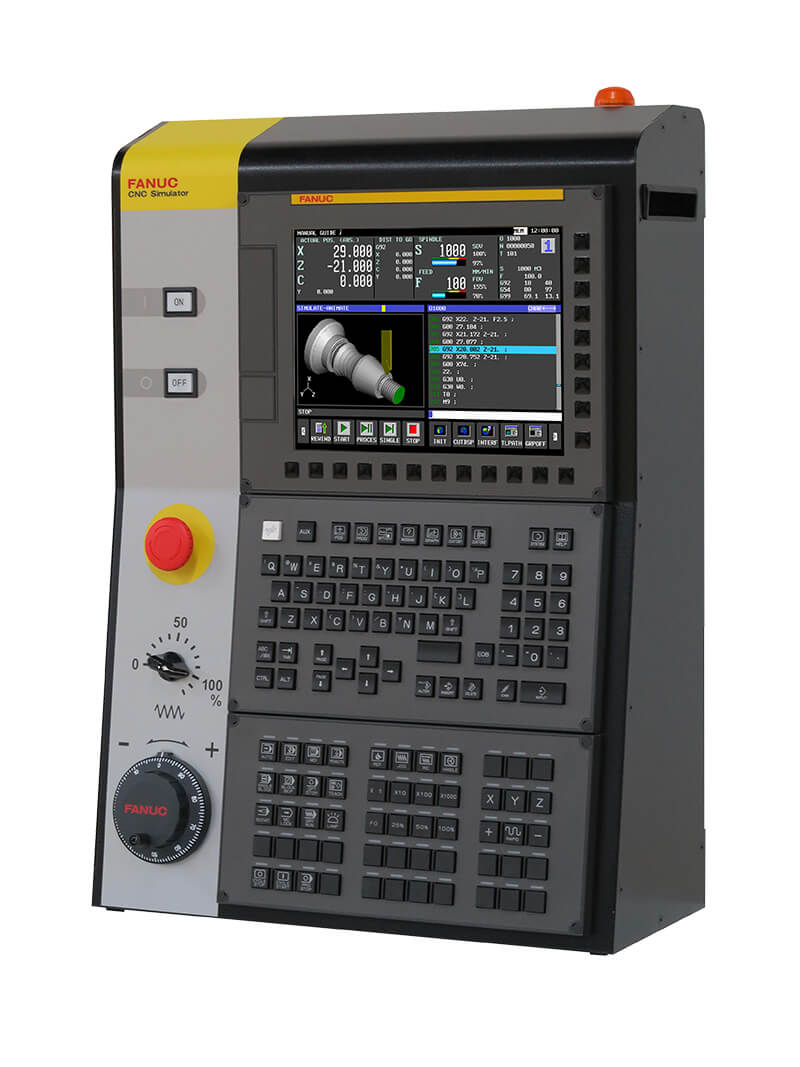
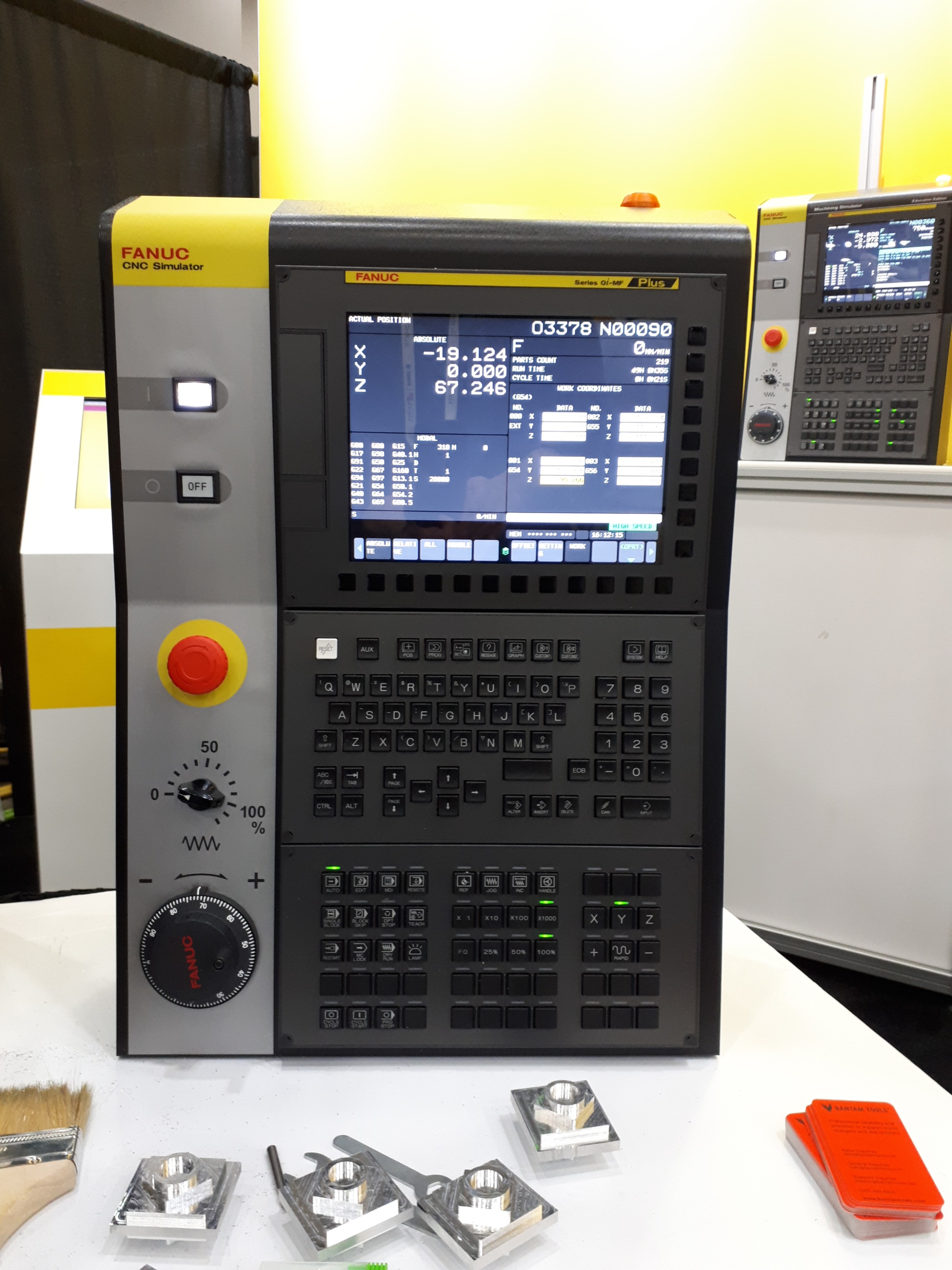
by computer gui standards, its pretty shit, and its hard as all hell to do stuff, and this is the "new", they went with a dark mode.
But Cnc workflow wise, its very fast, stable and safe, with very little screwing around. Its annoying compared to the LinuxCNC guis, but the workflow is less clumsy.
they always blast me for this in irc
second for the parameter page, I made an attempt to make a parameter display for axis, based on qtvcp code, but I am stuck on how to change them.
github.com/cakeslob/regularmac_800/tree/offset
Ive made good progress making the axis gui more fanuc like, PhilC has helped me a lot, and I use lots of stuff from qtvcp because it has all the features I want. I post this to show its not all gui whining but computers are hard.
by computer gui standards, its pretty shit, and its hard as all hell to do stuff, and this is the "new", they went with a dark mode.
But Cnc workflow wise, its very fast, stable and safe, with very little screwing around. Its annoying compared to the LinuxCNC guis, but the workflow is less clumsy.
they always blast me for this in irc
Attachments:
Last edit: 05 Jun 2025 00:49 by cakeslob.
The following user(s) said Thank You: spumco
Please Log in or Create an account to join the conversation.
- Kieran
- Offline
- Senior Member
-

Less
More
- Posts: 56
- Thank you received: 8
05 Jun 2025 20:45 #329771
by Kieran
Replied by Kieran on topic GUI that somewhat resembles haas or fanuc workflow.
step one for me is to figure out how to get my offsets onto a page like MDI and manual jog page instead of opening a whole different window. on linuxcnc I end up G10L10Pxx my tools from mdi because the extra window is annoying to me. It sounds like this is possible but Im having a hard time finding the right search term to get a how-to or starting point. Also is there a way I can add a "common" offset? It looks like "external offset" could be handy here. sometimes its nice to measure in process and adjust a few 0.001" here or there while running.
Please Log in or Create an account to join the conversation.
- cakeslob
- Offline
- Platinum Member
-
Less
More
- Posts: 927
- Thank you received: 280
05 Jun 2025 23:51 #329778
by cakeslob
Replied by cakeslob on topic GUI that somewhat resembles haas or fanuc workflow.
Im guessing your talking about axis? I havent found a way to embed the tooltable
but Im starting to remember that I already did this before....
forum.linuxcnc.org/21-axis/38188-solved-...screen-w-usercommand
5.5 years later....looks a little better
you still need a mouse though
but Im starting to remember that I already did this before....
forum.linuxcnc.org/21-axis/38188-solved-...screen-w-usercommand
5.5 years later....looks a little better
you still need a mouse though
Please Log in or Create an account to join the conversation.
- JT
-

- Away
- Administrator
-
Less
More
- Posts: 1103
- Thank you received: 593
08 Jun 2025 11:32 #329938
by JT
Replied by JT on topic GUI that somewhat resembles haas or fanuc workflow.
You can do almost anything you like very easy with Flex GUI. Trying to modify built in GUI's is very difficult due to how complex they are and in the case of Axis the code is almost impossible to read.
gnipsel.com/linuxcnc/flexgui/index.html
JT
gnipsel.com/linuxcnc/flexgui/index.html
JT
The following user(s) said Thank You: spumco, Kieran
Please Log in or Create an account to join the conversation.
- cmorley
- Offline
- Moderator
-
Less
More
- Posts: 7368
- Thank you received: 2181
14 Jun 2025 06:24 #330269
by cmorley
Replied by cmorley on topic GUI that somewhat resembles haas or fanuc workflow.
Is the Fanuc style of Gcodes display really better then linuxcnc's?
Here is both styles:
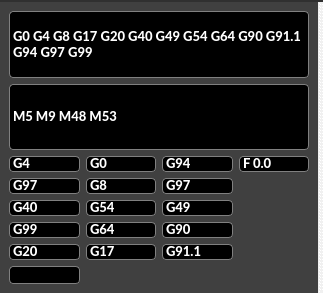
Here is both styles:
Attachments:
The following user(s) said Thank You: JT
Please Log in or Create an account to join the conversation.
- cakeslob
- Offline
- Platinum Member
-
Less
More
- Posts: 927
- Thank you received: 280
15 Jun 2025 18:48 #330319
by cakeslob
Replied by cakeslob on topic GUI that somewhat resembles haas or fanuc workflow.
The modal/active gcodes personally I find them to be more/less the same. I dont really find it any more readable than linuxcnc. They are both just a jumble of g and m codes with F S H T at the end. I just takes more space with coloums instead of rows
Please Log in or Create an account to join the conversation.
Time to create page: 0.266 seconds