
Wire EDM linuxCNC usage questions
- kb58
- Offline
- Junior Member
-

Less
More
- Posts: 24
- Thank you received: 4
12 Feb 2026 06:08 #342837
by kb58
Wire EDM linuxCNC usage questions was created by kb58
Credit where credit is due: I built it but didn't design it, the credit goes to Mike Bax, who builds and sells the high voltage pulse generator used in his EDM machine design. Anyway, it's running and working fine; my questions are about using linuxCNC in general.
I'm having a heck of a time wrapping my head around how to properly set up a workpiece in linuxCNC so that it starts cutting at the expected point. There are three markers in the Preview window, a large circle with crosshairs, and two smaller "X"s. I understand that the large marker is Machine Home but don't understand its usefulness in the display. The two small "X" figures move around when offsets are changed, but they don't always seem related to where the cut starts. My usual steps are:
Load an .nc job into linuxCNC, which appears in the Preview tab.
"Home All" is selected.
Bax supplies software with his power supply, including extensions to linuxCNC that provide utilities such as Edge Find. I run that, and the respective axis value changes to some value denoting the edge. So far, so good.
The first issue is that I don't know how the resulting value relates to the overall workpiece. The value changed somewhat during the Edge Find, so is offset by some amount. For this example when the cut starts right at the edge of the workpiece, I don't know if Touch Off is necessary, since the cutter is already immediately adjacent to the work piece. If a Touch Off value is required, I don't know what to enter.
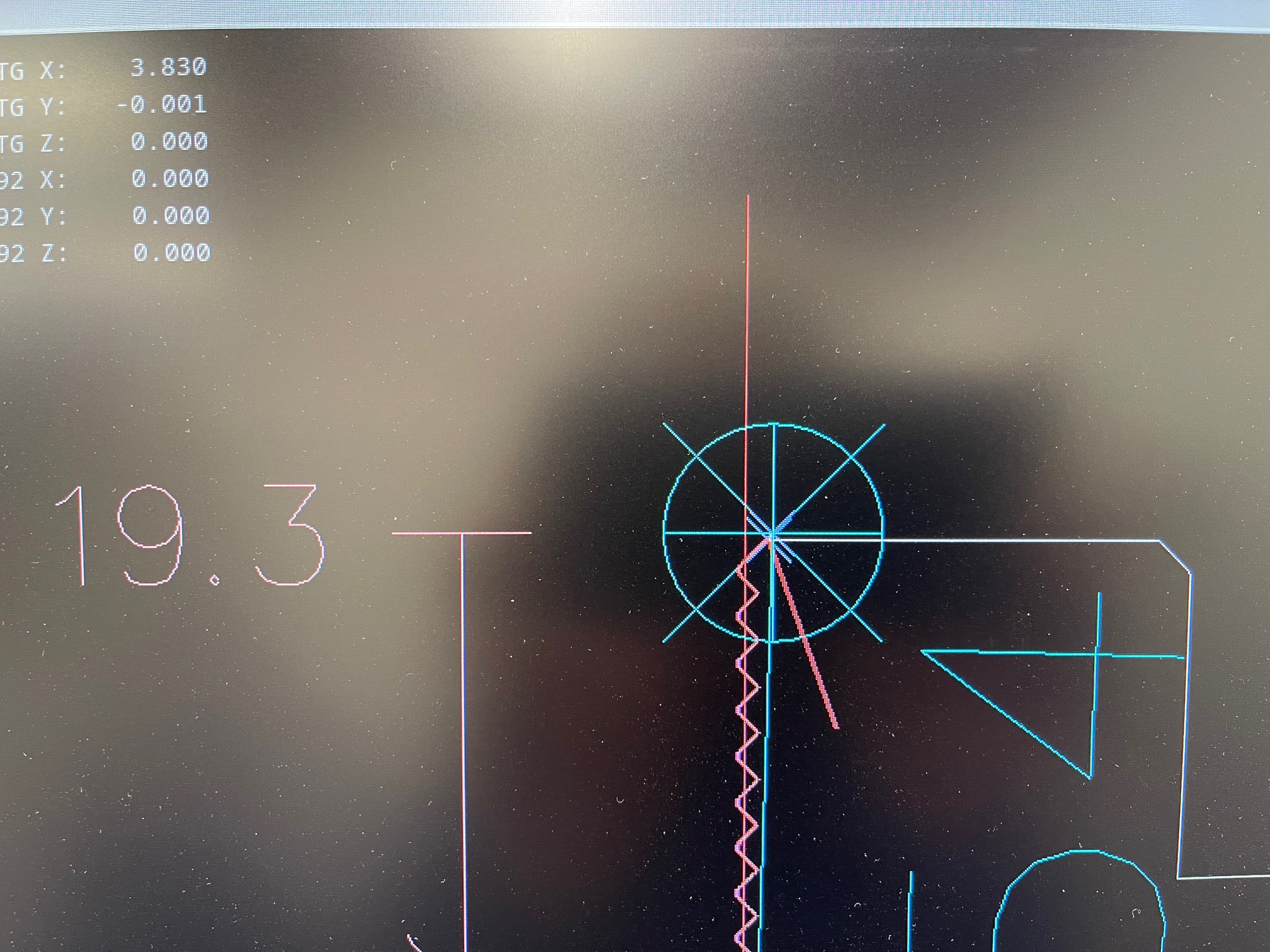
The first photo shows a typical preview display with the large target and the two X's. My "guess" is that the two X's represent the start and end of the cutting path. Correct? The large target doesn't seem useful, but it's probably because I don't know what it represents.
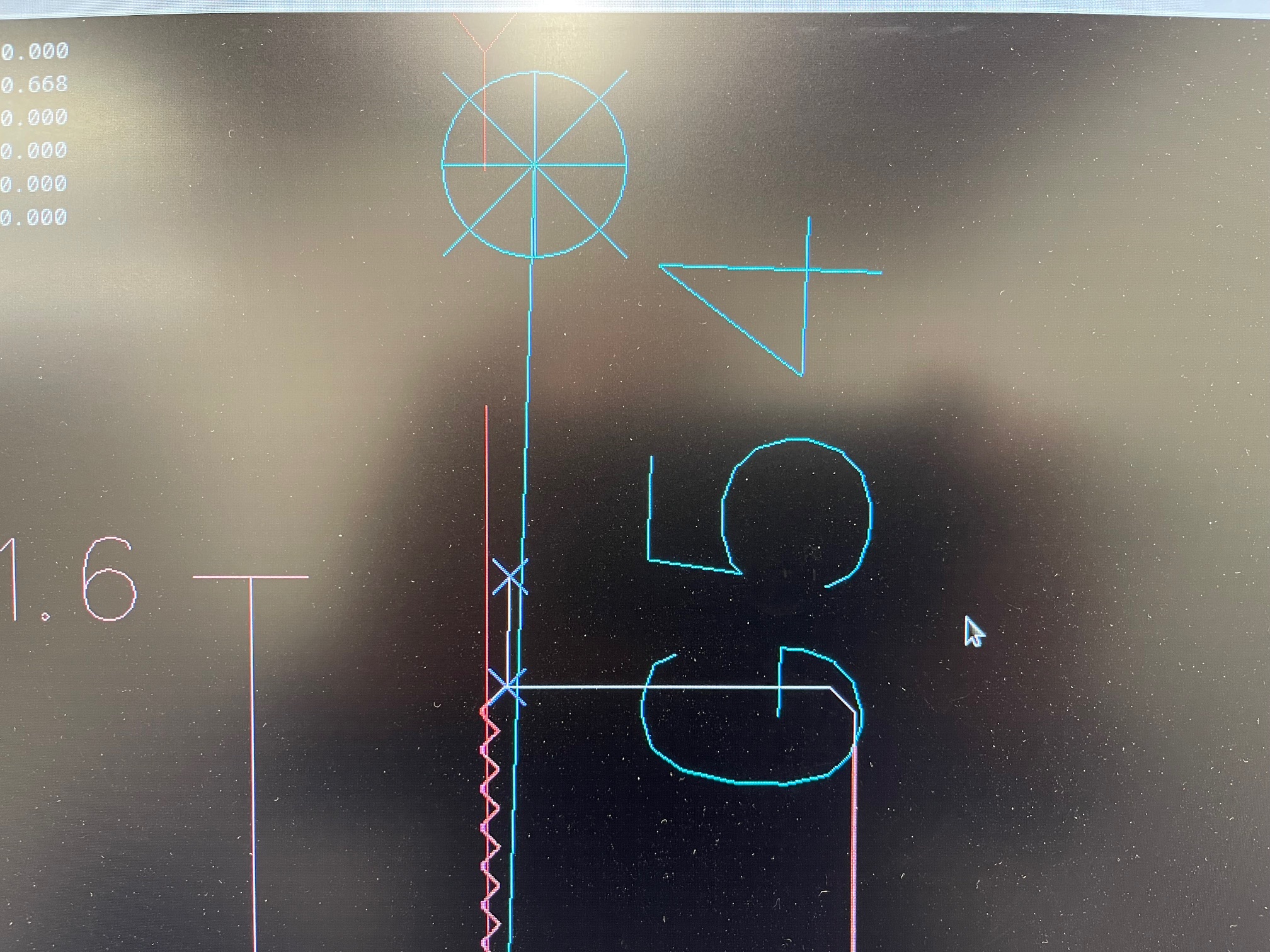
The second photo really confused me. Here, the cut "started" at the free end of the red diagonal line, moving toward the upper left corner of the workpiece (note that this is inside the workpiece). Also note that neither of the X markers is at the start of the red line. While the red diagonal line was extending, the physical cutter was Not moving. The red line continued until it reached one of the X's and then began following the contour of the cut. The crazy thing is that the physical cutter Still wasn't moving and didn't until the red track came down even with its start. Only then did the physical cutter contact the work. As a result, the entire workpiece ended up missing everything above that point.
I'm fairly convinced that I'm not understanding and using Touch Off values correctly and am hoping that someone can explain it to me as someone would explain to a small child... Thanks.
I'm having a heck of a time wrapping my head around how to properly set up a workpiece in linuxCNC so that it starts cutting at the expected point. There are three markers in the Preview window, a large circle with crosshairs, and two smaller "X"s. I understand that the large marker is Machine Home but don't understand its usefulness in the display. The two small "X" figures move around when offsets are changed, but they don't always seem related to where the cut starts. My usual steps are:
Load an .nc job into linuxCNC, which appears in the Preview tab.
"Home All" is selected.
Bax supplies software with his power supply, including extensions to linuxCNC that provide utilities such as Edge Find. I run that, and the respective axis value changes to some value denoting the edge. So far, so good.
The first issue is that I don't know how the resulting value relates to the overall workpiece. The value changed somewhat during the Edge Find, so is offset by some amount. For this example when the cut starts right at the edge of the workpiece, I don't know if Touch Off is necessary, since the cutter is already immediately adjacent to the work piece. If a Touch Off value is required, I don't know what to enter.
The first photo shows a typical preview display with the large target and the two X's. My "guess" is that the two X's represent the start and end of the cutting path. Correct? The large target doesn't seem useful, but it's probably because I don't know what it represents.
The second photo really confused me. Here, the cut "started" at the free end of the red diagonal line, moving toward the upper left corner of the workpiece (note that this is inside the workpiece). Also note that neither of the X markers is at the start of the red line. While the red diagonal line was extending, the physical cutter was Not moving. The red line continued until it reached one of the X's and then began following the contour of the cut. The crazy thing is that the physical cutter Still wasn't moving and didn't until the red track came down even with its start. Only then did the physical cutter contact the work. As a result, the entire workpiece ended up missing everything above that point.
I'm fairly convinced that I'm not understanding and using Touch Off values correctly and am hoping that someone can explain it to me as someone would explain to a small child... Thanks.
Please Log in or Create an account to join the conversation.
- tommylight
-

- Away
- Moderator
-

Less
More
- Posts: 21994
- Thank you received: 7488
12 Feb 2026 22:15 #342867
by tommylight
Replied by tommylight on topic Wire EDM linuxCNC usage questions
Does the machine have limit/homing switches?
Are they required explicitly?
Are they required explicitly?
Please Log in or Create an account to join the conversation.
Time to create page: 0.127 seconds