
Total lines in a GCode file
- scsmith1451
-
 Topic Author
- Offline
- Premium Member
-

Less
More
- Posts: 101
- Thank you received: 3
23 Jun 2026 13:22 #347268
by scsmith1451
Total lines in a GCode file was created by scsmith1451
Examining the linuxcnc.stat() module I see that there is "current_line" method. Is there a way to get the total number of lines in a loaded gcode file to drive a progress meter?
Please Log in or Create an account to join the conversation.
- MikkelRS
-

- Offline
- Junior Member
-

Less
More
- Posts: 20
- Thank you received: 6
23 Jun 2026 14:38 #347270
by MikkelRS
Replied by MikkelRS on topic Total lines in a GCode file
I dont have an answer, but i know its possible - there are interfaces with progress bars.
Please Log in or Create an account to join the conversation.
- Aciera
-

- Offline
- Administrator
-

Less
More
- Posts: 4819
- Thank you received: 2176
23 Jun 2026 15:23 #347272
by Aciera
Replied by Aciera on topic Total lines in a GCode file
Gmoccapy simply counts the lines of the loaded file:
    def on_hal_status_file_loaded(self, widget, filename):
        widgetlist = ["btn_use_current" ]
        # this test is only necessary, because of remap and toolchange, it will emit a file loaded signal
        if filename:
            fileobject = open(filename, 'r')
            lines = fileobject.readlines()
            fileobject.close()
            self.halcomp["program.length"] = len(lines)

            if len(filename) > 70:
                filename = filename[0:10] + "..." + filename[len(filename) - 50:len(filename)]
            self.widgets.lbl_program.set_text(filename)
            self._sensitize_widgets(widgetlist, True)
        else:
            self.halcomp["program.length"] = 0
            self._sensitize_widgets(widgetlist, False)
            self.widgets.lbl_program.set_text(_("No file loaded"))
Please Log in or Create an account to join the conversation.
- scsmith1451
-
Topic Author
- Offline
- Premium Member
-
Less
More
- Posts: 101
- Thank you received: 3
23 Jun 2026 16:50 #347276
by scsmith1451
Replied by scsmith1451 on topic Total lines in a GCode file
This was my thinking to get the program length if it was not being computed.
Is there a way of accessing "program.length" to set a global # parameter, say #1100 (#1100 = halcomp["program.length"] or is there a way to access halcomp["program.length"] inside of gCode?
Or better yet, is program progress being computed by gmoccapy which can be connected to an analog output, say motion.analog-out-01? This would be preferred since no additional lines need to be added a gcode file to track progress., just a HAL connection to the display widget.
Is there a way of accessing "program.length" to set a global # parameter, say #1100 (#1100 = halcomp["program.length"] or is there a way to access halcomp["program.length"] inside of gCode?
Or better yet, is program progress being computed by gmoccapy which can be connected to an analog output, say motion.analog-out-01? This would be preferred since no additional lines need to be added a gcode file to track progress., just a HAL connection to the display widget.
Please Log in or Create an account to join the conversation.
- Aciera
-
- Offline
- Administrator
-
Less
More
- Posts: 4819
- Thank you received: 2176
23 Jun 2026 17:15 - 23 Jun 2026 17:21 #347277
by Aciera
Replied by Aciera on topic Total lines in a GCode file
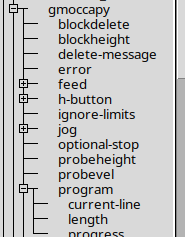
If you are using Gmoccapy then you can use the 'gmoccapy.program.progress' halpin which is created by the GUI.
Attachments:
Last edit: 23 Jun 2026 17:21 by Aciera.
The following user(s) said Thank You: scsmith1451
Please Log in or Create an account to join the conversation.
- scsmith1451
-
Topic Author
- Offline
- Premium Member
-
Less
More
- Posts: 101
- Thank you received: 3
24 Jun 2026 12:08 #347301
by scsmith1451
Replied by scsmith1451 on topic Total lines in a GCode file
While gmoccapy.program.progress does display the current progress of the job, it reports the value as whole percent rather that fractional percent. Unfortunately, the HBar widget requires fractional percent between 0.0 and 1.0.
Is there a way to convert the output of program.progress in the HAL file when connecting the signal or will I have to use an on_changed handler to do the conversion?
Is there a way to convert the output of program.progress in the HAL file when connecting the signal or will I have to use an on_changed handler to do the conversion?
Please Log in or Create an account to join the conversation.
- Aciera
-
- Offline
- Administrator
-
Less
More
- Posts: 4819
- Thank you received: 2176
24 Jun 2026 14:47 #347307
by Aciera
Replied by Aciera on topic Total lines in a GCode file
Try the scale component (set gain to 0.01) to convert 0..100 to 0..1:
linuxcnc.org/docs/html/man/man9/scale.9.html
linuxcnc.org/docs/html/man/man9/scale.9.html
Please Log in or Create an account to join the conversation.
- scsmith1451
-
Topic Author
- Offline
- Premium Member
-
Less
More
- Posts: 101
- Thank you received: 3
24 Jun 2026 20:26 #347315
by scsmith1451
Replied by scsmith1451 on topic Total lines in a GCode file
In case anyone else needs to work with HAL_HBar and HAL_VBar components in Glade, it turns out that I didn't have my hal file configured correctly for the HBar. Within Glade, there is a description the zone limits for color changes is based on 0.0 - 1.0 which is a fractional percentage of the MAX/MIN limits, not what is required for input. Hence, what ever the MAX?MIN limits are set to, zones are based on the fractional percentage of that range.
I had to remove the SCALE component and just net gmoccapy.program.progress directly to the GLADE HAL_HBar component for everything to work as expected.
Thank for all you help.
I had to remove the SCALE component and just net gmoccapy.program.progress directly to the GLADE HAL_HBar component for everything to work as expected.
Thank for all you help.
Please Log in or Create an account to join the conversation.
- rodw
-

- Offline
- Platinum Member
-

Less
More
- Posts: 12159
- Thank you received: 4151
24 Jun 2026 20:32 #347316
by rodw
Replied by rodw on topic Total lines in a GCode file
in master branch 2.10, the currently executing line number can be found on this pin
motion.interp.line-number
If you get the number of lines as gmoccappy does you can calculate the percent processed in real time
motion.interp.line-number
If you get the number of lines as gmoccappy does you can calculate the percent processed in real time
Please Log in or Create an account to join the conversation.
Time to create page: 0.258 seconds