Standalone LinuxCNC machine simulator using the Stepper-Ninja HAL interface

More
4 weeks 7 hours ago #350107 by tuxcnc

Code:
[b][b][code][code][code][code][b][url=https://github.com/FredericM88/linuxcnc-sim/releases/tag/v0.1.2][b]Could you try v0.1.2 with the new Phase 3 configuration and see whether the Z offset still occurs on your system?[/b][/url][/b]
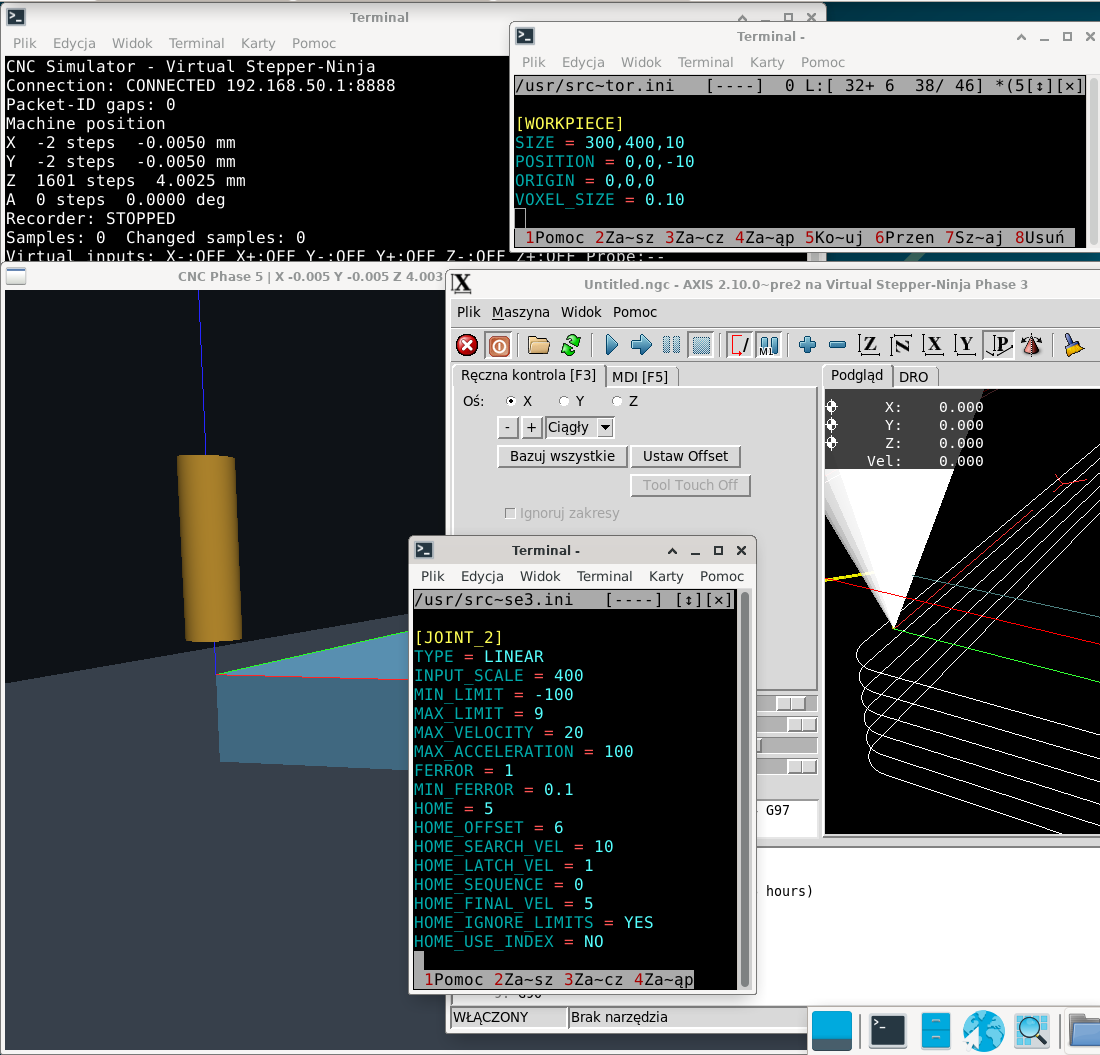
[/code][/code][/code][/b][/code][/b]
 
It's late, so I do test v0.1.2 rather tomorrow.
Bellow is what was and I described above.
 

Please Log in or Create an account to join the conversation.

More
4 weeks 6 hours ago #350108 by tuxcnc
I haven't tested 0.1.2, but I think I found the reason for the zeros moving apart.
In a normal machine, zero is counted from the point where the limit switch is actuated, but here the position of the limit switch is apparently set as relative to zero...
In my settings HOME_OFFSET = 6, so limits set Z max must be 2400 and not 4000 as it was.
After this change, the zeros in both windows are in place.
So there's nothing to fix, but some comment in the virtual-io.conf file would be helpful.
The following user(s) said Thank You: fmueller

Please Log in or Create an account to join the conversation.

More
4 weeks 5 hours ago #350111 by fmueller
Thank you very much for investigating this further and for explaining what you found.

You are absolutely right.

With 400 steps/mm and HOME_OFFSET = 6, the corresponding physical home-switch position in the simulator is:
Code:
6 mm × 400 steps/mm = 2400 steps

With the previous switch position at 4000 steps (10 mm), the difference is:
Code:
10 mm - 6 mm = 4 mm

which explains almost exactly the offset you observed between AXIS and the simulator.

So this is not a problem in the switch implementation. The important point is that the positions in virtual-io.conf describe physical switch positions in the simulator's step coordinate system, while HOME_OFFSET tells LinuxCNC which machine coordinate corresponds to the home-switch position.

I agree completely that this is not explained clearly enough at the moment. A user should not have to discover this relationship by trial and error.

I will add a clear explanation and an example directly to virtual-io.conf and also make sure the documentation describes the relationship between the virtual switch position, steps/mm and HOME_OFFSET.

Thank you for taking the time to investigate this instead of simply reporting that something was wrong. Your observation identified a real weakness in the documentation, and your explanation makes the intended behavior much clearer.

This kind of feedback is extremely valuable for the project. Thank you.

Please Log in or Create an account to join the conversation.

More
3 weeks 19 hours ago #350192 by tuxcnc
This is a great project that may beat all others in the future because it supports all LinuxCNC g-codes, including those that will be added in the future. I'm not kidding, the simulator will show all the movements that will be sent to the virtual controller, no matter how they are generated.

Unfortunately, the project also has many drawbacks, which is not surprising at this stage of development, but makes its use in practice very difficult.
What I miss most at the moment is tool changing.
Of course, LinuxCNC will replace the tool, but the simulator will use only one, configured in its own ini file...
Honestly, I don't really have an idea how to solve this problem.
I thought about REMAP M6 in an ini file that could run any program, so also one that would inform the simulator about a tool change. But what will happen when the user wants to use his own REMAP M6 and see its operation in the simulator?
By the way, simulating tool measurement would also be useful...

Please Log in or Create an account to join the conversation.

More
3 weeks 3 hours ago #350201 by fmueller
Hi tuxcnc,Thank you for your feedback and suggestions! You have actually touched on two of the next major features we are planning: physical tools and tool measurement.I think it would be useful to explain the underlying concept of this simulator, because it is slightly different from a traditional G-code simulator.Our goal is to simulate a real CNC machine, including its capabilities, limitations, and potential mistakes.A real CNC machine does not interpret G-code itself. LinuxCNC is responsible for interpreting G-code, planning trajectories, applying tool offsets, and controlling the hardware. The machine simply responds to the commands it receives.We want our simulator to behave in exactly the same way.The virtual machine will have its own physical state: axis positions, spindle, installed tool, tool geometry, workpiece, sensors, and eventually machine geometry and collisions.An important design principle is that the physical state of the simulated machine must remain independent of what LinuxCNC believes that state to be.For example:
  • If LinuxCNC requests tool T5 but the operator installs the wrong tool, the simulator should use the geometry of the tool that was actually installed.
  • If the physical tool length differs from the value in LinuxCNC's tool table, that difference should affect the machining result.
  • A virtual toolsetter should be able to detect the actual tool length, just like a real toolsetter.
  • Incorrect offsets, incorrect tools, or incorrect workpiece positioning should be capable of producing incorrect machining results or collisions.
This behavior is intentional. We don't want the simulator to automatically correct mistakes that would also happen on a real machine.For the same reason, I would prefer not to intercept or reinterpret M6 using a custom REMAP. We should instead investigate how to model the machine-side tool-changing process through the normal LinuxCNC interfaces, without interfering with an existing tool-change implementation.Of course, the simulator should also support automatic tool changers in the future. The important distinction is that a requested tool change and the tool physically installed in the spindle are not necessarily the same thing.We have also completed the first virtual spindle implementation. LinuxCNC can now control it through the normal spindle commands, with encoder feedback returned through the Stepper-Ninja interface.Our next development steps are the physical tool model, tool changes, and tool measurement.Your feedback is very valuable because it helps us identify what is needed to make the simulator useful for real LinuxCNC configurations.Thanks again for testing the project!
The following user(s) said Thank You: COFHAL

Please Log in or Create an account to join the conversation.

More
2 weeks 6 days ago #350206 by tuxcnc

  • If LinuxCNC requests tool T5 but the operator installs the wrong tool, the simulator should use the geometry of the tool that was actually installed.
    • If the physical tool length differs from the value in LinuxCNC's tool table, that difference should affect the machining result.
      • A virtual toolsetter should be able to detect the actual tool length, just like a real toolsetter.
        • Incorrect offsets, incorrect tools, or incorrect workpiece positioning should be capable of producing incorrect machining results or collisions.
I can't imagine it.
The simulator cannot use information that is not available.
If, for example, we have a manual tool change, the simulator can at most receive information that the tool has been replaced. LinuxCNC does not ask what physical tool the operator has installed, cannot use the answer to a question he did not ask and cannot transfer information to the simulator that he does not have.
I wrote about tool measurement simulation only in the sense that the simulator would show the movements that will actually be made.
I have a remap that goes to the manual tool change position, then moves to the height sensor, and then returns to where it started. Showing these movements would make the simulation more realistic, but it seems impossible to simulate operator error.
There are simply things that cannot be done and you have to accept it.
Coming back to REMAP M6, it could probably be done.
You could use a shell script that would first run a program to tell the simulator to change the tool, and then run the user remap  program. This should work.
An alternative would be to change the stepper-ninja code so that additional information is transmitted. Maybe it's worth going in this direction, because it would provide additional possibilities that could be useful in the future...
The following user(s) said Thank You: COFHAL

Please Log in or Create an account to join the conversation.

Time to create page: 0.066 seconds
Powered by Kunena Forum
