New install of Mesa 7i92 on TCL lathe

More
4 years 6 months ago #240122 by john11668
I have only one Ethernet connection and AFAIK no wifi so no conflicts there .
I am new to this and confused .
Take this for example
" Configure network with static address
Add these lines to the file /etc/network/interfaces to configure eth1 with a static address:

auto eth1
iface eth1 inet static
address 192.168.1.1
hardware-irq-coalesce-rx-usecs 0 "

All very simple to you guys but to this confused newbie the question arises ;-

Which file do I add them to???

Please Log in or Create an account to join the conversation.

More
4 years 6 months ago #240126 by tommylight
Open a terminal from the menu or by hilding down CTRL and ALT and pressing T,
Type:
ip a
Beware that Linux is case sensitive so i and I are not the same thing
That will show a lot of info about the network on that PC, one of them will be the network card, so write the name somewhere
Again in terminal, type
sudo nano /etc/network/interfaces
Copy the auto stuff all lines and paste them in the terminal, use keyboard to edit and change the eth1 to whatever the network card was named above, the write down thing
Hold down CTRL and press O
Press enter
CTRL X
Reboot the PC or just recnnect simply unplug and plug the network cable.
The following user(s) said Thank You: john11668

Please Log in or Create an account to join the conversation.

More
4 years 6 months ago - 4 years 6 months ago #240239 by john11668
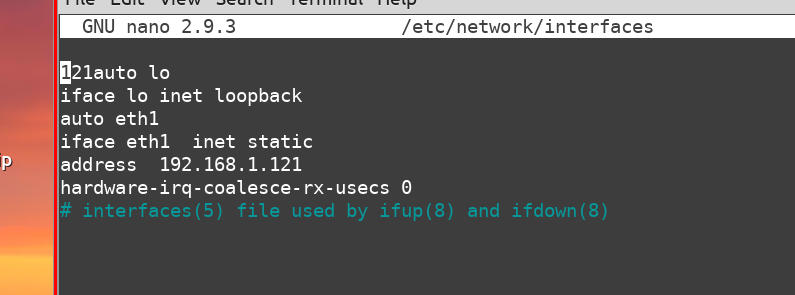
So I have edited and saved the file as shown
 

I have tried a number of IP addresses
192.168.1.1
192.168 .1.121   default
and even
169.254.61.149   This is the address given if I connect the card to a windows  machine and look for it using  C prompt  and   ipconfig /all .  On windows I can ping the card using that address and it responds

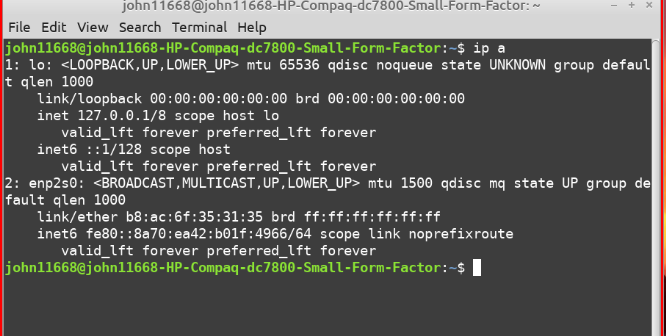
So I reconnect to linux and try with ip a
This is what I get
  
I see nothing in that which looks anything like an ip address for the  Mesa  so really am fishing in the dark for something appropriate to use as the address in "/etc/network/interfaces"

Ideas appreciated
 
Last edit: 4 years 6 months ago by john11668.

Please Log in or Create an account to join the conversation.
More
4 years 6 months ago #240242 by robertspark
looks like Linux is using ip6 for your ethernet card. not sure how to force ip4

Please Log in or Create an account to join the conversation.
More
4 years 6 months ago #240248 by john11668
Clearly I do not understand the significance of that Robert .
Dont really feel I want to. Just want something which will work .

Is this a peculiarity of 7i92 cards maybe? Might I be better using a different card or combination of cards .
Nothing has been simple with this machine

Please Log in or Create an account to join the conversation.

More
4 years 6 months ago #240250 by robertspark
can you paste the contents of this file please

/etc/network/interfaces

where are you (roughly) located? (I am near Liverpool in the UK)

Please Log in or Create an account to join the conversation.

Moderators: cmorley
Time to create page: 0.128 seconds
Powered by Kunena Forum
