
7i92T and mx3660 request for help
- ClarkSavage
- Offline
- Junior Member
-

Less
More
- Posts: 24
- Thank you received: 4
03 Mar 2026 11:40 #343786
by ClarkSavage
Replied by ClarkSavage on topic 7i92T and mx3660 request for help
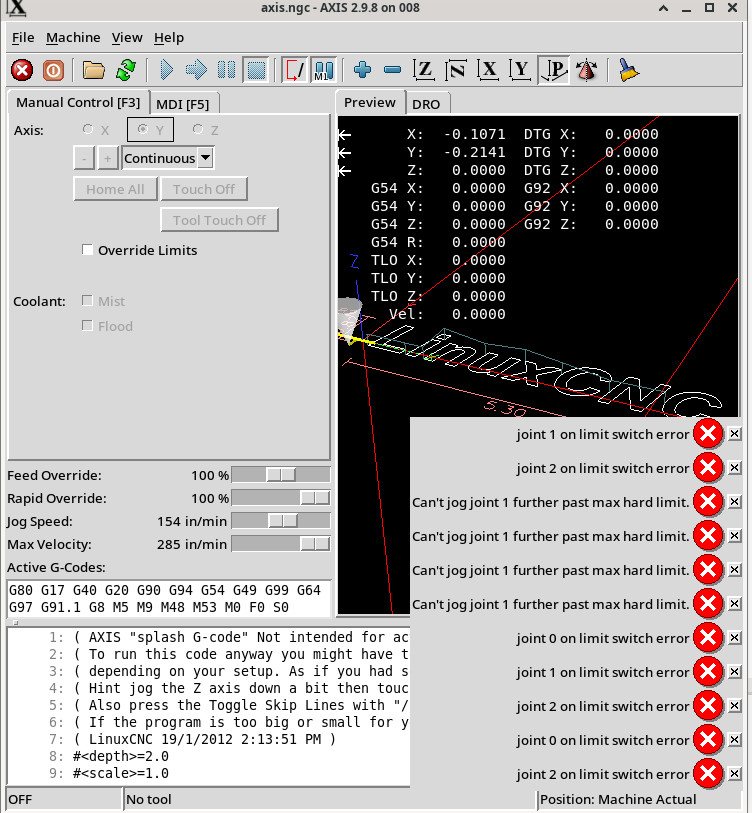
the image file that I could not get in the previous message
Attachments:
Please Log in or Create an account to join the conversation.
- tommylight
-

- Away
- Moderator
-

Less
More
- Posts: 21901
- Thank you received: 7465
03 Mar 2026 17:26 #343795
by tommylight
Replied by tommylight on topic 7i92T and mx3660 request for help
set the HOME_search/latch/final velocities to something really, really slow, that way you can see what part of the sequence is causing the issue while homing.
Please Log in or Create an account to join the conversation.
- ClarkSavage
- Offline
- Junior Member
-
Less
More
- Posts: 24
- Thank you received: 4
03 Mar 2026 18:46 #343806
by ClarkSavage
Replied by ClarkSavage on topic 7i92T and mx3660 request for help
Set velocities low – less than half of previous values – no luck - started “playing” again changing other items as it appeared to me that some thing was interfering with the switch signals.
had to back off the ballscrew for the Y axis by hand each time as it would hit the limit switch and lock right there. No over ride limits would allow me to jog it away, but that does work for the X and Z - can jog them away after over ride limits.
So tried commenting out stuff just to find what was interfering and - in HAL did the following:
net both-home-x <= hm2_7i92.0.gpio.013.in_not # --- MAX-HOME-Y ---
# net max-home-y <= hm2_7i92.0.gpio.014.in_not # --- BOTH-HOME-Z ---
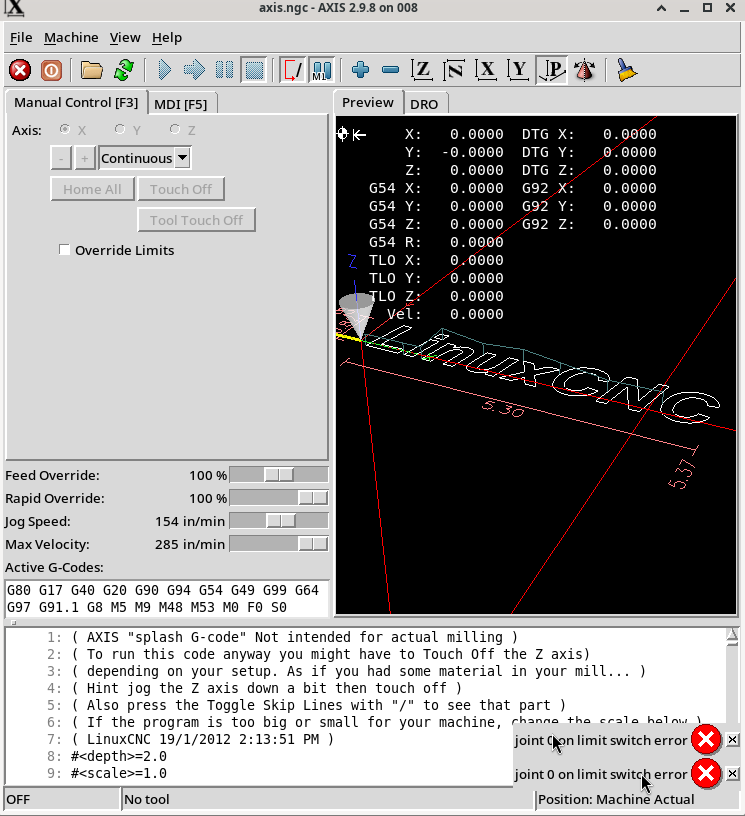
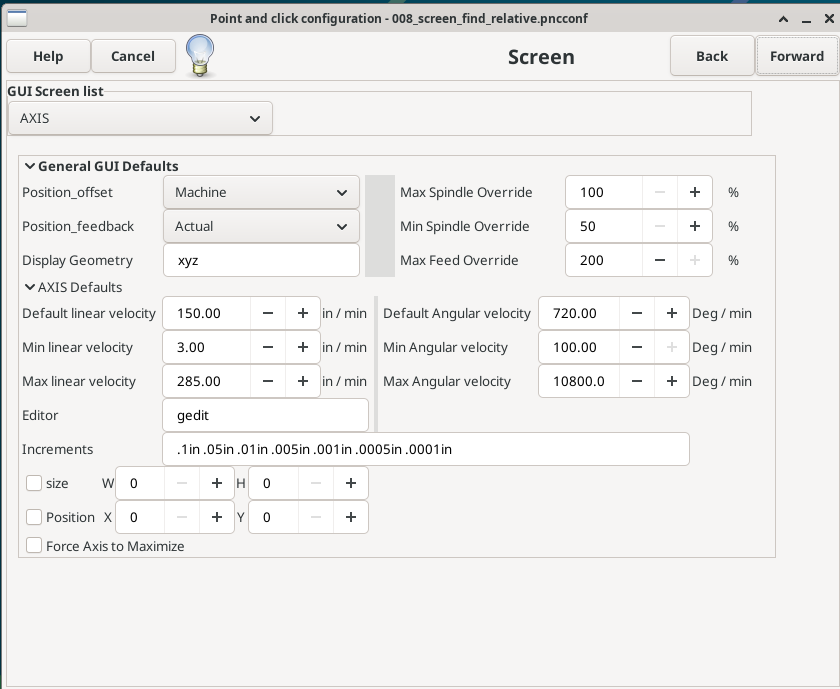
# net both-home-z <= hm2_7i92.0.gpio.015.in_notthis did get me an X axis home, with to limit switch then return, limit return latch and then backed off to ZERO and DRO displayed homed - but then immediately after homing gave me an “joint 0 on limit switch error”can someone tell me – I picked “machine actual” in Pnnconf – noticed on the DRO so wondering should I have picked relative which was in the drop down? Image attached after X homed. Reaching for straws I think but I have changed just about everything I can think of as of this point. I leave notes in the files as I change so I can put them back as they were upon changes.
had to back off the ballscrew for the Y axis by hand each time as it would hit the limit switch and lock right there. No over ride limits would allow me to jog it away, but that does work for the X and Z - can jog them away after over ride limits.
So tried commenting out stuff just to find what was interfering and - in HAL did the following:
- commented out ESTOP would not allow me to enable the machine even though the ESTOP position does nothing when tripped to the AXIS display
- commented out probe lines but did not make a difference so re-enabled
- commented out coolant - made no difference but I do not have coolant so left commented out
net both-home-x <= hm2_7i92.0.gpio.013.in_not # --- MAX-HOME-Y ---
# net max-home-y <= hm2_7i92.0.gpio.014.in_not # --- BOTH-HOME-Z ---
# net both-home-z <= hm2_7i92.0.gpio.015.in_notthis did get me an X axis home, with to limit switch then return, limit return latch and then backed off to ZERO and DRO displayed homed - but then immediately after homing gave me an “joint 0 on limit switch error”can someone tell me – I picked “machine actual” in Pnnconf – noticed on the DRO so wondering should I have picked relative which was in the drop down? Image attached after X homed. Reaching for straws I think but I have changed just about everything I can think of as of this point. I leave notes in the files as I change so I can put them back as they were upon changes.
Attachments:
Please Log in or Create an account to join the conversation.
- PCW
-

- Offline
- Moderator
-
Less
More
- Posts: 18080
- Thank you received: 5316
03 Mar 2026 20:14 #343814
by PCW
Replied by PCW on topic 7i92T and mx3660 request for help
Pretty sure that if you have combined home/limit switches you will need a
HOME setting that's away from the switch actuation point or the ON LIMIT
errors are guaranteed.
HOME setting that's away from the switch actuation point or the ON LIMIT
errors are guaranteed.
Please Log in or Create an account to join the conversation.
- ClarkSavage
- Offline
- Junior Member
-
Less
More
- Posts: 24
- Thank you received: 4
04 Mar 2026 11:17 #343831
by ClarkSavage
Replied by ClarkSavage on topic 7i92T and mx3660 request for help
Understood. I have stated - my Stepconf [before 7i92] setup has run for more than ten years. My setup has limit switches at both ends of travel on all axis, and used a shared home/limits setup.EG - old setup:#*** AXIS_X *******************************
MIN_LIMIT = -0.25
MAX_LIMIT = 36.5
[JOINT_0]
HOME = 0.0
MIN_LIMIT = -0.25
MAX_LIMIT = 36.5
HOME_OFFSET = -0.750000
HOME_SEARCH_VEL = -1.100000
HOME_LATCH_VEL = -0.40000
HOME_IGNORE_LIMITS = YES
HOME_SEQUENCE = 1
#******************************************
NEW setup:
#******************************************
[AXIS_X]
MAX_VELOCITY = 3.0
MAX_ACCELERATION = 2.0
# MAX_VELOCITY = 5.0
# MAX_ACCELERATION = 7.0
MIN_LIMIT = 0.00
MAX_LIMIT = 32.0
[JOINT_0]
TYPE = LINEAR
# increased home position to get it for sure out of too close to switch
HOME = 1.0
FERROR = 10.0
MIN_FERROR = 0.05
MAX_VELOCITY = 3.0
MAX_ACCELERATION = 2.0
# MAX_VELOCITY = 5.0
# MAX_ACCELERATION = 7.0
# The values below should be 25% larger than MAX_VELOCITY and MAX_ACCELERATION
# If using BACKLASH compensation STEPGEN_MAXACCEL should be 100% larger.
STEPGEN_MAXVEL = 6.25
STEPGEN_MAXACCEL = 8.75
P = 1000.0
I = 0.0
D = 0.0
FF0 = 0.0
FF1 = 1.0
FF2 = 0.0
BIAS = 0.0
DEADBAND = 0.0
MAX_OUTPUT = 0.0
# these are in nanoseconds
DIRSETUP = 10000
DIRHOLD = 10000
STEPLEN = 5000
STEPSPACE = 5000
STEP_SCALE = -1016.0030642800001
MIN_LIMIT = 0.0
# note here I have limited the travel just to keep the far limit out of the picture
MAX_LIMIT = 32.0
HOME_OFFSET = -0.118
HOME_SEARCH_VEL = .5
HOME_LATCH_VEL = .5
HOME_FINAL_VEL = .5
HOME_USE_INDEX = NO
HOME_IGNORE_LIMITS = YES
HOME_SEQUENCE = 2
#******************************************
Still get an error "joint out....." AFTER homing
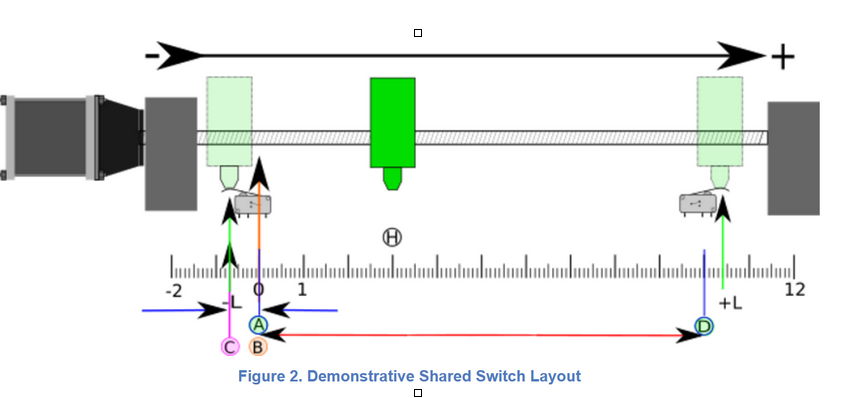
I have setup / changed the numbers per instruction - such as the negative 0.118 [comparable to the 3mm mentioned I should use] and so on following the Linuxcnc diagram below as always.
 I may be thick here - which is why I am asking for help. Feel like I am just missing something or something is missing me! I just don't get it. Willing to do anything. I would have thought this would be simple compared to everything else, but here I am weeks later getting ready to go back to parallel port as a last gasp.Still do not have feedback from the ESTOP either - wired to the mx3660 in NC config - same as limit switches.Sorry - but ?
$100 to anyone that can solve my ESTOP & Shared/home limits else I need to jump back to parallel port or some other os. After all - this should be the simple part - right?
MIN_LIMIT = -0.25
MAX_LIMIT = 36.5
[JOINT_0]
HOME = 0.0
MIN_LIMIT = -0.25
MAX_LIMIT = 36.5
HOME_OFFSET = -0.750000
HOME_SEARCH_VEL = -1.100000
HOME_LATCH_VEL = -0.40000
HOME_IGNORE_LIMITS = YES
HOME_SEQUENCE = 1
#******************************************
NEW setup:
#******************************************
[AXIS_X]
MAX_VELOCITY = 3.0
MAX_ACCELERATION = 2.0
# MAX_VELOCITY = 5.0
# MAX_ACCELERATION = 7.0
MIN_LIMIT = 0.00
MAX_LIMIT = 32.0
[JOINT_0]
TYPE = LINEAR
# increased home position to get it for sure out of too close to switch
HOME = 1.0
FERROR = 10.0
MIN_FERROR = 0.05
MAX_VELOCITY = 3.0
MAX_ACCELERATION = 2.0
# MAX_VELOCITY = 5.0
# MAX_ACCELERATION = 7.0
# The values below should be 25% larger than MAX_VELOCITY and MAX_ACCELERATION
# If using BACKLASH compensation STEPGEN_MAXACCEL should be 100% larger.
STEPGEN_MAXVEL = 6.25
STEPGEN_MAXACCEL = 8.75
P = 1000.0
I = 0.0
D = 0.0
FF0 = 0.0
FF1 = 1.0
FF2 = 0.0
BIAS = 0.0
DEADBAND = 0.0
MAX_OUTPUT = 0.0
# these are in nanoseconds
DIRSETUP = 10000
DIRHOLD = 10000
STEPLEN = 5000
STEPSPACE = 5000
STEP_SCALE = -1016.0030642800001
MIN_LIMIT = 0.0
# note here I have limited the travel just to keep the far limit out of the picture
MAX_LIMIT = 32.0
HOME_OFFSET = -0.118
HOME_SEARCH_VEL = .5
HOME_LATCH_VEL = .5
HOME_FINAL_VEL = .5
HOME_USE_INDEX = NO
HOME_IGNORE_LIMITS = YES
HOME_SEQUENCE = 2
#******************************************
Still get an error "joint out....." AFTER homing
I have setup / changed the numbers per instruction - such as the negative 0.118 [comparable to the 3mm mentioned I should use] and so on following the Linuxcnc diagram below as always.
$100 to anyone that can solve my ESTOP & Shared/home limits else I need to jump back to parallel port or some other os. After all - this should be the simple part - right?
Attachments:
Please Log in or Create an account to join the conversation.
- ClarkSavage
- Offline
- Junior Member
-
Less
More
- Posts: 24
- Thank you received: 4
04 Mar 2026 12:42 #343835
by ClarkSavage
Replied by ClarkSavage on topic 7i92T and mx3660 request for help
First come in order, we can take it offline or stay on - one at a time.
I am frustrated so will check later. Can go from there. Already ordered a parallel port card for the new computer so we will see. Got to do what I have to in order to get this running.
I am frustrated so will check later. Can go from there. Already ordered a parallel port card for the new computer so we will see. Got to do what I have to in order to get this running.
Please Log in or Create an account to join the conversation.
- PCW
-
- Offline
- Moderator
-
Less
More
- Posts: 18080
- Thank you received: 5316
04 Mar 2026 16:04 #343846
by PCW
Replied by PCW on topic 7i92T and mx3660 request for help
Did you verify that all home switch inputs work as expected in halshow?
that is, the motions home switch pins (like joint.0.home-sw-in ) change from
red to yellow when activated.
You might also check that there is no noise on the switch inputs.
(setting halscope to trigger on the switch active level can catch single cycle noise pulses)
that is, the motions home switch pins (like joint.0.home-sw-in ) change from
red to yellow when activated.
You might also check that there is no noise on the switch inputs.
(setting halscope to trigger on the switch active level can catch single cycle noise pulses)
Please Log in or Create an account to join the conversation.
- ClarkSavage
- Offline
- Junior Member
-
Less
More
- Posts: 24
- Thank you received: 4
04 Mar 2026 19:27 #343863
by ClarkSavage
Replied by ClarkSavage on topic 7i92T and mx3660 request for help
Yes, I am just confusing myself now.
Yes, looked at Halshow - never done that before so I read a little and then picked what I thought would give the best info.
So, I re-enabled the Y & Z both home limits. All home switches active. I made sure for each test I over road the limits and enable/active Axis display before moving any switch and I got the following. Screenshot is ENABLED base Halshow.
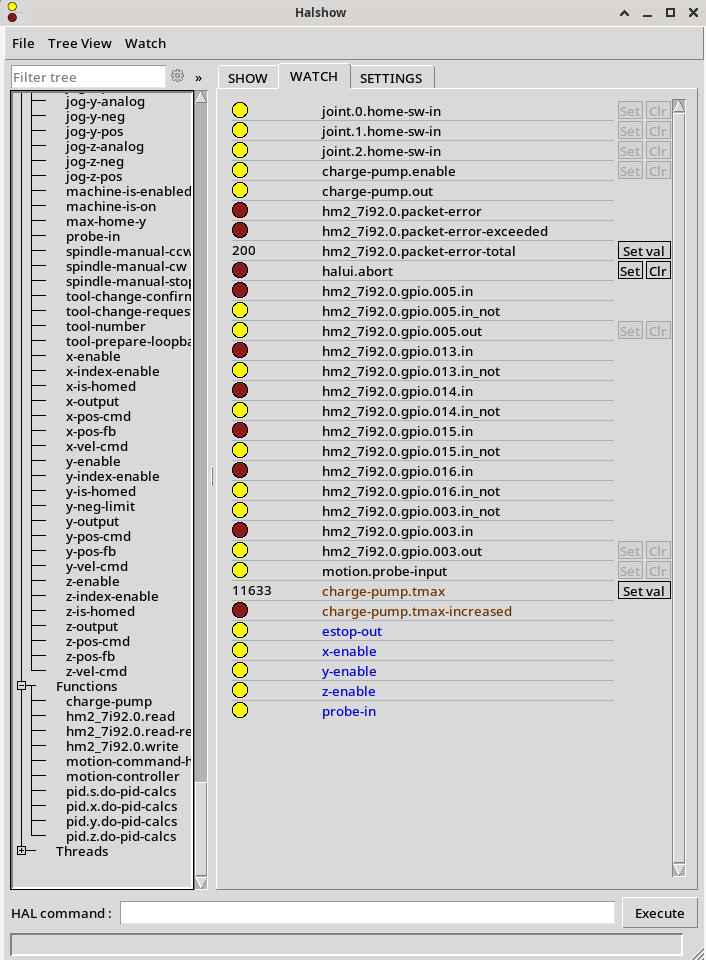
Then I methodically tripped switches + and recorded what happened.
For the limit switches at both ends of each axis:
Again, 7i92 connected with short parallel cord directly to mx3660. All limits and ESTOP run through the mx3660 and then would report back to the 7i92.
Appreciate the input. I now have a few things to learn and can see how Halshow sort of works so will check what I have which isn't much - enable, limit switches, Z probe only, external ESTOP.
Finally, I looked everything over for type mistakes but I am kinda deer in the headlights at this time so ask if you think something does not look right.
Yes, looked at Halshow - never done that before so I read a little and then picked what I thought would give the best info.
So, I re-enabled the Y & Z both home limits. All home switches active. I made sure for each test I over road the limits and enable/active Axis display before moving any switch and I got the following. Screenshot is ENABLED base Halshow.
Then I methodically tripped switches + and recorded what happened.
For the limit switches at both ends of each axis:
- joint.0.home-sw-in [my 7i92 X] yellow turns red when either switch tripped, then back to yellow on release
- joint.1.home-sw-in [my 7i92 Y] yellow turns red when either switch tripped, then back to yellow on release
- joint.2.home-sw-in [my 7i92 Z] yellow turns red when either switch tripped, then back to yellow on release
- charge-pump.enable yellow
- charge-pump.out blinking yellow / red
- hm2_7i92.9.gpio.005.in blinking yellow / red
- hm2_7i92.9.gpio.005.in_not blinking yellow / red opposite charge-pump.out
- hm2_7i92.9.gpio.005.out blinking yellow / red opposite charge-pump.out
- hm2_7i92.9.gpio.016.in red turns yellow when probe tripped
- hm2_7i92.9.gpio.016.in_not yellow turns red when probe tripped
- motion.probe-input yellow turns red when probe tripped
- probe-in yellow turns red when probe tripped
- hm2.7i92.0.gpio.003.in red not change when my ESTOP button active, but changes color when axis display button pushed
- hm2.7i92.0.gpio.003.out yellow not change when my ESTOP button active, but changes color when axis display button pushed
- hm2.7i92.0.gpio.003.in_not yellow not change when my ESTOP button active, but changes color when axis display button pushed
Again, 7i92 connected with short parallel cord directly to mx3660. All limits and ESTOP run through the mx3660 and then would report back to the 7i92.
Appreciate the input. I now have a few things to learn and can see how Halshow sort of works so will check what I have which isn't much - enable, limit switches, Z probe only, external ESTOP.
Finally, I looked everything over for type mistakes but I am kinda deer in the headlights at this time so ask if you think something does not look right.
Attachments:
Please Log in or Create an account to join the conversation.
- PCW
-
- Offline
- Moderator
-
Less
More
- Posts: 18080
- Thank you received: 5316
04 Mar 2026 20:17 #343864
by PCW
Replied by PCW on topic 7i92T and mx3660 request for help
Well the first thing is that all home switches are inverted...
The need to be false (dim red) when not activated and Yellow when activated.
(whoever chose those colors should be punished somehow...)
The need to be false (dim red) when not activated and Yellow when activated.
(whoever chose those colors should be punished somehow...)
Please Log in or Create an account to join the conversation.
- ClarkSavage
- Offline
- Junior Member
-
Less
More
- Posts: 24
- Thank you received: 4
04 Mar 2026 21:27 #343869
by ClarkSavage
Replied by ClarkSavage on topic 7i92T and mx3660 request for help
Ok, changed all in_out to in and the axes and everything stays enabled - I can jog them. They go in the right direction.
Since I have changed all the limit settings will revisit that later. Many thanks. Your in the run.
Now I need to play with getting my homing back to normal and get the axes unlimited and start uncommenting other stuff too.
Funny, the homing was INVERTED in Stepconf, but now is not in Pnnconf. Also the latest Pnnconf instructions do not match the Pnnconf I see on my machine. ????? documentation must be lagging I guess, realize everybody is busy and this is a free program......
Thanks again.
Thanks again, will report back once I can settle down and get this part straightened out.
Since I have changed all the limit settings will revisit that later. Many thanks. Your in the run.
Now I need to play with getting my homing back to normal and get the axes unlimited and start uncommenting other stuff too.
Funny, the homing was INVERTED in Stepconf, but now is not in Pnnconf. Also the latest Pnnconf instructions do not match the Pnnconf I see on my machine. ????? documentation must be lagging I guess, realize everybody is busy and this is a free program......
Thanks again.
Thanks again, will report back once I can settle down and get this part straightened out.
Please Log in or Create an account to join the conversation.
Moderators: cmorley
Time to create page: 0.186 seconds