Labview UI project for Linuxcnc

More
5 years 11 months ago - 5 years 11 months ago #188471 by auto-mation-assist
Attached is a bit of info on the TCP based StatusMain.vi that handles getting status data from linuxCNC and gets the staus data ready for further processing. Immediately after connecting to linuxCNC it asks for the name of the buffer it connects to for verification. If happy it will then proceed with status requests at a programmable interval, spit the data into its basic types and hand the status data off to be further processed and distributed. In the future it may also contain some code that pulls in the status buffer pointers which is currently in a separate process in my CommandMain.vi which is undergoing some cleanup work.

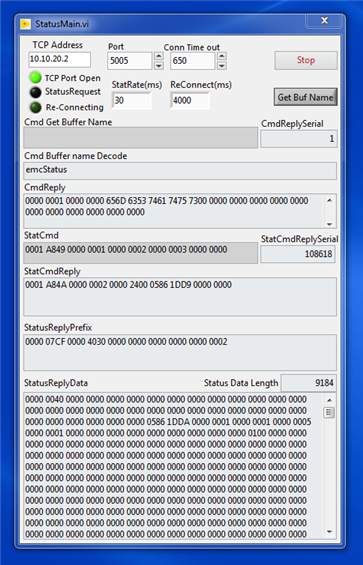
After running into the difficultly with data arriving via the TCP network connection that was not associated with the true emcStatus data I was able to run without errors again. The picture below shows that 108618 status request were sent and no errors were captured by one of this sub vi's which is not shown. It also shows that it successfully decoded the status buffer name on the first command that was sent to the status buffer. The latest master transfers 9216 status bytes of total status data, 20 bytes in its header, 12 bytes in its sync word, and then 9184 bytes of actual status data. This data is sent via the normal status write statement in emcmaintask and can be displayed as transmissions takes place as soon as the remote connects by using debug on the linuxCNC end of the link.

I run the Labview code on a Windows machine right now but it should work equally when when compiled to run on Linux.

Here is a picture for the StatusMain.vi with its front panel active to allow for monitoring values.


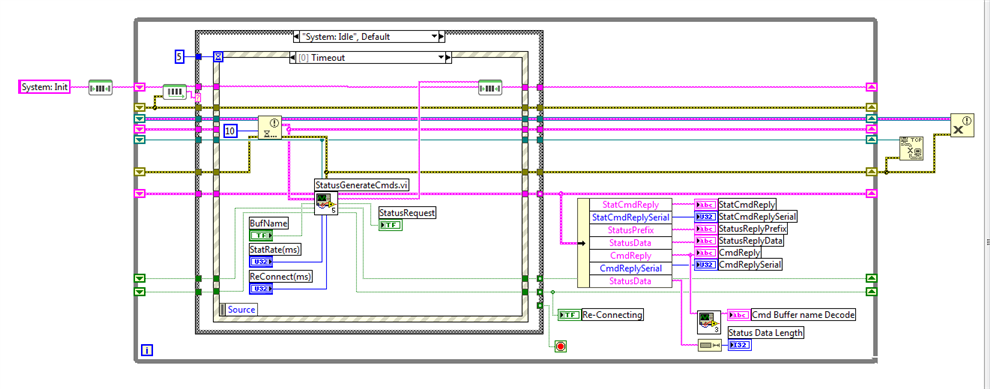
Below is what is the block diagram of the StatusMain.vi. It is event driven and when idle it updates the internal timers that do the status update requests in its command generator. The case structure, which includes System: Idle has 9 actual layers for its different functions. The event structure within it has 4 layers to handle the events that get the ones in the case structure active.


One of the great benefits of doing this type of status decoding is the ability to see issues with linucCNC development work problems that are not readily detectable with present debug or test functions. I really like Labview and I'm willing to share my code as progress is made if anyone is interested in helping to do development work. A labview - Python - linuxCNC interface is a posibility.

Last edit: 5 years 11 months ago by auto-mation-assist.

Please Log in or Create an account to join the conversation.

More
5 years 11 months ago #188604 by grijalvap
Hi I have been following your work and it is very interesting, you mention you can share your code, please let me know how can I get it.

Please Log in or Create an account to join the conversation.

More
5 years 11 months ago - 5 years 11 months ago #188649 by auto-mation-assist
Thank you for your interests. Since National Instruments came out withe the 2020 Community version of Labview it is a lot more of a worthwhile project since many individuals will be able to use it or some version of it. I'm in the process of doing some clean up work and converting the project files to the 2020 Labview Community version.

I have placed the Network TCP interface for the main status Vi on github. It can be used to check connectivity with LinuxCNC. I down loaded it as a zip file and run the StatusMain.vi in the StatusMain folder and it connects to LinuxCNC and runs fine. You should be able to use this to check your Labview configuration.

Requirements are: Labview 2020 Community version, the VI package manager for installing additions to Labview, and after the package manager is installed use it to install the JKI state machine. The link below should get you started and others will be available as I clean them up a bit. The next one will likely be the network NML command interface.

Link to the the network status interface is below.

github.com/auto-mation-assist/LinuxCNC-Labview
Last edit: 5 years 11 months ago by auto-mation-assist.

Please Log in or Create an account to join the conversation.

More
5 years 11 months ago #188689 by grijalvap
I have 2017 and 2018 licensed version of LabVIEW.

Please Log in or Create an account to join the conversation.

More
5 years 11 months ago #189632 by auto-mation-assist
2020 community version are available for down load from NI windows and Linux/Mac at no cost.

Please Log in or Create an account to join the conversation.

More
5 years 11 months ago - 5 years 11 months ago #189645 by auto-mation-assist
I updated to the latest development version today and find that latest 2.9 version has affected debug and that none of the debug statements for executing NML commands and others print out anymore in the terminal window as before.

Also the problem with the unknown data being put out with emcStaus buffer due to the tool info is also still there. Which is an easy fix locally for now by reducing the the tool table back to 56 from 1001 and changing the NML config file. This appears to prevent the status shared memory pointer from changing its start read location at about one second intervals to an area that is not actually the start of the real emcStatus data.

With this newest version of linuxCNC 2.9 it has further become impossible to turn my machine on because of a constant Estop condition that is generated within linuxCNC and no direct NML command will get it out of this condition. To me this seems to indicate that a change in the way Estop is handled has changed and that it is looking for something that is not NML based. Halui just indicates than Estop is on with no control over it.

In past testing.

Sending direct NML commands has worked really well but there are things within LinuxCNC 2.9 that do not always seem to update status when external NML commands are issued. These could be python related issues or even C code that may not have been fully tested for proper responses when external NML commands are issued to thier built in NML functions. You could say that its kind of like the left hand does not know what the right hand is doing. As an example, say that Python is on the left of CMC/NML and NML command is on the right with its designated default port access of 5005. You can send a command to port 5005 at any time and if that command is properly formatted it will be accepted and acted upon if that command type is defined but a Python process may not be coded properly to capture such a command or note a status change. This a a problem with having too many captains and only one ship.

If we look at history we can seen that users of LinuxCNC are never totally satisfied with any user interface and as a result we see more and more being added in as either concepts or allowed to be added into linuxCNC by some well meaning and talented people. But in the end this will become unmanageable because there is no universal users interface that can simply be plugged into and run on its own. Such a interface only need a available command list, status info and some kind of notification for error. Which is exactly what the right side as I defined it above offers with its port 5005. It was likely designed to provide one such standard user interface.

So this brings me back to the Labview UI which is indeed a interface that runs on its own, but with some limitation due to how data is handled by other processes that have been added in over the years that then to look like master control and that have no ability to deal with commands arriving from NML via port 5005.

Without pulling linuxCNC apart to much to make it more friendly with UI's that are not packaged with linuxCNC there appears to be at least the below items available that could be used to interface with Labview and to establish a standard universal interface.

1. Direct NML commands
2. Add Redis into LinuxCNC to interface with the Redis-Labview tools lib
3. Use Labview Node to interface with the linuxCNC .so files which in Windows are DLL files
4. Use Labview PythonNode to interface with present linuxCNC python code .py files

Number 1 is already usable as is and is very responsive. Commands can be added as desired and HAL pins controlled.
Number 2 is already in use by PathPilot with great success and compiled with linuxCNC in my development version but not used yet.
Number 3 could provide a fast interface and able to use C or C++
Number 4 would be the slowest and least desirable

It does appear to me that prior versions of linuxCNC development versions were more stable than those being issued now and this is causing me some concern. Or it could be that I just notice them more because I can see the negative effect they have on my own progress. But I do not want to be to far behind either.
.
Last edit: 5 years 11 months ago by auto-mation-assist.

Please Log in or Create an account to join the conversation.

Time to create page: 0.181 seconds
Powered by Kunena Forum