Labview UI project for Linuxcnc

More
7 years 3 months ago - 7 years 3 months ago #138674 by auto-mation-assist
I had worked for a while with Qtvcp and did develop a UI that was mostly functional but my interest has wavered a bit in doing additional work on that project at the present time. The files for that project, which need further work are available on github. My interest has been to convert my prior work with QTvcp and implement the basic UI layout and functionality using labview and interface it with Linuxcnc using either the Python module via TCP or interface it into shared memory again using TCP connections. That will likely be my biggest problem since it is not something that I'm familiar with doing. But I intend to overcome that as time progresses. I will very likely need assistance from others that have more knowledge it that area.

Presently I'm busy converting my prior work on the x1Mill UI to Labview code to get the UI where it will be usable for testing without Linuxcnc via network connections and simulator. Progress on the code conversion has been moving along well but I have concerns on how to best handle the TCP interface to Linuxcnc.

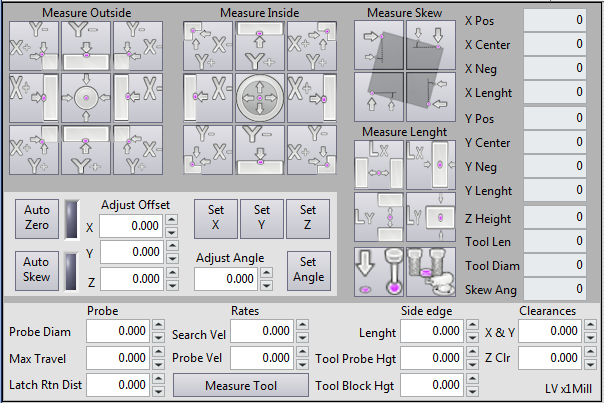
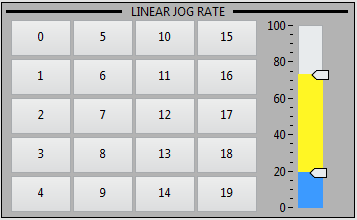
Here are a few pictures of the several panels that have been converted to Labview with all the buttons functional for sending commands but not interfaced beyond the basic functions.

The probing panel is the most complex while the linear jogging panel shows the slider with both its slow and fast rate sliders. The button values and labels will be loaded from a configuration file as was done in the QTvcp version for all button that need that functionality.

The goal of this project is to be able to run this UI remotely from either a Linux or Windows system and to develop a Network interface to linuxcnc that can be used for other UI's as well that may not use Labview.

The pictures of the below files are the Labview versions.



Last edit: 7 years 3 months ago by auto-mation-assist.
The following user(s) said Thank You: PKM, tommylight, pinder

Please Log in or Create an account to join the conversation.

More
7 years 3 months ago #138690 by pl7i92
quite nice
as so many using now Probe screen
the thing is you wont be able to change the probe speed during probing by a UI
The following user(s) said Thank You: auto-mation-assist

Please Log in or Create an account to join the conversation.

More
7 years 3 months ago - 7 years 3 months ago #138695 by auto-mation-assist
In regard to changing probing speeds while probing.

Probing speeds are to be set before a probing macro file started by the default values from the systems configuration file or by modifications to those values by the numeric controls on the probing UI panel before selecting a probing macro file to run.

The small preliminary sample UI panel showing the fast and slow sliders are used only while manual jogging mode is active. This is one of five UI panels associated with jogging and not associated with probing process.
Last edit: 7 years 3 months ago by auto-mation-assist.

Please Log in or Create an account to join the conversation.

More
7 years 3 months ago #138700 by tommylight
The following user(s) said Thank You: auto-mation-assist

Please Log in or Create an account to join the conversation.

More
7 years 3 months ago #138712 by BigJohnT
Very interesting indeed!

JT
The following user(s) said Thank You: auto-mation-assist

Please Log in or Create an account to join the conversation.

More
7 years 3 months ago #138723 by pl7i92
it woudt also be interest to get a big jogging bar to gmoccapy and the option to connect to a poti so on mashine you can fast see the jog speed
The following user(s) said Thank You: auto-mation-assist

Please Log in or Create an account to join the conversation.

Time to create page: 0.077 seconds
Powered by Kunena Forum