Labview UI project for Linuxcnc

More
5 years 11 months ago - 5 years 11 months ago #190225 by auto-mation-assist
One of the problem that I ran into was the amount of space the tool table was using in the emcStatus buffer which was causing issues with invalid data being received over the TCP link. I posted some information on this separately and it looks like a cure for that is being worked on and effective already. I don't use a tool changer so cant say if that work is totally complete. Here is a link to that post.

forum.linuxcnc.org/38-general-linuxcnc-q...97-tool-table-issues

Now that this is mostly resolved I went back to solving why the continuous jog functions would not stop any axis/joint when a properly formatted NML 136 command was sent.

The command was being excepted but not acted upon due to missing "int nr; members in the jog class definitions in the emc_nml.hh file. I added these as, int nr; // axis or joint number
in the classes listed below.

class EMC_JOG_CONT:public EMC_JOG_CMD_MSG {
class EMC_JOG_INCR:public EMC_JOG_CMD_MSG {
class EMC_JOG_ABS:public EMC_JOG_CMD_MSG {
class EMC_JOG_STOP:public EMC_JOG_CMD_MSG {

I figure that "nr" was a a recent name change and assume it was meant to represent 'number' and that they were not put back in when the old names were removed. I have seen this happen when focusing to much on internals and not considering external use also.

There may also be at least one "int jjogmode; // 1==> joint jog, 0==> axis jog"
missing but I did not add that.

It may need to go into
class EMC_JOG_CMD_MSG:public RCS_CMD_MSG {

This solved my continues Jog not stopping problem.

It should be nated that the NML 136 command worked fine when it was executed by gmoccapy but it also depends on other internal linuxCNC processes in addition to the NML 136 command.

The Jogging functions in linuxCNC could use some cleanup work and is a bit difficult to follow due to name changes here and there and things not always ways being in the same order in the code.

Last edit: 5 years 11 months ago by auto-mation-assist.

Please Log in or Create an account to join the conversation.

More
5 years 11 months ago #190521 by grijalvap
The VI in you project are password protected, may I have the password?

Please Log in or Create an account to join the conversation.

More
5 years 11 months ago - 5 years 11 months ago #190536 by auto-mation-assist
Yes this project is: sRd579qZ8^

I'm working on updates for the main and sub.vi's. It will take a while before these are completed. The main status vi has had changes to its reconnect function to allow the vi the vi itself to be stopped white in that loop.

Other updates have to do with the notifier system control commands that are sent to the main command vi that handles all the NML and MDI commands sent to linuxCNC to a three state instead of two states. This is a new CmdControl variable within the main and all subvi type defines.

0 = Do not send command on a button release
1 = Send command on button release
2 = Send command on button down

I have not worked on a tool table .vi yet and if anyone wants to start one that would be helpful. All subvi's need to be coded to use the JKI state machine.

I'm scheduled to have eye surgeries during the next several weeks and that may prevent me working on this project for a short period of time.

I have not had the time to do anything with the rmcsys.org/ website that I started to set up for this labview project and to share .zip files.
Last edit: 5 years 11 months ago by auto-mation-assist.

Please Log in or Create an account to join the conversation.

More
5 years 11 months ago - 5 years 11 months ago #190541 by auto-mation-assist
Since I mentioned that I have not coded a tool table subvi that reads the toot table file and allow for changes to be made yet I figured that if someone wanted to work on this that it may be helpful to have some info as to the panel size to stuff this into.

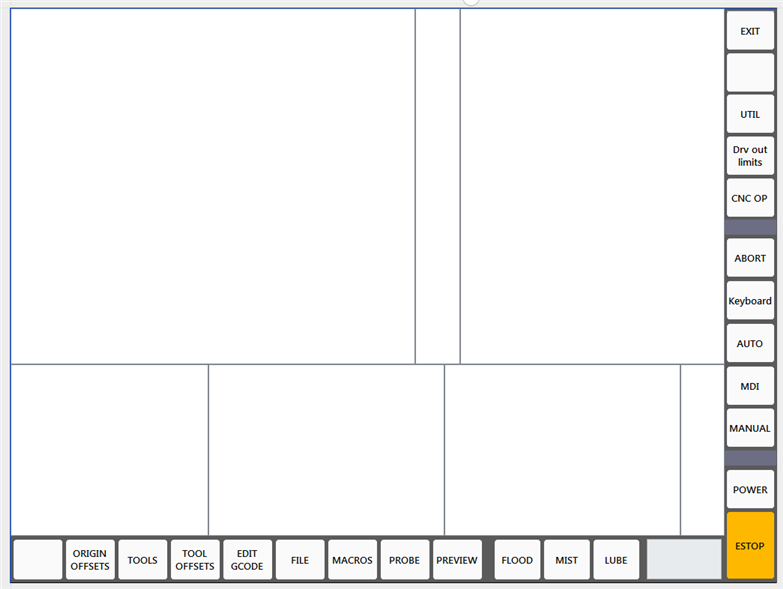
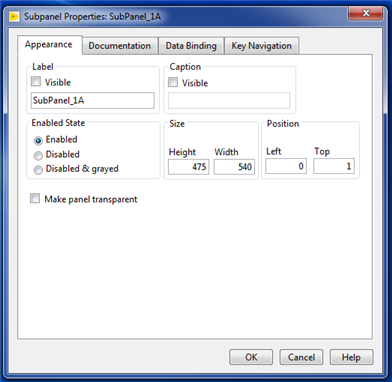
If you look at the upper left area of the picture below you will see SubPanel_1A area which is normally displaying the 3D Gcode preview. This area has a height of 457 and a width of 540 and things that get displayed in this area are those selected by the 9 horizontal buttons on the bottom left. It is also possible to display these to the maximum size which covers the entire area that does not have the vertical and horizontal rows of buttons. To do this is just a matter of calling up a different SubPanel.


And some info about this particular SubPanel.


I have always tried to get this to fit into a compact screen area of 768x1024 which reduces the length of arm movement when using a mouse and still provide large enough work area. The SubPanels panels can be rearranged simply by dragging then into a new desired location and lining them up properly. I'm right handed so I set these up to best suite me.

My subvi's that fill some SubPanel locations may have a lot of buttons. However the number of buttons that are actually displayed on these subvi's is controlled by entries in the .ini file. For these the values that those enter when a particular button is clicked on is also set by the same line in the .ini file.


.
Last edit: 5 years 11 months ago by auto-mation-assist.

Please Log in or Create an account to join the conversation.

More
5 years 10 months ago - 5 years 10 months ago #191980 by grijalvap
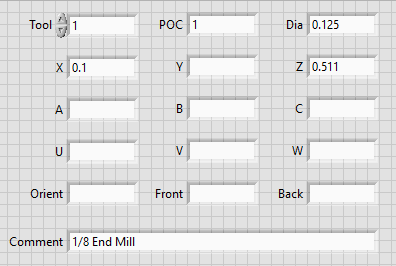
Do you think something like this can work


or may be like this
Last edit: 5 years 10 months ago by grijalvap.

Please Log in or Create an account to join the conversation.

More
5 years 1 month ago - 5 years 1 month ago #219931 by udoS
@auto-mation-assist

Hi to all and thanks for this topic. At least I hope so.

I'm building a new interface to connect a plc (LogicLab with etherCat master) pure nml .
Now getting the status was pretty simple but now I'm stuck. First thing that I need now is how to send the act. joint (encoder) value to lcnc with nml.
All done in c/c++.
Last edit: 5 years 1 month ago by udoS.

Please Log in or Create an account to join the conversation.

Time to create page: 0.080 seconds
Powered by Kunena Forum