
- Posts: 422
- Thank you received: 126
Kleines Script zum "Bewussten" runterfahren *howto*
- spicer
- Offline
- Platinum Member
-

Less
More
7 years 5 months ago - 7 years 4 months ago #133272
by spicer
Kleines Script zum "Bewussten" runterfahren *howto* was created by spicer
Hatte das Problem, dass ich vor dem Runterfahren vergass, die Y Achse nach oben (ins Plus) zu fahren.
Da ich in Plusrichtung referenziere hatte das dann die Folge, dass beim nächsten Einschalten der CNC immer der ganze Weg (über 1100mm) langsam durchgefahren werden musste zum referenzieren. Da 2 Y-Motoren vorhanden sind, kann ich auch nicht im JOG-Mode fahren vor dem Referenzieren.
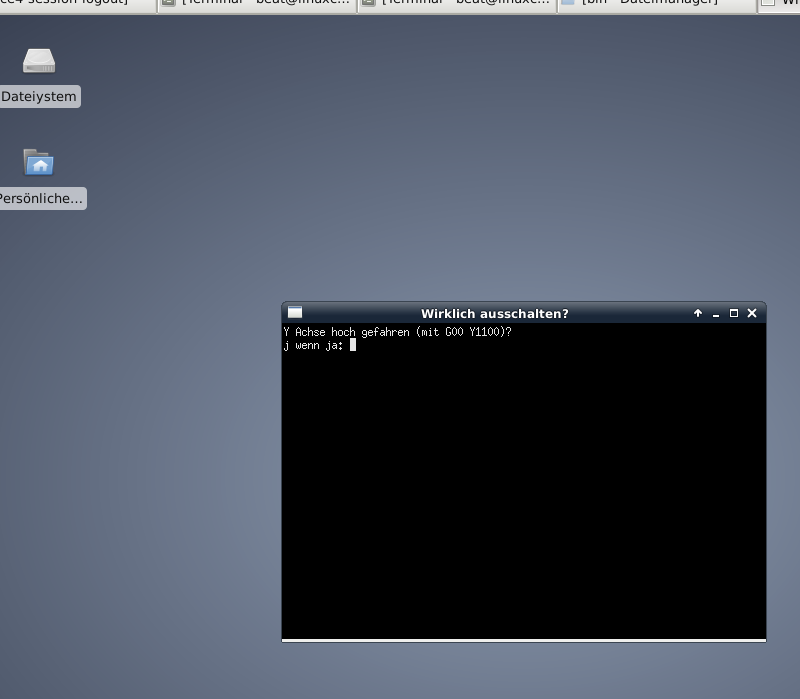
Habe mir nun ein kleines Script geschrieben, welches vor dem Runterfahren oder Abmelden ein Nachfrage-Fenster erscheinen lässt.
Script:
Dieses muss unter /usr/local/bin/xfce4-session-logout gespeichert und als ausführbar markiert werden.
Im Script kann man noch auswählen, ob nach j Eingabe direkt runtergefahren werden oder das Ausschaltmenu erscheinen soll.
Einfach das Gewünschte auskommentieren.
Da ich in Plusrichtung referenziere hatte das dann die Folge, dass beim nächsten Einschalten der CNC immer der ganze Weg (über 1100mm) langsam durchgefahren werden musste zum referenzieren. Da 2 Y-Motoren vorhanden sind, kann ich auch nicht im JOG-Mode fahren vor dem Referenzieren.
Habe mir nun ein kleines Script geschrieben, welches vor dem Runterfahren oder Abmelden ein Nachfrage-Fenster erscheinen lässt.
Script:
Code:
#!/bin/bash
xterm -T "Wirklich ausschalten?" -e 'echo "Y Achse hoch gefahren (mit G00 Y1100)?"
read -p "j wenn ja: " eing
if [ "$eing" = "j" ]
then
# /usr/bin/xfce4-session-logout #Ausschaltmenu
/usr/bin/xfce4-session-logout --halt #Direkter Shutdown
fi'
Dieses muss unter /usr/local/bin/xfce4-session-logout gespeichert und als ausführbar markiert werden.
Im Script kann man noch auswählen, ob nach j Eingabe direkt runtergefahren werden oder das Ausschaltmenu erscheinen soll.
Einfach das Gewünschte auskommentieren.
Last edit: 7 years 4 months ago by spicer.
Please Log in or Create an account to join the conversation.
- Grotius
- Offline
- Platinum Member
-
Less
More
- Posts: 2419
- Thank you received: 2349
7 years 5 months ago - 7 years 5 months ago #133277
by Grotius
Replied by Grotius on topic Kleines Script zum "Bewussten" runterfahren
The main problem of this is at higher level.
I have issued this problem before. Norbert say's that it is alway's possible to jog, but i think not.
When you have machine config XYZ, you can always jog, even when not homed.
When you have machine config XXYZ, you have a problem.
Jog mode must be alway's 100 % possible, even when not homed. If jogging was always possible you did not have to write your bash log off script. In fact you could connect your bash log off command's to linuxcnc when using linuxcnc terminal command's integrated in your scripting, this then will only pop up when x or y value's are at a certain level.
And you don't have to have 2 startup icon's. (second solution : one startup icon for homing and one startup icon for non-homing)
So i hope they can do a git push, or how it's called very soon about this item. I will smile if jogging is alway's possible with exeption of auto mode off course.
In safety prospect, a machine or robot jog mode must be possible at any time when a accident has happened. If not we can call Houston.
I have issued this problem before. Norbert say's that it is alway's possible to jog, but i think not.
When you have machine config XYZ, you can always jog, even when not homed.
When you have machine config XXYZ, you have a problem.
Jog mode must be alway's 100 % possible, even when not homed. If jogging was always possible you did not have to write your bash log off script. In fact you could connect your bash log off command's to linuxcnc when using linuxcnc terminal command's integrated in your scripting, this then will only pop up when x or y value's are at a certain level.
And you don't have to have 2 startup icon's. (second solution : one startup icon for homing and one startup icon for non-homing)
So i hope they can do a git push, or how it's called very soon about this item. I will smile if jogging is alway's possible with exeption of auto mode off course.
In safety prospect, a machine or robot jog mode must be possible at any time when a accident has happened. If not we can call Houston.
Last edit: 7 years 5 months ago by Grotius.
Please Log in or Create an account to join the conversation.
- spicer
- Offline
- Platinum Member
-
Less
More
- Posts: 422
- Thank you received: 126
7 years 5 months ago #133281
by spicer
Replied by spicer on topic Kleines Script zum "Bewussten" runterfahren
Ich habe XYYZ. Siehe "Da 2 Y-Motoren vorhanden sind, kann ich auch nicht im JOG-Mode fahren vor dem Referenzieren.".
Ich kann ohne Referenzfahrt lediglich X und Z im JOG-Mode bewegen.
Ich kann ohne Referenzfahrt lediglich X und Z im JOG-Mode bewegen.
Please Log in or Create an account to join the conversation.
- Grotius
- Offline
- Platinum Member
-
Less
More
- Posts: 2419
- Thank you received: 2349
7 years 5 months ago #133282
by Grotius
Replied by Grotius on topic Kleines Script zum "Bewussten" runterfahren
Exactly !!!
When linuxcnc code is updated at this section the problem is solved. But i am not the one to push the update to Git.
I have my own git repro. But i think i will look at a solution coming time. I will put this one on my bucketlist !!!
And in the mean time, have fun with linuxcnc !!
Good luck.
When linuxcnc code is updated at this section the problem is solved. But i am not the one to push the update to Git.
I have my own git repro. But i think i will look at a solution coming time. I will put this one on my bucketlist !!!
And in the mean time, have fun with linuxcnc !!
Good luck.
Please Log in or Create an account to join the conversation.
- spicer
- Offline
- Platinum Member
-
Less
More
- Posts: 422
- Thank you received: 126
7 years 5 months ago #133336
by spicer
Replied by spicer on topic Kleines Script zum "Bewussten" runterfahren
Wenn es möglich wäre, Befehle aus dem Terminal an LCNC zusenden bzw Positonsdaten von LCNC auszulesen?
Dann könnte ich das Script so erweitern, dass gefragt wird, ob die Y-Achse zuerst nach oben fahren soll, wenn diese zuweit unten steht.
Dann könnte ich das Script so erweitern, dass gefragt wird, ob die Y-Achse zuerst nach oben fahren soll, wenn diese zuweit unten steht.
Please Log in or Create an account to join the conversation.
- 3D-Master
- Offline
- Elite Member
-

Less
More
- Posts: 238
- Thank you received: 5
7 years 5 months ago #133371
by 3D-Master
Replied by 3D-Master on topic Kleines Script zum "Bewussten" runterfahren
Eventuell solltest du es mal damit versuchen. Einfach die Koordinaten eingeben und schauen was passiert. (Falls es noch möglich ist, Koordinierte Bewegungen auszuführen)
2.7. [HAL] section
TWOPASS=ON - Use two pass processing for loading HAL comps. With TWOPASS processing, all [HAL]HALFILES are first read and multiple appearances of loadrt directives for each moduleb are accumulated. No hal commands are executed in this initial pass.
HALFILE = example.hal - Execute the file example.hal at start up. If HALFILE is specified multiple times, the files are executed in the order they appear in the ini file. Almost all configurations will have at least one HALFILE, and stepper systems typically have two such files, one which specifies the generic stepper configuration (core_stepper.hal) and one which specifies the machine pin out (xxx_pinout.hal)
HALCMD = command - Execute command as a single HAL command. If HALCMD is specified multiple times, the commands are executed in the order they appear in the ini file. HALCMD lines are executed after all HALFILE lines.
SHUTDOWN = shutdown.hal - Execute the file shutdown.hal when LinuxCNC is exiting. Depending on the hardware drivers used, this may make it possible to set outputs to defined values when LinuxCNC is exited normally. However, because there is no guarantee this file will be executed (for instance, in the case of a computer crash) it is not a replacement for a proper physical e-stop chain or other protections against software failure.
POSTGUI_HALFILE = example2.hal - (Only with the TOUCHY and AXIS GUI) Execute example2.hal after the GUI has created its HAL pins. See section pyVCP with Axis Section for more information.
HALUI = halui - adds the HAL user interface pins. For more information see the HAL User Interface chapter.
Please Log in or Create an account to join the conversation.
Moderators: Muecke
Time to create page: 2.939 seconds