Run/Step Hold/Resume Buttons

  • vasilyzel.
  • New Member
  • New Member
More
2 years 2 weeks ago #312348 by vasilyzel.
Replied by vasilyzel. on topic Run/Step Hold/Resume Buttons
Очень хочу подключить кнопку начало исполнения программы ,можете помочь?

Please Log in or Create an account to join the conversation.
More
2 years 2 weeks ago #312460 by Benb
Replied by Benb on topic Run/Step Hold/Resume Buttons
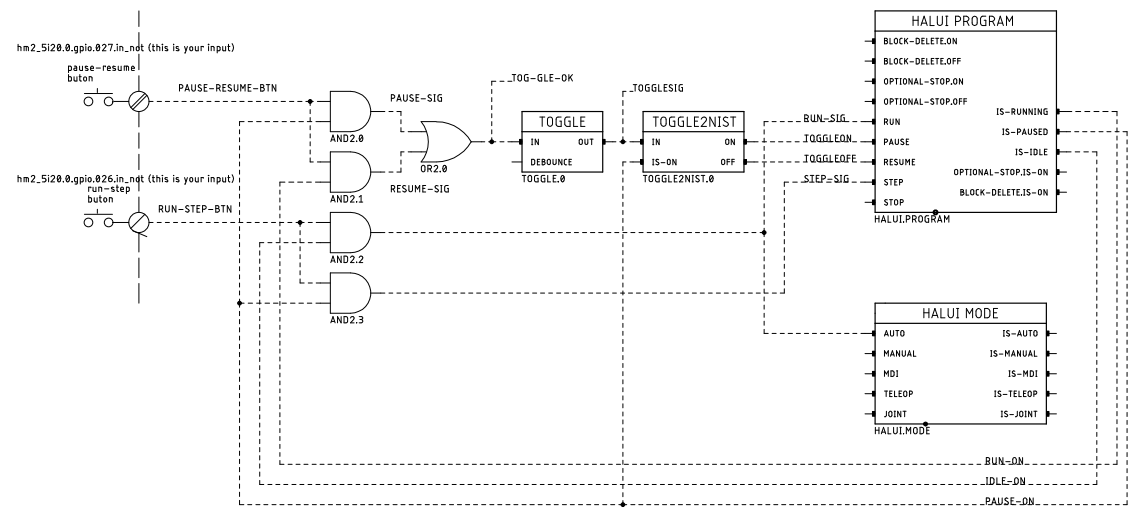
The following is block diagram based on BJT Run/Step Hold/Resume Buttons hal netlist file as shown at the beginning of this discussion.
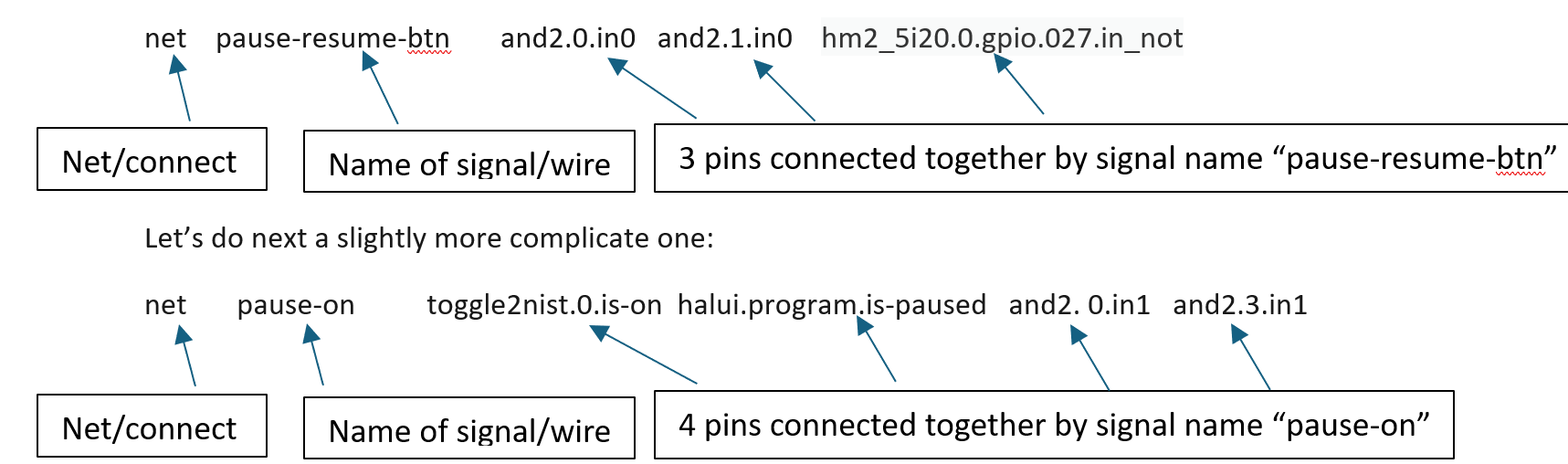
  Now, let’s start little tutorial that show how you can generate hal file from a block diagram:Let’s take the first line of the block diagram and convert it into hal netlisting:
  I let you do the rest as an exercise. Once you get hang of converting block diagrams to hal netlist you will find that it makes creating hal solutions much easier.Now if you would like to automatically generate hal file from block diagram. The one I use is eagle2hal see LinuxCNC wiki or even better use Ed Nisley kicad to hal. softsolder.com/2021/03/25/kicad-to-hal-basic-schematic-symbols/
The following user(s) said Thank You: JT

Please Log in or Create an account to join the conversation.
More
2 years 2 weeks ago #312542 by Benb
Replied by Benb on topic Run/Step Hold/Resume Buttons
Something important I forgot to mention in my previous message regarding converting block diagram to hal netlist.
 
Let'e take toggle2nist component, the way you extract the information from the symbol is as follows.

From bottom left is the name of the component toggl2nist.0 and you add the pin name in, we end up with toggl2nist.0.in same for the rest of the pins of this component ie toggl2nist.0.is-on toggl2nist.0.on toggl2nist.0.off

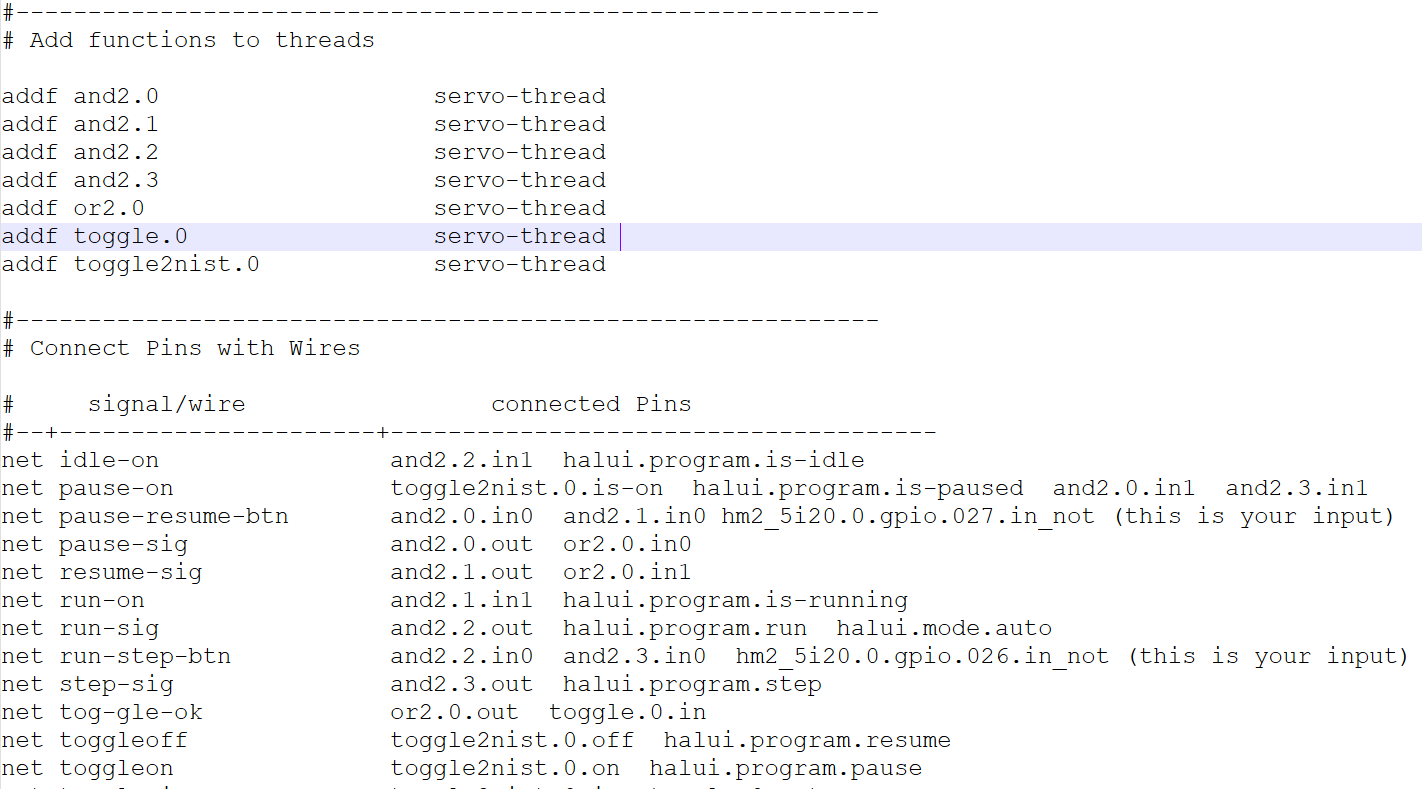
For the complete hal file we end up with this:


Please Log in or Create an account to join the conversation.
More
1 year 5 months ago - 1 year 5 months ago #327997 by vre
Replied by vre on topic Run/Step Hold/Resume Buttons
This config if you push start and it is in manual mode changes to auto automatically and runs the code.
How to do it not change to auto automatically?
I have changed this
Code:
net run-sig halui.mode.auto halui.program.run <= and2.2.out

to this
Code:
net run-sig halui.program.run <= and2.2.out

but continues to run the program even it is in manual mode.

Also this must uncommented or not ?
Code:
# net pause.on and 2.3.in1 <= halui.program.is-paused
Last edit: 1 year 5 months ago by vre.

Please Log in or Create an account to join the conversation.

Time to create page: 0.178 seconds
Powered by Kunena Forum
