How to. 2 or more motors on one axis. Gantry

More
7 years 2 months ago #143170 by FedX
Great thank you! Now evereything works fine after "homing". Should i do theese changes also on the real machine or is it just a "cosmetic" effect?

Please Log in or Create an account to join the conversation.

More
7 years 1 month ago - 7 years 1 month ago #146706 by deemoss
Hi Guys, thanks for the excellent write up.

1.
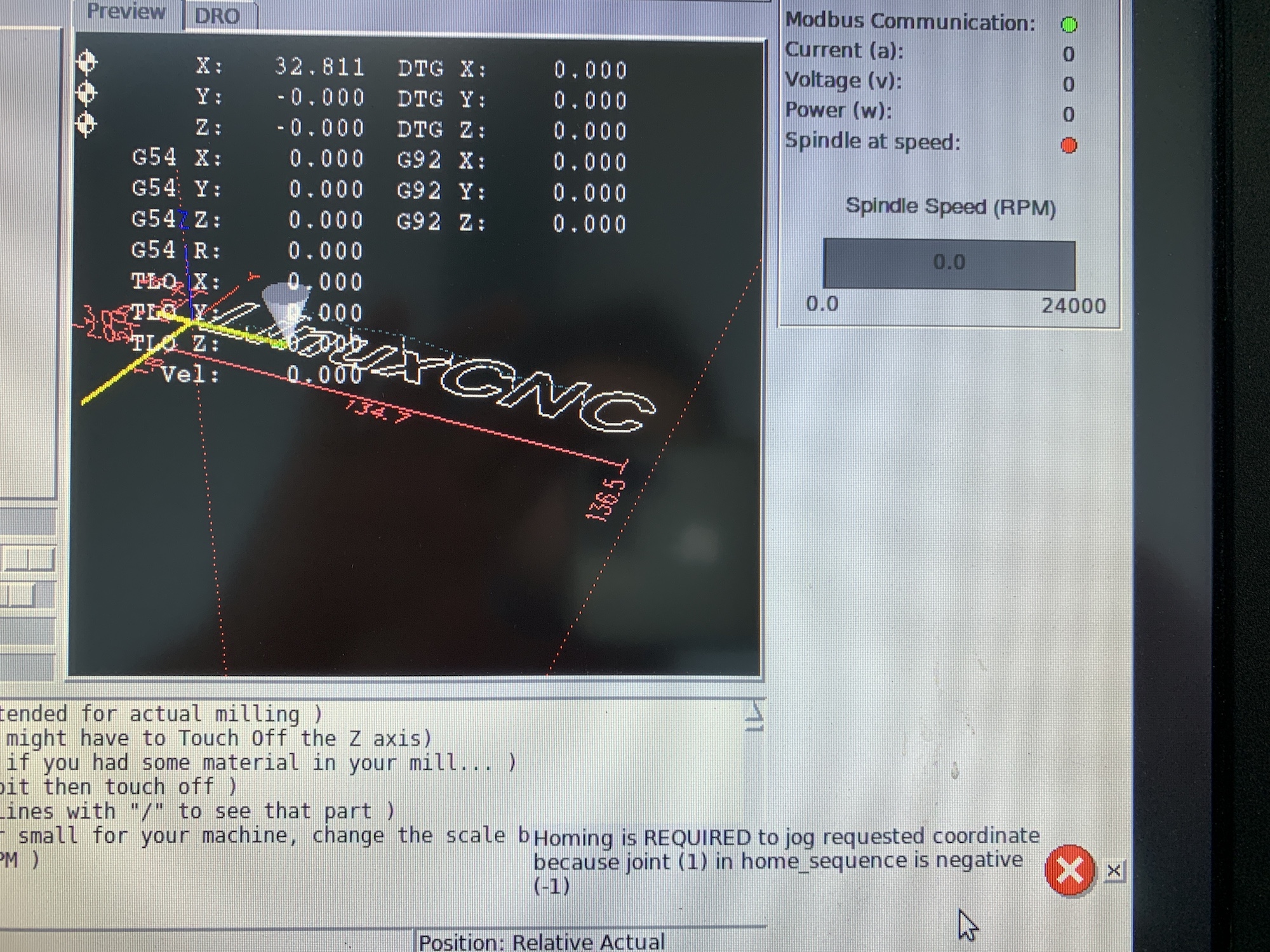
I have implemented the changes in 2.8pre and it seems that I am able to home the 2 joint Y gantry (Home ALL). As you can see in the screenshot 1, the router LOOKS homed. Then when I try to jog Y, I get this error (as if it hasn't been homed). Why could this be?

2.
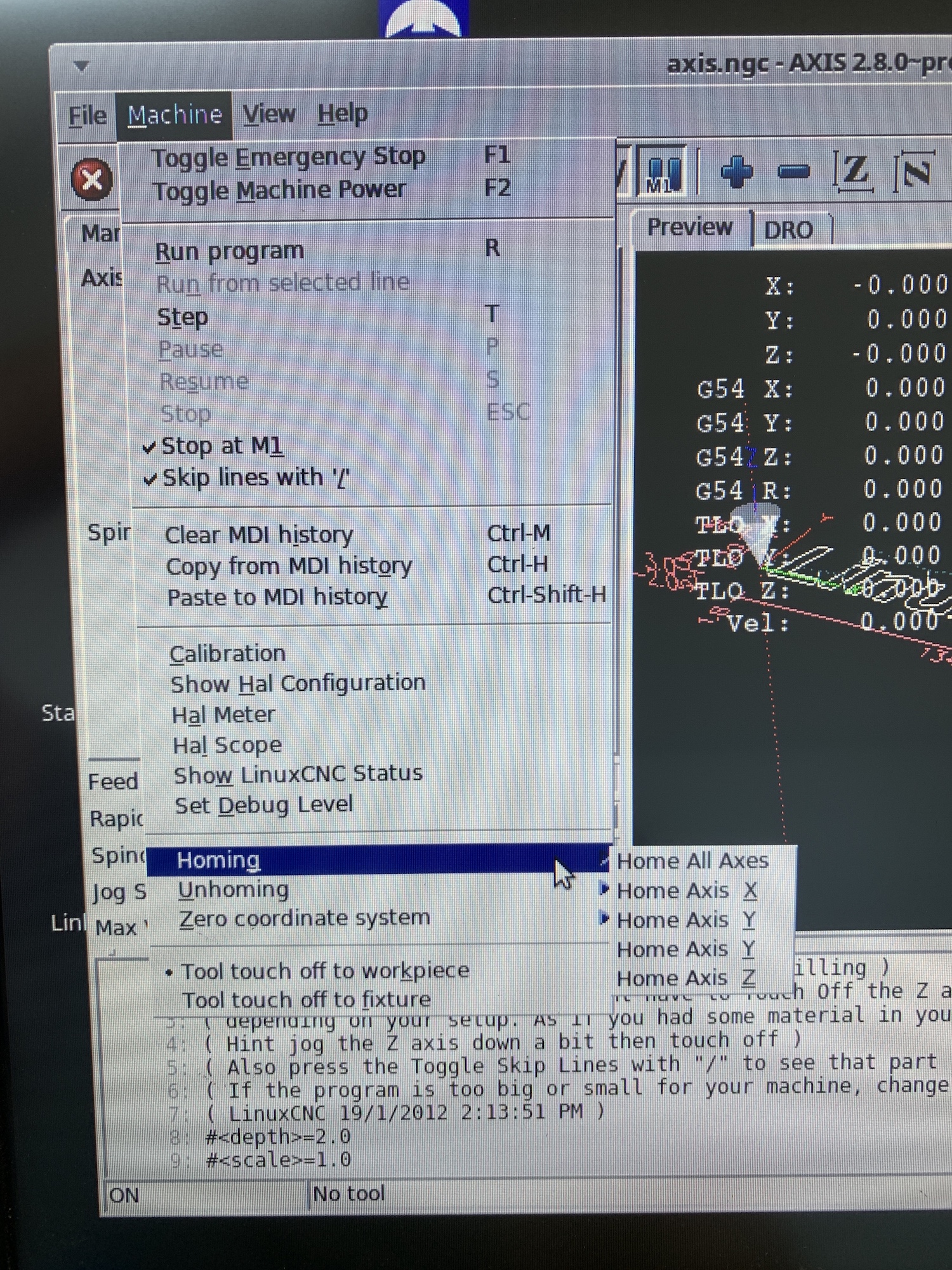
When (in Axis) going to Machine -> Homing I see two "Home Axis Y". If I try one of them does it mean that only one joint will start moving? Screenshot 2.

Cheers,
Dimos
Last edit: 7 years 1 month ago by deemoss.

Please Log in or Create an account to join the conversation.

More
7 years 1 month ago #146707 by tommylight
You have them set as two separate axis, they should be the same axis but with two joints.
Attach the hal and ini files.

Please Log in or Create an account to join the conversation.

More
7 years 1 month ago #146709 by pl7i92
i guess you will use gantryhoming
[KINS]
KINEMATICS = trivkins coordinates=XYYZ kinstype=BOTH
JOINTS = 4
## so joint0=X joint1=yA joinit2=yB joint3=Z
Code:
[JOINT_1] TYPE = LINEAR # final home position machine-unit/sec HOME = 70 #where the mashine ends after homing is finished MIN_LIMIT = -0.001 MAX_LIMIT = 200 MAX_VELOCITY = 25.0 MAX_ACCELERATION = 750.0 STEPGEN_MAXACCEL = 937.5 SCALE = 200 FERROR = 1 MIN_FERROR = .25 # FIRST MOTOR OFSET TO BE SQARE # use this to square the gantry HOME_OFFSET = 0.1 # machine-units per sec next 3 lines HOME_SEARCH_VEL = 10 HOME_LATCH_VEL = -6 HOME_FINAL_VEL = 20 HOME_USE_INDEX = NO # has to be -ve for gantry HOME_SEQUENCE = -1 [JOINT_2] TYPE = LINEAR # final home position machine-unit/sec HOME = 70 MIN_LIMIT = -0.001 MAX_LIMIT = 200 MAX_VELOCITY = 25.0 MAX_ACCELERATION = 750.0 STEPGEN_MAXACCEL = 937.5 SCALE = 200 FERROR = 1 MIN_FERROR = .25 # second SIDE ofset to be square # use this to square the gantry HOME_OFFSET = 0.5 # machine-units per sec next 3 lines HOME_SEARCH_VEL = 10 HOME_LATCH_VEL = -6 HOME_FINAL_VEL = 20 HOME_USE_INDEX = NO # has to be -ve for gantry HOME_SEQUENCE = -1


the AXis Y will travel both till the first reatch A switch then it will be homing one after the other and then travel to HOME on Both

Please Log in or Create an account to join the conversation.

More
7 years 1 month ago - 7 years 1 month ago #146791 by deemoss
Thanks Guys!

I (kind of) fixed it after reading your comments by adding the second Y to:
[TRAJ]
COORDINATES = X Y Y Z

Now when I go to Machine -> Homing i don't see the Y axis (is this correct?) see screenshot homing.png.

Also, after I do Home ALL (actually that does not include homing Z because I have no sensors on it - #HOME_SEQUENCE is commented out) and then try to jog Y, I get this error which refers to joint1 (part of axis Y) not being homed. The strange thing is that I can jog Y after I Touch Off Z. Screenshot Moving Y-after homing ALL.png.

I also attached my INI and HAL files.

Dimos
Last edit: 7 years 1 month ago by deemoss.

Please Log in or Create an account to join the conversation.

More
7 years 1 month ago #146802 by dgarrett
Code:
If HOME_SEQUENCE is not specified then the joint will not be homed by the HOME ALL sequence (but may be homed by individual joint-specific homing commands).

Ref: linuxcnc.org/docs/2.8/html/config/ini-homing.html
Specifically:
Ref: linuxcnc.org/docs/2.8/html/config/ini-ho....html#_home_sequence

Use "Immediate homing" for the joint that
corresponds to the Z coordinate (joint 2 in your case)
if it has no home switches
Code:
Immediate Homing If a joint does not have home switches or does not have a logical home position like a rotary joint and you want that joint to home at the current position when the "Home All" button is pressed in the Axis gui, then the following ini entries for that joint are needed. HOME_SEARCH_VEL = 0 HOME_LATCH_VEL = 0 HOME_USE_INDEX = NO HOME equals to HOME_OFFSET HOME_SEQUENCE = 0 (or other valid sequence number)

Ref: linuxcnc.org/docs/2.8/html/config/ini-ho...ml#_immediate_homing

When using trivkins for a gantry with two joints for a
coordinant, it is recommended to use kinstype=Both in
order to see the homing condition for each joint.

The attached ini file is a sim config based on your ini
file for demonstration (it is a simulation, no hardware
required):
The following user(s) said Thank You: deemoss

Please Log in or Create an account to join the conversation.

Time to create page: 0.278 seconds
Powered by Kunena Forum