
- Posts: 22011
- Thank you received: 7491
new install, now cant import tkinter
- tommylight
- Online
- Moderator
-

Less
More
6 years 4 months ago #170115
by tommylight
Replied by tommylight on topic new install, now cant import tkinter
Ran into the same issue yesterday, updater only affected.
Thank you.
Thank you.
Please Log in or Create an account to join the conversation.
- Marcodi
- Offline
- Elite Member
-

Less
More
- Posts: 198
- Thank you received: 13
6 years 4 months ago #170299
by Marcodi
Replied by Marcodi on topic new install, now cant import tkinter
I ran into the same issue 10 days ago, apparently now there is a proposed solution for it.
I couldn't solve it and I downgraded to 2.8.0 again
.
I couldn't solve it and I downgraded to 2.8.0 again
.
Please Log in or Create an account to join the conversation.
- phillc54
- Offline
- Platinum Member
-

Less
More
- Posts: 5711
- Thank you received: 2100
6 years 4 months ago - 6 years 4 months ago #170305
by phillc54
Replied by phillc54 on topic new install, now cant import tkinter
It is probably worthwhile opening an issue here
github.com/LinuxCNC/linuxcnc/issues
A quick look doesn't show anything similar.
A quick look doesn't show anything similar.
Last edit: 6 years 4 months ago by phillc54.
The following user(s) said Thank You: arvidb
Please Log in or Create an account to join the conversation.
- arvidb
- Offline
- Platinum Member
-
Less
More
- Posts: 459
- Thank you received: 158
6 years 4 months ago #170378
by arvidb
Replied by arvidb on topic new install, now cant import tkinter
Yes, good advice. I've opened an issue now:
github.com/LinuxCNC/linuxcnc/issues/881
The following user(s) said Thank You: phillc54
Please Log in or Create an account to join the conversation.
- rodw
- Offline
- Platinum Member
-
Less
More
- Posts: 12170
- Thank you received: 4153
6 years 4 months ago #170412
by rodw
Replied by rodw on topic new install, now cant import tkinter
I installed Beagle's Mint ISO build master from source yesterday and this was one missing dependency which stalled me. I think
sudo apt-get install python3-tk
sudo apt-get install python-tk
Fixed it.
Just not sure on the second one. It might have been python2-tk. I just guessed we'd need to do something for python2 as well.
So I guessed the dependency.
Not related but the only problem I have is the linuxcnc chooser it too hard to read with squashed up text It would be nice if the column was resizable.
sudo apt-get install python3-tk
sudo apt-get install python-tk
Fixed it.
Just not sure on the second one. It might have been python2-tk. I just guessed we'd need to do something for python2 as well.
So I guessed the dependency.
Not related but the only problem I have is the linuxcnc chooser it too hard to read with squashed up text It would be nice if the column was resizable.
Please Log in or Create an account to join the conversation.
- tjtr33
- Offline
- Elite Member
-
Less
More
- Posts: 170
- Thank you received: 54
3 years 2 months ago - 3 years 2 months ago #278804
by tjtr33
Replied by tjtr33 on topic new install, now cant import tkinter
Update: 26 Aug 2023
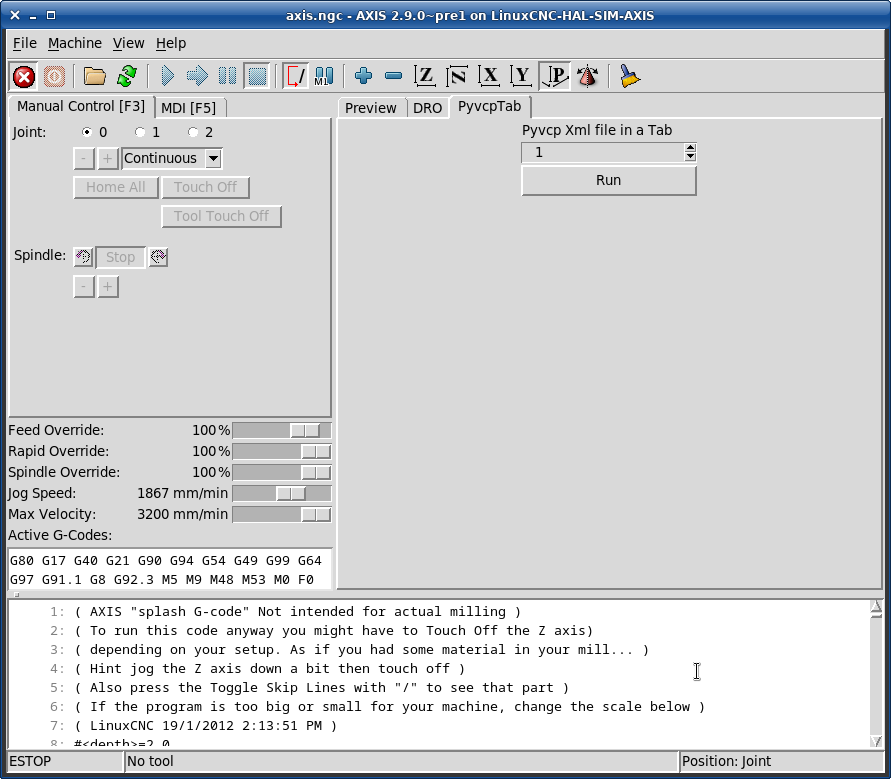
Phill Carter proved it works in 2.9.0-pre mumble
Thanks Phill
see attached png pyvcp2.9.0-pre.png
Hello, on linuxcnc 2.8.4 ,
I cannot load Jepler's teachin.py
and
reloading python3-tk then puthon-tk did not get rid of 'no module anemd tkinter'
both modules show up to date
"python3-tk is already the newest version (3.7.3-1)."
"python-tk is already the newest version (2.7.16-2)."
yet jeplers teachin.py gets error
"Traceback (most recent call last):
File "/home/tomp/linuxcnc/nc_files/teachin.py", line 27, in <module>
import tkinter
ImportError: No module named tkinter
"
TomP 22Aug2023
EDIT:
this is a bitch
python 2.nnn uses Tkinter
python 3.nnn uses tkinter
note the capital T vs lowercase t
also, most of the calls are different in format
and if you try to search Tkinter vs tkinter,
the web will pften hand you the wrong info despite quotes
Here is a good reference for python 2.nn's Tkinter
www.geeksforgeeks.org/create-first-gui-a...sing-python-tkinter/
but beware opf 'signup' nagging
To learn more on your own...
run python2.nnn ( likely default for Linuxcnc users )
then import Tkinter
then print(dir(Tkinter)) to get a list of all the keywords in he lib
then help(Tkinter.wordofinterest)) to learn more about a function
Be very wary of any code on web untill you can recognize which T/t kinter is used
HTH tomp
Phill Carter proved it works in 2.9.0-pre mumble
Thanks Phill
see attached png pyvcp2.9.0-pre.png
Hello, on linuxcnc 2.8.4 ,
I cannot load Jepler's teachin.py
and
reloading python3-tk then puthon-tk did not get rid of 'no module anemd tkinter'
both modules show up to date
"python3-tk is already the newest version (3.7.3-1)."
"python-tk is already the newest version (2.7.16-2)."
yet jeplers teachin.py gets error
"Traceback (most recent call last):
File "/home/tomp/linuxcnc/nc_files/teachin.py", line 27, in <module>
import tkinter
ImportError: No module named tkinter
"
TomP 22Aug2023
EDIT:
this is a bitch
python 2.nnn uses Tkinter
python 3.nnn uses tkinter
note the capital T vs lowercase t
also, most of the calls are different in format
and if you try to search Tkinter vs tkinter,
the web will pften hand you the wrong info despite quotes
Here is a good reference for python 2.nn's Tkinter
www.geeksforgeeks.org/create-first-gui-a...sing-python-tkinter/
but beware opf 'signup' nagging
To learn more on your own...
run python2.nnn ( likely default for Linuxcnc users )
then import Tkinter
then print(dir(Tkinter)) to get a list of all the keywords in he lib
then help(Tkinter.wordofinterest)) to learn more about a function
Be very wary of any code on web untill you can recognize which T/t kinter is used
HTH tomp
Last edit: 3 years 2 months ago by tjtr33. Reason: update
Please Log in or Create an account to join the conversation.
Time to create page: 2.565 seconds