
- LinuxCNC
- Installing LinuxCNC
- current latest download of LinuxCNC V2.9.8 will not install GRUB on several PC's
current latest download of LinuxCNC V2.9.8 will not install GRUB on several PC's
- NWE
-

- Offline
- Elite Member
-

Less
More
- Posts: 263
- Thank you received: 81
09 Feb 2026 20:58 #342733
by NWE
If bios has CSM and it is turned off, I have no luck booting anything in legacy bios mode, I get:
"No boot media found"
My hazy memory is slowly refreshing. It seems I manually created a small bios boot partition (legacy mode) or efi partition (uefi mode). I never investigated why I had to do that; whether:
1. The automatic partitioner failed to create it, or
2. Some option I had selected prevented it from creating it automatically.
Posting a screenshot of what it is creating at the stage it asks you to confirm the partitioning might be helpful. I'm not sure whether there is an easy way to take a real screenshot of that, you might have to snap a photo of it.
Replied by NWE on topic current latest download of LinuxCNC V2.9.8 will not install GRUB on several PC's
Not all bios seem to have that.Can’t find anything in the bios related to csm
If bios has CSM and it is turned off, I have no luck booting anything in legacy bios mode, I get:
"No boot media found"
My hazy memory is slowly refreshing. It seems I manually created a small bios boot partition (legacy mode) or efi partition (uefi mode). I never investigated why I had to do that; whether:
1. The automatic partitioner failed to create it, or
2. Some option I had selected prevented it from creating it automatically.
Posting a screenshot of what it is creating at the stage it asks you to confirm the partitioning might be helpful. I'm not sure whether there is an easy way to take a real screenshot of that, you might have to snap a photo of it.
Please Log in or Create an account to join the conversation.
- NWE
-
- Offline
- Elite Member
-
Less
More
- Posts: 263
- Thank you received: 81
09 Feb 2026 21:27 #342735
by NWE
One naughty bios in one of my systems a while back showed: CSM = disabled. It could not be enabled. The manual said it can be enabled if you install a graphics card. I tried that and it worked. Which was a problem because it had only one PCIe slot and I wanted something else in it; I had no need for a graphics card on that system.
Replied by NWE on topic current latest download of LinuxCNC V2.9.8 will not install GRUB on several PC's
That sounds like it... Trusted computing. Boot priority. Those are some areas I'd think of checking. If it is nowhere, then it probably does not have CSM.I didn’t spot it in the bios but equally wasn’t looking for it. Is it normally in the same area of the bios screen that legacy mode and secure boot reside ?
One naughty bios in one of my systems a while back showed: CSM = disabled. It could not be enabled. The manual said it can be enabled if you install a graphics card. I tried that and it worked. Which was a problem because it had only one PCIe slot and I wanted something else in it; I had no need for a graphics card on that system.
Please Log in or Create an account to join the conversation.
- depronman
- Offline
- Senior Member
-

Less
More
- Posts: 62
- Thank you received: 9
11 Feb 2026 08:59 #342797
by depronman
Replied by depronman on topic current latest download of LinuxCNC V2.9.8 will not install GRUB on several PC's
Further experimenting seems to have determined the cause of the failure at Grub install
I was performing the install in the workshop where I have wifi access to the internet but no Ethernet connections
Everytime without fail the install of 2.9.8 failed at the install Grub stage
Now on the same PC with a Ethernet cable plugged in the install ran through without any issues at all
i therefore believe that something critical to installing Grub is missing from the 2.9.8 ISO, as the 2.9.7 iso installed ok WITHOUT the Ethernet cable being plugged in
hopefully this rather time consuming and frustrating experience of installing 2.9.8 will help other following the same path
Thanks to all who replied with ideas, very much appreciated
best regards. Paul
I was performing the install in the workshop where I have wifi access to the internet but no Ethernet connections
Everytime without fail the install of 2.9.8 failed at the install Grub stage
Now on the same PC with a Ethernet cable plugged in the install ran through without any issues at all
i therefore believe that something critical to installing Grub is missing from the 2.9.8 ISO, as the 2.9.7 iso installed ok WITHOUT the Ethernet cable being plugged in
hopefully this rather time consuming and frustrating experience of installing 2.9.8 will help other following the same path
Thanks to all who replied with ideas, very much appreciated
best regards. Paul
The following user(s) said Thank You: tommylight, fts, NWE
Please Log in or Create an account to join the conversation.
- tommylight
-

- Offline
- Moderator
-

Less
More
- Posts: 21985
- Thank you received: 7484
11 Feb 2026 13:48 #342804
by tommylight
Replied by tommylight on topic current latest download of LinuxCNC V2.9.8 will not install GRUB on several PC's
Thank you for reporting back.
The following user(s) said Thank You: depronman
Please Log in or Create an account to join the conversation.
- fts
- Offline
- New Member
-

Less
More
- Posts: 5
- Thank you received: 1
09 Mar 2026 17:35 #344060
by fts
Replied by fts on topic current latest download of LinuxCNC V2.9.8 will not install GRUB on several PC's
I have had the same issue today installing LinuxCNC 2.9.8 onto an OptiPlex 990. I don't have a network and skipped the network config, so my experience matches yours.
There must be something going on with Debian these days because I ran into a similar issue last month installing the latest version of base Debian on a brand new server. Ryzen 9 and 64GB of RAM. I was doing a non-graphical installation without a network connection, and the installation failed every time. It was a (near?) bare minimal installation that didn't include a GUI. There was some package like PostgreSQL or a DBMS portion of some SQL server that failed and killed the package installation process. I gave up and plugged an Ethernet cable into a dummy network, restarted the installation, went through the network portion, and everything worked. This is bad practice on their QA side to allow things like this to happen.
There must be something going on with Debian these days because I ran into a similar issue last month installing the latest version of base Debian on a brand new server. Ryzen 9 and 64GB of RAM. I was doing a non-graphical installation without a network connection, and the installation failed every time. It was a (near?) bare minimal installation that didn't include a GUI. There was some package like PostgreSQL or a DBMS portion of some SQL server that failed and killed the package installation process. I gave up and plugged an Ethernet cable into a dummy network, restarted the installation, went through the network portion, and everything worked. This is bad practice on their QA side to allow things like this to happen.
The following user(s) said Thank You: tommylight
Please Log in or Create an account to join the conversation.
- depronman
- Offline
- Senior Member
-
Less
More
- Posts: 62
- Thank you received: 9
09 Mar 2026 19:07 - 09 Mar 2026 19:07 #344065
by depronman
Replied by depronman on topic current latest download of LinuxCNC V2.9.8 will not install GRUB on several PC's
Many thanks for confirming than I’m not going mad.
The really strange part is the previous iso of LinuxCNC (2.9.7) is also based on debian13 and that installed without any grub issues and no internet access was available
However when trying to update 2.9.7 to 2.9.8 I hit loads of problems with broken packages
I’m in the process of moving all of my CNC machines from parallel ports to mesa cards and have taken the opportunity to update to the latest version and also update the PC’s from circa 2010 hardware to much newer intel NUC’s
As such I’ve installed linuxCNC 2.9.8 on three NUC’s over the last few days and allowed the graphic install to have access to my mobile phones internet connections via the NUC’s built in WiFi card. All three install have gone through perfectly
The really strange part is the previous iso of LinuxCNC (2.9.7) is also based on debian13 and that installed without any grub issues and no internet access was available
However when trying to update 2.9.7 to 2.9.8 I hit loads of problems with broken packages
I’m in the process of moving all of my CNC machines from parallel ports to mesa cards and have taken the opportunity to update to the latest version and also update the PC’s from circa 2010 hardware to much newer intel NUC’s
As such I’ve installed linuxCNC 2.9.8 on three NUC’s over the last few days and allowed the graphic install to have access to my mobile phones internet connections via the NUC’s built in WiFi card. All three install have gone through perfectly
Last edit: 09 Mar 2026 19:07 by depronman.
Please Log in or Create an account to join the conversation.
- rodw
-

- Offline
- Platinum Member
-

Less
More
- Posts: 12156
- Thank you received: 4149
09 Mar 2026 23:00 #344072
by rodw
Replied by rodw on topic current latest download of LinuxCNC V2.9.8 will not install GRUB on several PC's
I've recently cloned and built the linuxCNC live builder and created and installed a couple of ISO's without drama. If there are issues with Grub, I suspect I will be due to uefi/secure boot. This is outside of control in our ISO as its pure Debian! But then again Debian 13 has good uefi support.Try and disable it in your BIOS.
The only other issue I had was not finding a couple of obsolete firmware modules sometimes which broke the build process.
firmware-b43-installer
firmware-b43legacy-installer
Apparently, these are a wrapper around a download from flakey servers that have a history of failing. This broke the build process. I just deleted them. There are a number of other very old and probably obsolete Debian non-standard firmware drivers that seem to have been carried over from old builds which I suspect could also be removed.
The only other issue I had was not finding a couple of obsolete firmware modules sometimes which broke the build process.
firmware-b43-installer
firmware-b43legacy-installer
Apparently, these are a wrapper around a download from flakey servers that have a history of failing. This broke the build process. I just deleted them. There are a number of other very old and probably obsolete Debian non-standard firmware drivers that seem to have been carried over from old builds which I suspect could also be removed.
Please Log in or Create an account to join the conversation.
- fts
- Offline
- New Member
-
Less
More
- Posts: 5
- Thank you received: 1
10 Mar 2026 03:09 - 10 Mar 2026 03:16 #344076
by fts
Replied by fts on topic current latest download of LinuxCNC V2.9.8 will not install GRUB on several PC's
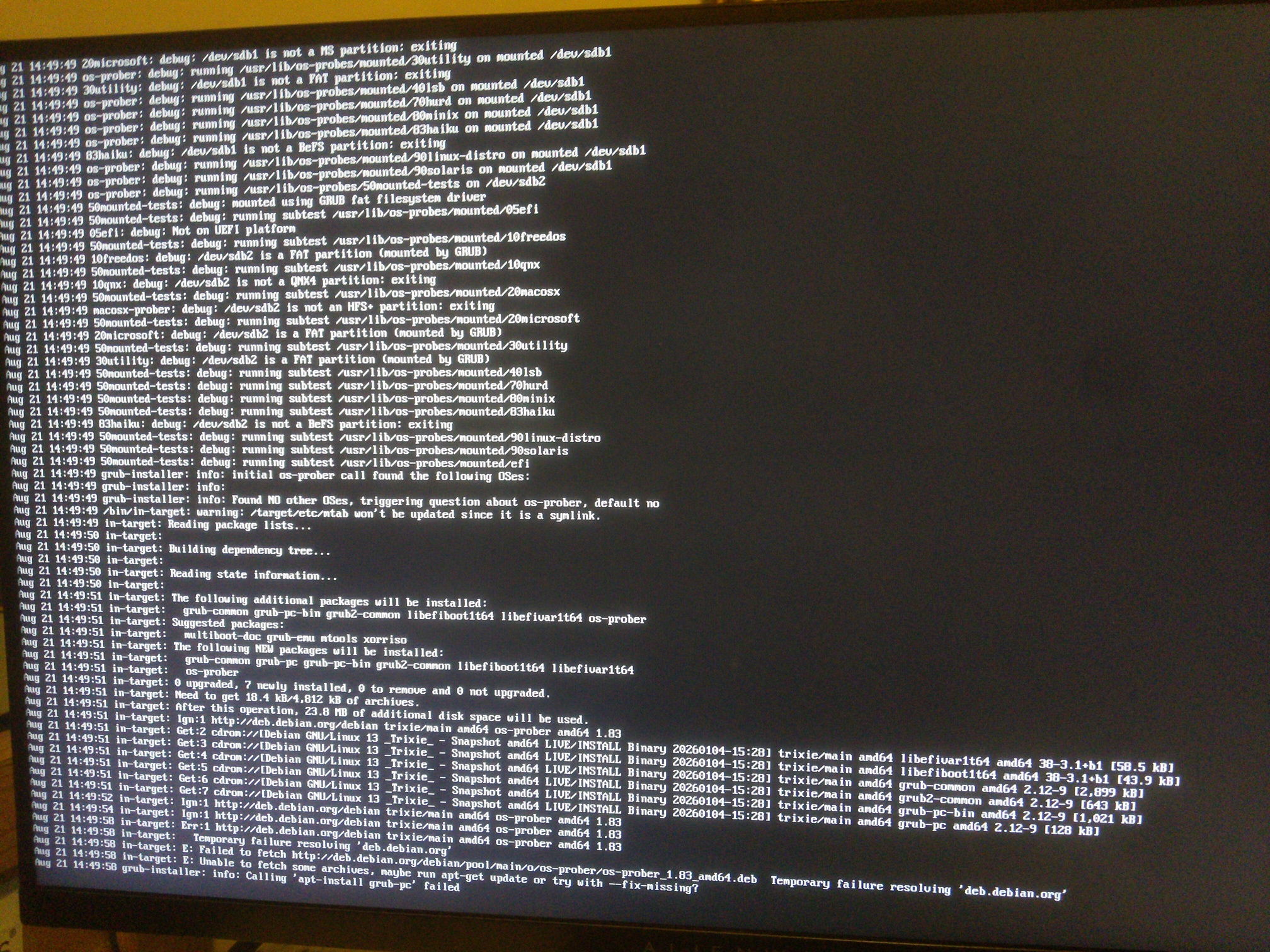
If the installation fails and you want to see what is going on, go back to "Configure the package manager."
Hit Ctrl Alt F4.
You will likely see something like the attached output scrolling down the screen. What is odd in my situation is that even with the network cable plugged in, I am able to ping the host that it claims to be unable to reach.
Hit Ctrl Alt F5, and that will take you back to the GUI where it has gone on to the GRUB installation portion and likely failed at this point.
This is an odd issue to have!
Hit Ctrl Alt F4.
You will likely see something like the attached output scrolling down the screen. What is odd in my situation is that even with the network cable plugged in, I am able to ping the host that it claims to be unable to reach.
Hit Ctrl Alt F5, and that will take you back to the GUI where it has gone on to the GRUB installation portion and likely failed at this point.
This is an odd issue to have!
Last edit: 10 Mar 2026 03:16 by fts.
Please Log in or Create an account to join the conversation.
- rodw
-
- Offline
- Platinum Member
-
Less
More
- Posts: 12156
- Thank you received: 4149
10 Mar 2026 05:46 #344080
by rodw
Replied by rodw on topic current latest download of LinuxCNC V2.9.8 will not install GRUB on several PC's
that looks like its looking on the cd/DVD. If this is not on installation, edit your sources file to remove the CD/DVD settings
Please Log in or Create an account to join the conversation.
- Xnke
- Offline
- Senior Member
-
Less
More
- Posts: 79
- Thank you received: 3
10 Mar 2026 14:38 #344089
by Xnke
Replied by Xnke on topic current latest download of LinuxCNC V2.9.8 will not install GRUB on several PC's
I am also trying to use the latest ISO with the Preempt-RT kernel, and the installer fails at the "installing system" step. It also can't format the boot partition as vfat, because apparently the module to read and write FAT32 or FAT16 isn't included? I also have issues with the Realtek firmware for the NIC not being included either.
In order of appearance:
Need non-free firmware, rtl8106g-2.fw not included. I insert removable media (USB thumbdrive) with the realtek firmware .deb and the actual .fw file and it apparently can't access this, even when prompted. Leads to no network access during install.
During partitioning, I prefer seperate /, /tmp, /bin, and /home partitions, but I can work in anything that works. Unfortuntately, no matter what partitioning system I use, even the suggested systems, I get the same error during the installation step: Installing system failed. If I drop to a terminal and do a "cd / && ls" , I can see all the normal things I would expect, but if I try to mount sda0,1 at /, then cd to it and ls, I get what looks normal, but I have not done a comparison yet to see how much is missing.
Finally, if I just push it forward to install grub and try to boot a possibly crippled system, it fails to install grub and complains that it cannot access /boot due to not having the vfat module.
I've downloaded and verified the .iso and burned it with Rufus using both the .iso and dd methods, and I get consistently the same results.
System is a J3445 Celeron 1.5ghz with 4gb of ram and a 140gb Sandisk SSD.
In order of appearance:
Need non-free firmware, rtl8106g-2.fw not included. I insert removable media (USB thumbdrive) with the realtek firmware .deb and the actual .fw file and it apparently can't access this, even when prompted. Leads to no network access during install.
During partitioning, I prefer seperate /, /tmp, /bin, and /home partitions, but I can work in anything that works. Unfortuntately, no matter what partitioning system I use, even the suggested systems, I get the same error during the installation step: Installing system failed. If I drop to a terminal and do a "cd / && ls" , I can see all the normal things I would expect, but if I try to mount sda0,1 at /, then cd to it and ls, I get what looks normal, but I have not done a comparison yet to see how much is missing.
Finally, if I just push it forward to install grub and try to boot a possibly crippled system, it fails to install grub and complains that it cannot access /boot due to not having the vfat module.
I've downloaded and verified the .iso and burned it with Rufus using both the .iso and dd methods, and I get consistently the same results.
System is a J3445 Celeron 1.5ghz with 4gb of ram and a 140gb Sandisk SSD.
Please Log in or Create an account to join the conversation.
- LinuxCNC
- Installing LinuxCNC
- current latest download of LinuxCNC V2.9.8 will not install GRUB on several PC's
Time to create page: 2.276 seconds