current latest download of LinuxCNC V2.9.8 will not install GRUB on several PC's

More
8 months 3 weeks ago #342797 by depronman
Further experimenting seems to have determined the cause of the failure at Grub install

I was performing the install in the workshop where I have wifi access to the internet but no Ethernet connections 
Everytime without fail the install of 2.9.8 failed at the install Grub stage

Now on the same PC with a Ethernet cable plugged in the install ran through without any issues at all

i therefore believe that something critical to installing Grub is missing from the 2.9.8 ISO, as the 2.9.7 iso installed ok WITHOUT the Ethernet cable being plugged in

hopefully this rather time consuming and frustrating experience of installing 2.9.8 will help other following the same path

Thanks to all who replied with ideas, very much appreciated

best regards. Paul
The following user(s) said Thank You: tommylight, fts, NWE

Please Log in or Create an account to join the conversation.

More
8 months 3 weeks ago #342804 by tommylight
The following user(s) said Thank You: depronman

Please Log in or Create an account to join the conversation.

More
7 months 3 weeks ago #344060 by fts
I have had the same issue today installing LinuxCNC 2.9.8 onto an OptiPlex 990. I don't have a network and skipped the network config, so my experience matches yours.


There must be something going on with Debian these days because I ran into a similar issue last month installing the latest version of base Debian on a brand new server. Ryzen 9 and 64GB of RAM. I was doing a non-graphical installation without a network connection, and the installation failed every time. It was a (near?) bare minimal installation that didn't include a GUI. There was some package like PostgreSQL or a DBMS portion of some SQL server that failed and killed the package installation process. I gave up and plugged an Ethernet cable into a dummy network, restarted the installation, went through the network portion, and everything worked. This is bad practice on their QA side to allow things like this to happen.
The following user(s) said Thank You: tommylight

Please Log in or Create an account to join the conversation.

More
7 months 3 weeks ago - 7 months 3 weeks ago #344065 by depronman
Many thanks for confirming than I’m not going mad.
The really strange part is the previous iso of LinuxCNC (2.9.7) is also based on debian13 and that installed without any grub issues and no internet access was available
However when trying to update 2.9.7 to 2.9.8 I hit loads of problems with broken packages

I’m in the process of moving all of my CNC machines from parallel ports to mesa cards and have taken the opportunity to update to the latest version and also update the PC’s from circa 2010 hardware to much newer intel NUC’s
As such I’ve installed linuxCNC 2.9.8 on three NUC’s over the last few days and allowed the graphic install to have access to my mobile phones internet connections via the NUC’s built in WiFi card. All three install have gone through perfectly
Last edit: 7 months 3 weeks ago by depronman.

Please Log in or Create an account to join the conversation.

More
7 months 3 weeks ago #344072 by rodw
I've recently cloned and built the linuxCNC live builder and created and installed a couple of ISO's without drama. If there are issues with Grub, I suspect I will be due to uefi/secure boot. This is outside of control in our ISO as its pure Debian! But then again Debian 13 has good uefi support.Try and disable it in your BIOS.

The only other issue I had was not finding a couple of obsolete firmware modules sometimes which broke the build process.
firmware-b43-installer
firmware-b43legacy-installer

Apparently, these are a wrapper around a download from flakey servers that have a history of failing. This broke the build process. I just deleted them. There are a number of other very old and probably obsolete Debian non-standard firmware drivers that seem to have been carried over from old builds which I suspect could also be removed.

Please Log in or Create an account to join the conversation.
More
7 months 3 weeks ago - 7 months 3 weeks ago #344076 by fts
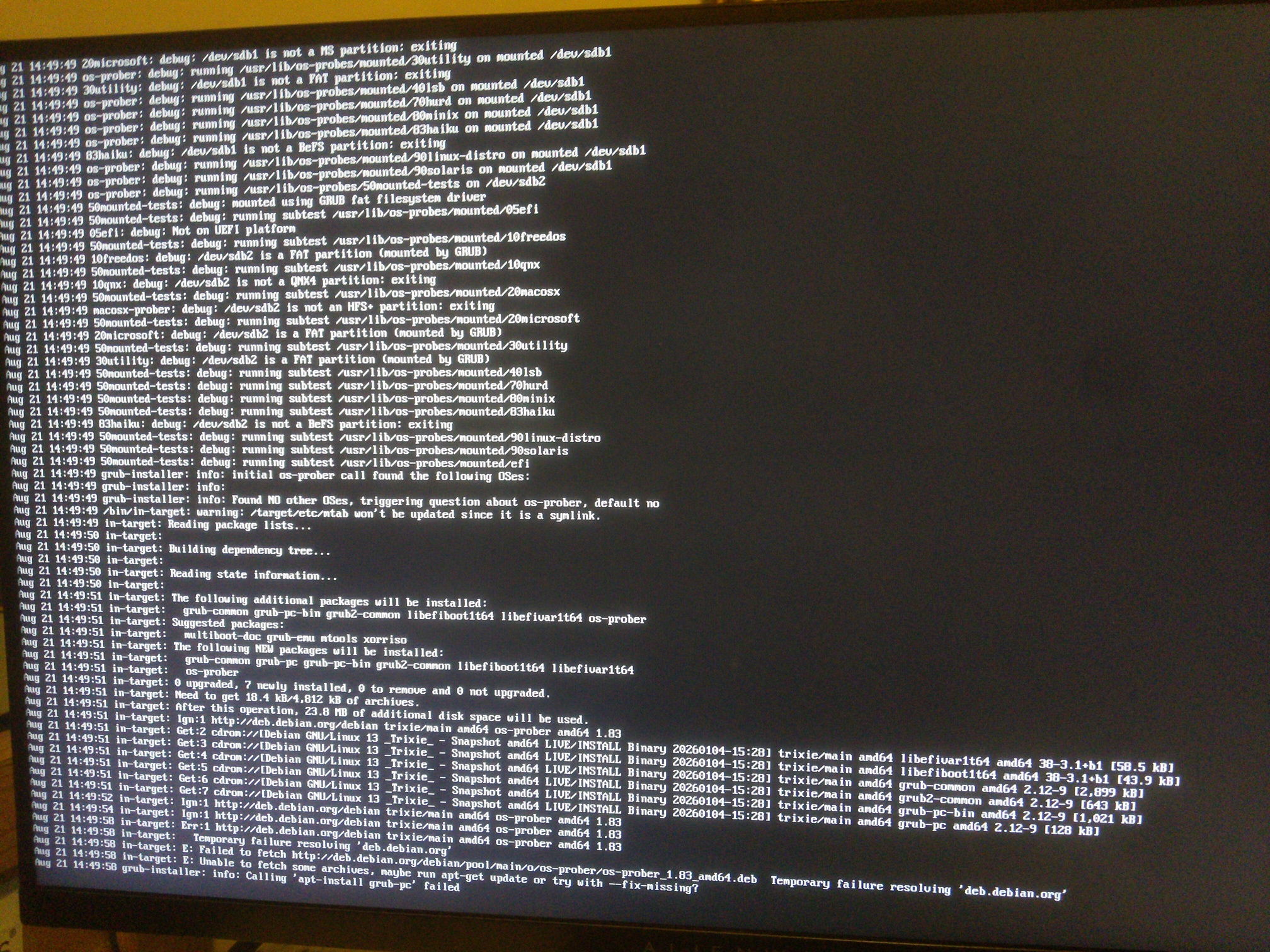
If the installation fails and you want to see what is going on, go back to "Configure the package manager."

Hit Ctrl Alt F4.

You will likely see something like the attached output scrolling down the screen. What is odd in my situation is that even with the network cable plugged in, I am able to ping the host that it claims to be unable to reach.

Hit Ctrl Alt F5, and that will take you back to the GUI where it has gone on to the GRUB installation portion and likely failed at this point.

This is an odd issue to have!
Last edit: 7 months 3 weeks ago by fts.

Please Log in or Create an account to join the conversation.

Time to create page: 0.143 seconds
Powered by Kunena Forum
