
- Configuring LinuxCNC
- Advanced Configuration
- EtherCAT
- Commission drive on AX5206) using TC3 to prep for linuxcnc-ethercat
Commission drive on AX5206) using TC3 to prep for linuxcnc-ethercat
- GuiHue
-
 Topic Author
- Offline
- Premium Member
-

- Posts: 112
- Thank you received: 39
I seek help in commissioning a Motor with a Beckhoff Ax5000 series drive within TwinCAT to then transfer that tested setup to linuxcnc-ethercat. I cannot for the life of me get that motor to run over.
Setup:
Motor: HarmonicDrive LynxDrive-20C-100-MEE-AO (reduction 100, MEE Encoder (Heidenhain EQN-1125 Endat 2.2/2.1), motor values are known, commutation unknown)
Driver: Beckhoff AX5206-0000-0203 Fw 1.06
Goal: Be bale to move the drive from NC in Twincat to check for functionality of the setup
What did I try:
- Scan Bus in TwinCat to find devices
- Found the Driver
- Setup of power management, safety (off), set mode for channel 1 to position control
- Setup Channel 1: X11 for encoder connector, selected Heidenhain EQN1125 from list, manually setup the motor with relevant values (pdf: harmonicdrive.de/fileadmin/user_upload/E...8856_08_2018_V04.pdf, page 17)
When I try to scan for the encoder it identifies as Endat 2.2 without a nameplate. However, when selecting an Endat2.2 from the list of encoders, it does not work. (0xF148: Build drive system: unknown feedback system)
Question: I assumed that this table takes the values for the motor and not for the output shaft (which is behind the harmonic drive's reduction), correct?
- Setup of scaling
Question: Here I am not sure. To me it makes the most sense to set this up for the motor shaft (as this is where the encoder is). I.e. 360°/motor revolution (see screenshot) - correct?
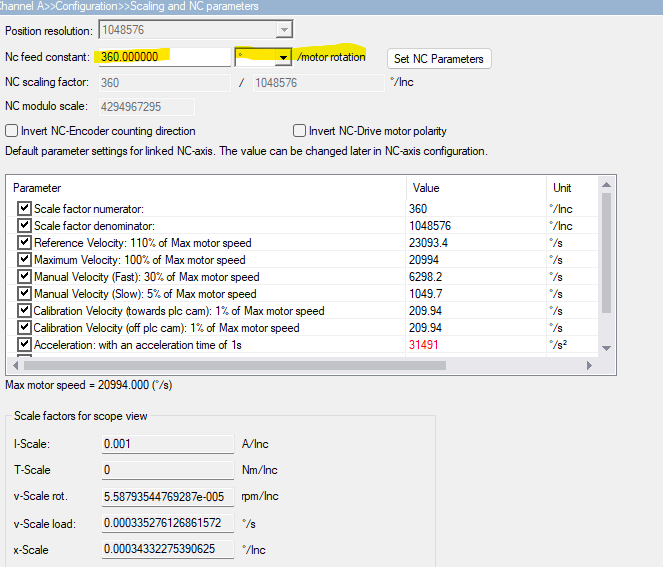
Next would be to setup the commutation setup (mechanical and electrical offset).
This is where I struggle. The manual (www.beckhoff.com/en-en/download/61857533) states two different chapters regarding commutation:
1) Chapter 9.1.4 Third-party Motors
Step one asks to ensure motor rotation: The output shaft is connected to the HD. Given a reduction of 100 it is really difficult to backdrive the thing. Question: Am I correct in assuming that the HD reverses the direction of rotation? that is: if the servo motor moves CW, the output moves CCW?
Next step is the electrical commutation offset determination.
I tried to follow page 168ff using P-0-0166:
I get values after starting the command, with equal directions being "No". Changing U and V accordingly changes direction of the motor, but has no effect. I cannot get a constant value. I keep chasing my tail around.
Note: At this point P-0-0150 Commutation Node is set to 3; Adjustable commutation offset (mechanical) is 0 deg
I then followed chapter
Manual 9.6 list commutation methods (p 201ff)
Accordinglx, P-0-0160 is executed first
Regardless of the actual value of P-0-00578 (Electrical commutation offset) I get a value for the mechanical commutation offset which I enter in P-0-0150 above.
Doing so, an flipping the polarity of UV, I then get the following result for P-0-0166: Equal Directions: yes; Offset: 357.55 deg
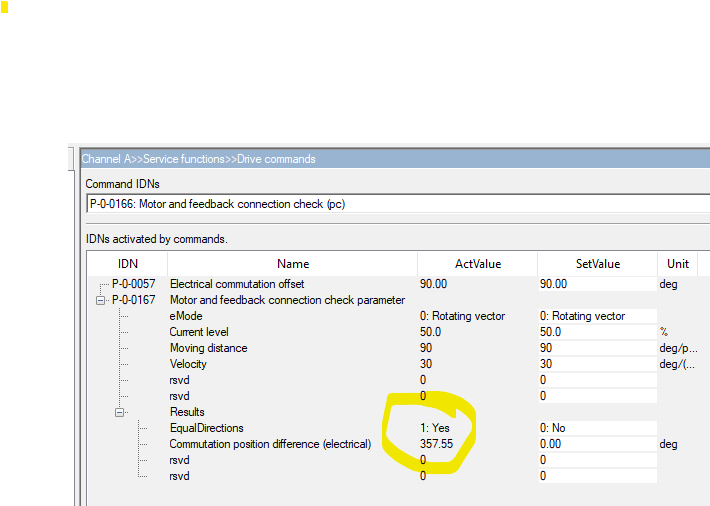
I do not understand what way is the correct way. Accordingly, I am not sure if the offset is correct.
Now I undertand I should be able to move th eaxis using NC-A: Online (image 3)
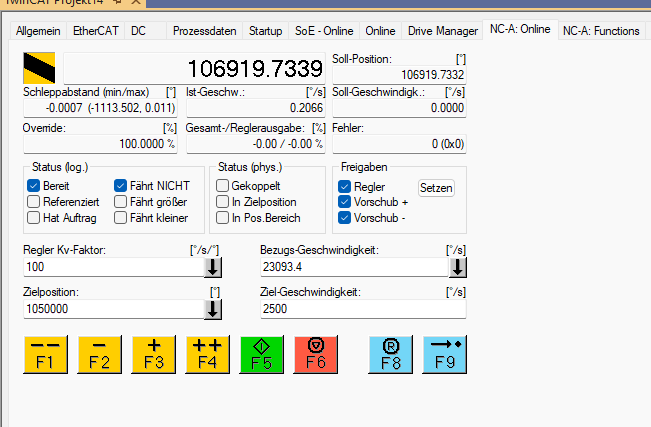
I can enable the drive and it does start to make light noises and one can feel light vibration on the output shaft.
However, when I send a command using F2/F3 I get an increase in following error and nothing moves. (Image 4).
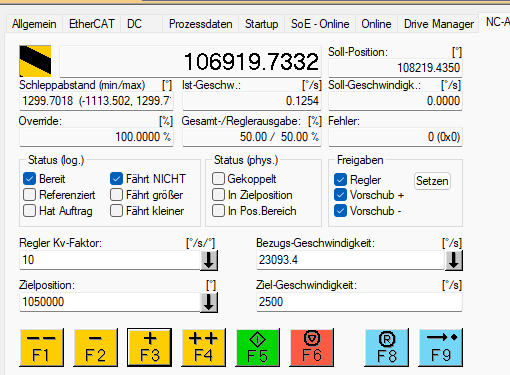
Parameters of the axis enc are as indicated by image 5.
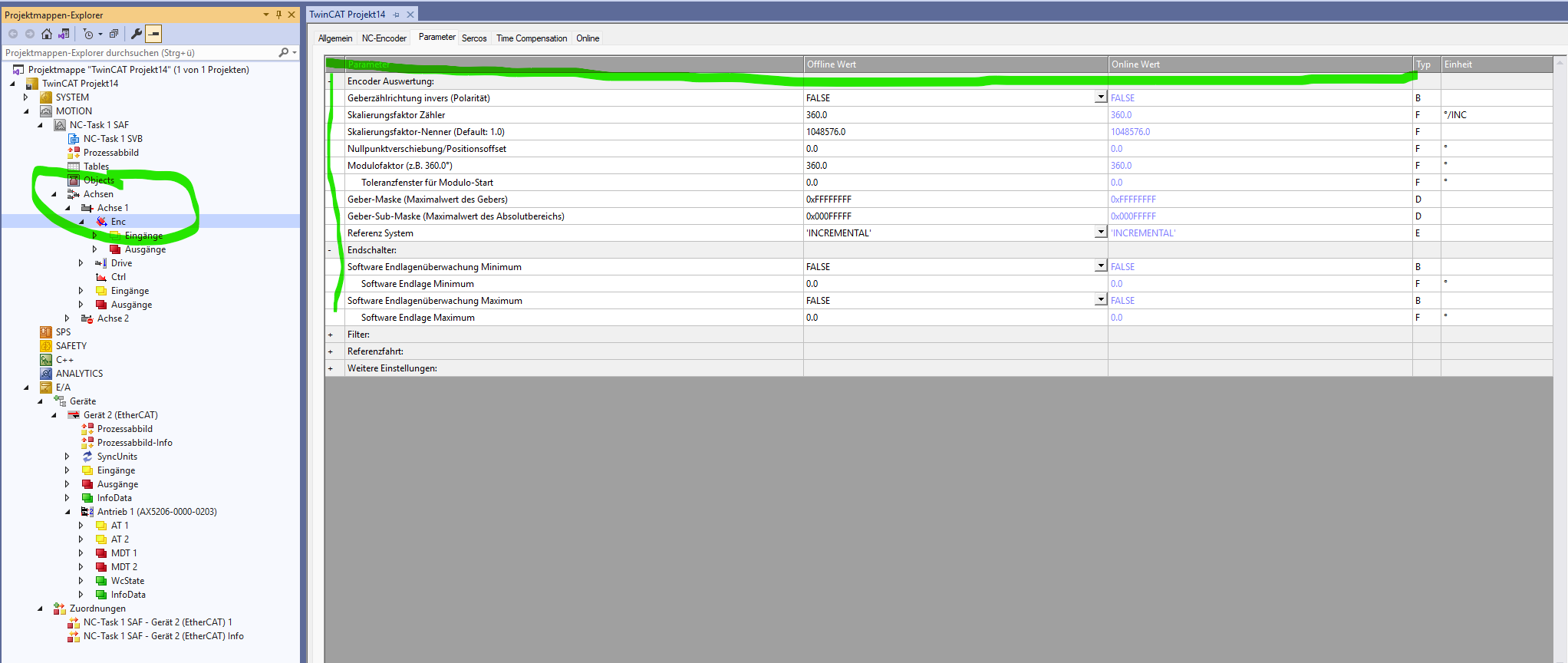
I assume something in scaling is borked and thus the PID cant work properly. But I cannot find anything that is missing.
- I have checked (to the best of my ability) the polarity and pins for both the power and the encoder connector. At this point I assume that these are correct.
- I have manually pulsed the motor with a low dc voltage, It then performs the expected jump. The encoder provides a new value afterwards as well.
I am open for any and all advice. It must be sooo close.
Thank you!
Attachments:
Please Log in or Create an account to join the conversation.
- endian
-

- Offline
- Platinum Member
-

- Posts: 339
- Thank you received: 134
If you have reduction factor ... you will determine it in the nominator and denominator rows somewhere in the drive manager ...
Yes one motor revolution == one encoder revolution ..
Yes HD should reverse you motion .. every odd
This setting you generally free enable movement... next tune or you will need firmware update to start autotunnig the servo system ..
Please Log in or Create an account to join the conversation.
- GuiHue
-
Topic Author
- Offline
- Premium Member
-
- Posts: 112
- Thank you received: 39
I have since made some progress. After moving to Firmware 2.10 and hence Drive Manager 2, I managed to get a setup going, that allows me to enable move CW and CCW. However, scaling is way off.
Sending a move of 5° results in roughly 375-390° on the output side.
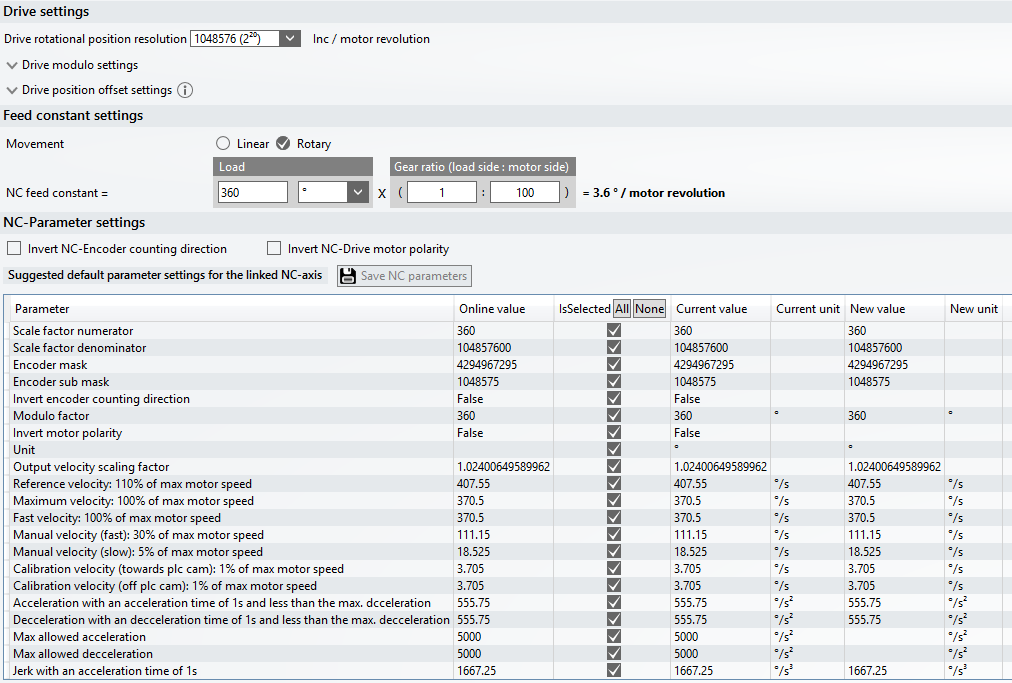
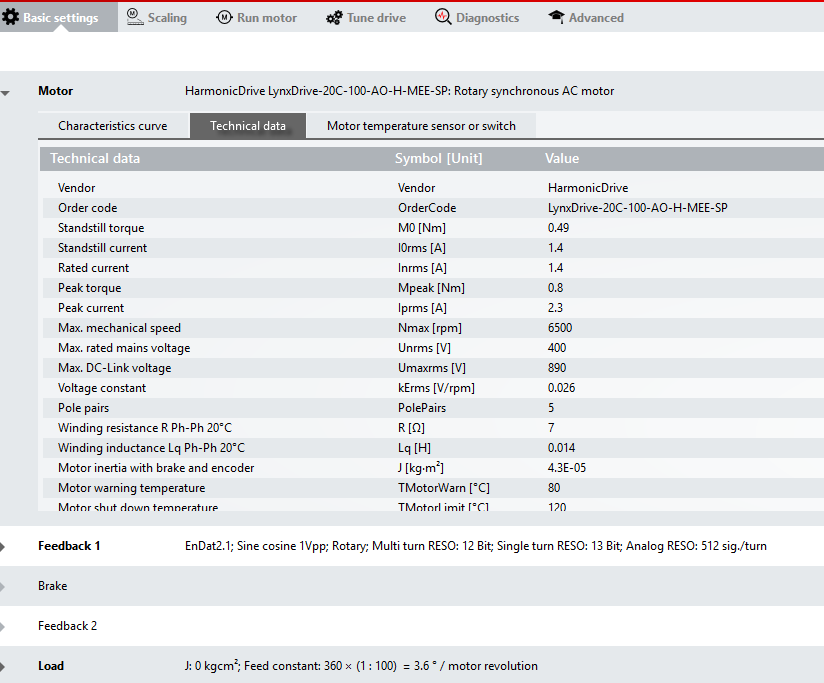
Any ideas?
Attachments:
Please Log in or Create an account to join the conversation.
- GuiHue
-
Topic Author
- Offline
- Premium Member
-
- Posts: 112
- Thank you received: 39
Please Log in or Create an account to join the conversation.
- Tomatendose
- Offline
- New Member
-

- Posts: 2
- Thank you received: 0
I am currently also in the process of setting up an AX5112 servo drive. Unfortunately, there does not seem to be any newer firmware available for my device that would allow me to use Drive Manager 2, so I have to stick with Drive Manager Classic.
My problem is that I cannot see the Drive Manager at all in the tabs of the drive/motor configuration. At the moment I am only supplying the drive with 24 V so that I can familiarize myself with it.
Does anyone have an idea what could be wrong here? I can hardly find any documentation on how to use Drive Manager Classic in TwinCAT 3. The Drive Manager Classic itself is installed via the package manager.
Please Log in or Create an account to join the conversation.
- endian
-
- Offline
- Platinum Member
-
- Posts: 339
- Thank you received: 134
Please Log in or Create an account to join the conversation.
- Tomatendose
- Offline
- New Member
-
- Posts: 2
- Thank you received: 0
Now the next problem occurs: “PreOp to SAFEOP failed.”
Do any additional settings need to be made here?
An AX5801 industrial safety card is installed in the AX5112. The two safety inputs are currently supplied with 24 V. Could this be causing the problem?10.01.2026 17:17:32 814 ms | "Antrieb 1 (AX5112-0000-0216)' (1001); 'PREOP to SAFEOP' failed! Error 'check device state for SAFEOP', AL Status Ox0012' read and Dx0004' expected, AL Status Code 0x0045 - MBX SoE'10.01.2026 17:17:32 814 ms | 'Antrieb 1 (AX5112-0000-0216) (1001); state change aborted (requested 'SAFEOP', back to 'PREOP).
The connected servo motor and resolver are not listed in the database, so we have to identify manually which type of resolver it is (Eco&Logic Syncrotech SY150…). From the old servo drive we know that it is a resolver.
Please Log in or Create an account to join the conversation.
- endian
-
- Offline
- Platinum Member
-
- Posts: 339
- Thank you received: 134
if something it not listed you have to know which type of encoder feedbeck it is and then choose right one from DriveManagerX ... then setup the axis in manual jog and everything
at resolver you had have to know which type, frequency and poles it is ... that all then grab these data and configure the in the Drive manager
my own driver with integrated homing subroutine which is working same as at CoE drivers is here
(TC3 machine with win10)configuration tool which grab export TC3 master and transfer everything to lcec master shape is here
after succesfull configuration of TC3 just export and copy paste to lcnc folder ... its more easy than ever
lowest scan time which I get from AX5YZZ is 250us scan which I am currently running same as at shared example
Please Log in or Create an account to join the conversation.
- Lutra
- Offline
- New Member
-
- Posts: 1
- Thank you received: 0
Please Log in or Create an account to join the conversation.
- endian
-
- Offline
- Platinum Member
-
- Posts: 339
- Thank you received: 134
Please Log in or Create an account to join the conversation.
- Configuring LinuxCNC
- Advanced Configuration
- EtherCAT
- Commission drive on AX5206) using TC3 to prep for linuxcnc-ethercat