
- Configuring LinuxCNC
- Advanced Configuration
- EtherCAT
- Stepperonline A6 Ethercat - Digital IO [SOLVED]
Stepperonline A6 Ethercat - Digital IO [SOLVED]
- spumco
- Offline
- Platinum Member
-

Less
More
- Posts: 2180
- Thank you received: 905
27 May 2026 01:29 #346684
by spumco
Replied by spumco on topic Stepperonline A6 Ethercat - Digital IO [SOLVED]
Success.
My suspicions were correct - there are undocumented parameters to set in the drive before the digital outputs can be activated.
Stepperonline advised the following:
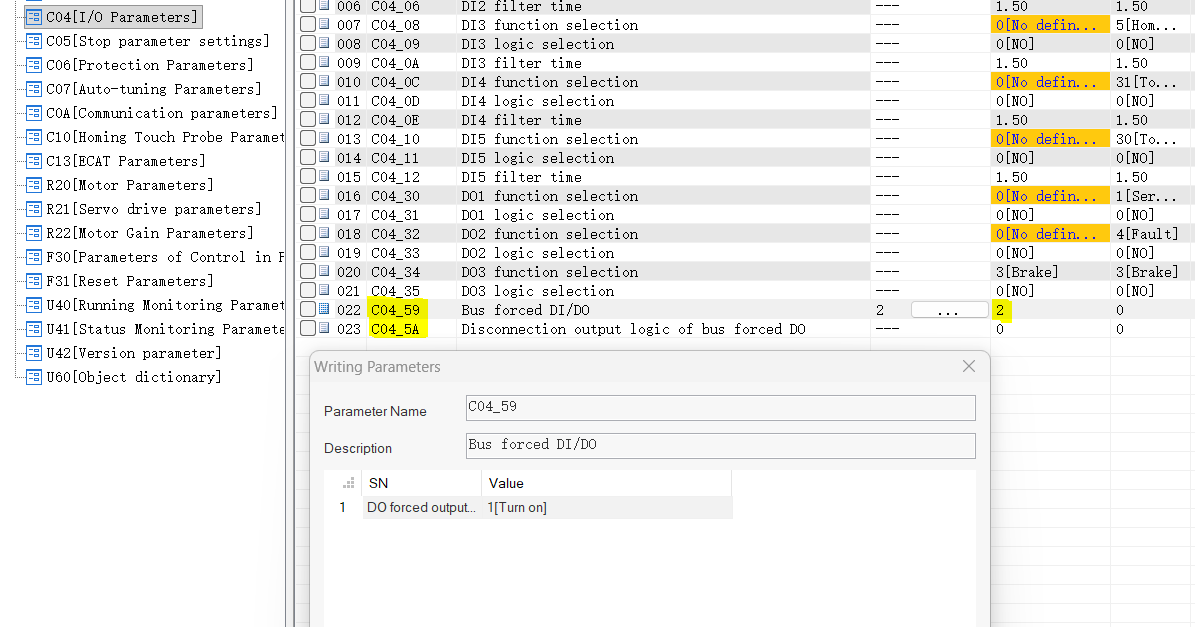
Please verify the settings for C04.59 and C04.5A, as these are mandatory parameters.
The 60FE bit mapping adheres to the standard conventions of CiA 402: Bits 0–15 are reserved for specific functions (e.g., the brake), while Bits 16–31 correspond to DO1–DO16.
Therefore:
DO1 corresponds to Bit 16
DO2 corresponds to Bit 17
DO3 corresponds to Bit 18
The operating steps are as follows:
Step 1: You must first configure the Bit Mask (0x60FE:02) to enable bus control.
Set C04.59 = 1.
To control DO1: Write 0x60FE:02 = 0x00010000 (i.e., Bit 16 = 1; decimal value: 65536).
To control DO2: Write 0x60FE:02 = 0x00020000 (i.e., Bit 17 = 1; decimal value: 131072).
To control DO1 and DO2 simultaneously: Write 0x60FE:02 = 0x00030000 (decimal value: 196608).
Step 2: Use 0x60FE:01 to toggle the DO outputs.
DO1 ON: 0x60FE:01 = 0x00010000 (65536)
DO1 OFF: 0x60FE:01 = 0x00000000 (0)
DO2 ON: 0x60FE:01 = 0x00020000 (131072)
DO2 OFF: 0x60FE:01 = 0x00000000 (0)
DO1 + DO2 ON simultaneously: 0x60FE:01 = 0x00030000 (196608)
Parameters C04.59 and C04.5A are not in the manual. They are, however, visible in the tuning software (see attached screenshot).
I've attached a bare-bones xml file which will create HAL pins for all five digital inputs, and two of the three digital outputs. The last output - DO3 - is reserved for the motor brake and commented out.
As usual, thanks to everyone for helping out.
MODERATORS - please change title to: Stepperonline A6 Ethercat - Digital IO [SOLVED]
My suspicions were correct - there are undocumented parameters to set in the drive before the digital outputs can be activated.
Stepperonline advised the following:
Warning: Spoiler!
Please verify the settings for C04.59 and C04.5A, as these are mandatory parameters.
The 60FE bit mapping adheres to the standard conventions of CiA 402: Bits 0–15 are reserved for specific functions (e.g., the brake), while Bits 16–31 correspond to DO1–DO16.
Therefore:
DO1 corresponds to Bit 16
DO2 corresponds to Bit 17
DO3 corresponds to Bit 18
The operating steps are as follows:
Step 1: You must first configure the Bit Mask (0x60FE:02) to enable bus control.
Set C04.59 = 1.
To control DO1: Write 0x60FE:02 = 0x00010000 (i.e., Bit 16 = 1; decimal value: 65536).
To control DO2: Write 0x60FE:02 = 0x00020000 (i.e., Bit 17 = 1; decimal value: 131072).
To control DO1 and DO2 simultaneously: Write 0x60FE:02 = 0x00030000 (decimal value: 196608).
Step 2: Use 0x60FE:01 to toggle the DO outputs.
DO1 ON: 0x60FE:01 = 0x00010000 (65536)
DO1 OFF: 0x60FE:01 = 0x00000000 (0)
DO2 ON: 0x60FE:01 = 0x00020000 (131072)
DO2 OFF: 0x60FE:01 = 0x00000000 (0)
DO1 + DO2 ON simultaneously: 0x60FE:01 = 0x00030000 (196608)
Parameters C04.59 and C04.5A are not in the manual. They are, however, visible in the tuning software (see attached screenshot).
I've attached a bare-bones xml file which will create HAL pins for all five digital inputs, and two of the three digital outputs. The last output - DO3 - is reserved for the motor brake and commented out.
As usual, thanks to everyone for helping out.
MODERATORS - please change title to: Stepperonline A6 Ethercat - Digital IO [SOLVED]
The following user(s) said Thank You: tommylight
Please Log in or Create an account to join the conversation.
- tommylight
-
- Offline
- Moderator
-

Less
More
- Posts: 21980
- Thank you received: 7480
27 May 2026 01:31 #346685
by tommylight
Replied by tommylight on topic Stepperonline A6 Ethercat - Digital IO [SOLVED]
Done, thank you.MODERATORS - please change title to: Stepperonline A6 Ethercat - Digital IO [SOLVED]
The following user(s) said Thank You: rodw, spumco
Please Log in or Create an account to join the conversation.
- rodw
-

- Offline
- Platinum Member
-
Less
More
- Posts: 12156
- Thank you received: 4149
28 May 2026 23:32 #346717
by rodw
Replied by rodw on topic Stepperonline A6 Ethercat - Digital IO [SOLVED]
Great you worked it out. But normally, there will also be settings to tell the type of input. eg, GPIO, Max Limit, Min Limit, Estop (disable drive),
Did you work that out too? eg If you want to use as GPIO, you need to set the type to be GPIO for a specific pin for internnalhoming, you need to set homing.
Did you work that out too? eg If you want to use as GPIO, you need to set the type to be GPIO for a specific pin for internnalhoming, you need to set homing.
Please Log in or Create an account to join the conversation.
- spumco
- Offline
- Platinum Member
-
Less
More
- Posts: 2180
- Thank you received: 905
29 May 2026 11:40 #346730
by spumco
Yes, I worked that out, too. I'd already set the DIO appropriately before starting this thread.
Unlike the missing output information, the manual is explicit on DIO function configuration:
Replied by spumco on topic Stepperonline A6 Ethercat - Digital IO [SOLVED]
Great you worked it out. But normally, there will also be settings to tell the type of input. eg, GPIO, Max Limit, Min Limit, Estop (disable drive),
Did you work that out too? eg If you want to use as GPIO, you need to set the type to be GPIO for a specific pin for internnalhoming, you need to set homing.
Yes, I worked that out, too. I'd already set the DIO appropriately before starting this thread.
Unlike the missing output information, the manual is explicit on DIO function configuration:
- Via parameters:
- DI - C04.00-C04.12
- DO - C04.30-C04.35
- Via Ethercat:
- 2004, sub-index 01 through 36
The following user(s) said Thank You: rodw
Please Log in or Create an account to join the conversation.
- Configuring LinuxCNC
- Advanced Configuration
- EtherCAT
- Stepperonline A6 Ethercat - Digital IO [SOLVED]
Time to create page: 0.279 seconds