Advanced Search

Search Results (Searched for: )

  • tommylight
  • tommylight's Avatar
03 Jan 2025 21:03
Replied by tommylight on topic Arduino IO Expansion

Arduino IO Expansion

Category: Show Your Stuff

From some website on google search
The Baud rate refers to the total number of signal units transmitted in one second. The Bit rate refers to the total Bits transmitted in one unit time. Baud rate indicates the total number of times the overall state of a given signal changes/ alters.
and from Mesa manuals
In the operate mode, the baud
rate is set to 2.5M baud (default).
Not the same thing, but close enough.
  • Lcvette
  • Lcvette's Avatar
03 Jan 2025 21:02

[SOLVED] ProbeBasic NameError: name 'tool' is not defined

Category: QtPyVCP

you are probing in lathe? what probe routines are you using? i don't think i ever defined any probing routines in lathe so is ti possible that the touchprobe isn't defined somewhere as per the subroutines requirement?
  • Lcvette
  • Lcvette's Avatar
03 Jan 2025 20:53
Replied by Lcvette on topic Probe_Basic Bugs?

Probe_Basic Bugs?

Category: QtPyVCP

ooh you're right.. typo..doh sorry about that!! ficing and will be in latest push in a little while
  • Edi_48
  • Edi_48
03 Jan 2025 20:21
Replied by Edi_48 on topic Netzwerk abbruch

Netzwerk abbruch

Category: Installing LinuxCNC

vom Terminal
  • Edi_48
  • Edi_48
03 Jan 2025 20:19
Replied by Edi_48 on topic Netzwerk abbruch

Netzwerk abbruch

Category: Installing LinuxCNC

24 Volt Netzteil
  • Cant do this anymore bye all
  • Cant do this anymore bye all's Avatar
03 Jan 2025 20:17
Replied by Cant do this anymore bye all on topic LinuxCNC on Raspberry Pi 5

LinuxCNC on Raspberry Pi 5

Category: Installing LinuxCNC

From memory the arduino is connected via a USB serial port so it’s very limited.

If you are looking at small form factor x86 based boards the Odroid h4 is probably worth a look. I’ve been using a h2 for years now, one of the good things about it is the dual Ethernet ports.
  • RV3Dtech
  • RV3Dtech
03 Jan 2025 20:09
Replied by RV3Dtech on topic Handrad xhc-whb04b-6

Handrad xhc-whb04b-6

Category: Deutsch

Hallo,
vielen Dank für die ausfühliche Erklärung. Sorrý wenn ich das nochmal hier auf mache, aber ich hänge da genauso. 
Die abkürzung mit "net machine- is-on whb.halui.machine- is-on" funktioniert bei mir nicht. 

Hab es bei mir soweit in der Handrad.hal angepasst: (Netzname, Eingang, Ausgang)
net maschine.ist-an halui.machine.is-on whb.halui.machine.is-on
net pdnt.machine.on whb.halui.machine.on halui.machine.on
net pdnt.machine.off whb.halui.machine.off halui.machine.off

Dennoch die Fehlermeldung mit der doppelten Verknüpfung. Hab auch schon verschiedene Varianten durch, bleibt unverändert.

Machine.hal sieht wie folgt aus:
# ---HALUI Signale---
net axis-select-x halui.axis.x.select ## ist in der Handrad HAL
net jog-y-neg halui.axis.y.minus
net jog-x-pos halui.axis.x.plus
net jog-x-neg halui.axis.x.minus
net jog-x-analog halui.axis.x.analog
net x-is-homed halui.joint.0.is-homed ## ist in der Handrad HAL
net axis-select-y halui.axis.y.select ## ist in der Handrad HAL
net jog-y-neg halui.axis.y.minus
net jog-y-analog halui.axis.y.analog
net y-is-homed halui.joint.1.is-homed
net axis-select-z halui.axis.z.select ## ist in der Handrad HAL
net jog-y-neg halui.axis.y.minus
net jog-z-pos halui.axis.z.plus
net jog-z-neg halui.axis.z.minus
net jog-z-analog halui.axis.z.analog
net z-is-homed halui.joint.2.is-homed
net jog-selected-pos halui.axis.selected.plus
net jog-selected-neg halui.axis.selected.minus
net spindle-manual-cw halui.spindle.0.forward
net spindle-manual-ccw halui.spindle.0.reverse
net spindle-manual-stop halui.spindle.0.stop
net machine-is-on halui.machine.is-on ## ist in der China Hanrad HAL
net jog-speed halui.axis.jog-speed
net MDI-mode halui.mode.is-mdi ## ist in der China Hanrad HAL

Da kommt dann noch die ganzen select und homed Netzweke hinzu, die zicken machen. 
Wenn man die Handrad Pins in der Machine.hal ergänzt und in der Handrad.hal raus nimmt werden diese nicht gefunden. 
Viellecht hast du mir ein Ansatz was ich da falsch mache. 
 
  • zelo
  • zelo
03 Jan 2025 20:08

Remora - ethernet NVEM / EC300 / EC500 cnc board

Category: Computers and Hardware

MrDe I don't have NVEM V5 but i guess this config here is for it: github.com/scottalford75/Remora-RT1052-c...xCNC/nvem-rt1052.txt
Just make sure you have RT1052 version.
  • erdem
  • erdem
03 Jan 2025 20:05
Cnclinux do not find harddisk was created by erdem

Cnclinux do not find harddisk

Category: Installing LinuxCNC

Hi guys,
I  am new in here.I  want to install cnclinux, but  linuxcnc 2.9.3 debian  does not find my harddisk.
I looked at old ıssue ,ı change  from ıde to ACHI , but it does not find  harddisk that is ntfs format
What  am I making  at now ? 
  • TomAlborough
  • TomAlborough's Avatar
03 Jan 2025 19:14
Replied by TomAlborough on topic LinuxCNC on Raspberry Pi 5

LinuxCNC on Raspberry Pi 5

Category: Installing LinuxCNC

Hi resmond,

Thank you for the summary of your interactions with the Pi 5 world and its parallels. It sounds like a win.

Hi cornholio,

GitHub/LinuxCNC certainly has a lot going on including "issues". Let me ask some questions there about helping.

Thanks,
Tom
  • BSOD
  • BSOD
03 Jan 2025 18:48

Remora - ethernet NVEM / EC300 / EC500 cnc board

Category: Computers and Hardware

  1. Connect all the V+ pins of the stepper drivers to the Common pin of the EC500.
  2. Then, connect each signal (Step & Dir) from the EC500 to the negative pins of the drivers.

    If your current setup is already configured like that, try reversing the connections, i.e., connect the V+ pins to the negative pin of the EC500, and the signal pins (Step & Dir) to the Common pin.

    This adjustment worked for me in the past, so hopefully, it will resolve the issue for you. Let me know if this helps!

IT'S  A L I V E !!!
Thank you! I had everything at least triple checked. I've never would have thought to reverse polarity on the signals. Actually, common sense tells me to watch polarity very carefully, to contain the magic smoke where it belongs.

 
  • TooTall18T
  • TooTall18T's Avatar
03 Jan 2025 18:24
Replied by TooTall18T on topic Linux CNC startet nicht mehr

Linux CNC startet nicht mehr

Category: Deutsch

Was die Latenz angeht, hilft dir evtl. auch das Video:
  • resmond
  • resmond
03 Jan 2025 18:06
Replied by resmond on topic LinuxCNC on Raspberry Pi 5

LinuxCNC on Raspberry Pi 5

Category: Installing LinuxCNC

Now that I have my Pi 5 / Mesa 7i95T basically working (still re-reading Docs and tweaking ini/hal configs) I do like it and don't regret starting with it.

I faced the most challenges from the following:
  • Very rusty on Linux distro's, package managers and Kernel versions
  • The Docs, Form and Wiki are AWESOME but it's often a challenge to remember where something was documents to find and re-read the details once I hit a problem.  (Fortunately Google search will usually find Forum threads for error outputs.
  • Since the Pi4/5 are ARM based its more challenging to find Deb packages and APT sources for certain things.
  • I always started with the LinuxCNC Debian imaging for all my builds - then would screw it up from there.
I am planning to build up an Intel platform machine next to smooth out some of the ARM related challenges.  If I had it to do over I would have chosen Intel.

Here are a few of the options I'm looking at and I've used other boards for other projects.

LattePanda Mu ($105 on sale)
    A Micro x86 Compute Module (N100 CPU,8GB RAM,64GB eMMC)
     On DfRobot

Lite Carrier Board for LattePanda Mu Compute Module ($39)
(USB 3.0, Ethernet, PCIe 3.0, M.2 M key, HDMI)
     On DfRobot

The carrier has two PCIe slots (1x/3x) but most people will need to add wifi Intel M.2 Wifi ($19)
     On Amazon

So that's around $170 plus shipping then you have to choose a DC supply and this one is really fast if that matters.

LattePanda 2 Delta 432
A Pocket-sized Powerful Windows/Linux Single Board Computer (4GB RAM/32GB eMMC)
     On DfRobot

M.2 PCIe card riser ($30)  On Amazon
This one comes with WiFi so it just needs power. It has less memory than the Mu and needs the riser to plug in full sized PCIe cards but it comes with a fan.

LattePanda V1 (~160 on sale) On DfRobot
The Smallest Windows 10 Single Board Computer (Unactivated, 4GB/64GB)
Both the V1 and Delta 432 come with a built in Arduino with standard HAT connections but since this one does not have a PCIe compatible M.2 using PCI Mesa cards would be out. It would be Ethernet only.

I think it would be facinating to see what the built in Arduino might make possible for controlling odds and ends using the HAT boards.

 
  • Cant do this anymore bye all
  • Cant do this anymore bye all's Avatar
03 Jan 2025 17:39
Replied by Cant do this anymore bye all on topic LinuxCNC on Raspberry Pi 5

LinuxCNC on Raspberry Pi 5

Category: Installing LinuxCNC

Also sometimes users want something that doesn’t work within Linuxcnc’s model.
Mostly this will boil down to USB motion cards, usually ones the Mach supports and using Linuxcnc to send gcode to an external board. Most are accepting this is not supported and not in the pipe line, once every often someone will spit the dummy and throw all their toys out of the pram.
For other support channels you may want to jump over to the Linuxcnc homepage and see what the other options are and links to said options.
  • ihavenofish
  • ihavenofish
03 Jan 2025 17:35
Replied by ihavenofish on topic Mini wannabe datron build

Mini wannabe datron build

Category: CNC Machines
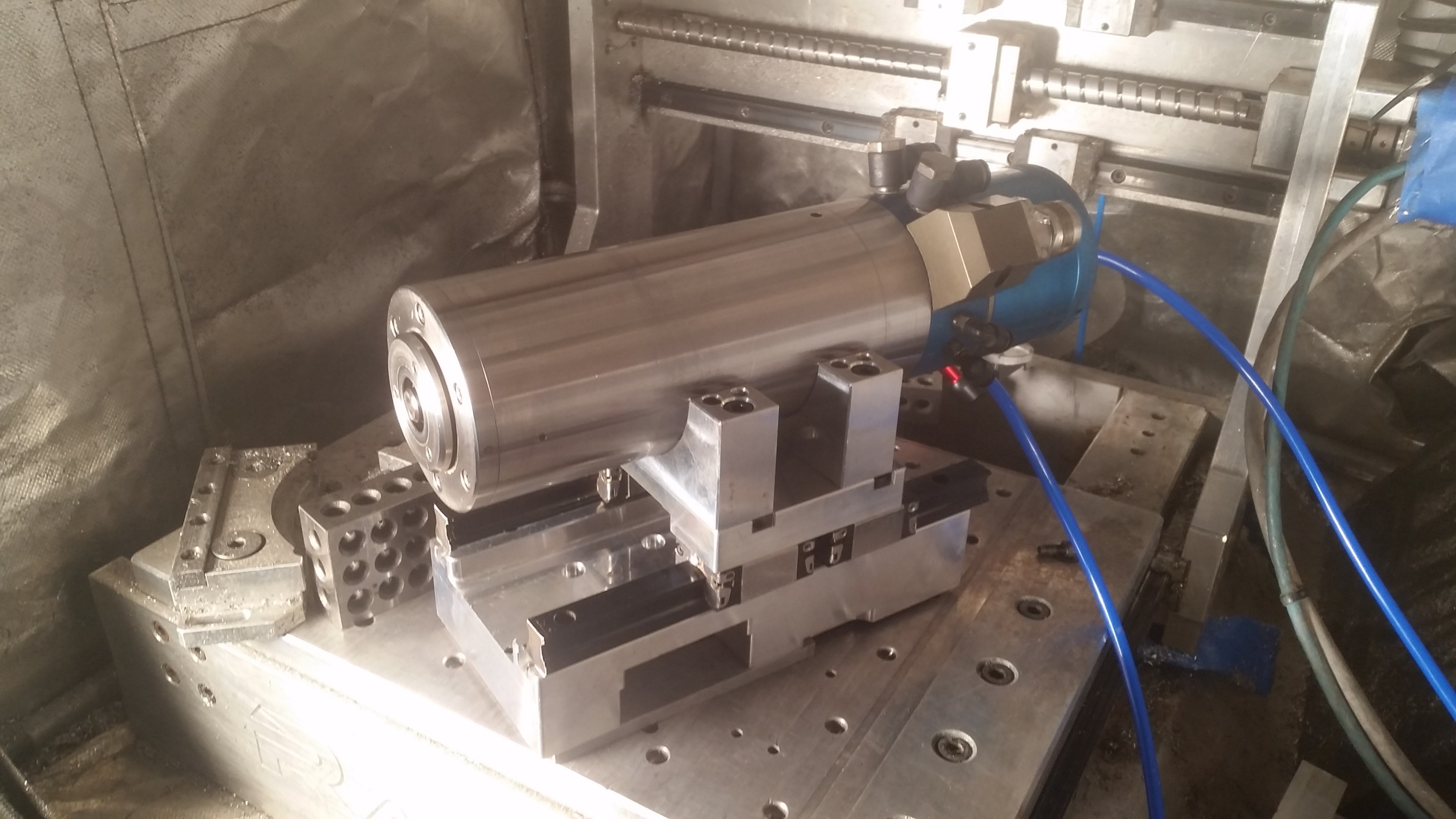
Shiny!

   
Displaying 20791 - 20805 out of 21736 results.
Time to create page: 0.455 seconds
Powered by Kunena Forum